Hello! Let's dive into the practical side of state management. In our last lesson, we established the "what" and "why" of state. Now, we'll focus on the "how."
Introduction
In the previous lesson, we drew a clear line between props and state. You learned that props are like function arguments, passed from a parent to configure a child, while state is a component's private, internal memory. The most crucial takeaway was that a change in state triggers a re-render, allowing our UI to "react" to user interactions and other events.
Today, we'll implement this concept. Our learning outcome is to use the useState hook to add local state to functional components. We'll cover its syntax, how to update state correctly, and the fundamental rules you must follow when using it. This is your first step into the world of React Hooks, which are the building blocks of modern React applications.
The useState Hook: A Component's Memory Bank
To add state to a functional component, we use the useState hook. A "hook" is a special function that lets you "hook into" React features from your functional components. useState is the hook that lets us hook into the state feature.
Let's start by understanding its syntax.
import { useState } from 'react';

function MyComponent() {
  const [stateVariable, setStateFunction] = useState(initialValue);
  // ...
}
This single line does three important things:
- Initializes State: It tells React that this component needs a piece of state and that its initial value should be
initialValue. This only happens on the very first render. - Returns the Current State: It gives you a variable (
stateVariable) that holds the current value of your state for the current render. - Returns a Setter Function: It gives you a special function (
setStateFunction) that you can call to update the state value and trigger a re-render.
The const [a, b] = ... syntax is standard JavaScript array destructuring. useState returns an array with two elements, and we are simply giving them convenient names.
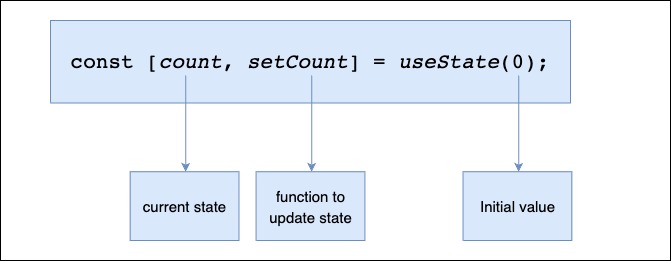
This diagram visually breaks down the useState syntax. The hook returns a pair: the current state value and a function to update it.
Let's see it in action with a classic counter.
import { useState } from 'react';

function Counter() {
  // Initialize state with the value 0
  const [count, setCount] = useState(0);

  function handleIncrement() {
    // Call the setter function to update the state
    setCount(count + 1);
  }

  return (
    <div>
      <p>You clicked {count} times</p>
      <button onClick={handleIncrement}>
        Click me
      </button>
    </div>
  );
}
When the user clicks the button, handleIncrement is called. Inside, setCount(count + 1) tells React to schedule a re-render of the Counter component with a new state value for count. React then calls the Counter function again, but this time useState(0) will return the new value (1, then 2, and so on), and the UI updates accordingly.
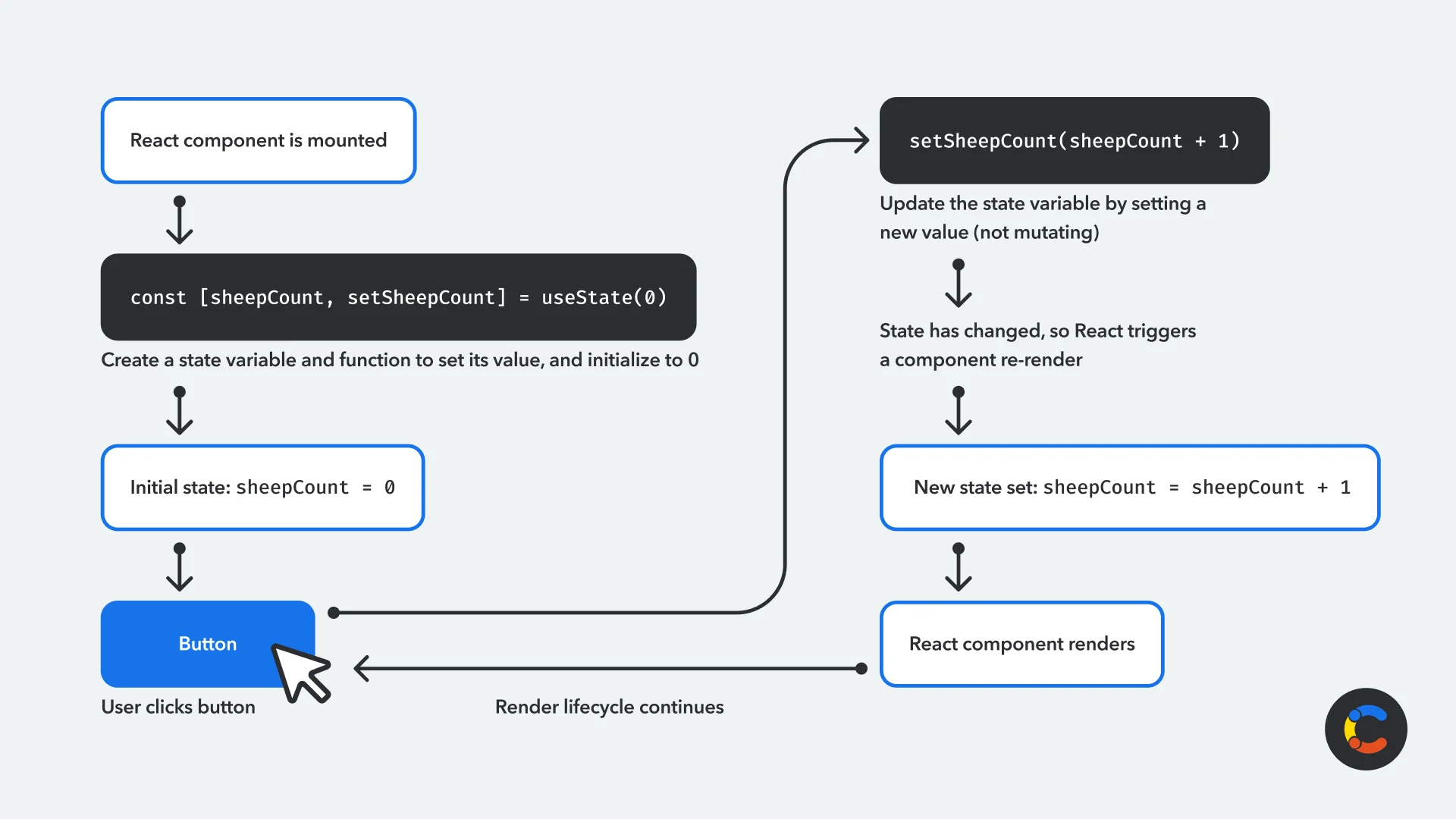
This flowchart shows the cycle: a component renders with its current state. A user event calls the state setter function, which triggers a re-render with the new state, updating the UI.
The Two Rules of Hooks
Before we go further, you must learn two rules that apply to useState and all other hooks. They are enforced by the React linter plugin and are critical for hooks to work correctly.
- Only Call Hooks at the Top Level. Do not call hooks inside loops, conditions, or nested functions. You must always use Hooks at the top level of your React function, before any early returns. This ensures that hooks are called in the same order on every render, which is how React preserves state between calls.
- Only Call Hooks from React Functions. Call hooks from React functional components or from custom hooks (which we'll cover later). Don't call them from regular JavaScript functions.
The Nature of State Updates
A common source of confusion is the timing and behavior of state updates. Your background in imperative programming might lead you to think of setCount(count + 1) as immediately changing the count variable. In React, it's more nuanced.
State as a Snapshot
A state variable's value is fixed for any single render. Think of it as a snapshot. When React re-renders a component, it's using the state values from that specific render's snapshot.
React Component Lifecycle: A Deep Dive for Beginners
The article 'React Component Lifecycle: A Deep Dive for Beginners' from Fullstack Foundations provides an excellent explanation of this concept.
Please read the chapter 'How React State works'. Focus on the sections 'How state works in React', 'How state snapshots work', and 'Batching state updates'. The analogy comparing state updates to a waiter taking an order is particularly insightful.
As the article explains, if you have multiple setCount(count + 1) calls in the same event handler, the count value in each call refers to the value from the snapshot of the render that is currently happening. It doesn't update mid-function.
function handleClick() {
  // If count is 0 in this render's snapshot:
  setCount(count + 1); // Schedules a re-render with count = 1
  setCount(count + 1); // Schedules a re-render with count = 1
  setCount(count + 1); // Schedules a re-render with count = 1
}
// After this handler runs, React will re-render ONCE, with the final value being 1.
This behavior, known as batching, is a performance optimization. React waits for your event handler to finish running before it triggers a single re-render with the final state.
Functional Updates: Updating State Based on Previous State
So, how do you correctly increment a counter multiple times in one go? You use the functional update form. Instead of passing a new value directly to the setter, you pass a function. This function receives the most up-to-date previous state and returns the new state.
function handleClick() {
  setCount(prevCount => prevCount + 1);
  setCount(prevCount => prevCount + 1);
  setCount(prevCount => prevCount + 1);
}
// If the initial count was 0, React queues these updates:
// 1. A function that takes 0 and returns 1.
// 2. A function that takes 1 and returns 2.
// 3. A function that takes 2 and returns 3.
// The final state will be 3, and React will still only re-render once.
This guarantees that you are always working with the latest state, even within a batch.
All 12 useState & useEffect Mistakes Junior React Developers Still Make in 2025
The video 'All 12 useState & useEffect Mistakes...' by ByteGrad clearly demonstrates this exact scenario and the solution.
Watch from the beginning to 02:32. This part visually shows why setCount(count + 1) doesn't work as expected multiple times and how the functional update form solves it.
Test your understanding!
You have a component with a state variable score initialized to 10.
const [score, setScore] = useState(10);

function handleEvent() {
  setScore(score + 5);
  setScore(s => s - 2);
  setScore(15);
  setScore(s => s * 2);
}
What will the value of score be after handleEvent runs and the component re-renders? Trace the queue of updates.
Show answer
The final value will be 30.
Here's how React processes the queue:
- Initial state:
scoreis10. setScore(score + 5): Thescorein this render's snapshot is10. This queues an update to15.setScore(s => s - 2): This queues a functional update.setScore(15): This queues another direct update to15, overwriting the first one.setScore(s => s * 2): This queues another functional update.
React will process the queue:
- Start with the current state:
10. - Process direct updates: The last direct update was
setScore(15), so the state becomes15. - Process functional updates on top of that:
- First function:
s => s - 2runs withs = 15. The state becomes13. - Second function:
s => s * 2runs withs = 13. The state becomes26.
- First function:
Wait, the answer is 30, not 26. What happened? There's a slight nuance in how React docs describe this. When batching, React may not strictly separate direct and functional updates. Instead, it can process them in order. Let's re-trace:
- Start with state
10.
setScore(score + 5): Queues an update to10 + 5 = 15.setScore(s => s - 2): Queues an updater function.setScore(15): Queues an update to15.setScore(s => s * 2): Queues an updater function.
React processes the queue for the next render:
- Base state for this series of updates is
10. - The update to
15(from step 1) is immediately overwritten by the update to15in step 3. The current pending value is15. - The first functional update (
s => s - 2) is applied to15, resulting in13. - The second functional update (
s => s * 2) is applied to13, resulting in26.
Okay, there seems to be conflicting information or a misunderstanding. Let's re-read the React docs on this. Ah, the new docs clarify: "If you update state multiple times in one render, React will queue them up and apply them in order." So, let's trace again, applying them in order to the previous state.
setScore(score + 5):scoreis from the snapshot (10). The update is10 + 5 = 15. The pending state is now15.setScore(s => s - 2): The updater function receives the pending state, which is15. It returns15 - 2 = 13. The pending state is now13.setScore(15): This is a direct set. It overwrites the pending state. The pending state is now15.setScore(s => s * 2): The updater function receives the pending state, which is15. It returns15 * 2 = 30. The pending state is now30.
So, after the event handler completes, React schedules a single re-render with the final state of 30. This demonstrates the power and predictability of the functional update form when mixed with direct sets.
Working with Objects and Arrays in State
Managing primitive types like numbers or strings is straightforward. When your state is an object or an array, you must follow one golden rule: do not mutate state directly.
Given your CS background, you know that objects and arrays in JavaScript are reference types. React determines if it needs to re-render by doing a shallow comparison of the state value. If you mutate an object directly (myObject.property = 'new'), the reference to the object in memory doesn't change, so React thinks nothing happened and won't re-render.
You must always provide a new object or array to the state setter function. The easiest way to do this is with the spread syntax (...).
All 12 useState & useEffect Mistakes Junior React Developers Still Make in 2025
Let's watch two more clips from the ByteGrad video. The first explains the vital difference between primitive and non-primitive state changes, and the second shows the correct, immutable way to update object state.
First, watch from 14:22 to 19:02 to understand how JavaScript's pass-by-value vs. pass-by-reference impacts React re-renders. Then, watch from 04:44 to 07:57 to see the common mistake of mutating object state and the correct pattern using the spread operator.
Here's a quick example with an object:
// Define the shape of our state
interface UserProfile {
  name: string;
  email: string;
}

// Initialize the state object
const [profile, setProfile] = useState<UserProfile>({
  name: 'John Doe',
  email: 'john.doe@example.com'
});

function handleNameChange(newName: string) {
  // INCORRECT: Direct mutation
  // profile.name = newName;
  // setProfile(profile); // Won't work!

  // CORRECT: Create a new object
  setProfile(prevProfile => ({
    ...prevProfile, // Copy all existing properties
    name: newName   // Overwrite the one that changed
  }));
}
As you can see, we're already touching on TypeScript. When we initialize state, TS can often infer the type. With objects and more complex scenarios, explicitly typing them with an interface or type alias is best practice, which we will explore fully in the next lesson.
Conclusion
You've just learned the most fundamental hook in React. Mastering useState is the key to building interactive applications.
Key Takeaways:
- The
useStatehook adds local state to a component, returning the current value and a setter function:const [value, setValue] = useState(initialValue). - Hooks must be called at the top level of a component and in the same order every time.
- State updates are batched. React collects all state updates in an event handler and performs a single re-render.
- State variables are snapshots; their values are constant within a given render.
- To update state based on its previous value, use the functional update form:
setValue(prevValue => ...). - Never mutate objects or arrays in state directly. Always create a new copy, typically using the spread (
...) syntax.
Next Steps
In the next lesson, we'll build on what we've learned and dive deep into applying TypeScript to the useState hook. We will cover how to handle state that can be null or undefined, define types for complex objects and arrays, and use TypeScript's power to make our state management more robust and error-free.