Hello! Welcome to the final lesson in our module on useEffect. So far, we've learned how to use useEffect to manage side effects like fetching data, and in our last lesson, we built a robust component that handles loading and error states.
Today, we're going to tackle some of the most common and frustrating issues that developers encounter with useEffect. The hook is incredibly powerful, but its behavior can sometimes feel counterintuitive, leading to bugs that are hard to track down. This lesson is dedicated to identifying and fixing these common pitfalls, with a special focus on the notorious infinite re-render loop.
By the end of this lesson, you'll be able to:
- Understand the root cause of most
useEffectissues: referential equality. - Diagnose and fix infinite re-render loops caused by state updates, unstable objects, and unstable functions.
- Recognize and solve problems related to stale data (closures) and race conditions.
- Develop a systematic approach to debugging
useEffect.
Let's dive in and master these tricky but essential concepts.
1. The Core Issue: How React Checks Dependencies
Before we look at specific bugs, we must solidify our understanding of how the useEffect dependency array works. You tell React to re-run an effect whenever a value in its dependency array changes. But what does "changes" mean?
Given your computer science background, you're familiar with the distinction between value equality and reference equality. This is the key.
- For primitive types (
string,number,boolean,null,undefined), React uses value equality. It checks if5 === 5(true) or'hello' === 'world'(false). - For reference types (
object,array,function), React uses reference equality. It checks if the variables point to the exact same object in memory. Two different objects with identical contents are not equal.
const obj1 = { id: 1 };
const obj2 = { id: 1 };
console.log(obj1 === obj2); // false! They are different objects in memory.

const arr1 = [1, 2];
const arr2 = [1, 2];
console.log(arr1 === arr2); // false!

const func1 = () => {};
const func2 = () => {};
console.log(func1 === func2); // false!
Since a React component is just a function that re-runs on every render, any objects, arrays, or functions defined directly inside the component body are re-created from scratch on every render. This means they will have a new reference every single time, even if their contents are identical. This is the root cause of most useEffect pitfalls.
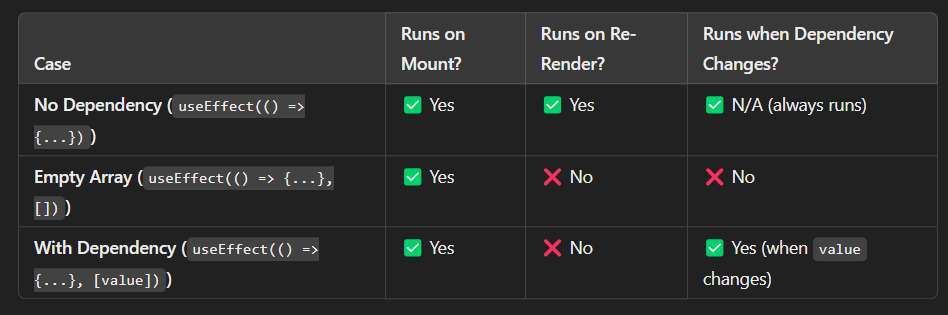
This table provides a great summary of how the dependency array controls the effect's execution:
2. Pitfall 1: The Direct Infinite Loop
The most classic infinite loop occurs when an effect updates a piece of state that is also one of its own dependencies.
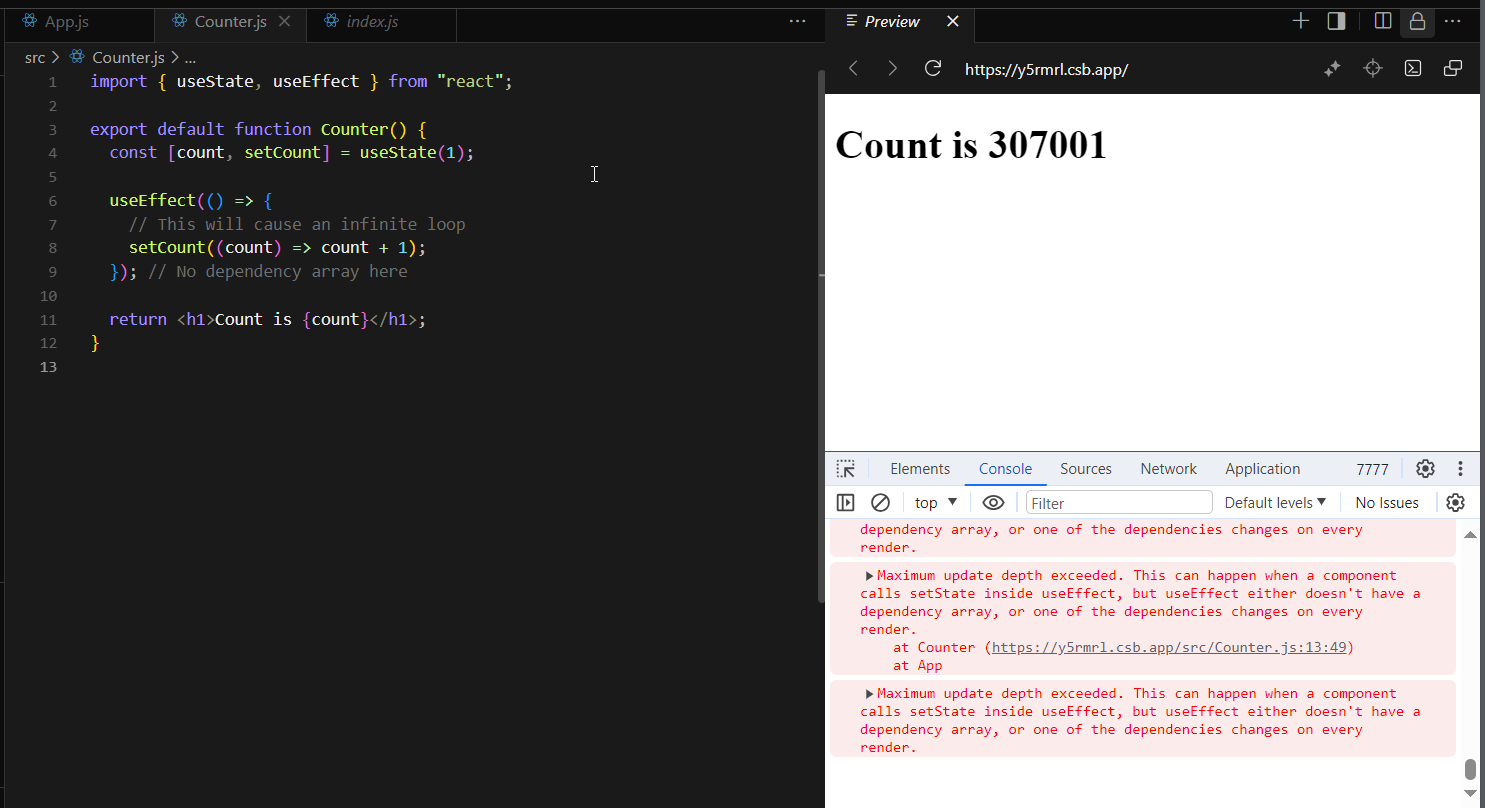
Consider this simple, broken component:
import { useState, useEffect } from 'react';

function Counter() {
  const [count, setCount] = useState(0);

  // 🔴 This creates an infinite loop
  useEffect(() => {
    setCount(count + 1);
  }, [count]); // Dependency on 'count'

  return <h1>{count}</h1>;
}
Let's trace the execution:
- Initial Render:
countis0. The component renders<h1>0</h1>. - Effect Runs: After rendering,
useEffectruns. It callssetCount(0 + 1), settingcountto1. - Re-render: The state update triggers a re-render.
countis now1. - Dependency Check: React compares the new
count(1) with the oldcount(0). They are different. - Effect Runs Again: Because a dependency changed, the effect runs again. It calls
setCount(1 + 1). - ...and so on, forever.
How to Fix It: The Functional Update Form
The problem is that our effect depends on the count value to calculate the next count value. We can break this dependency by using the functional update form of the state setter.
import { useState, useEffect } from 'react';

function Counter() {
  const [count, setCount] = useState(0);

  // ✅ Correct: No dependency on 'count' needed
  useEffect(() => {
    const intervalId = setInterval(() => {
      // 'prevCount' is guaranteed by React to be the latest state.
      setCount(prevCount => prevCount + 1);
    }, 1000);

    return () => clearInterval(intervalId);
  }, []); // The effect runs only once on mount.

  return <h1>{count}</h1>;
}
By passing a function to setCount, we tell React, "I don't care what the current count is right now; just take whatever the latest value is and add one to it." This removes the need to include count in the dependency array, breaking the loop.
The official React documentation explains this pattern clearly.
useEffect Reference - Updating state based on previous state from an Effect
The React docs provide an excellent explanation for updating state based on previous state from within an useEffect hook. This is a crucial pattern to understand.
In the provided documentation, navigate to the 'Usage' section and find the subsection titled 'Updating state based on previous state from an Effect'. Read this section to see how using the functional updater setCount(c => c + 1) allows you to remove the state variable from the dependency array, fixing the infinite loop.
3. Pitfall 2: Unstable Dependencies (Objects & Functions)
A more subtle infinite loop happens when you depend on a non-primitive value (an object or a function) that is re-created on every render.
Let's look at an example with a data-fetching function defined inside the component.
function PokemonList() {
  const [pokemon, setPokemon] = useState([]);
  const [query, setQuery] = useState("");

  // This function gets a new reference on every single render
  const getPokemon = async () => {
    const res = await fetch('https://pokeapi.co/api/v2/pokemon');
    const data = await res.json();
    setPokemon(data.results);
  };

  useEffect(() => {
    getPokemon();
  }, [getPokemon]); // 🔴 'getPokemon' changes on every render!

  // ...
}
This causes an infinite loop:
- Component renders,
getPokemonis created. useEffectruns, callsgetPokemon.getPokemoncallssetPokemon.- State changes, component re-renders.
- A new
getPokemonfunction is created with a new memory reference. - React compares the new
getPokemonwith the old one. They have different references, so React considers the dependency "changed." - The effect runs again... forever.
This video from Web Dev Cody explains this exact problem and walks through three different solutions.
Why useEffect causes infinite loops - fix it with useCallback
This video clearly demonstrates how defining a function inside a component and using it as a dependency for useEffect causes an infinite loop.
Please watch from 02:34 to 07:43. The video presents three ways to fix this: Move the function outside the component (02:34 - 03:32): Best if the function doesn't depend on props or state. Move the function inside the useEffect hook (04:57 - 05:50): Best if the function is only used by that one effect. Wrap the function in useCallback (05:50 - 07:43): The tool for memoizing functions so they don't get re-created unless their own dependencies change. We will cover this hook in depth in a later module, but it's important to see its purpose now.
The same logic applies to objects. If you create an object in the component body and use it as a dependency, your effect will run on every render.
// 🔴 'options' is a new object on every render
const options = { url: 'https://...', method: 'GET' };

useEffect(() => {
  // fetch logic
}, [options]);
The fixes are analogous to functions:
- Deconstruct: Depend on the primitive values inside the object:
[options.url, options.method]. - Move Inside: Create the object inside the
useEffect. - Memoize: Wrap the object creation in a
useMemohook (the equivalent ofuseCallbackfor values).
4. Pitfall 3: Stale Closures & Missing Dependencies
What happens if you try to "fix" a dependency issue by simply removing the dependency from the array, against the advice of the ESLint rule? You create a stale closure.
The function you pass to useEffect "closes over" the props and state from the render in which it was created. If you omit a dependency, the effect will never re-run to get the new values, and it will be stuck with the old, stale ones.
The video below gives an excellent demonstration of this with setInterval.
All 12 useState & useEffect Mistakes Junior React Developers Still Make in 2025
This segment from ByteGrad's video on common mistakes is one of the clearest explanations of stale closures you will find. It shows how a setInterval can fail to update correctly.
Watch from 33:08 to 38:16. Pay close attention to: Why the counter gets stuck at 1 (the initial closure). Why simply adding count to the dependencies creates another problem (multiple intervals). How adding a proper cleanup function solves the multiple interval problem. How using the functional update form is the cleanest solution of all, removing the dependency and the need for cleanup/re-creation.
The Golden Rule: Always respect the react-hooks/exhaustive-deps ESLint rule. It's there to protect you from stale closures. If it's warning you about a missing dependency, don't just disable the rule. Instead, figure out why the dependency is unstable and use one of the techniques we've discussed (moving logic, functional updates, or memoization with useCallback/useMemo) to fix the root cause.
Test your understanding!
You have a component that fetches user data based on a userId prop.
function UserProfile({ userId }: { userId: number }) {
  const [user, setUser] = useState(null);

  useEffect(() => {
    // an expensive options object
    const options = { headers: { 'API-Key': '...' } };

    fetch(`https://api.example.com/users/${userId}`, options)
      .then(res => res.json())
      .then(data => setUser(data));
  }, []); // ESlint warning: missing 'userId' and 'options'

  // ... render user
}
The linter warns that userId and options are missing from the dependency array. If you add [userId, options], the component gets stuck in an infinite loop. What are the two distinct problems here, and how would you fix them?
Show answer
There are two separate issues:
-
The
optionsobject: It's defined inside the component body, so it gets a new reference on every render. Including it in the dependency array causes the effect to run on every render, leading to a state update (setUser), which triggers a re-render and continues the loop.- Fix: Since
optionsdoesn't depend on any props or state, it can be defined outside the component, making it a stable reference. Alternatively, it could be moved inside theuseEffect.
- Fix: Since
-
The
userIdprop: It's a prop that can change, and the fetch call depends on it. It must be in the dependency array to ensure the component re-fetches when theuserIdchanges. It was incorrectly omitted.- Fix: Add
userIdto the dependency array.
- Fix: Add
The corrected code would look like this:
// 'options' is now stable, defined outside the component
const options = { headers: { 'API-Key': '...' } };

function UserProfile({ userId }: { userId: number }) {
  const [user, setUser] = useState(null);

  useEffect(() => {
    fetch(`https://api.example.com/users/${userId}`, options)
      .then(res => res.json())
      .then(data => setUser(data));
  }, [userId]); // ✅ Effect now correctly re-runs only when userId changes

  // ... render user
}
5. A Systematic Debugging Checklist
When your useEffect is misbehaving, it's helpful to have a mental checklist.
React useEffect Dependency Arrays: A Debugging Checklist
This article provides a fantastic, concise debugging checklist. It maps common symptoms to their likely causes and fixes.
Please read the section titled '🛠 Debugging Checklist for Dependency Bugs'. This is a practical summary of everything we've discussed.
If you're still unsure which dependency is causing re-renders, the React docs suggest a handy manual debugging trick:
useEffect(() => {
  // ...
}, [dep1, dep2]);

// Log the dependencies on every render
console.log([dep1, dep2]);
You can then right-click the logged arrays in your browser's console, store them as global variables (e.g., temp1, temp2), and compare the references directly: Object.is(temp1[0], temp2[0]). This will tell you exactly which dependency is "unstable."
Conclusion
Mastering useEffect is a rite of passage for any React developer. While the dependency array can be a source of confusion, understanding the core principle of referential equality unlocks the ability to debug and solve these issues systematically.
Key Takeaways:
useEffectdependencies are compared using reference equality for objects, arrays, and functions.- Values created inside a component's render body get a new reference on every render, making them "unstable" dependencies.
- The most common cause of infinite loops is an effect that sets state, causing a re-render that changes one of its own dependencies.
- Fix unstable dependencies by:
- Moving them outside the component (if they don't use props/state).
- Moving them inside the
useEffect(if only used there). - Using the functional update form of
setStateto remove a state dependency. - Memoizing them with
useMemooruseCallback(which we'll cover in detail later).
- Always respect the
exhaustive-depsESLint rule to avoid stale closures.
You've now completed the module on useEffect! You have a deep understanding of how to handle side effects, manage asynchronous operations, and debug the most common pitfalls.
In our next module, "Forms and Event Handling," we'll shift our focus to capturing user input. You'll see how the concepts of state, props, and re-renders we've mastered are fundamental to building interactive and dynamic forms in React.