Hello! Welcome to the first lesson in our module on handling side effects.
In the previous module, we focused entirely on state management within your React application. You learned how to use useState to manage component memory and how to lift state up to share it between components. All of these operations were self-contained within the React ecosystem.
However, applications rarely exist in a vacuum. They need to interact with the "outside world"—fetching data from servers, responding to browser events, or connecting to third-party APIs. These interactions are called side effects. This lesson will explain what side effects are and, more importantly, why React's architecture demands that you handle them separately from your component's main rendering logic.
1. From Pure Functions to Side Effects
Your Computer Science background gives you a great head start here, as the concept of side effects is rooted in the principles of functional programming, specifically the idea of pure functions.
A pure function has two defining characteristics:
- It minds its own business: It only uses the inputs (arguments) it was given to compute its result. It doesn't rely on or change any external variables or state.
- It's predictable: For the same inputs, it will always return the same output.
A simple add(a, b) function is a perfect example. A function that modifies a global variable or writes to a file is not.
To solidify this, please watch the first few minutes of the following video, which provides a clear distinction between pure functions and those with side effects.
What are "Pure Functions" and "Side Effects"?
This video from Academind offers a concise explanation of pure functions and then introduces the concept of a side effect, which is any action that affects the world outside the function's own scope.
Watch from 00:26 to 03:43. Focus on the definition of a pure function and how actions like console.log or sending an HTTP request make a function impure by introducing side effects.
In React, a side effect is any operation within a component that isn't directly related to calculating the JSX output. It's any time your component interacts with something outside of its own scope.
Common examples of side effects in a React application include:
- Fetching data from an API.
- Setting up or cleaning up a subscription to a WebSocket or an event listener.
- Manually manipulating the DOM (e.g., to focus an input field).
- Setting timers with
setTimeoutorsetInterval. - Reading from or writing to
localStorage.
2. The Two Phases of a React Component: Render and Commit
So, why does React care so much about separating these side effects? The answer lies in how React updates the UI. It's not a single, monolithic operation. Instead, every update happens in distinct phases. For our purposes, the two most important are the Render and Commit phases.
React Component Lifecycle: A Deep Dive for Beginners
To understand why side effects are special, we first need to understand React's component lifecycle. This article provides an excellent deep dive into the phases of a component's life, which is crucial background knowledge.
Please read 'Chapter 2: A Component's Lifecycle (trigger, render, commit)'. Focus on the distinction between React's 'render' phase (the calculation) and the browser's rendering (painting to the screen), and what happens during the 'commit' phase.
Let's break this down:
-
Phase 1: The Render Phase
When a component's state or props change, React "renders" it. Crucially, this does not mean updating the screen yet. In the render phase, React calls your component function to produce a new "snapshot" of the UI (the Virtual DOM). This is a purely computational step. React expects your rendering logic to be a pure function. Given the same props and state, it should always produce the same JSX. -
Phase 2: The Commit Phase
After rendering, React compares the new snapshot with the old one (a process called "reconciliation"). If there are differences, React enters the commit phase. Here, it applies the calculated changes to the actual DOM, and the browser finally paints the updates to the screen.
3. The Problem: Polluting the Render Phase
Because React's render phase is designed to be a pure calculation, putting side effects directly inside your component's main body is a major anti-pattern.
Consider this incorrect example:
function MyComponent() {
  // ⛔️ Bad: Side effect is directly in the render logic
  fetch('/api/data').then(...);

  return <div>...</div>;
}
Why is this so bad?
-
Unpredictable Execution: React makes no guarantees about how many times it will run your component's render logic before committing. To improve performance, React might start rendering and then discard the result. If you trigger a
fetchevery time, you could end up with a cascade of unnecessary network requests. In development, React'sStrictModeintentionally double-invokes render functions to help you catch these accidental side effects. -
Performance Issues: The render phase should be as fast as possible. Slow operations like network requests will block rendering, making your UI feel sluggish and unresponsive.
The fundamental rule is: Rendering must be a pure calculation and should not have any side effects. The purpose of rendering is simply to describe the UI based on the current props and state.
4. The Solution: Isolating Side Effects
If we can't put side effects in the render logic, where do they go?
React provides a dedicated mechanism for this: the useEffect hook. This hook is your escape hatch from the pure world of rendering. It lets you tell React: "Run this code, but do it after you have finished rendering and committed the changes to the DOM."
This cleanly separates the pure calculation (render phase) from the impure interactions with the outside world (side effects).
The following diagram provides a fantastic visual summary of this lifecycle. Notice how hooks like useState and useMemo are part of the "Render phase," while useEffect is firmly in the "Commit phase," which happens after the DOM has been updated.
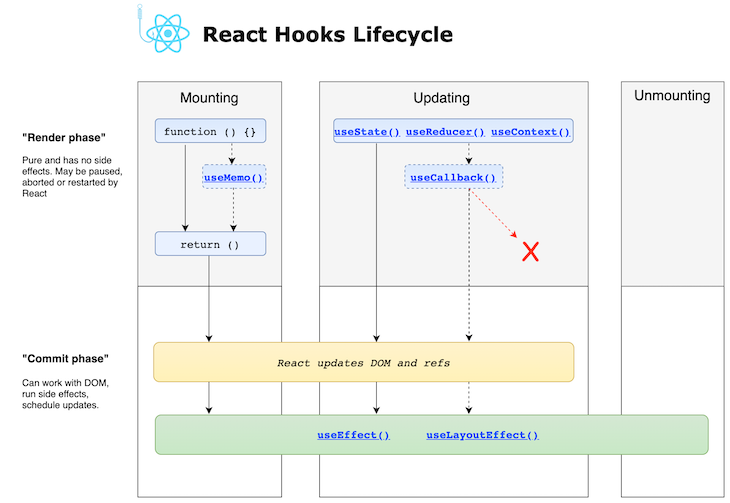
Let's see this separation in action by comparing the wrong way with the right way.
React Side-Effects: useEffect, useLayoutEffect, ...
This article provides a clear comparison of placing side effects directly in a component versus correctly placing them inside a useEffect hook.
Read the two sections 'Without useEffect (not recommand)' and 'With useEffect (recommand)'. Observe how placing the fetch call inside the useEffect hook moves the side effect logic outside of the main render path.
By using useEffect, you are ensuring that your side effects run at a predictable time—after the UI has been updated—and you avoid polluting the pure, computational render phase.
Test your understanding!
A developer writes the following component to set the document's title:
let renderCount = 0;

function PageTitle({ title }: { title: string }) {
  renderCount++;
  console.log(`Render count: ${renderCount}`);

  // Side Effect: Directly manipulating the DOM
  document.title = `${title} - My Awesome App`;

  return <h1>{title}</h1>;
}
Based on what you've learned, what are two potential problems with this code, especially in a complex React application or when StrictMode is enabled?
Show answer
-
It runs on every render, not just when the title changes. If a parent component re-renders for any reason (e.g., its own state changes),
PageTitlewill also re-render. This will cause thedocument.titleto be set again, even if thetitleprop hasn't changed. While trivial here, this is inefficient and can cause bugs with more complex side effects. -
It makes rendering impure and unpredictable. The component is no longer just returning JSX; it's also interacting with an external system (the browser's
documentobject). If this component is rendered insideStrictMode, the render logic would run twice, meaningdocument.titlewould be set twice unnecessarily for a single update. If the side effect was an API call, this would be a significant bug. The component's job should only be to describe the UI, not to change things outside of React during the render phase.
Conclusion
Congratulations! You've just grasped one of the most important theoretical concepts in React. Understanding this separation between rendering and side effects is what distinguishes a beginner from an experienced React developer.
Key Takeaways:
- Side Effects are any operations that interact with the world outside a component's scope, like API calls or DOM manipulation.
- React components should ideally be pure functions of their props and state during the render phase.
- The render phase is a pure calculation to determine the UI; the commit phase is when React applies those changes to the DOM.
- Placing side effects in the render logic leads to unpredictable behavior and performance issues because rendering can happen multiple times per update.
- React provides the
useEffecthook as the correct place to handle side effects, ensuring they run after the render and commit phases are complete.
Next Steps
Now that you understand what side effects are and why they need to be handled carefully, our next lesson will move from theory to practice. We will dive into the useEffect hook itself, learning its syntax and how to use it to perform side effects after a component renders.