Hello! Welcome back to our series on handling side effects in React.
In the previous lesson, we introduced the useEffect hook as the designated place for side effects. You learned its basic syntax and how to use it with an empty dependency array [] to run code just once when a component mounts, a perfect pattern for initial data fetching.
Today, we'll unlock the full potential of useEffect by mastering its second argument: the dependency array. You will learn how to precisely control when your effects re-run in response to changes in props or state. This is fundamental to building dynamic and interactive components that synchronize with the world outside of React.
1. The Three Modes of useEffect Execution
The dependency array dictates the entire execution logic of an effect after the initial render. Let's visualize the three possibilities.
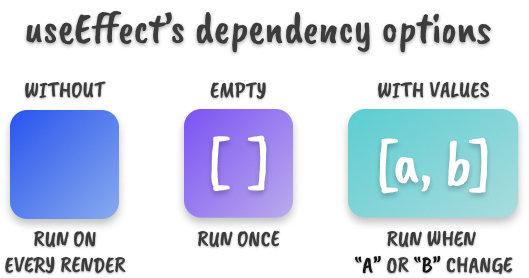
Let's quickly review what we know and introduce the focus of today's lesson:
-
No Dependency Array:
useEffect(() => { ... })- When it runs: After the initial render AND after every subsequent re-render.
- Use case: Rare. Often leads to performance issues or infinite loops. You should almost always specify a dependency array.
-
Empty Dependency Array:
useEffect(() => { ... }, [])- When it runs: Only once, after the initial render (i.e., when the component "mounts").
- Use case: Perfect for setup code, initializing third-party libraries, or fetching initial data that doesn't change.
-
Populated Dependency Array:
useEffect(() => { ... }, [dep1, dep2])- When it runs: After the initial render, and again after any re-render where the value of
dep1ordep2has changed. - This is our focus today. This pattern allows your component to "react" to changes. For example, re-fetching data when a user ID prop changes.
- When it runs: After the initial render, and again after any re-render where the value of
2. How React Compares Dependencies: The Critical Detail
To use the dependency array correctly, you must understand how React decides if a dependency has "changed." React performs a shallow comparison of each item in the dependency array between renders.
This comparison is done using the Object.is algorithm, which behaves very similarly to the strict equality operator (===).
This seemingly simple detail has profound implications, especially given your background in computer science. The behavior differs drastically for primitive types versus reference types.
The video 'Mastering React's useEffect' by Jack Herrington provides an outstanding explanation of this core concept. He demonstrates exactly how JavaScript's comparison works and why it's so important for useEffect.
Please watch from 06:58 to 12:16. The presenter uses a live-coding environment to show the difference between comparing scalars (numbers, strings) and references (objects, arrays). This distinction is the root cause of many common useEffect bugs.
As the video explains, here's the summary:
- Primitive Types (string, number, boolean, null, undefined): Compared by value.
5is always equal to5."hello"is always equal to"hello". If a dependency is a primitive, the effect will only re-run if its value actually changes (e.g., from5to6). - Reference Types (object, array, function): Compared by reference (i.e., their location in memory). A new object
{ id: 1 }is not equal to another{ id: 1 }because they are two separate objects in memory, even though their contents are identical.
This leads to our first major pitfall. If you create a new object, array, or function inside your component's render body and include it in a dependency array, React will see a "new" value on every render, causing your effect to run every time.
For a deeper look into the internal mechanics, the following reading explains how React uses this comparison to decide whether to execute an effect.
The article 'useEffect under the Hood' offers a glimpse into React's source code. It shows precisely where the dependency comparison happens and how it affects the effect queue.
Read the sections under the updateEffectImpl code block and the commitHookEffectList code block. Focus on how areHookInputsEqual is used. If the dependencies are equal, a NoHookEffect tag is pushed, which tells React to skip executing the effect's main function during the commit phase. This is the mechanism that a dependency array uses to control execution.
3. Common useEffect Pitfalls and Solutions
Understanding the value-vs-reference comparison is the key to solving the most common useEffect problems.
Pitfall #1: Infinite Loops with Objects and Arrays
Let's see the reference type issue in action. Imagine an effect that depends on an options object.
function MyComponent() {
  const [data, setData] = useState(null);

  // This object is re-created on every render
  const options = { enabled: true };

  useEffect(() => {
    // Some fetching logic that uses options...
    console.log('Fetching data with options...');
    // fetch(..., options).then(...)
  }, [options]); // ⚠️ PROBLEM: `options` is a new object every time!

  return <div>...</div>;
}
This code creates an infinite loop:
- Component renders, creating a new
optionsobject. useEffectruns becauseoptionsis a new reference.- The effect might call
setData. setDatatriggers a re-render.- Go back to step 1.
The video you just watched demonstrates this exact problem and the solution.
Let's revisit Jack Herrington's video to see how this infinite loop manifests and how to fix it.
Watch the following three short clips: The Problem (03:14 - 04:04): See what happens when useEffect is called without a dependency array after a state update. The Trigger (06:24 - 06:58): Observe the infinite loop that occurs when an object is placed in the dependency array. The Solution (12:16 - 15:27): Understand how to fix this by depending on primitive values from within the object (e.g., options.url) instead of the object itself. He also briefly touches on functions, which we'll discuss next.
The Solution: Whenever possible, de-structure your objects and arrays and list only the primitive values your effect truly depends on in the dependency array.
// CORRECTED
const options = { url: 'https://api.example.com', method: 'GET' };

useEffect(() => {
  fetch(options.url, { method: options.method });
}, [options.url, options.method]); // ✅ CORRECT: Depends on primitive strings.
Pitfall #2: Stale State and Closures
Another classic issue arises when an effect needs to update state based on that same state's previous value, especially with timers or intervals.
An effect function "closes over" the props and state from the render in which it was created. If you use an empty dependency array [], it will only ever see the initial values.
The useStopwatch example in the video is the perfect illustration of this.
Let's continue with the 'Mastering React's useEffect' video to see how to handle state updates from within an effect without causing issues.
Watch from 21:22 to 24:52. Pay close attention to why setCount(count + 1) fails when count isn't in the dependency array. Then, see how the 'functional update' form (setCount(c => c + 1)) solves this elegantly.
The Solution: When you need to update state based on its previous value from within a useEffect, use the functional update form of your state setter. This gives you access to the most up-to-date state without needing to add it as a dependency.
// INCORRECT: `count` is stale (always 0)
useEffect(() => {
  const intervalId = setInterval(() => {
    setCount(count + 1); // `count` is always the initial value
  }, 1000);
  return () => clearInterval(intervalId);
}, []);

// CORRECT
useEffect(() => {
  const intervalId = setInterval(() => {
    // This form guarantees you get the latest state
    setCount(prevCount => prevCount + 1);
  }, 1000);
  return () => clearInterval(intervalId);
}, []); // ✅ CORRECT: No dependency on `count` needed.
Test your understanding!
You have a component that logs a user object to an analytics service whenever the user prop changes.
interface User {
  id: number;
  name: string;
  settings: {
    theme: string;
  };
}

interface UserAnalyticsProps {
  user: User;
}

function UserAnalytics({ user }: UserAnalyticsProps) {
  useEffect(() => {
    logToAnalytics(user);
  }, [user]); // The effect depends on the whole user object

  return <div>Displaying data for {user.name}</div>;
}
The parent component that provides the user prop sometimes re-renders for other reasons, and in its render function, it constructs a new user object, even if the user's data hasn't changed.
Based on what you've learned, what is the potential problem here, and how could you make this useEffect more robust and efficient?
Show answer
The problem is that the UserAnalytics component's useEffect depends on the user object by reference. If the parent component creates a new user object on every render, this effect will run on every single re-render of the parent, even if the user.id and other properties are identical. This could lead to spamming the analytics service with redundant data.
A more robust solution is to depend on a stable, primitive value that uniquely identifies the user, like user.id.
function UserAnalytics({ user }: UserAnalyticsProps) {
  useEffect(() => {
    logToAnalytics(user);
  }, [user.id]); // ✅ CORRECT: Effect only runs when the user ID changes.
}
This way, even if the parent passes a new object reference with the same user data, the effect will not re-run unnecessarily. It will only run when the user being tracked actually changes.
4. Practical Application: Re-fetching Data on Demand
Let's tie this all together. A common requirement is a component that fetches data based on a prop (like an ID) and re-fetches that data whenever the ID prop changes. This is a perfect use case for a populated dependency array.
All 12 useState & useEffect Mistakes Junior React Developers Still Make in 2025
The video 'All 12 useState & useEffect Mistakes...' by ByteGrad has a fantastic, clear example of building a component that fetches a blog post and then refactors it to re-fetch when the post ID changes.
Watch from 38:47 to 42:35. Notice how the initial implementation with [] doesn't work when the ID changes. The key moment is when he adds id to the dependency array, making the component correctly synchronize with its prop.
The pattern shown in the video is central to building interactive React applications:
function Post({ postId }: { postId: number }) {
  const [post, setPost] = useState(null);

  useEffect(() => {
    // This effect synchronizes the `post` state with the `postId` prop.
    const fetchPost = async () => {
      const response = await fetch(`https://api.example.com/posts/${postId}`);
      const data = await response.json();
      setPost(data);
    };

    fetchPost();
  }, [postId]); // Re-run this effect whenever `postId` changes!

  if (!post) {
    return <div>Loading post...</div>;
  }

  return <h1>{post.title}</h1>;
}
Conclusion
You have now learned the most critical aspect of useEffect: how to control its execution with the dependency array. This skill separates developers who fight with useEffect from those who use it as a powerful tool for synchronization.
Key Takeaways:
- The dependency array tells React when to re-run an effect by comparing the values in the array between renders.
- React compares dependencies shallowly (
Object.is). This means primitives are compared by value, and reference types (objects, arrays, functions) are compared by reference. - To avoid infinite loops, do not put objects, arrays, or functions that are redefined on every render into the dependency array. Instead, depend on the stable, primitive values they contain.
- To update state based on its previous value inside an effect, use the functional update form (e.g.,
setCount(c => c + 1)) to avoid stale closure issues and unnecessary dependencies.
Next Steps
The data-fetching example in the last video touched on an interesting problem: what happens if you click the button to fetch a new post while a previous request is still in flight? This can lead to race conditions. To solve this, useEffect has a "cleanup" mechanism. In our next lesson, we will explore this cleanup function, which allows you to cancel subscriptions, clear timers, and abort fetch requests, completing your understanding of the effect lifecycle.