Hello! Welcome to your next lesson in the "Interacting with Web Services and APIs" module.
In our previous lesson, we successfully used Go's net/http package to make GET and POST requests. We retrieved the response body as a raw slice of bytes ([]byte). While useful, this raw data isn't easy to work with. In the DevOps world, most modern APIs communicate using JSON, a structured data format.
Today, we'll focus on the crucial next step: parsing that JSON data into native Go structs. This process, known as unmarshalling or deserialization, transforms the raw text from an API response into a typed, structured, and easily accessible format in your code. Mastering this will enable you to effectively consume and utilize the data from any API you interact with.
1. From JSON to Go Structs: The Core Idea
The goal is to map a JSON object's keys and values to the fields of a Go struct. For this to work, we need to define a Go struct that mirrors the structure of the JSON we expect to receive.
A critical concept here is the use of struct tags. APIs often use snake_case or camelCase for their JSON keys (e.g., "user_id"), but Go's convention for exported struct fields is PascalCase (e.g., UserID). Struct tags bridge this gap, telling the Go json package how to map the fields.
Go Programming - JSON Encoding & Decoding in Golang
Let's start with the video "Go Programming - JSON Encoding & Decoding in Golang" from the BugBytes channel. This section picks up right where we left off—with a raw JSON response—and shows how to define a Go struct to match it, introducing the essential concept of struct tags.
Watch from 05:14 to 07:20. Focus on: How the Todo struct is defined to mirror the JSON structure from the API. The use of json:"fieldName" tags to map JSON keys (like userId) to exported Go struct fields (like UserID).
As you saw, the struct tags are strings placed within backticks (``) after a field's type definition:
type Todo struct {
    UserID    int    `json:"userId"`
    ID        int    `json:"id"`
    Title     string `json:"title"`
    Completed bool   `json:"completed"`
}
Notice that the struct fields (UserID, ID, etc.) must start with a capital letter. This makes them exported, meaning they are visible and modifiable by packages outside the current one, including the encoding/json package.
Go Programming - JSON Encoding & Decoding in Golang
Forgetting to export struct fields is a very common mistake. Let's see a quick demonstration from the same video on why this is so important.
Watch from 14:27 to 16:43. This part explains the difference between public (uppercase) and private (lowercase) fields and shows how unmarshalling fails to populate a private field, leaving it with its zero value (e.g., 0 for an int).
2. Using json.Unmarshal
With a correctly defined struct, we can use the json.Unmarshal function to perform the parsing. This function takes the raw JSON data as a byte slice and a pointer to the variable where you want to store the parsed data.
Passing a pointer is crucial; it allows json.Unmarshal to modify the struct variable you declared in your function.
Go Programming - JSON Encoding & Decoding in Golang
The video continues by demonstrating the use of the json.Unmarshal function to parse the JSON byte slice into the Todo struct.
Continue watching from 07:20 to 09:48. Pay attention to: The declaration of an empty struct variable: var todoItem Todo. The call to json.Unmarshal, passing the byte slice and a pointer to the todoItem variable (&todoItem). The result of printing the populated struct, showing the data is now accessible via its fields (e.g., todoItem.Title).
3. Handling Complex and Real-World API Responses
Real-world API responses are rarely as flat as the simple Todo example. They often contain nested objects, arrays of objects, and have fields that might be missing or extra. Go's json package handles these scenarios gracefully.
A Comprehensive Guide to Using JSON in Go
The article "A Comprehensive Guide to Using JSON in Go" from BetterStack provides excellent examples of these more complex structures and highlights common behaviors you need to be aware of.
Read the following parts of the article: "Using structs for JSON unmarshalling": Skim the simple Dog struct example, then focus on the FullPerson example. This demonstrates how to model nested JSON objects (Address) and arrays of objects ([]Pet) with corresponding nested structs and slices in Go. "Common pitfalls with JSON unmarshalling in Go": Read this entire section. It covers what happens with extra fields (ignored by default), missing fields (set to zero value), and the case-insensitivity of field matching. This is invaluable practical knowledge for building resilient tools.
Key takeaways from the reading:
- Nested JSON Object → Nested Struct: If a JSON object contains another object, you define a struct field whose type is another struct.
- JSON Array of Objects → Slice of Structs: If a JSON object contains an array of objects, you define a struct field as a slice of the corresponding struct type (e.g.,
Pets []Pet). - Flexibility by Default: Go's default behavior of ignoring extra fields and using zero-values for missing ones provides flexibility. Your tool won't break if an API adds a new, optional field.
4. A More Efficient Method: Decoding from a Stream
In the previous lesson, and in the json.Unmarshal examples so far, we first read the entire HTTP response body into a byte slice using io.ReadAll. For very large API responses, this can consume a lot of memory.
A more efficient pattern is to decode the JSON directly from the io.Reader stream provided by resp.Body. This is done using json.NewDecoder.
Go Programming - JSON Encoding & Decoding in Golang
Let's return to the BugBytes video, which refactors the code to use this more efficient, stream-based decoding approach.
Watch from 09:48 to 11:28. Notice how using json.NewDecoder(resp.Body).Decode(&todoItem) replaces the io.ReadAll and json.Unmarshal steps with a single, more memory-efficient line of code.
This streaming approach is a best practice, especially in a DevOps context where you might be processing large log files or extensive resource lists from a cloud API.
5. Enforcing Strict API Contracts
While Go's flexibility is often a benefit, sometimes you need to be strict. You might want your program to fail if the API response deviates from the expected structure, for example, if it includes unknown fields that might signal a breaking change in the API.
The json.Decoder provides a method for this: DisallowUnknownFields.
Go Programming - JSON Encoding & Decoding in Golang
The json.Decoder gives us more control than json.Unmarshal. Let's see how to use it to enforce a strict API contract.
Watch from 11:28 to 14:27. This part demonstrates how to call the DisallowUnknownFields() method on a decoder. When this is set, the Decode() method will return an error if the JSON contains fields not defined in your Go struct.
Using DisallowUnknownFields is a powerful way to make your automation more robust and to catch potential API versioning issues early.
Test your understanding!
You are writing a tool to interact with a CI/CD system. The API returns the following JSON for a specific job:
{
  "id": 4781,
  "name": "build-and-push-image",
  "status": "success",
  "runner": {
    "id": 12,
    "description": "docker-runner-1"
  },
  "pipeline_id": 987,
  "allow_failure": false
}
Your task is to define the Go struct(s) that can be used to unmarshal this JSON data. Remember to use appropriate types and JSON struct tags to match the snake_case keys.
Show answer
Here are the Go structs that correctly model the JSON data:
// Runner holds information about the CI runner that executed the job.
type Runner struct {
    ID          int    `json:"id"`
    Description string `json:"description"`
}

// Job represents the state and metadata of a CI/CD job.
type Job struct {
    ID            int    `json:"id"`
    Name          string `json:"name"`
    Status        string `json:"status"`
    RunnerInfo    Runner `json:"runner"` // Nested struct for the runner object
    PipelineID    int    `json:"pipeline_id"`
    AllowFailure  bool   `json:"allow_failure"`
}
This solution correctly models the nested runner object with a separate Runner struct and uses json tags to map the snake_case JSON keys to PascalCase Go fields.
6. Tooling and Productivity
Manually writing structs for large, complex API responses can be tedious and error-prone. As a DevOps engineer, you appreciate tools that boost productivity. The Go ecosystem, and your GoLand IDE, have you covered.
- Online Converters: Tools like JSON-to-Go can automatically generate Go structs from a JSON sample. You can paste in a JSON response, and it will generate the corresponding Go structs with the correct types and tags. This is an excellent starting point.
- IDE Integration: GoLand has built-in features to assist with this. It can auto-complete struct tags, and with plugins or built-in actions, you can often generate structs directly from JSON.
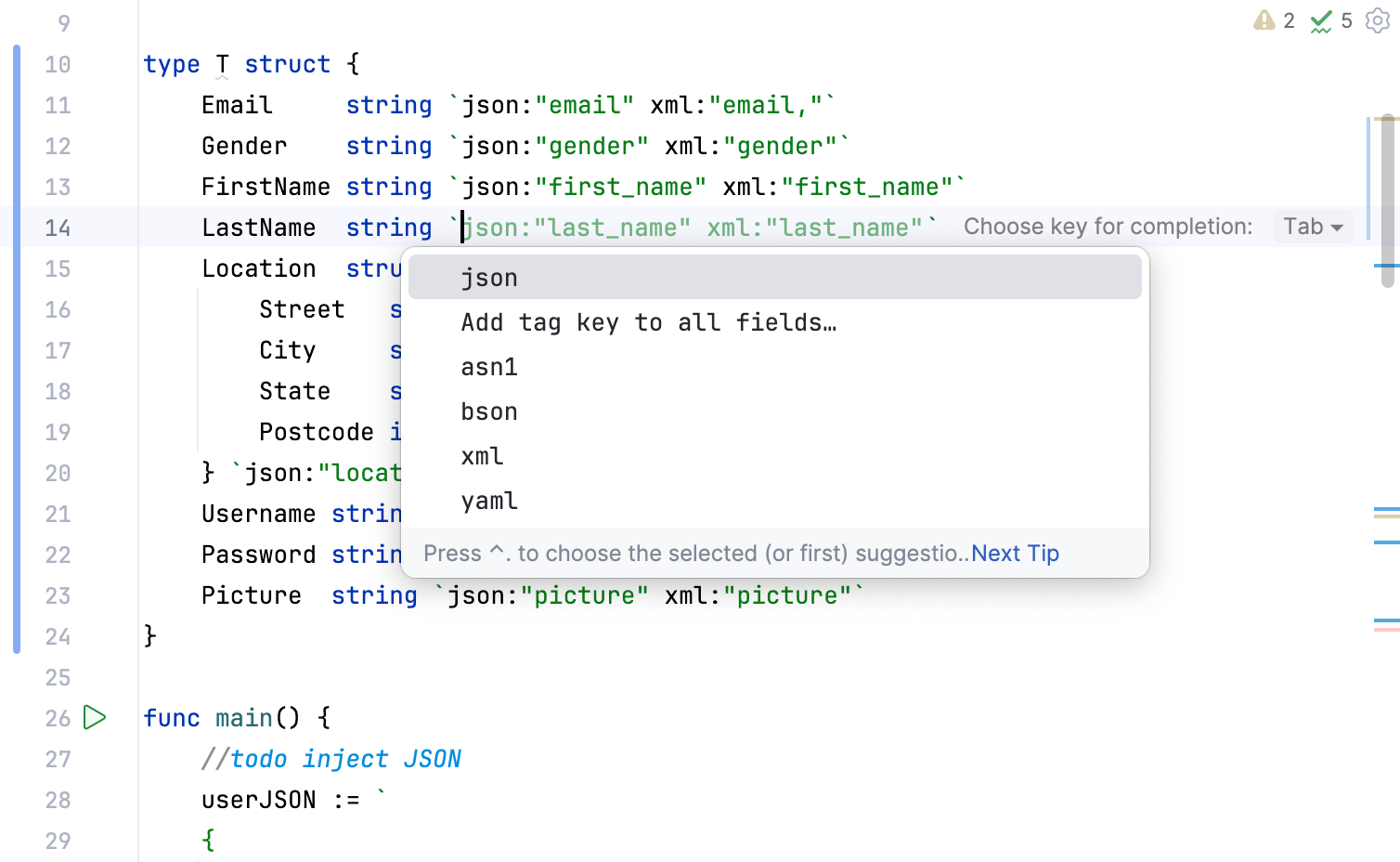
Leveraging these tools can save you a significant amount of time when you first start working with a new API.
Conclusion
In this lesson, you've moved from handling raw text to working with structured, native Go data. This is a fundamental skill for building any serious automation or backend tool that communicates with APIs.
Key Takeaways:
- Use
json.Unmarshalorjson.NewDecoderto parse JSON into Go structs. - Struct fields must be exported (start with a capital letter) to be populated.
- Struct tags (e.g.,
`json:"field_name"`) are essential for mapping JSON keys to your Go struct fields, especially when naming conventions differ. - Model nested JSON objects and arrays with nested structs and slices of structs.
- For memory efficiency with large responses, prefer the streaming
json.NewDecoder(resp.Body).Decode(&v)over reading the whole body first. - Use
decoder.DisallowUnknownFields()when you need to enforce a strict API contract.
Next Up
You can now make an HTTP request and parse its response. But most real-world APIs require authentication. In the next lesson, we will cover how to pass authentication tokens and custom headers in API requests, allowing you to interact with secured endpoints.