Hello! Welcome back.
In our last lesson, we focused on how to execute and manage external commands from within your Go programs, a crucial skill for automation. You learned to capture stdout and stderr, provide stdin, and manage process lifetimes using contexts. This allows your Go tools to orchestrate the vast ecosystem of existing CLI applications.
Now, we'll address what to do with the output you capture. Many modern tools and APIs, from kubectl and the AWS CLI to internal microservices, communicate using structured data formats. This lesson will teach you how to parse and generate JSON and YAML for application configuration. This is a cornerstone of building intelligent DevOps tooling. Instead of just treating command output as plain text, you'll be able to understand and manipulate its structure, enabling you to build far more powerful and reliable applications.
1. A Tale of Two Formats: JSON and YAML
In the DevOps world, you'll constantly encounter two primary data serialization formats: JSON and YAML. While both serve to structure data in a human-readable way, they are optimized for different use cases.
- JSON (JavaScript Object Notation): The lingua franca of web APIs. It is compact and strictly defined, making it ideal for machine-to-machine communication.
- YAML (YAML Ain't Markup Language): Favored for configuration files (think Kubernetes, Ansible, CI/CD pipelines). Its use of indentation and support for comments makes it easier for humans to read and write.
This image provides an excellent side-by-side comparison of the same data represented in both formats.
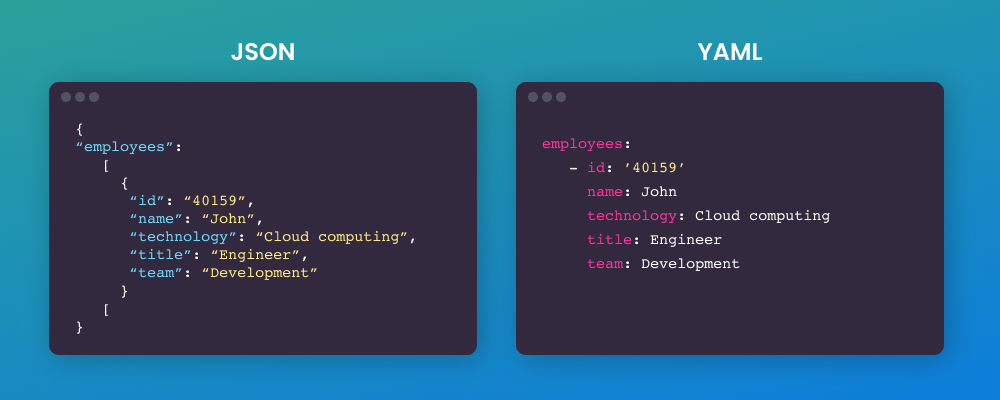
As a DevOps engineer, you need to be proficient in handling both. Let's see how Go makes this process straightforward.
2. Working with JSON: The encoding/json Package
Go's standard library provides the powerful encoding/json package for all your JSON needs. The two fundamental operations you'll perform are:
- Unmarshalling: Parsing JSON data (typically a
[]byte) into a Gostruct. - Marshalling: Generating JSON data from a Go
struct.
The key to this process is defining a Go struct that mirrors the structure of your JSON data.
The following video provides a great hands-on walkthrough of reading, parsing, and writing JSON files. We'll break down the key concepts from it.
Go Programming for beginners | Working with files and JSON
This video from 'That DevOps Guy' provides a practical demonstration of working with JSON in Go, from reading a file to marshalling the data back out.
First, watch from 09:24 to 16:30. This segment covers the core process of reading a JSON file and unmarshalling its contents into a slice of Go structs. Then, watch from 18:40 to 22:13, which demonstrates the reverse: marshalling the structs back into JSON and saving to a new file.
Unmarshalling: From JSON to Go Structs
Let's say you've executed a command like gcloud compute instances describe my-instance --format=json and captured the output. To work with this data in Go, you first define a struct.
// A simplified struct for a VM instance
type VMInstance struct {
    Name        string
    MachineType string
    Status      string
    Disks       []string
}
The process to unmarshal a JSON byte slice jsonData into this struct is a single function call:
var instance VMInstance
err := json.Unmarshal(jsonData, &instance)
if err != nil {
    log.Fatalf("Error unmarshalling JSON: %v", err)
}

fmt.Printf("Instance Name: %s, Status: %s\n", instance.Name, instance.Status)
Notice that json.Unmarshal takes a pointer (&instance) as the second argument. This is because the function needs to modify the instance variable in memory to populate it with the parsed data.
Struct Tags: Mapping JSON to Go
What if your JSON keys don't perfectly match your Go field names? For instance, JSON often uses camelCase or snake_case, while Go's convention for exported fields is PascalCase. This is where struct tags come in. They are string literals placed after a field's type that provide metadata to the json package.

Let's refine our VMInstance struct with tags:
type VMInstance struct {
    Name        string   `json:"name"`
    MachineType string   `json:"machineType"`
    Status      string   `json:"status"`
    Disks       []string `json:"disks"`
}
Now, json.Unmarshal knows to map the JSON key "machineType" to the Go field MachineType. It's a best practice to always use struct tags for explicit mapping.
Marshalling: From Go Structs to JSON
Generating JSON is just as easy. The json.Marshal function takes a Go struct and returns its JSON representation as a byte slice.
updatedInstance := VMInstance{
    Name:        "my-instance",
    MachineType: "e2-medium",
    Status:      "TERMINATED", // We've updated the status
    Disks:       []string{"disk-1"},
}

// Marshal to a compact, single-line JSON string
jsonData, err := json.Marshal(updatedInstance)
if err != nil {
    // handle error
}

// For human-readable output, use MarshalIndent
prettyJSON, err := json.MarshalIndent(updatedInstance, "", "  ") // "" prefix, "  " indent
if err != nil {
    // handle error
}

fmt.Println(string(prettyJSON))
The output of MarshalIndent would be:
{
  "name": "my-instance",
  "machineType": "e2-medium",
  "status": "TERMINATED",
  "disks": [
    "disk-1"
  ]
}
Test your understanding!
You have the following JSON string from a monitoring tool:{"service_name": "api-gateway", "healthy_replicas": 2, "is_critical": true}
Define a Go struct with appropriate types and struct tags to unmarshal this JSON.
Show answer
type ServiceStatus struct {
    ServiceName     string `json:"service_name"`
    HealthyReplicas int    `json:"healthy_replicas"`
    IsCritical      bool   `json:"is_critical"`
}
You would then use json.Unmarshal([]byte(jsonString), &ServiceStatus{}) to parse it.
3. Handling Configuration with YAML and Viper
While you can parse YAML using a similar marshal/unmarshal pattern with a third-party library like gopkg.in/yaml.v3, a more robust and common approach for application configuration is to use a dedicated library. Viper is the de-facto standard in the Go ecosystem.
Viper is powerful because it can:
- Read from YAML, JSON, TOML, and other file formats.
- Read from environment variables.
- Read from command-line flags.
- Set default values.
This layered approach is perfect for DevOps tools, where you might want a default configuration in a file that can be overridden by environment variables in a CI/CD pipeline.
The following resources will guide you through setting up Viper to handle YAML configuration.
#72 Golang - Master Config Management with Viper: Step-by-Step Guide
This video from codeHeim is a step-by-step guide to using Viper for configuration management. It demonstrates the exact patterns you'll use in your own tools.
Watch from 05:10 to 09:06. This section shows how to switch from a simple config to a nested YAML file and, crucially, how to unmarshal that entire configuration into a type-safe Go struct.
To reinforce what you see in the video, here is a great article that covers the same concepts in text form.
A Guide to Configuration Management in Go with Viper
This article, "A Guide to Configuration Management in Go with Viper," provides a concise written guide to setting up and using Viper, which complements the video well.
Read Step 1: Install the Viper Package, Step 2: Create a Configuration File, and the code example under Implementing Viper in Go. Focus on how Viper is configured and how viper.Unmarshal is used.
The Viper Workflow
Let's summarize the typical workflow for reading a config.yaml file.
-
Define your config struct, using
mapstructuretags (Viper's preferred tag name, though it often falls back to others likeyaml).// config.yaml server: host: "localhost" port: 8080 database: user: "admin" password: "password"// config.go type Config struct { Server struct { Host string `mapstructure:"host"` Port int `mapstructure:"port"` } `mapstructure:"server"` Database struct { User string `mapstructure:"user"` Password string `mapstructure:"password"` } `mapstructure:"database"` } -
Configure and run Viper to read the file and unmarshal it.
import (
    "fmt"
    "log"
    "github.com/spf13/viper"
)

func LoadConfig() (Config, error) {
    var config Config

    // Tell Viper where to look for the config file
    viper.AddConfigPath(".") // Look in the current directory
    viper.SetConfigName("config") // Name of the config file (without extension)
    viper.SetConfigType("yaml") // Type of the config file

    // Attempt to read the config file
    if err := viper.ReadInConfig(); err != nil {
        return Config{}, fmt.Errorf("failed to read config file: %w", err)
    }

    // Unmarshal the configuration into our struct
    if err := viper.Unmarshal(&config); err != nil {
        return Config{}, fmt.Errorf("unable to decode into struct: %w", err)
    }

    return config, nil
}

func main() {
    cfg, err := LoadConfig()
    if err != nil {
        log.Fatalf("Error loading config: %v", err)
    }

    fmt.Printf("Server will run on %s:%d\n", cfg.Server.Host, cfg.Server.Port)
}
This pattern gives you a strongly-typed Config object that you can pass around your application, making your code clean, testable, and easy to reason about.
Conclusion
You now have the skills to handle the two most common data formats in the cloud-native and DevOps landscape. This ability to parse and generate structured data transforms your Go programs from simple script replacements into sophisticated components of your automation and infrastructure stack.
Key Takeaways:
- Go's
encoding/jsonpackage providesMarshalandUnmarshalfunctions for seamless JSON handling. - Structs are the foundation for working with structured data in a type-safe way in Go.
- Struct tags (
json:,yaml:,mapstructure:) are essential for mapping keys from your data format to your Go struct fields. - For application configuration, especially with YAML, Viper is the industry-standard library that provides a robust, layered approach to reading from files, environment variables, and more.
- The most reliable pattern is to unmarshal your configuration directly into a Go struct, giving you type safety and code completion.
Next Up
In this lesson, we saw how Viper can read from files. We also mentioned its ability to read from environment variables. In the next lesson, we will dive deeper into environmental interactions. You will learn to interact with the OS via environment variables and the path/filepath package. This will complete your foundational knowledge for building CLI tools that are fully aware of and configurable by their runtime environment.