Hello! Welcome back to our module on "Interfaces and Program Design."
In our last lesson, we explored how to define and use interfaces to create polymorphic behavior, allowing us to write flexible and extensible code. You learned that an interface is a contract, and any type that satisfies the contract's methods implements it implicitly. This decouples our core logic from specific implementations, a crucial pattern for building robust tools.
Today, we will apply that knowledge to two of the most important interfaces in the Go standard library: io.Reader and io.Writer. Your learning outcome is to utilize standard library interfaces like io.Reader and io.Writer for building composable tools.
For a DevOps engineer, mastering these interfaces is non-negotiable. They are the foundation for almost every tool that handles data, whether it's reading a config file, writing logs, processing an API response, or streaming data over a network. By the end of this lesson, you'll see how to "pipe" and "tee" data streams together to create powerful and efficient data-processing logic with very little code.
1. Why Readers and Writers? The Power of Streaming
Before diving into the interfaces themselves, let's understand why they are so prevalent in Go. When working with data, especially in scripts or automation, a common approach might be to read an entire file or API response into a byte slice ([]byte). This works for small data, but what if you're processing a multi-gigabyte log file or a large artifact from object storage? Loading it all into memory is inefficient and can crash your application.
io.Reader and io.Writer solve this by abstracting data access into a stream. A reader provides data in chunks, and a writer consumes data in chunks, without needing to hold the entire dataset in memory.
Why Golang's IO.READER Is More Important Than You Think
This short video, 'Why Golang's IO.READER Is More Important Than You Think', clearly explains the motivation behind using readers. It contrasts passing a full byte slice with using a reader for memory efficiency and composability, especially in common tasks like making HTTP requests.
Watch from the beginning to 03:19. Focus on the core argument: io.Reader allows you to process data in chunks, which is crucial for handling large data streams efficiently. Note how standard library functions like http.Post are designed to accept an io.Reader for the request body.
2. The io.Reader Interface: The Source of Data
The io.Reader interface is beautifully simple. It represents the "read" end of a data stream and has only one method.
type Reader interface {
    Read(p []byte) (n int, err error)
}
Read(p []byte): This method reads data from the source and fills the provided byte slicep.n int: It returnsn, the number of bytes that were actually read intop.err error: It returns an error if something went wrong. When the stream has no more data, it returns a special sentinel error,io.EOF.
The key insight is that your code provides the buffer (p), and the Read method fills it. This avoids unnecessary memory allocations.
Many types in the standard library implement this interface, making any function that accepts an io.Reader incredibly versatile. Common implementations include:
*os.File: Reading from a file on disk.strings.NewReader: Reading from a string in memory.bytes.NewBuffer: Reading from a byte slice in memory.http.Request.Body: Reading the body of an incoming HTTP request.http.Response.Body: Reading the body of an outgoing HTTP response.net.Conn: Reading from a TCP/UDP network connection.
Understanding io.Reader & io.Writer in Go with Code Examples
The video 'Understanding io.Reader & io.Writer in Go with Code Examples' provides a detailed walkthrough of the Reader interface and its usage. It shows a perfect example of polymorphism in action.
Watch from 00:27 to 07:00. Pay close attention to: The explanation of the Read method's signature and the io.EOF error. The list of common io.Reader implementations. The countAlphabets function, which accepts an io.Reader. Notice how the same function is used first with a file (*os.File) and then with a string (strings.NewReader) without any changes to its logic.
3. The io.Writer Interface: The Destination for Data
The io.Writer interface is the counterpart to io.Reader. It represents the "write" end of a data stream and also has a single method.
type Writer interface {
    Write(p []byte) (n int, err error)
}
Write(p []byte): This method writes the data from the byte slicepto the destination.n int: It returnsn, the number of bytes that were successfully written.err error: It returns an error if something went wrong.
Common io.Writer implementations include:
*os.File: Writing to a file.os.Stdout,os.Stderr: Writing to standard output or standard error.bytes.NewBuffer: Writing to an in-memory byte buffer.http.ResponseWriter: Writing the body of an HTTP response.net.Conn: Writing to a network connection.
Understanding io.Reader & io.Writer in Go with Code Examples
Let's continue with the same video to cover the Writer interface.
Watch from 07:00 to 10:24. This section explains the io.Writer interface and demonstrates writing a string to a file using a function that accepts an io.Writer.
4. Composition: The Art of Building I/O Pipelines
Now we get to the most powerful part: combining readers and writers to build tools. Because so many types implement these interfaces, the io package provides a set of highly effective helper functions to connect them.
We'll explore these patterns using an excellent article from the GitLab blog, which uses these concepts extensively in their own infrastructure tooling.
Compose Readers and Writers in Golang applications
The article 'Compose Readers and Writers in Golang applications' is a fantastic, practical guide to building I/O pipelines. We'll walk through its key patterns.
Keep this article open as we go through the next sections. You don't need to read it all at once; we will refer to specific parts.
io.Copy: The Universal Connector
The simplest and most common form of composition is io.Copy. It reads data from a Reader and writes it to a Writer until it reaches EOF or an error occurs.
func Copy(dst Writer, src Reader) (written int64, err error)
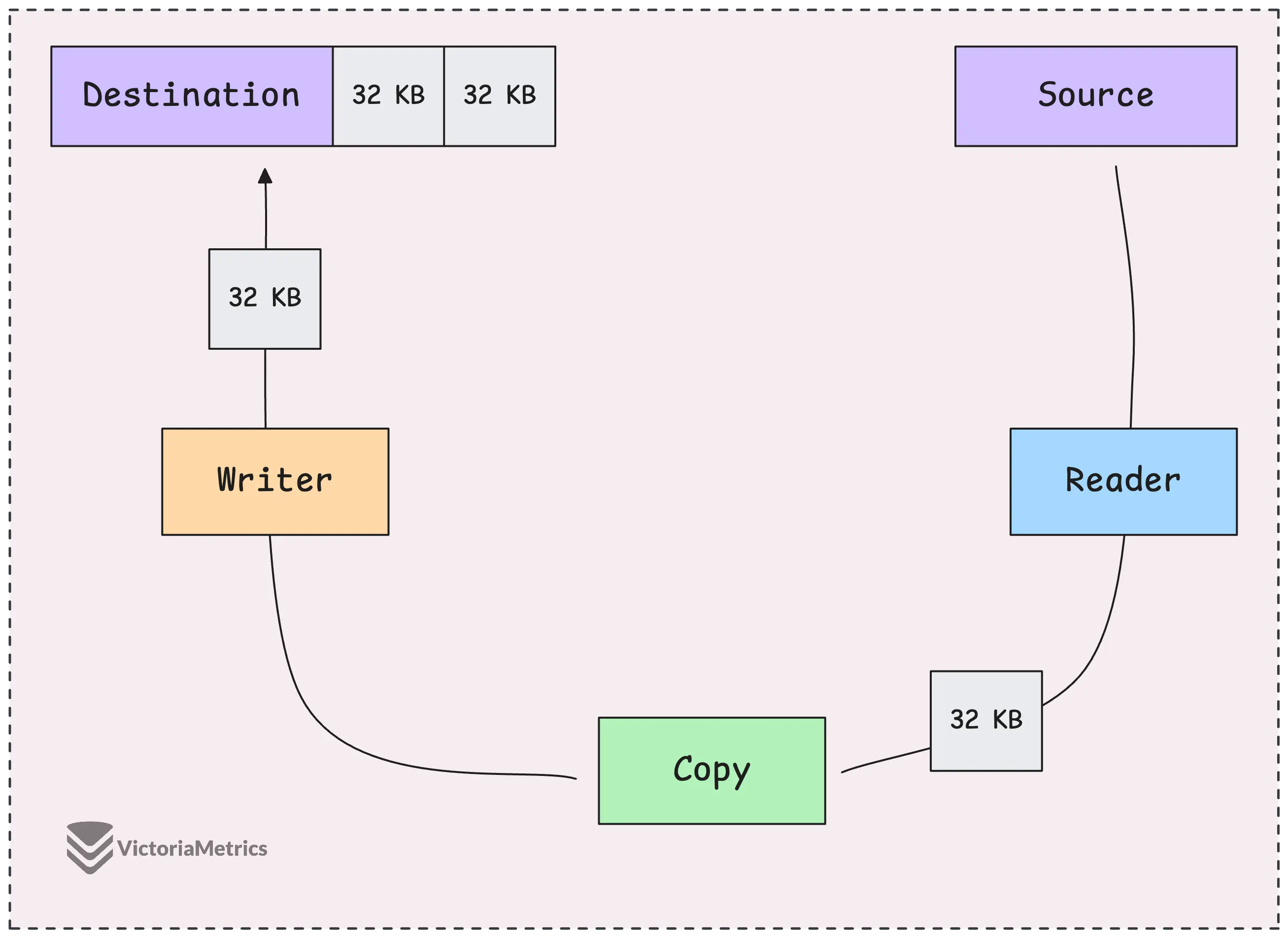
For example, to download a file from a URL and save it to disk:
resp, err := http.Get("https://example.com/somefile.zip")
// ... error handling ...
defer resp.Body.Close()

file, err := os.Create("somefile.zip")
// ... error handling ...
defer file.Close()

// resp.Body is an io.Reader, file is an io.Writer
_, err = io.Copy(file, resp.Body)
This is elegant, efficient, and much cleaner than a manual read/write loop.
A great example of this principle is in network programming. The net.Conn type, which represents a TCP connection, implements both io.Reader and io.Writer. This allows you to write a processing function that is completely decoupled from the networking layer.
Backend from the Beginning, Pt 1: Introduction, TCP, DNS, HTTP
The article 'Backend from the Beginning' contains a perfect demonstration of this decoupling.
In the article, find the section '4.2. server'. Look at the echoUpper function. It takes an io.Writer and an io.Reader. Then, see how it's called in the server's main function: go echoUpper(conn, conn). Since conn is both a reader and a writer, it can serve as both the source and destination for the function.
io.MultiWriter: One Source, Multiple Destinations
What if you need to send the same data to multiple places? For example, you want to print a command's output to the console and also save it to a log file. io.MultiWriter creates a single Writer that duplicates its writes to all the underlying writers you provide.
Consult the GitLab article (LINK) and find the section "Reader -> Multiple Writers". The code example shows how to use io.MultiWriter to calculate multiple hashes from the same data stream simultaneously, as each hash function's implementation provides an io.Writer.
io.TeeReader: Tapping into a Data Stream
io.TeeReader is like a "T-splitter" for a data pipe. It returns a Reader that, as you read from it, also writes the same data to a provided Writer. This is incredibly useful for inspecting a data stream as it passes through a pipeline.
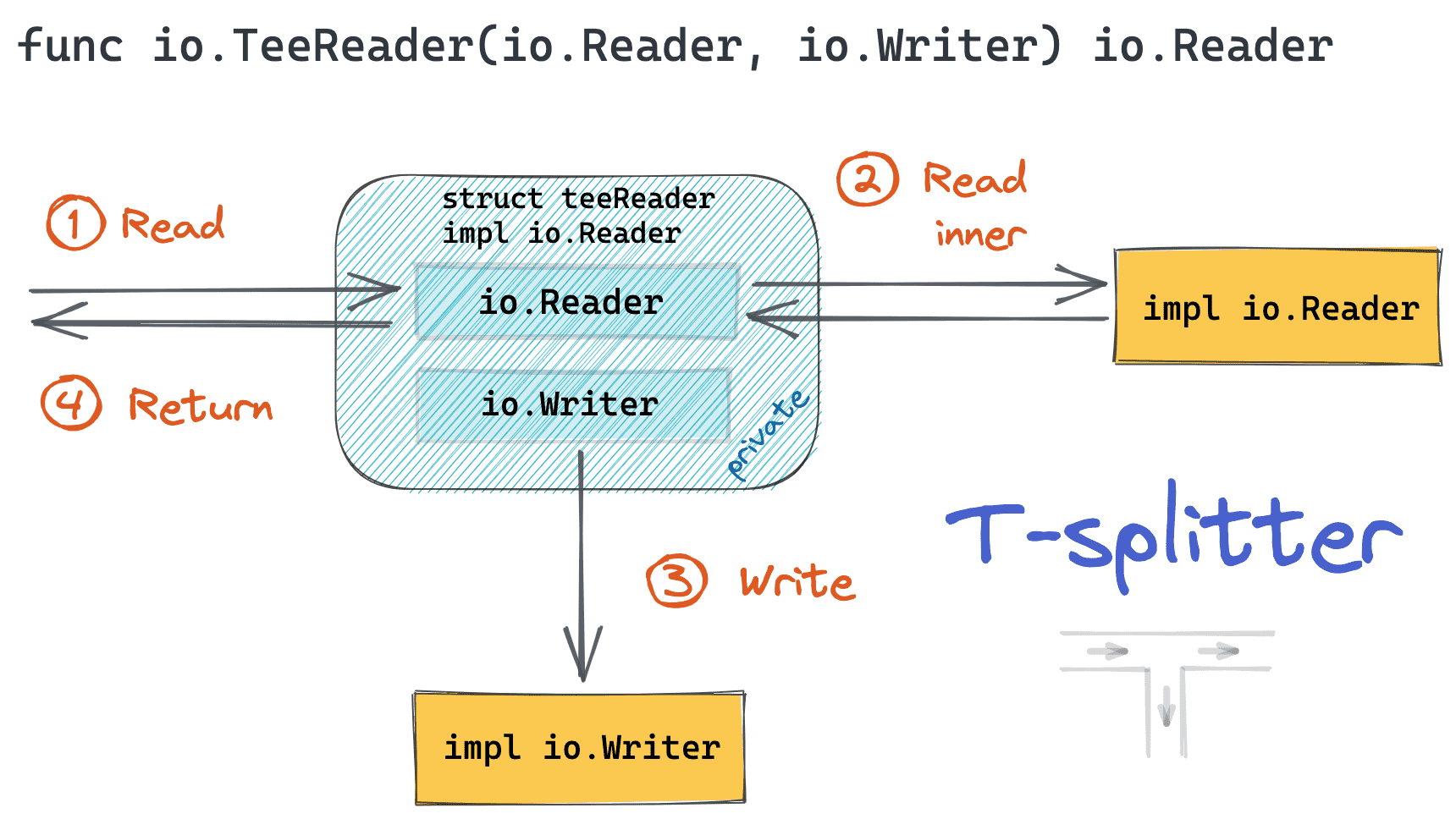
A classic DevOps task is to download a file while simultaneously calculating its checksum to verify integrity. TeeReader is perfect for this.
Find the section "Reader -> Reader + Writer" in the GitLab article (LINK). The example Inject function shows how it uses TeeReader to stream a file download to the user while also writing it to object storage for caching.
io.Pipe: In-Memory Pipelines
io.Pipe creates a synchronous, in-memory pipe. It returns an io.PipeReader and an io.PipeWriter. Anything written to the PipeWriter can be read from the PipeReader. This is extremely powerful for connecting functions or goroutines that expect readers and writers without using temporary files on disk.
Find the section "Writer -> Reader" in the GitLab article (LINK). The example shows how they use io.Pipe to transform a file on-the-fly. A goroutine writes the transformed data to the PipeWriter, and the main function reads the result from the PipeReader to send in an HTTP request.
5. Putting it All Together: A Composable Tool
Let's write a small function that demonstrates these principles. We want to fetch content from a URL, print it to the screen, and return its SHA256 hash.
import (
    "crypto/sha256"
    "fmt"
    "io"
    "net/http"
    "os"
)

// getContentAndHash fetches content from a URL, prints it to stdout,
// and returns the SHA256 hash of the content.
func getContentAndHash(url string) (string, error) {
    // 1. Make the request. resp.Body is our initial io.Reader.
    resp, err := http.Get(url)
    if err != nil {
        return "", err
    }
    defer resp.Body.Close()

    // 2. Create a new SHA256 hash object. It implements io.Writer.
    hasher := sha256.New()

    // 3. Create a reader that will write to both stdout (os.Stdout) and the hasher.
    // We use MultiWriter to combine two writers into one.
    combinedWriter := io.MultiWriter(os.Stdout, hasher)

    // 4. Use io.Copy to read from the response body and write to our combined writer.
    // This streams the download to the screen and calculates the hash simultaneously.
    if _, err := io.Copy(combinedWriter, resp.Body); err != nil {
        return "", err
    }

    // 5. Finalize the hash and return it as a hex string.
    hashInHex := fmt.Sprintf("%x", hasher.Sum(nil))
    return hashInHex, nil
}
This small function is a perfect example of a composable tool. We connected an HTTP response body, standard output, and a hash function like Lego bricks, all using the io interfaces and helpers.
Test your understanding!
Modify the getContentAndHash function. Instead of writing to os.Stdout, how would you change it to save the content to a file named output.html and calculate the hash, without printing anything to the console?
Show answer
You would replace os.Stdout with a file handle. The core logic remains the same, demonstrating the flexibility of the io.Writer interface.
func getContentAndHashToFile(url string) (string, error) {
    resp, err := http.Get(url)
    if err != nil {
        return "", err
    }
    defer resp.Body.Close()

    // Create the destination file. It's an io.Writer!
    file, err := os.Create("output.html")
    if err != nil {
        return "", err
    }
    defer file.Close()

    hasher := sha256.New()

    // Create a writer that writes to the file and the hasher.
    combinedWriter := io.MultiWriter(file, hasher)

    // The rest of the logic is identical.
    if _, err := io.Copy(combinedWriter, resp.Body); err != nil {
        return "", err
    }

    hashInHex := fmt.Sprintf("%x", hasher.Sum(nil))
    return hashInHex, nil
}
Conclusion
You have now seen how Go's io.Reader and io.Writer interfaces form the backbone of data handling. By designing functions to work with these simple contracts, you can build powerful, efficient, and highly composable tools.
Key Takeaways:
io.Readerandio.Writerabstract data sources and destinations into streams, promoting memory efficiency.- Functions written to accept these interfaces are incredibly reusable, able to work with files, network connections, and in-memory buffers without modification.
- The
iopackage provides essential helper functions (Copy,MultiWriter,TeeReader,Pipe) that act as "plumbing" to connect readers and writers into powerful I/O pipelines. - This compositional approach is central to idiomatic Go and is essential for building effective DevOps tools.
Next Up
We've seen how powerful a single interface can be. In the next lesson, we will explore how to compose multiple interfaces together to create even more descriptive and flexible contracts. We'll look at standard library examples like io.ReadCloser and discuss how you can combine standard and custom interfaces to design robust components for your applications.