Hello again!
In our last lesson, you mastered request routing, learning how to direct incoming HTTP requests to the correct handlers using both the standard library's http.ServeMux and the popular chi router. You now have the "switchboard" for your API.
Today, we'll implement the logic inside those handlers. Our focus is on the most common data format for modern APIs: JSON. This lesson will teach you how to build HTTP handlers for GET and POST requests involving JSON payloads.
You'll learn how to:
- Encode Go structs into JSON and send them as responses to
GETrequests. - Decode JSON bodies from
POSTrequests into Go structs. - Implement robust, production-ready JSON handling that deals with common pitfalls like malformed data, body size limits, and incorrect content types.
This is a fundamental skill for building the DevOps tools you're aiming for, whether it's an automation service that exposes a REST API or a tool that interacts with platforms like GitHub or Kubernetes.
Let's begin by looking at what a typical JSON API interaction looks like.
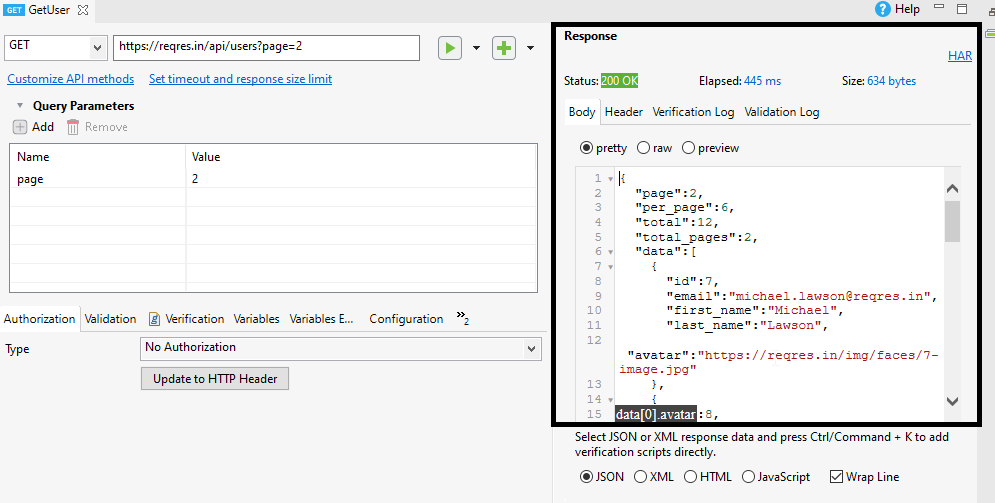
1. Handling GET Requests: Sending JSON Responses
The first part of our task is to create a handler that responds to a GET request with a JSON payload. The process is straightforward:
- Define a Go
structthat represents the data you want to send. Thejsonpackage will use the exported field names (those starting with a capital letter) as the keys in the JSON object by default. - In your handler, create an instance of that
struct(this would typically come from a database or some other business logic). - Set the
Content-Typeheader of the response toapplication/jsonto inform the client what kind of data it's receiving. - Use
json.NewEncoder(w).Encode(data)to serialize the Go struct into JSON and write it directly to thehttp.ResponseWriter.
Let's create a simple server that provides the status of a service.
package main

import (
	"encoding/json"
	"log"
	"net/http"
	"time"
)

// ServiceStatus represents the data we'll send as JSON.
// We use JSON struct tags to control the naming in the output.
type ServiceStatus struct {
	Status    string    `json:"status"`
	Timestamp time.Time `json:"timestamp"`
	Version   string    `json:"version"`
}

func statusHandler(w http.ResponseWriter, r *http.Request) {
	// For simplicity, we only handle GET requests.
	if r.Method != http.MethodGet {
		http.Error(w, "Method not allowed", http.StatusMethodNotAllowed)
		return
	}

	// Create the data structure.
	status := ServiceStatus{
		Status:    "OK",
		Timestamp: time.Now(),
		Version:   "1.2.3",
	}

	// Set the Content-Type header.
	w.Header().Set("Content-Type", "application/json")

	// Encode the struct directly to the response writer.
	// The Encode function also handles writing an error response
	// if the encoding fails, so we can often skip explicit error handling here.
	err := json.NewEncoder(w).Encode(status)
	if err != nil {
		// This would happen if the struct is malformed in a way that
		// it can't be marshaled, which is rare for simple cases.
		log.Printf("Error encoding JSON response: %v", err)
		http.Error(w, "Failed to encode response", http.StatusInternalServerError)
	}
}

func main() {
	http.HandleFunc("/status", statusHandler)
	log.Println("Starting server on :8080...")
	log.Fatal(http.ListenAndServe(":8080", nil))
}
Run this program (go run .) and test it from another terminal using curl:
curl -i http://localhost:8080/status
You should see output similar to this, including the HTTP headers and the JSON body:
HTTP/1.1 200 OK
Content-Type: application/json
Date: ...
Content-Length: ...

{"status":"OK","timestamp":"2023-10-27T10:00:00Z","version":"1.2.3"}
Notice the json:"..." tags in the struct definition. These are called "struct tags" and are a common Go pattern for adding metadata to struct fields. The encoding/json package uses them to customize the JSON field names. Without them, the fields would be Status, Timestamp, and Version (with capital letters).
2. Handling POST Requests: Receiving JSON Payloads
Now for the other direction: accepting a JSON payload in a POST request. This is crucial for any API that needs to create or update resources. For example, a DevOps tool might accept a JSON object describing a new deployment to orchestrate.
The basic process involves json.NewDecoder(r.Body).Decode(&targetStruct), which reads from the request body, parses the JSON, and populates a Go struct.
Building a GO API - No External Packages!
For a quick, practical demonstration of this, let's watch a clip from the video 'Building a GO API - No External Packages!'. It shows how to handle both GET and POST-style requests.
Watch from 02:03 to 04:05. Pay attention to two key parts: GET (02:03-03:06): How he writes a JSON object back to the client using json.NewEncoder. POST/PATCH (03:06-04:05): How he uses json.NewDecoder(r.Body).Decode(&p) to parse the incoming request body into a struct, and the important defer r.Body.Close() call.
As the video hinted, simply calling Decode works, but it's not robust enough for a production environment. A public-facing API needs to be much stricter.
How to parse a JSON request body in Go
The article 'How to parse a JSON request body in Go' by Alex Edwards is an excellent resource that explains why the naive approach is insufficient and how to build a production-grade handler.
First, read the initial code example in the section titled 'How to parse a JSON request body in Go' to see the simple approach. Then, carefully read the following section that lists the problems with this approach (starts with 'But if you're building an API for public use...'). Focus on understanding these key issues: Vague error messages sent to the client. Silently ignoring unknown fields in the JSON. No limit on the request body size, which is a security risk (DoS). No check for the Content-Type header.
Building a Robust JSON Decoding Handler
Having read about the potential issues, let's build a handler that addresses them. We'll create a POST /config endpoint to update a configuration value. This example is based on the "Improved Handler" from the Alex Edwards article you just reviewed.
Here's the code with detailed comments explaining each protection mechanism:
package main

import (
	"encoding/json"
	"errors"
	"fmt"
	"io"
	"log"
	"net/http"
	"strings"
)

// A simple in-memory store for our configuration.
// In a real app, this would be a database, and access would be thread-safe.
var configStore = map[string]string{
	"log_level": "info",
}

// ConfigUpdate represents the JSON payload for a POST request.
type ConfigUpdate struct {
	Value string `json:"value"`
}

func configHandler(w http.ResponseWriter, r *http.Request) {
	// Extract the config key from the URL path, e.g., "/config/log_level"
	key := strings.TrimPrefix(r.URL.Path, "/config/")
	if key == "" {
		http.Error(w, "Config key must be provided in the URL path", http.StatusBadRequest)
		return
	}

	switch r.Method {
	case http.MethodGet:
		handleGetConfig(w, r, key)
	case http.MethodPost:
		handlePostConfig(w, r, key)
	default:
		http.Error(w, "Method not allowed", http.StatusMethodNotAllowed)
	}
}

func handleGetConfig(w http.ResponseWriter, r *http.Request, key string) {
	value, ok := configStore[key]
	if !ok {
		http.NotFound(w, r)
		return
	}
	w.Header().Set("Content-Type", "application/json")
	json.NewEncoder(w).Encode(map[string]string{"key": key, "value": value})
}

func handlePostConfig(w http.ResponseWriter, r *http.Request, key string) {
	// 1. Enforce a maximum request body size (e.g., 1MB) to prevent DoS attacks.
	r.Body = http.MaxBytesReader(w, r.Body, 1048576)

	// 2. Set up the decoder and enforce that the JSON does not contain any
	// fields that are not in our target struct.
	dec := json.NewDecoder(r.Body)
	dec.DisallowUnknownFields()

	var update ConfigUpdate
	err := dec.Decode(&update)
	if err != nil {
		// The error handling here is crucial. We provide clear, actionable
		// error messages to the client without revealing internal details.
		var syntaxError *json.SyntaxError
		var unmarshalTypeError *json.UnmarshalTypeError
		var maxBytesError *http.MaxBytesError

		switch {
		case errors.As(err, &syntaxError):
			msg := fmt.Sprintf("Request body contains badly-formed JSON (at position %d)", syntaxError.Offset)
			http.Error(w, msg, http.StatusBadRequest)

		case errors.Is(err, io.ErrUnexpectedEOF):
			http.Error(w, "Request body contains badly-formed JSON", http.StatusBadRequest)

		case errors.As(err, &unmarshalTypeError):
			msg := fmt.Sprintf("Request body contains an invalid value for the %q field", unmarshalTypeError.Field)
			http.Error(w, msg, http.StatusBadRequest)

		case errors.Is(err, io.EOF):
			http.Error(w, "Request body must not be empty", http.StatusBadRequest)

		case strings.HasPrefix(err.Error(), "json: unknown field "):
			fieldName := strings.TrimPrefix(err.Error(), "json: unknown field ")
			http.Error(w, fmt.Sprintf("Request body contains unknown field %s", fieldName), http.StatusBadRequest)

		case errors.As(err, &maxBytesError):
			http.Error(w, "Request body must not be larger than 1MB", http.StatusRequestEntityTooLarge)

		default:
			log.Println(err.Error())
			http.Error(w, http.StatusText(http.StatusInternalServerError), http.StatusInternalServerError)
		}
		return
	}

	// 3. Ensure the request body contains exactly one JSON object.
	err = dec.Decode(&struct{}{})
	if !errors.Is(err, io.EOF) {
		http.Error(w, "Request body must only contain a single JSON object", http.StatusBadRequest)
		return
	}

	// At this point, the JSON is valid and decoded.
	// We can now use the `update` struct.
	log.Printf("Updating config key '%s' to value '%s'", key, update.Value)
	configStore[key] = update.Value

	// Respond with the updated resource.
	handleGetConfig(w, r, key)
}


func main() {
	http.HandleFunc("/config/", configHandler)
	log.Println("Starting server on :8080...")
	log.Fatal(http.ListenAndServe(":8080", nil))
}
Run this server and try sending it various POST requests with curl.
1. A valid request:
curl -i -X POST -H "Content-Type: application/json" -d '{"value": "debug"}' http://localhost:8080/config/log_level
You should get a 200 OK response with the updated value.
2. Malformed JSON (missing comma):
curl -i -X POST -H "Content-Type: application/json" -d '{"value": "debug" "oops": 1}' http://localhost:8080/config/log_level
You'll get a 400 Bad Request with a helpful error message about the syntax.
3. Unknown field:
curl -i -X POST -H "Content-Type: application/json" -d '{"value": "error", "priority": "high"}' http://localhost:8080/config/log_level
You'll get a 400 Bad Request complaining about the unknown "priority" field.
4. Empty body:
curl -i -X POST -H "Content-Type: application/json" -d '' http://localhost:8080/config/log_level
You'll get a 400 Bad Request saying the body must not be empty.
This robust error handling is exactly what distinguishes a prototype from a production-ready tool.
3. Best Practice: Refactoring into a Helper Function
You've probably noticed that the handlePostConfig function is now quite long and filled with boilerplate error-checking logic. If you have multiple handlers that accept JSON, repeating this code is inefficient and error-prone.
The standard practice is to refactor this logic into a reusable helper function.
How to parse a JSON request body in Go
The final section of the Alex Edwards article demonstrates this refactoring perfectly. It encapsulates all the validation logic into a clean decodeJSONBody helper.
Read the section titled 'Making a Helper Function'. Pay close attention to how the verbose switch statement is moved into the decodeJSONBody function, and how the handler itself becomes much cleaner and more focused on its core logic.
This idea of creating helper functions for common tasks like JSON encoding and decoding is a widely accepted best practice in the Go community.
THIS is the BEST Way to Write HTTP Services in Golang
The video 'THIS is the BEST Way to Write HTTP Services in Golang' also champions this exact pattern. It's good to see multiple experienced developers recommending the same approach.
Watch from 08:10 to 09:46. Notice how the presenter discusses creating encode and decode helper functions as a sensible abstraction that stands the test of time. This reinforces the value of what you just read.
Test your understanding!
Why is it a good idea to use dec.DisallowUnknownFields() when decoding a JSON request body in a production API?
Show answer
Using dec.DisallowUnknownFields() enforces strictness and prevents clients from sending unexpected data. This has two main benefits:
- Security: It can prevent certain classes of vulnerabilities where extra fields might trigger unintended side effects in other parts of the system that process the raw data.
- Clarity for Clients: It provides immediate feedback to API consumers if they misspell a field name or include data that your API version does not support, making integration easier and less error-prone. It makes your API contract explicit.
Conclusion
Congratulations! You've successfully built HTTP handlers that can both produce and consume JSON data. More importantly, you've learned how to do it in a robust, secure, and maintainable way suitable for real-world applications.
Key Takeaways:
- Sending JSON: Use
w.Header().Set("Content-Type", "application/json")andjson.NewEncoder(w).Encode(data)to serialize Go structs into HTTP responses. - Receiving JSON: The basic tool is
json.NewDecoder(r.Body).Decode(&targetStruct). Always remember todefer r.Body.Close(). - Robustness is Key: For production-grade handlers, you must validate incoming JSON. This includes limiting body size with
http.MaxBytesReader, disallowing unknown fields, and providing detailed error messages for different parsing failures. - Stay DRY (Don't Repeat Yourself): Encapsulate complex JSON decoding logic into a reusable helper function to keep your handlers clean and focused.
Next Up
Our handlers now contain the core logic for their respective endpoints. However, many APIs have cross-cutting concerns like logging every request, checking for authentication tokens, or compressing responses. Adding this logic to every single handler would be repetitive. In our next lesson, we will explore the middleware pattern, a powerful technique for applying centralized logic to your handlers in a clean and composable way.