Hello! In our last lesson, we focused on using ping and traceroute to confirm IPv6 connectivity and isolate failure points in a network. You learned that while the tools are familiar, IPv6 has specific nuances, like the critical role of ICMPv6. Today, we will move from identifying where a problem is to diagnosing what the problem is.
This lesson focuses on diagnosing common IPv6 configuration errors. We will investigate some of the most frequent mistakes that break connectivity, including fundamental router settings, incorrect address prefixes, and failures in the crucial Neighbor Discovery Protocol (NDP). By the end of this session, you will be able to methodically diagnose and identify the root cause of these common IPv6 issues.
The Most Common Oversight: Enabling IPv6 Routing
One of the most common and easily overlooked errors when configuring IPv6 on a Cisco router is forgetting to enable IPv6 packet forwarding globally. You can assign IPv6 addresses to every interface, and all interfaces can be up, but the router will not forward packets between different IPv6 subnets. The hosts will be able to ping their own default gateway, but nothing beyond it.
This happens because, by default, a Cisco router will not act as an IPv6 router. You must explicitly enable this functionality with a single global configuration command: ipv6 unicast-routing.
The following video from Jeremy's IT Lab provides a perfect demonstration of this exact scenario.
Free CCNA | Configuring IPv6 (Part 1) | Day 31 Lab | CCNA 200-301 Complete Course
Watch this segment to see the symptoms of forgetting to enable IPv6 unicast routing and how quickly the issue is resolved by adding the correct command.
Pay close attention to the demonstration from 4:59 to 6:57. The instructor first shows that a PC can ping its default gateway and other interfaces on the same router, but the ping to a PC on another subnet fails. After enabling ipv6 unicast-routing in global configuration mode, the inter-subnet ping immediately succeeds.
This is your first diagnostic check. If you observe that communication works within a local subnet but fails when it needs to be routed, your first step should be to verify that ipv6 unicast-routing is enabled on the router. You can do this by checking the running configuration with show running-config | include ipv6 unicast-routing.
Diagnosing Incorrect Prefixes and Addresses
Incorrectly configured IP addresses or prefixes are another frequent source of problems. This can include typos, using the wrong prefix length, or assigning a host an address that doesn't belong to the subnet defined on the router's interface.
The primary command for verifying this is one you've seen before: show ipv6 interface brief. This command gives you a quick overview of all interfaces, their configured IPv6 addresses, and their status.
When troubleshooting, you must systematically compare the router's configuration with the end host's configuration.
- On the router: Use
show ipv6 interface brief. - On a Windows host: Use
ipconfig. - On a Linux/macOS host: Use
ifconfigorip addr.
Does the host's default gateway match the router's interface address on that link? Is the host's IPv6 address within the same prefix that is configured on the router's interface? A mismatch in the prefix length (e.g., /64 on the router but /48 on the host) can also cause unpredictable issues. In the previous lesson, you saw how an incorrect default gateway on a PC broke connectivity; an incorrect prefix is a similar class of problem.
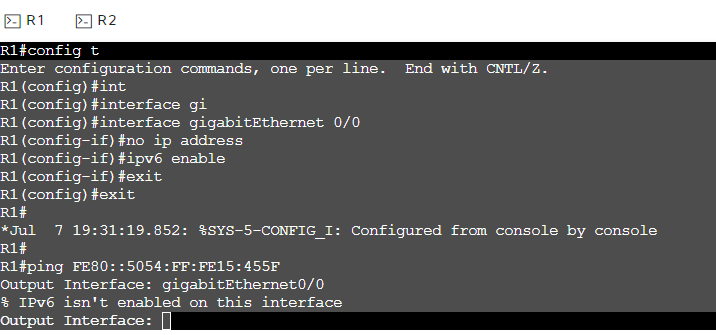
Diving Deep: Troubleshooting Neighbor Discovery Protocol (NDP)
In IPv4, Address Resolution Protocol (ARP) is used to map a known IP address to an unknown MAC address on the local network segment. In IPv6, this function, and several others, are handled by the Neighbor Discovery Protocol (NDP). NDP is not just a feature; it is fundamental to IPv6's operation on a local link.
NDP is responsible for:
- Address Resolution: Finding the MAC address of a neighbor on the same link (replaces ARP).
- Router Discovery: Hosts finding local routers (via Router Solicitation and Router Advertisement messages).
- Duplicate Address Detection (DAD): Ensuring no two devices on a link use the same address.
- Neighbor Unreachability Detection: Determining if a neighbor is no longer reachable.
All of these functions are carried out using ICMPv6 messages (specifically, types 133 through 137). This is why we stressed in the last lesson that you cannot block all ICMPv6 traffic. If you do, you break NDP, and your IPv6 network will not function.
The following reading provides an excellent overview of NDP's functions and the messages it uses.
Learn IPv6 Addressing - howtonetwork.com
This resource from howtonetwork.com breaks down the functions of NDP and how it uses ICMPv6 to operate.
Please read the following sections: Start with "Neighbor Discovery Protocol" to understand its key features and the five ICMPv6 message types it uses (RA, RS, NS, NA, Redirect). Next, read the section on Duplicate Address Detection to see how NDP ensures address uniqueness. Finally, read the section on Neighbor Address Resolution, which explains how NDP replaces ARP and introduces the crucial show ipv6 neighbors command.
The NDP Process and the Neighbor Cache
When a host (H1) wants to send a packet to another host (H2) on the same local network, but doesn't know H2's MAC address, it performs the following steps:
- H1 sends a Neighbor Solicitation (NS) message to a special multicast address that only H2 will be listening to. The message effectively asks, "Who has the IP address of H2? Please tell me your MAC address."
- H2 receives the NS message and responds directly to H1 with a Neighbor Advertisement (NA) message. This message contains H2's MAC address.
- H1 receives the NA, stores the IPv6-to-MAC address mapping in its neighbor cache, and can now send the packet to H2.

You can inspect a Cisco router's neighbor cache using the show ipv6 neighbors command. The output will show the IPv6 address, its age, the corresponding MAC address, and the state of the entry (e.g., REACH, STALE, INCOMP).
- REACH: The neighbor is known to be reachable.
- STALE: The entry is still valid, but its reachability has not been recently confirmed. The router will attempt to verify reachability on the next use.
- INCOMP (Incomplete): An NS has been sent, but no NA has been received yet. If an entry is stuck in this state, it points to a problem.
Diagnosing NDP Failures
If you suspect an NDP issue (e.g., a host can't ping another host on the same subnet), your troubleshooting process is:
- Check the neighbor cache: On the source device, use
show ipv6 neighbors. Is there an entry for the destination IP? If not, or if it's stuck in INCOMP, NDP is failing. - Ensure ICMPv6 is not blocked: Check for any access-lists or firewalls between the devices that might be dropping ICMPv6 packets.
- Verify L2/L1 connectivity: Is the link up? Are the devices in the same VLAN? NDP relies on the underlying network to transmit its messages.
- Use debugs: For a live view, you can use
debug ipv6 nd. Warning: Use this with extreme caution on a production network, as it can generate a lot of output. On a lab router, it is an invaluable tool to see the NS and NA messages being sent and received in real-time.
The following video provides a fantastic walkthrough of the entire NDP process in Packet Tracer, showing both local and remote discovery and how to verify the results.
9.3.4 Packet Tracer - IPv6 Neighbor Discovery
This video from Tech Acad uses Packet Tracer's simulation mode to visually deconstruct the NDP process, making the message exchange very clear.
Please watch these key segments: Local NDP: Watch the demonstration of local network discovery from 1:45 to 10:53. The instructor initiates a ping, and you can see the initial ICMP Echo packet being paused while an NDP (NS/NA) exchange happens first to resolve the MAC address. Verification: Skip ahead and watch the verification on the router from 33:01 to 36:06. The instructor uses show ipv6 neighbors to see the entries that have been learned through the discovery process. Key Concepts: Finally, watch the summary in the reflection questions from 36:16 to 37:56. This concisely answers key questions about when and how NDP is used.
Conclusion
In this lesson, you've moved beyond simply identifying connectivity failures and into the diagnostic process of figuring out why they occur. You have learned to spot some of the most common IPv6 configuration errors and the commands needed to diagnose them.
Key Takeaways:
- A router will not forward IPv6 packets between subnets unless
ipv6 unicast-routingis enabled globally. - Mismatched prefixes or incorrect addresses are common errors. Systematically verify configurations on both routers (
show ipv6 interface brief) and end hosts. - Neighbor Discovery Protocol (NDP) is the IPv6 replacement for ARP and is essential for local link operations.
- NDP failures can be diagnosed by checking the neighbor cache with
show ipv6 neighborsand, in a lab environment, by watching live exchanges withdebug ipv6 nd. - Blocking ICMPv6 traffic is a common cause of NDP failure.
In our next lesson, we will put all these skills together. We will tackle a more complex scenario: troubleshooting inter-VLAN routing in an IPv6 environment. This will require you to apply your knowledge of IPv6 addressing, routing, and the diagnostic techniques you've learned today.