Introduction
Hello again! In our last lesson, we successfully trained and visualized a decision tree. You saw that, by default, scikit-learn grows the tree until every leaf is perfectly "pure" with respect to the training data. This creates a detailed, and often very deep, flowchart.
While this approach guarantees perfect performance on the data the model has already seen, it comes with a significant risk: overfitting. Today, we'll explore what overfitting means for a decision tree. You will learn to identify it and use a key hyperparameter, max_depth, to control the tree's complexity. This process, often called pruning, is crucial for building models that generalize well to new, unseen data.
What is Overfitting in a Decision Tree?
Overfitting occurs when a model learns the training data too well—so well that it captures not just the underlying patterns but also the noise and random fluctuations specific to that dataset. A decision tree is particularly prone to this. If left unconstrained, it will create a unique path for almost every single data point, leading to an overly complex set of rules.
To build your intuition, let's start with a concise article that explains this concept with a great analogy.
Tuning Tree Depth to Prevent Overfitting in Decision Trees
This article from CodeSignal provides an excellent, easy-to-understand introduction to overfitting in decision trees and the role of tree depth.
Please read the first three sections: 'What is a Decision Tree?', 'Introduction: Controlling Complexity...', and 'How Tree Depth Affects Overfitting...'. Focus on the fruit analogy, which perfectly illustrates the difference between a simple, generalizable model and a complex, overfit one.
As the article explains, an overfit tree is like someone who has memorized the answers to a test but hasn't actually learned the subject. It performs brilliantly on the exact questions it studied (the training data) but fails when faced with new questions (the test data).
A classic sign of overfitting is a large gap between the model's performance on the training set and its performance on the test set. The model below has learned the training data perfectly, but its performance on the test data starts to degrade as it becomes too complex.
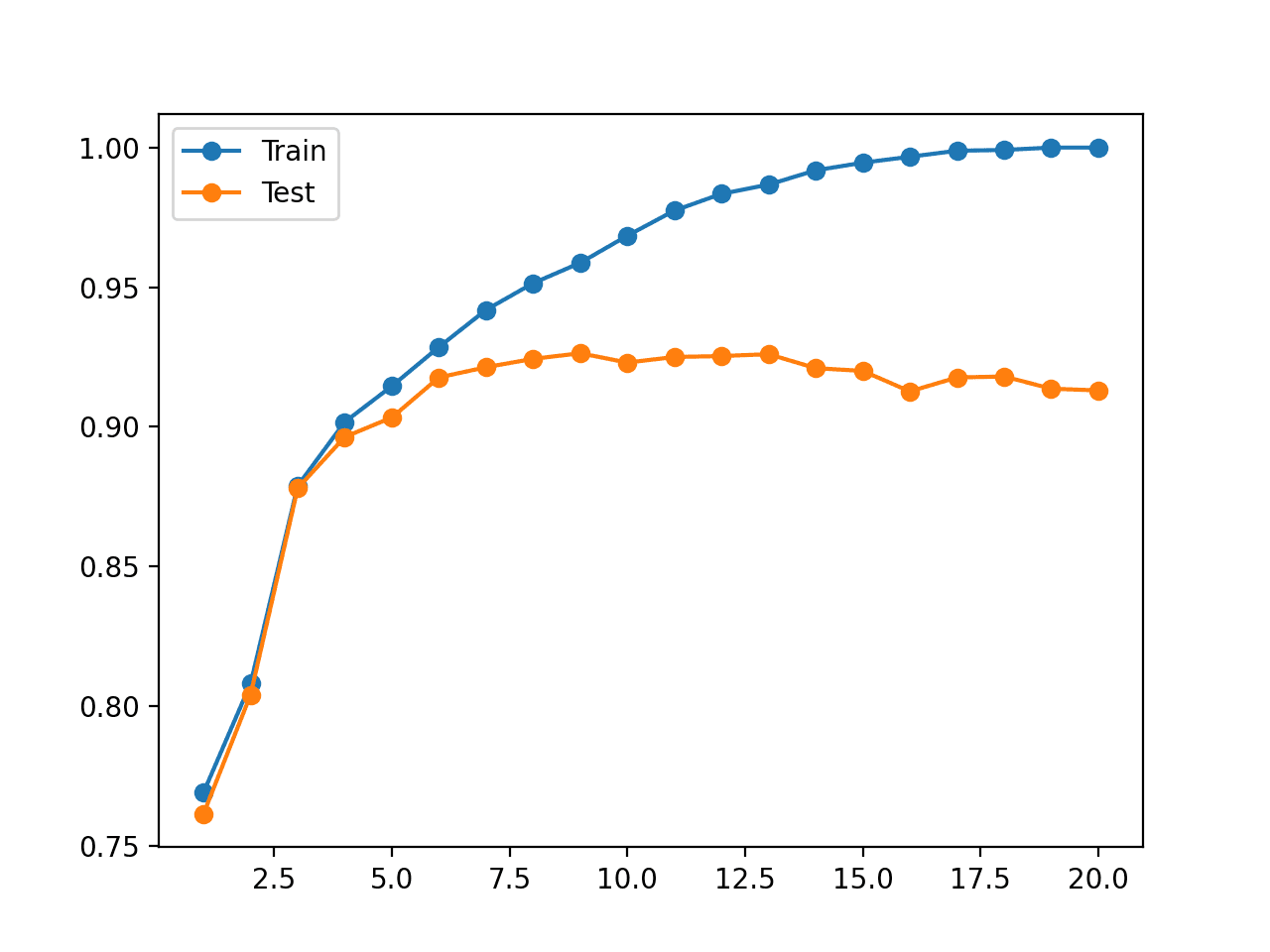
Consider this simple example. An overly complex tree might create a special branch just to classify one noisy or outlier data point from the training set. This adds complexity without improving the model's ability to generalize.

Controlling Complexity with Pre-Pruning and max_depth
To prevent overfitting, we need to stop the tree from growing too deep. This process is called pruning. There are two main approaches:
- Pre-pruning (or Early Stopping): We set rules to stop the tree's growth before it becomes fully developed.
- Post-pruning: We let the tree grow fully and then trim back branches that provide little value.
We will focus on pre-pruning, which is more common and intuitive. The most straightforward way to do this is by setting the max_depth hyperparameter in scikit-learn's DecisionTreeClassifier. This limits the number of splits from the root to the furthest leaf.
The following video demonstrates the practical difference between a default, fully-grown tree and one constrained by max_depth.
How to Implement Decision Trees in Python (Train, Test, Evaluate, Explain)
In this video, Mısra Turp demonstrates how setting max_depth prevents a tree from becoming overconfident and overfit.
Watch from 03:52 to 08:17. First, you'll see a default tree being trained. Notice at 07:06 how the prediction probabilities are all 1.0 or 0.0 — a sign of overfitting. Then, see how setting max_depth=4 (at 07:26) results in more nuanced probabilities, indicating a less overconfident model.
As you saw, by limiting the depth, we force the tree to learn more general decision boundaries. Here is how you would implement this in your code:
from sklearn.tree import DecisionTreeClassifier


# When instantiating the classifier, set the max_depth
# Let's use a max_depth of 3 as an example
clf_pruned = DecisionTreeClassifier(max_depth=3, random_state=42)


# Now, you can fit this classifier to your training data
# clf_pruned.fit(X_train, y_train)
The difference in complexity between a shallow and a deep tree can be staggering. The article below provides a powerful visual comparison.
A Visual Guide to Tuning Decision-Tree Hyperparameters
This article by James de la Cruz visually explores how hyperparameters affect a decision tree. The first comparison is the most dramatic.
Please read the section titled 'Tree depth', focusing on the subsections 'Shallow' and 'Deep'. Compare the simple tree image under 'Shallow' (max_depth=3) with the massive, complex tree under 'Deep' (max_depth=None). This highlights the effect of this single parameter.
Other Important Pruning Parameters
While max_depth is the most direct way to control complexity, scikit-learn offers other useful pre-pruning hyperparameters. You don't need to master them now, but it's good to be aware of them:
min_samples_split: The minimum number of samples a node must have before it can be split.min_samples_leaf: The minimum number of samples a leaf node must have. A split will only be considered if it leaves at least this many samples in each resulting child node.max_leaf_nodes: Limits the total number of leaf nodes in the tree.
These parameters help ensure that the tree only makes splits based on a significant number of data points, preventing it from creating tiny branches to account for outliers. The article "A Visual Guide to Tuning Decision-Tree Hyperparameters" you just looked at has excellent visual explanations for these as well, which you can explore in the "Other hyperparameters" section if you're curious.
Finally, scikit-learn also supports post-pruning via the ccp_alpha (Cost-Complexity Pruning) parameter. This method prunes the least important branches from a fully grown tree.
Conclusion
In this lesson, you explored one of the most critical concepts in building effective decision trees: managing complexity to avoid overfitting.
Key Takeaways:
- Overfitting occurs when a decision tree learns the training data's noise, resulting in high training accuracy but poor performance on new, unseen test data.
- An unconstrained tree will grow until its leaves are pure, making it highly susceptible to overfitting.
- Pruning is the process of controlling a tree's complexity to make it more general.
max_depthis a key pre-pruning hyperparameter that limits the tree's growth, preventing it from becoming too complex.- Other parameters like
min_samples_leafandmin_samples_splitalso help prevent overfitting by ensuring splits are meaningful.
Preview of the Next Lesson
We've now seen how to build and control a single decision tree. While pruning helps, a single tree can still be sensitive to the specific data it was trained on (an issue of high variance). In the next lesson, we will explore Random Forests, an ensemble method that builds on this by combining many decision trees to create a more robust and accurate model, effectively canceling out the errors of individual trees.