Welcome to the next lesson in our journey through frontend system design. In our last session, we focused on the crucial skill of back-of-the-envelope estimation, turning abstract requirements into concrete numbers for traffic, storage, and bandwidth. Those estimations are not just an academic exercise; they are the quantitative foundation upon which we build our system's architecture.
Today, we will take those numbers and start giving our system a shape. This lesson is all about visualization: you will learn how to diagram the high-level architecture of a client-server web application. This is a pivotal skill in any system design interview, as it demonstrates your ability to think structurally and communicate a complex design clearly and effectively. We'll move from the "how much" to the "what and how."
Why Diagrams Matter: The C4 Model
In a system design interview, a diagram is your primary communication tool. It's more than just boxes and arrows; it's a map of your thought process. However, a single diagram often struggles to serve every purpose. A product manager might need a 10,000-foot view, while a fellow engineer needs to see the internal structure of a specific service.
To address this, we can use a structured approach like the C4 model, which provides a framework for creating diagrams at different "zoom levels," ensuring clarity for any audience.
Visualizing Frontend Architecture
This article from Frontend at Scale provides an excellent introduction to the C4 model and why a structured approach to diagramming is so valuable.
Please read the sections from Maps of your code through to the end of the "Code Diagram" description. As you read, focus on understanding the purpose and audience for each of the four levels: System Context: The big picture. Container: The major deployable units (like your frontend app and backend API). Component: The building blocks inside a container. Code: The implementation details within a component.
The C4 model gives us a powerful vocabulary to discuss architecture at the appropriate level of abstraction, preventing us from getting lost in the weeds too early.
Adapting C4 for Frontend Architecture
While the C4 model is generic, its real power for us comes from adapting it to the specifics of frontend development. Levels 1 (Context) and 2 (Container) are broadly applicable, but Levels 3 and 4 are where we can tailor the model to describe the internal structure of our client application.
Let's explore what this looks like in practice.
Level 1: System Context Diagram
This is your highest-level view. It shows your entire system as a single box, interacting with users and other external systems. It answers the question: "What is the system's neighborhood?"

The diagram above is a great example. At a glance, we see:
- Users: The people interacting with our system.
- Clients: The entry points, like a Web Browser or Mobile app.
- External Services: Things like a Content Delivery Network (CDN) for fast asset delivery, or external notification services (SMS/Email).
- Our System: The central box, which contains all the services we will build and manage.
Level 2: Container Diagram
Now, we "zoom in" to the main system box. A "container" in C4 terms is a separate, runnable/deployable unit. For a typical web application, the primary containers are:
- Client/Single-Page Application (SPA): The code running in the user's browser. This is your domain as a frontend engineer.
- Backend API/Server: The service(s) that provide data and business logic.
- Database: Where persistent data is stored.
- Object Storage: For storing large files like images or videos.
The key interaction is between the Client and the Backend API. From a frontend interview perspective, the backend is often treated as a "black box" that exposes a set of APIs.
Level 3: Component/Module Diagram (Inside the Client)
This is where your frontend expertise truly shines. We zoom into the Client container. To avoid confusion with UI components (like a Button or Form), the author of the Frontend at Scale article suggests using the term Module for these larger architectural blocks. These modules represent the primary building blocks of your frontend application.
The RADIO Framework | Front End System Design Playbook
This guide from the Front End System Design Playbook provides a standard breakdown of the components inside a modern frontend application.
Please read the subsection titled Typical components/modules. It outlines four key architectural layers within the client.
As the article describes, we can typically break down a frontend application into these core modules or layers:
- View Layer: Renders the UI and handles user interaction (e.g., React components, Vue components).
- Store/Model Layer: Manages global application state (e.g., Redux, Zustand, Vuex).
- Data Access Layer: Handles all communication with the backend API, including fetching, caching, and error handling (e.g., React Query, Apollo Client).
- Controller (Logic Layer): Often intertwined with the other layers, this orchestrates the flow of data and events between the View, Store, and Data Access layers.
This logical separation is often visualized using a pattern reminiscent of Model-View-Controller (MVC), adapted for the client side.
Front End System Design Fundamentals (All In One Comprehensive Guide)
This video from Shivam Bhalla provides a visual walkthrough of a high-level component architecture for a news feed, demonstrating the client-side MVC pattern.
Watch the section from designing the component architecture. Pay close attention to how the diagram separates the Controller, Data Model (Store), and View Layer, and how they interact with each other and the backend API.
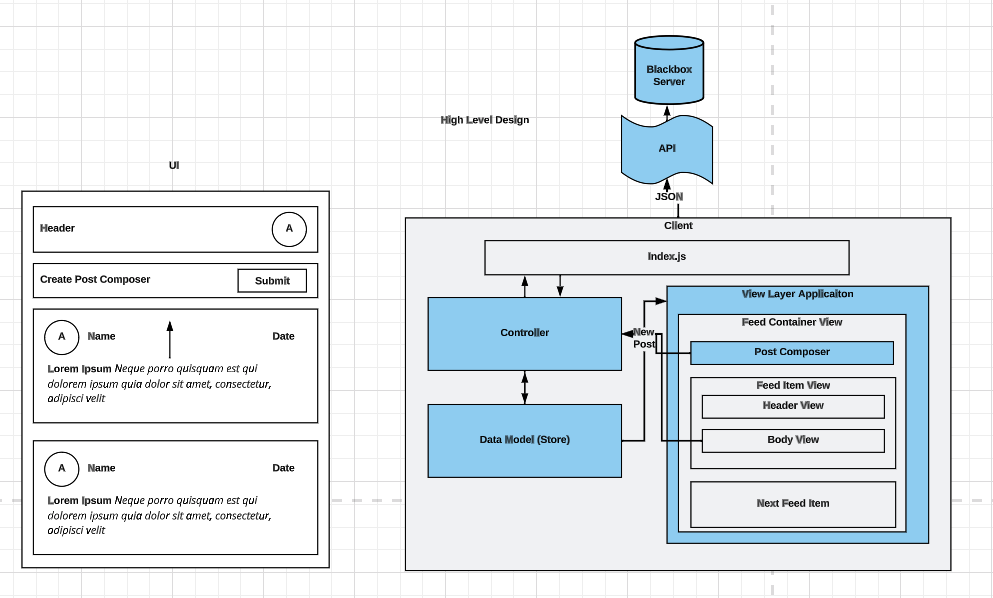
This diagram clearly shows the flow:
- The
index.jsfetches initial data from the API. - A
Controllerprocesses this data and places it in theData Model (Store). - The
View Layer Applicationreads from the store to render the UI. - When a user interacts (e.g., clicks "Submit"), the event goes to the
Controller, which may trigger a new API call and update theStore, causing the UI to update.
Putting It All Together: A Complete High-Level Diagram
Now, let's connect all these concepts. In an interview, you'll be expected to draw a diagram that combines the client-server interaction (Level 2) with an understanding of the key backend components that support the frontend. The first diagram we saw is an excellent template for this.
Let's walk through it again, this time connecting it to the estimations from our previous lesson:
- Users & DNS: The journey starts with a user navigating to your site. The browser uses DNS to resolve your domain name to an IP address.
- Content Delivery Network (CDN): The first stop is often a CDN. This is critical for performance. It caches your static frontend assets (JS bundles, CSS, images) geographically close to users, reducing latency. Your bandwidth estimations would justify the need for a CDN.
- Load Balancer: For dynamic API requests that can't be served by the CDN, the traffic hits a load balancer. If your QPS estimation showed thousands of requests per second, you can't rely on a single server. A load balancer distributes this traffic across multiple servers, ensuring high availability and scalability.
- App Frontend / Web Servers: These servers handle two main tasks:
- Serving the initial HTML shell of your application.
- If you're using Server-Side Rendering (SSR), they also pre-render pages before sending them to the client.
- App Backend / Application Server: This is the core of your backend. It handles business logic, processes data from the client, and communicates with the databases. This is the "black box" API your client's Data Access Layer talks to.
- Databases & Caches: The application server retrieves and stores data in various databases (e.g., a Relational DB for user profiles, a NoSQL DB for feed posts). A DB Cache sits in front to speed up frequent queries. Your storage estimations inform the scale and type of databases you might need.
- Asynchronous Services: For tasks that shouldn't block the user, like sending an email or a push notification, the application server places a job in a Message Queue. A separate worker process picks it up later.
This comprehensive view shows an interviewer that you understand not just the frontend client, but how it fits into the broader ecosystem of a modern, scalable web application.
Conclusion
In this lesson, we bridged the gap between quantitative estimates and qualitative structure. You learned how to think about and draw the architecture of a client-server application at multiple levels of detail, a fundamental skill for any system design discussion.
Key takeaways from today:
- Diagrams are for communication: Use them to make your design clear and easy to follow.
- Use a structured model like C4: Start with the high-level System Context and progressively zoom in to Containers (Client/Server) and Components (View/Store/Data Access).
- Adapt models for the frontend: When diagramming the client, use modules like View, Store, and Data Access Layer to describe its internal architecture.
- Connect architecture to scale: Use your estimations (QPS, storage) to justify key architectural components like CDNs, load balancers, and different database types.
In our next lesson, we will tie together the skills from our first few sessions—gathering requirements, estimation, and high-level design. You will learn how to apply a structured framework, like RADIO, to formulate a comprehensive and coherent response in a system design interview, ensuring you cover all the critical aspects of the problem.