Hello! Welcome to the final lesson in our module on integrating React with Astro.
In our previous lessons, you've successfully set up the React integration, rendered components, passed them props, and even managed their internal state with hooks like useState and useEffect. You now have all the technical skills needed to build interactive features for your accounting website.
Today, we'll address a crucial architectural question that lies at the heart of Astro's philosophy: How do you distinguish when to use a static Astro component versus an interactive React component?
Making the right choice here is the key to unlocking the performance benefits Astro offers. Your experience with React SPAs, where almost every piece of the UI is a component managing state, provides a great point of contrast for understanding Astro's "static first" approach. By the end of this lesson, you'll have a clear framework for deciding which tool to use for which job, ensuring your site is both powerful and incredibly fast.
1. The Core Distinction: Static vs. Interactive
In Astro, not all components are created equal. They exist in two distinct worlds: the server and the client.
-
Astro Components (
.astro): These are the native citizens of Astro. They are purely server-side templating components. When you build your site, Astro processes them, runs any JavaScript inside their frontmatter "code fence" (---), and renders them into pure, lightweight HTML, CSS, and (optionally) vanilla JavaScript. By default, they ship zero client-side JavaScript. They are the building blocks for your site's structure, layout, and static content. -
UI Framework Components (
.jsx,.tsx, etc.): This is where your React components live. They are guests in the Astro ecosystem, designed to bring client-side interactivity. You use them when a part of your UI needs to respond to user input, manage state, and re-render in the browser without a full page reload.
The Astro documentation makes this distinction very clear.
Front-end frameworks - Astro Docs
The official Astro documentation provides a concise explanation of the roles of different component types. It's a foundational read for understanding their boundaries.
Read the sections titled "Using framework components" and "Can I hydrate Astro components?". These two short sections perfectly summarize the default behavior of framework components and the fundamental limitation of Astro components.
As you just read, the key takeaways are:
- Astro components (
.astro) are HTML-only and cannot be hydrated. They can never be interactive in the way a React component can. - Framework components (like React) are rendered to static HTML by default, but become interactive "islands" once you add a
client:*directive.
This leads us to the core concept of Astro's island architecture.
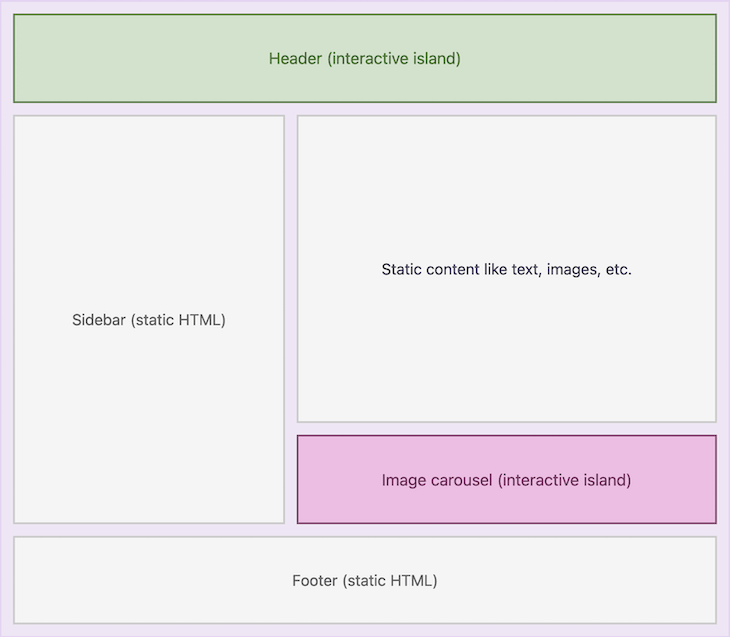
2. Adopting the "Static First" Mindset
To build high-performance sites with Astro, you should adopt a "static first" mindset. This is a complete reversal of the Single Page Application (SPA) approach you might be used to, where everything is interactive by default.
Here's the new thought process:
Assume every component will be a static Astro (
.astro) component first. Only upgrade it to an interactive React component if it's absolutely necessary.
When does a component need to be interactive? Ask yourself these two questions:
- Does this component need to maintain its own state that can change over time (e.g., a counter, a form input, an open/closed toggle)?
- Does it need to respond to user events (like clicks or keyboard input) to trigger a change in its own structure or data without reloading the page?
If the answer to either of these is "yes," you have a candidate for an interactive React component. If not, it should remain a static Astro component.
The following resource explains this principle and its benefits for performance.
Astro Islands Architecture Explained
This article from Strapi's blog does an excellent job of explaining the philosophy behind Astro and the practical implications of a 'static-first' approach.
Please read the section titled "Component Design Principles for Static-First Development". It provides a clear guide on how to approach component creation in Astro and highlights common performance pitfalls to avoid.
The anti-pattern mentioned in the article—spawning multiple interactive islands inside a .map() loop—is a classic example of accidentally breaking the performance model. Instead of making every single PostCard interactive, you keep them static and hydrate only a single, controlling component, like a search filter or sorter.
3. A Visual Guide to Islands
The theory is important, but seeing it in action makes it click. This short video from the Astro team provides a perfect visual summary of how different components on the same page can have different interactivity rules.
Watch this quick official video to see a practical demonstration of how Astro treats different components as static or interactive islands.
Watch the entire video (it's less than 2 minutes). Pay close attention to the three examples: the static hero banner, the conditionally interactive navigation bar, and the lazy-loaded image carousel. Notice how the client:* directives in the code directly control this behavior.
The video demonstrates the choices you'll make constantly:
- Hero Banner: Just text and links. No state, no events. Result: Static component (no client-side JS).
- Navigation Menu: Needs a slide-out menu on mobile, but is just static links on desktop. Result: Interactive component with
client:mediadirective. - Image Carousel: Needs buttons to change slides, but is below the fold. Result: Interactive component with
client:visibledirective to lazy-load it.
4. A Decision-Making Framework for Your Project
Let's turn this into a practical decision-making framework you can use while building your accounting website. When you need to create a new UI element, follow these steps:
Step 1: Does it need client-side interactivity?
-
What it does: Displays content, links to other pages, structures the layout.
-
Examples: A blog post body, a static client testimonial card, the site footer, a service description.
-
Decision: Use a static Astro (
.astro) component. -
What it does: Responds to user input, manages state, fetches data on the client.
-
Examples: An interactive contact form, a theme toggle switch, a dropdown menu, an image carousel.
-
Decision: Use a React (
.tsx) component and go to Step 2.
Step 2: If it's interactive, when should it load?
You've decided you need a React component. Now, you must choose the right client:* directive to control its performance impact. This determines when its JavaScript is loaded and executed.
-
client:load: Use for critical UI that must be interactive immediately.- When to use: The component is immediately visible (above the fold) and essential for the user experience.
- Example for your site: The main navigation dropdown menu in the header. A user might interact with it right away.
-
client:visible: Use for components that are interactive but can wait until the user sees them. This is often your best default choice.- When to use: The component is below the fold or not immediately critical.
- Example for your site: A testimonial slider or a contact form at the bottom of the homepage. There's no need to load its JavaScript until the user scrolls down to it.
-
client:idle: Use for lower-priority components.- When to use: The component is not essential, and you want to wait until the browser has finished rendering everything else.
- Example for your site: A "chat with us" widget or a newsletter signup pop-up that appears after a delay.
-
client:media: Use for components that are only interactive on certain screen sizes.- When to use: The UI and its behavior are fundamentally different on mobile vs. desktop.
- Example for your site: A mobile "hamburger" menu button that reveals the navigation. It's not needed on desktop, so you can prevent its JavaScript from loading on larger screens.
Test your understanding!
For your accounting website, you plan to build the following features. For each one, decide if it should be an .astro component or an interactive .tsx component. If it's a .tsx component, which client:* directive seems most appropriate?
- A "Services" page that lists the firm's offerings (e.g., Tax Preparation, Bookkeeping) with a title and a paragraph for each.
- An image gallery on a "Team" page that uses buttons to cycle through photos of the staff. The gallery is halfway down the page.
- The main site footer, containing copyright information and links to privacy policy pages.
- A "Request a Consultation" button in the header that opens a modal window with a form inside it.
Show answer
- Services List: Astro component (
.astro). This is purely static content. It just displays text and doesn't need to manage any state or handle complex events. - Image Gallery: React component (
.tsx) withclient:visible. It's interactive (buttons change the displayed image), so it must be a client-side component. Since it's halfway down the page,client:visibleis perfect—the JavaScript for the gallery will only load when the user scrolls it into view, speeding up the initial page load. - Site Footer: Astro component (
.astro). Like the services list, this is just static text and standard<a>links. No client-side interactivity is needed. - "Request a Consultation" Modal: React component (
.tsx) withclient:load. This component needs to manage the open/closed state of the modal, making it interactive. Because it's in the header and is a primary call-to-action, you want it to be responsive immediately.client:loadensures its JavaScript is ready as soon as the page loads.
Conclusion
You've now reached a critical milestone in your Astro journey. Understanding the distinction between static Astro components and interactive React components is fundamental to building a modern, performant website.
Key Takeaways:
- Astro Components (
.astro) are for static content and structure. They render to HTML on the server and have no client-side runtime, making them extremely fast. - React Components (
.tsx) are for interactivity. Use them when you need to manage state or handle user events in the browser. - Embrace the "static first" mindset. Always start with an
.astrocomponent and only switch to a React component when interactivity is essential. - Choose your hydration strategy wisely. Use
client:*directives to control when your interactive components load their JavaScript, optimizing for the best possible user experience and Core Web Vitals.
Up Next:
This lesson concludes our module on integrating React. You have a solid foundation in how to use Astro and React together effectively. In the next module, "Building the Core Website Pages," we will put all this knowledge into practice. You'll start building the main reusable pieces of your accounting website, including the site header, dynamic service pages, and testimonial sections, applying the architectural decisions we've discussed today.