Introduction
Welcome back to the capstone project. In the last lesson, you did the crucial work of a network architect: translating the business goals of Aperture Logistics into a concrete technical requirements document. That document is our blueprint, and now we're going to build the first part of the structure: the VLAN plan.
This lesson is all about producing a complete VLAN plan that meets the requirements you've already defined. We'll move from the what ("we need to segment the network") to the how ("VLAN 10 will be DATA_HQ for headquarter users"). This process of defining your Layer 2 broadcast domains is a foundational step that directly impacts security, performance, and manageability.
Let's get started.
The 'Why' and 'What' of a VLAN Plan
You're already familiar with configuring VLANs on a switch, but a VLAN plan is a higher-level strategic document. It's not just a list of numbers; it's a deliberate design that maps your technical requirements to logical network segments.
A good VLAN plan is built on a few core principles:
- Segmentation by Function: Grouping devices by their purpose (e.g., servers, phones, workstations) rather than just their physical location.
- Segmentation for Security: Isolating sensitive groups (like R&D) or untrusted groups (like Guests) from the rest of the network.
- Logical Organization: Using a clear, scalable numbering and naming scheme that makes the network easy to manage and troubleshoot.
This image provides a good overview of how different functional groups in a business are placed into their own VLANs.
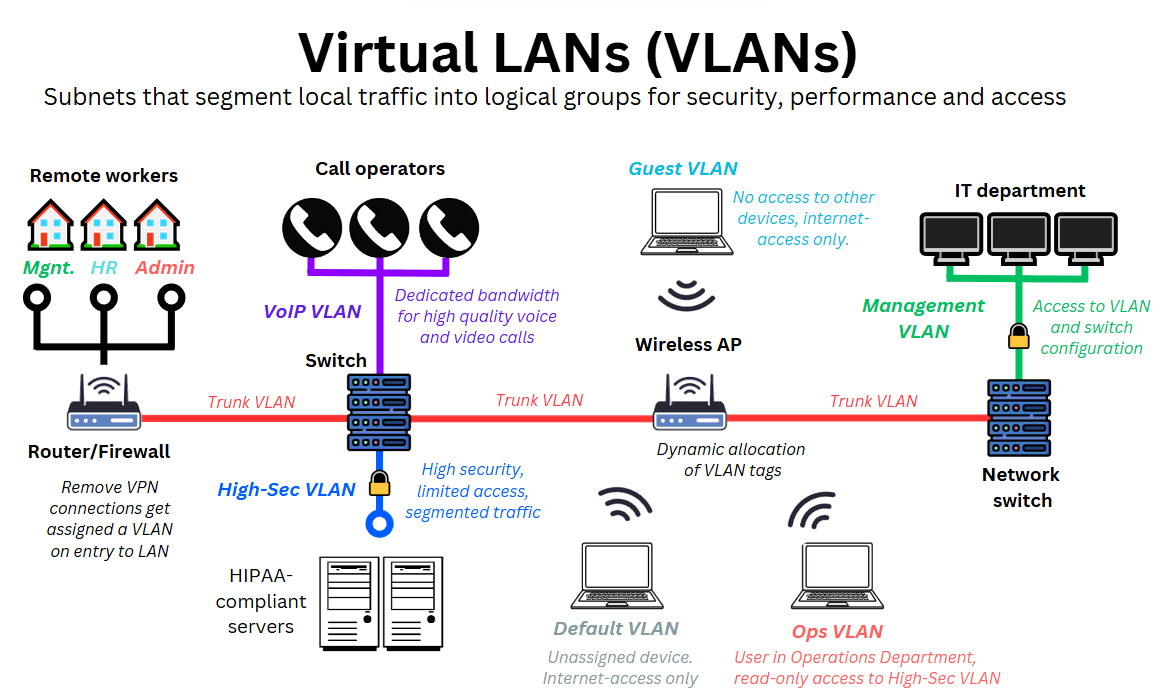
Before we design our own plan, let's explore some professional guidance on the different types of VLANs and how to structure them.
VLANs and Inter-VLAN Routing: The No-Nonsense CCNA Guide
This guide provides excellent, no-nonsense advice on planning VLANs. We'll focus on the section that breaks down VLANs by traffic type, which is a cornerstone of modern network design.
Read the section titled 'VLAN Assignment by Traffic Type.' It's under the 'Design Notes for Labs and POCs' heading. Pay close attention to the recommendations for Voice, Data, Management, and Guest traffic. This directly applies to the Aperture Logistics scenario.
Strategic Design: The Local VLAN Model
For a large campus network like Aperture Logistics, one of the most important design decisions is choosing the right VLAN model. There are two primary approaches:
- End-to-End VLANs: A single VLAN (e.g., VLAN 10 for Sales) spans the entire campus, across multiple buildings and switches. This was a common approach in older designs.
- Local VLANs: VLANs are confined to a specific geographic area, typically a single building or even a single wiring closet. Traffic between buildings is handled at Layer 3 (routing).
The modern, recommended best practice for scalable and resilient networks is the Local VLAN model. It creates smaller, more predictable failure domains and relies on the fast convergence of routing protocols instead of the slower Spanning Tree Protocol (STP) for path redundancy between buildings.
The technical requirements you developed in the last lesson—specifically the use of a hierarchical design with L3 switches at the core—naturally lead to a Local VLAN design.
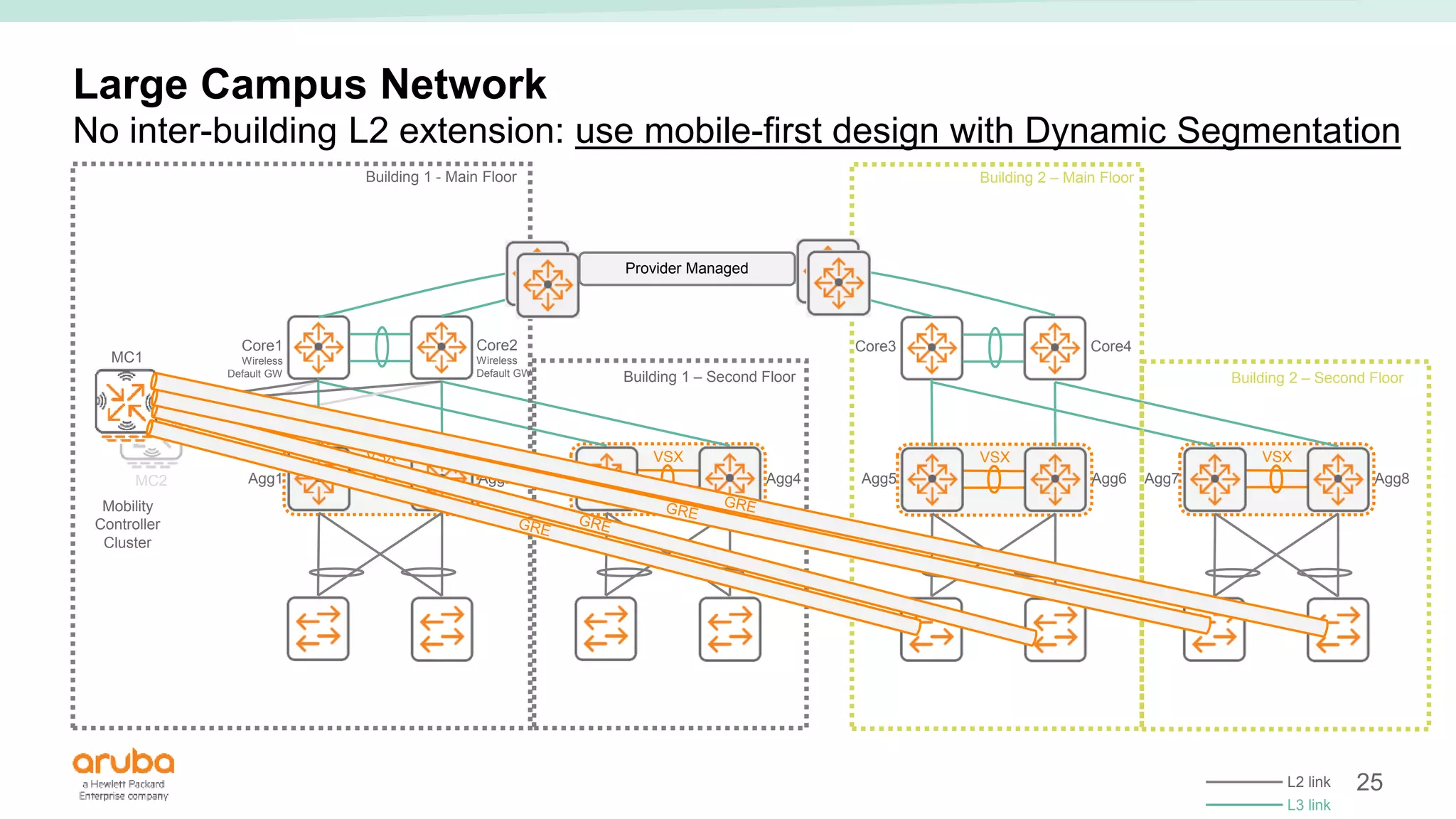
To solidify your understanding of why this is the preferred approach, the following resource provides a detailed comparison.
This document from a Cisco CCNP course directly compares the End-to-End and Local VLAN models. Understanding the pros and cons here is key to justifying our design choice for Aperture Logistics.
Read the sections 'End-to-End VLANs,' 'Local VLANs,' and 'Comparison of End-to-End and Local VLANs.' Focus on the characteristics and the reasons for implementing each design. You'll quickly see why the Local VLAN model is superior for scalability and availability.
Building the Aperture Logistics VLAN Plan
Now, let's apply these principles to our capstone project. We will create the VLAN plan for Aperture Logistics step-by-step.
Step 1: Identify the Required VLANs
First, we review our Technical Requirements Document from the previous lesson to list all the necessary segments.
Requirement 3.3.1: We need separate VLANs for different user groups (HQ Staff, R&D Staff) and functions (VoIP, IoT, Servers).Requirement 3.3.3 & 3.3.4: We need a VLAN for Guest Wi-Fi that will be tied to a separate VRF.Requirement 3.5.1: We need a dedicated, out-of-band management VLAN.- Best Practice: We also need a dedicated, unused VLAN to serve as the Native VLAN on trunk links for security. And we need to account for the default VLAN 1.
This gives us the following list:
- HQ Staff (Admin, HR, Sales, Mgmt)
- R&D Engineers
- Warehouse & Showroom Staff
- IoT Devices (Warehouse)
- Server Farm (R&D Building)
- VoIP Phones (Campus-wide)
- Guest Wi-Fi (Campus-wide)
- Network Management
- Native VLAN (for trunks)
- Black Hole / Unused (for unused ports)
- Default VLAN 1 (for specific control plane traffic only)
Step 2: Establish a Naming and Numbering Scheme
A chaotic numbering system is a nightmare to manage. We need a logical, scalable scheme. Leaving gaps between numbers allows for future expansion without re-numbering the entire network.
The following video from Jeremy Cioara is an industry-standard take on how to do this right.
The RIGHT Way to Name & Number VLANs!
This video explains the best practices for naming and numbering VLANs. It covers why you shouldn't use VLAN 1 for production traffic and how to create a scalable numbering scheme.
Watch from 01:52 to 06:09. The first part covers the security risks of using VLAN 1. The second part introduces the 'plus one' approach to numbering, which is a fantastic concept for building scalable networks.
Based on these best practices, we'll establish a scheme for Aperture Logistics:
- 10-99: User Data VLANs
- 100-199: Voice VLANs
- 200-299: Server & Data Center VLANs
- 300-399: Guest & IoT VLANs
- 800-899: Special Purpose / Lab VLANs
- 900-999: Infrastructure VLANs (Management, Native)
Step 3: Create the VLAN Plan Document
Now we combine our list of required VLANs with our numbering scheme to create the formal plan. This document will be a key part of our final project deliverables.
Here is the complete VLAN plan for Aperture Logistics:
| VLAN ID | VLAN Name | Purpose / Users | Scope / Location | Security Considerations |
|---|---|---|---|---|
| 10 | DATA_HQ |
HQ Staff (Admin, HR, Sales, Mgmt) | HQ Building | Standard corporate access. |
| 20 | DATA_RD |
R&D Engineers | R&D Building | High. Must be isolated from other data VLANs via ACLs. |
| 30 | DATA_WH |
Warehouse & Showroom Staff | Warehouse Building | Standard corporate access. |
| 100 | VOICE_CORP |
VoIP Phones | Campus-wide | Requires QoS priority (EF). |
| 200 | SERVERS_DC |
Physical & Virtual Servers | R&D Building (Data Center) | Access restricted by ACLs based on role. |
| 301 | GUEST_WIFI |
Public Wi-Fi for clients and visitors | Campus-wide | Total Isolation. Belongs to GUEST_INTERNET VRF. |
| 302 | IOT_WH |
Warehouse IoT devices (inventory scanners) | Warehouse Building | High. Access restricted to one inventory server only. |
| 888 | BLACK_HOLE |
Unused switch ports | Campus-wide | All traffic dropped. No SVI. |
| 900 | MGMT_INFRA |
Network device management interfaces (switches, etc.) | Campus-wide | Critical. Access restricted to IT workstations only. |
| 999 | NATIVE_TRUNK |
Unused native VLAN for 802.1Q trunks | Campus-wide | No devices, no traffic. Prevents VLAN hopping attacks. |
| 1 | DEFAULT |
Control plane traffic only (CDP, STP, etc.) | Campus-wide | Do not use for any user or management traffic. |
This table is clear, logical, and directly addresses the technical requirements. It defines the name, number, purpose, and security posture for every Layer 2 segment in our network.
Conclusion
You have now produced a professional VLAN plan that forms the segmentation backbone of the Aperture Logistics network. This plan is not an arbitrary list; it is a direct implementation of the business goals and technical requirements we established in the previous lesson.
Key Takeaways:
- Plan Before You Configure: A documented VLAN plan is essential for any large network.
- Local is Better: The Local VLAN model, where VLANs are confined to a building or floor, is the modern standard for scalable and resilient campus networks.
- Structure is Everything: A logical and scalable numbering and naming scheme makes the network far easier to manage, troubleshoot, and expand.
- Special-Purpose VLANs are Non-Negotiable: Every professional network design includes dedicated VLANs for Management, Voice, Guests, and a secure Native VLAN.
Preview of the Next Lesson:
With our Layer 2 segmentation defined by the VLAN plan, the next logical step is to superimpose a Layer 3 addressing structure onto it. In the next lesson, you will develop a hierarchical VLSM addressing plan for the entire enterprise, assigning a unique IP subnet to each VLAN we have just defined.