Introduction
Welcome back! In our last lesson, we mastered the two fundamental laws of ACL processing: the top-down, first-match rule and the implicit deny all. You now know how to structure your ACL statements in the correct order to achieve your desired security policy and how to use permit ip any any to avoid unintended outages.
So far, we have built the what (the rules) and the how (the order). In this lesson, we will focus on the final, crucial piece: the where and which way. You will learn how to apply your completed ACL to a Switched Virtual Interface (SVI) in the correct direction—either inbound or outbound—to enforce your policy.
Correctly choosing the direction is critical for both functionality and performance. Applying an ACL in the wrong direction can render it completely ineffective or, worse, cause an outage. By the end of this lesson, you will be able to analyze traffic flow and confidently apply ACLs to an SVI to filter inter-VLAN traffic correctly and efficiently.
The Core Concept: Direction is From the SVI's Perspective
The single most important—and often misunderstood—concept when applying ACLs to SVIs is that the direction (in or out) is always from the perspective of the Layer 3 SVI itself, not the VLAN as a whole.
Think of the SVI as a physical router interface that is logically "plugged into" the VLAN.
- Inbound (
in): Traffic originating from a host within the VLAN and arriving at the SVI to be routed to another network. The packet is coming in to the SVI from its local VLAN. - Outbound (
out): Traffic that has already been routed from another network and is now leaving the SVI to be delivered to a host within the VLAN. The packet is going out of the SVI into its local VLAN.
This concept can seem counter-intuitive at first. A great way to solidify it is to read a clear explanation from engineers who have untangled this exact problem.
Access-Lists and VLAN and understanding traffic flow
This discussion on Network Engineering Stack Exchange provides an excellent breakdown of why SVI directionality can be confusing and offers the 'virtual router interface' analogy to clarify it.
Read the initial question and the first, most-voted answer. Focus on the explanation that treats the SVI as a physical interface on a router connected to the VLAN. This perspective is key to understanding the 'in' vs. 'out' logic.
Visualizing the Traffic Flow
Let's visualize this with a concrete example. A host in VLAN 10 (Sales) wants to communicate with a server in VLAN 20 (Servers).
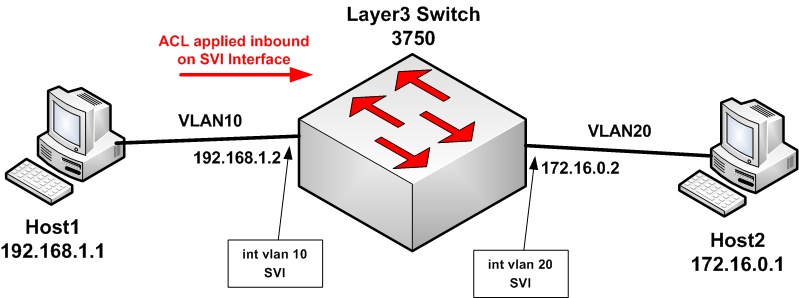
Here is the step-by-step packet flow:
- The Sales host (192.168.1.1) sends a packet to the Server (172.16.0.1).
- The packet travels through the Layer 2 domain of VLAN 10 and arrives at its default gateway, which is the SVI
interface Vlan10(192.168.1.2). - From the perspective of
interface Vlan10, this packet is INBOUND. - The L3 switch performs a routing lookup and determines the packet needs to go to VLAN 20.
- The switch forwards the packet to
interface Vlan20. - From the perspective of
interface Vlan20, this packet is now OUTBOUND, as it is leaving the routing engine and entering the Layer 2 domain of VLAN 20 to reach the server.
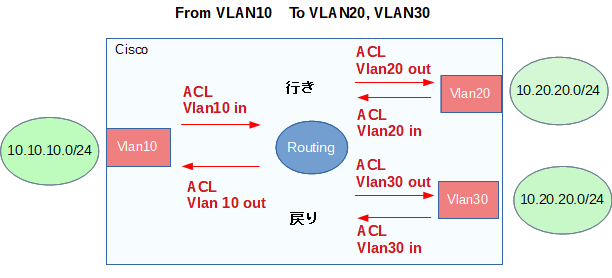
The diagram below provides a more detailed view of this process for traffic going between multiple VLANs and the corresponding return traffic.
Best Practice: Filter Inbound, as Close to the Source as Possible
You might be thinking, "If I can filter the packet either inbound on the source SVI or outbound on the destination SVI, which one should I choose?"
For extended ACLs, the universal best practice is to filter the traffic as close to the source as possible. In an L3 switched environment, this almost always means applying the ACL inbound on the source VLAN's SVI.
Why? Efficiency.
Applying an inbound ACL stops unwanted traffic before the L3 switch wastes CPU cycles on a routing lookup, only to discover it has to drop the packet at the destination. By filtering inbound, you drop the packet immediately upon its arrival at the first L3 interface.
Let's watch a practical demonstration of creating and applying an ACL using this best practice.
How to Set up Extended ACLs on a Cisco L3 Switch | CCNA Security | Access Control List Configuration
In this video, Paolo Reyes demonstrates how to block SSH while permitting ICMP between two VLANs. He correctly identifies the source VLAN and applies the extended ACL inbound on its SVI.
Watch from 03:21 to the end. First, pay attention to his explanation at 03:21 about why extended ACLs should be placed close to the source. Then, follow his step-by-step configuration from 05:46 onward, where he creates the ACL and applies it with ip access-group ... in. He makes a common mistake with wildcard masks around 09:30, which is a valuable learning point, and then corrects it to verify the ACL works.
As you saw in the video, the process is:
- Identify the source and destination of the traffic you want to control.
- Write the ACL statements (
permit/deny). - Apply the ACL to the source VLAN's SVI using the
ip access-group <ACL_NAME> incommand.
When Would You Use an Outbound ACL?
While inbound filtering is the most common and efficient method, outbound ACLs have their place. You typically use an outbound ACL when you want to control traffic entering a specific VLAN from multiple other sources.
Scenario: Imagine you have a VLAN for sensitive servers (VLAN 50) and multiple user VLANs (VLAN 10, 20, 30, 40). Your policy is: "No VLAN is allowed to communicate with the highly sensitive server 192.168.50.100."
- Inefficient Method: Create and apply an inbound ACL on
interface Vlan10,interface Vlan20,interface Vlan30, andinterface Vlan40. This is repetitive and hard to manage. - Efficient Method: Create a single ACL and apply it outbound on the destination SVI.
! ACL to block access TO the sensitive server
ip access-list extended SERVER-PROTECTION
 deny ip any host 192.168.50.100
 permit ip any any

! Apply ACL outbound on the server VLAN's SVI
interface Vlan50
 ip address 192.168.50.1 255.255.255.0
 ip access-group SERVER-PROTECTION out
In this case, traffic from any source VLAN gets routed first. Then, as it attempts to exit the routing engine via interface Vlan50 to reach the destination server, the outbound ACL catches and drops it.
Practice Analysis
Let's put your understanding to the test.
Scenario:
- VLAN 20: Engineering (
10.1.20.0/24) - VLAN 30: Quality Assurance (QA) (
10.1.30.0/24) - VLAN 70: Legacy Systems (
10.1.70.0/24)
Security Policy: "QA devices must be completely blocked from accessing any device on the Legacy Systems VLAN. All other inter-VLAN communication is permitted."
You have written the following ACL:
ip access-list extended QA_BLOCK_LEGACY
 10 deny ip 10.1.30.0 0.0.0.255 10.1.70.0 0.0.0.255
 20 permit ip any any
Question 1: To which SVI and in which direction (in or out) should you apply this ACL to adhere to best practices?
Click for Analysis
You should apply the ACL to interface Vlan30 in the inbound direction.
- Source of traffic: QA VLAN (VLAN 30).
- Best Practice: Filter as close to the source as possible.
- Application:
interface Vlan30is the gateway for the source traffic. Applying the ACLinboundfilters the packets the moment they attempt to leave their local VLAN to be routed. - Command:
interface Vlan30
 ip access-group QA_BLOCK_LEGACY in
Question 2: Could you achieve the same result by applying an ACL on interface Vlan70? If so, what would be the direction, and why is this approach less efficient?
Click for Analysis
Yes, you could achieve the same result by applying the same ACL to interface Vlan70 in the outbound direction.
- Logic: Traffic from QA would be routed by the switch. Then, as it tries to exit
interface Vlan70to enter the Legacy Systems VLAN, the outbound ACL would drop it. - Why it's less efficient: This method forces the switch to perform a routing lookup and process the packet, only to drop it at the final step. The inbound method on the source SVI is more efficient because it drops the packet before the routing process even begins, saving switch resources.
Conclusion
You have now integrated the final piece of the ACL puzzle. You can translate policy to rules, order them correctly, and apply them with the right directionality to control traffic flow between your network segments.
Key Takeaways:
- Direction is from the SVI's perspective:
inmeans traffic coming from the VLAN to the SVI for routing.outmeans traffic going from the SVI into the VLAN after routing. - Best practice is inbound filtering: For extended ACLs, always filter as close to the source as possible by applying the ACL
inboundon the source VLAN's SVI. This is the most efficient method. - Outbound ACLs are for specific use cases: Use outbound ACLs primarily to protect a destination VLAN from multiple sources, as this simplifies management.
In our next lesson, we will put everything from this module into practice. We'll tackle a common and critical security task: designing and applying an ACL to restrict access to a dedicated network management VLAN, ensuring it is protected from unauthorized access while allowing necessary administrative traffic.