Introduction
Welcome back! In our last lesson, we took a set of network requirements and methodically populated a professional IPAM document. We translated user counts into VLSM subnets and filled in every column, from VLAN ID to network address. You'll recall we also filled in a "Gateway IP" for each subnet, typically using the first usable address.
Today, we're going to unpack the true meaning and importance of that "Gateway IP" column. This lesson is all about how you assign a default gateway IP address for each subnet/VLAN within the IPAM document. We'll cover:
- The role of a default gateway in enabling communication between VLANs.
- How this gateway is implemented in a modern network using Layer 3 switches.
- The best practices for choosing and documenting the gateway IP.
This lesson bridges the gap between your IPAM spreadsheet and the actual CLI configuration on your network hardware.
What is a Default Gateway?
Think of a subnet as a local neighborhood. Any device can talk directly to another device within the same subnet (neighborhood) without any special help. But what happens when a device in VLAN 10 (e.g., 10.50.0.100) needs to send a packet to a server in VLAN 30 (e.g., 10.50.5.70)? It can't send it directly because the destination is outside its local network.
This is where the default gateway comes in. It's an IP address on the local subnet that serves as the "exit door." Any traffic destined for a different subnet is sent to the default gateway. The gateway, being a Layer 3 device, then uses its routing table to forward the packet toward its final destination.
In your network architecture, which uses Layer 3 switches for routing, this gateway isn't a separate physical router. Instead, it's a virtual interface on the switch itself.
The Gateway's Home: The Switched Virtual Interface (SVI)
A Layer 3 switch can perform both Layer 2 switching and Layer 3 routing. To act as a gateway for a VLAN, it uses a Switched Virtual Interface (SVI).
An SVI is a logical, virtual interface that represents a specific VLAN in the routing process of the switch. You create one SVI for each VLAN that needs routing, and you assign it an IP address from that VLAN's subnet. This IP address becomes the default gateway for all devices in that VLAN.
How to Configure a Switch Virtual Interface (SVI)
To see this in action, let's watch this clip from Kevin Wallace. He clearly explains why an SVI is used as a default gateway on an L3 switch and contrasts it with older methods.
Watch the segment from 02:07 to 03:53. Focus on how the SVI is described as a virtual interface that holds the IP address of the default gateway for devices on its VLAN.
As the video explains, by creating interface Vlan10 and interface Vlan20 with IP addresses, the switch itself becomes the router for those networks. This is the fundamental mechanism for inter-VLAN routing in the type of large network you're designing.
Assigning the Gateway IP Address: A Matter of Convention
So, we know we need to assign an IP address from the subnet to the SVI. But which one? There are two universally accepted best practices:
- Use the first usable IP address in the subnet (e.g., for
10.50.2.0/24, the gateway would be10.50.2.1). - Use the last usable IP address in the subnet (e.g., for
10.50.2.0/24, the gateway would be10.50.2.254).
Neither is technically better than the other, but consistency is critical. If you choose to use the first usable address, use it for every single subnet in your network. This makes your documentation clean and troubleshooting far more intuitive. In our previous exercises, we've been defaulting to the first usable IP, which is a very common choice.
How to Design a Basic Subnet in 9 Minutes
The following clip from CBT Nuggets reinforces this point about choosing a gateway IP and sticking with a standard.
Watch from 05:35 to 06:48. The key takeaway is the emphasis on standardization. Mixing conventions (.1 here, .254 there) leads to confusion and errors.
Documenting the Gateway in the IPAM
Your IPAM document is the single source of truth. The "Gateway IP" column you've been filling out is precisely for documenting the IP address you will configure on the SVI for that VLAN. When it's time to write your switch configurations, you'll refer directly to this column.
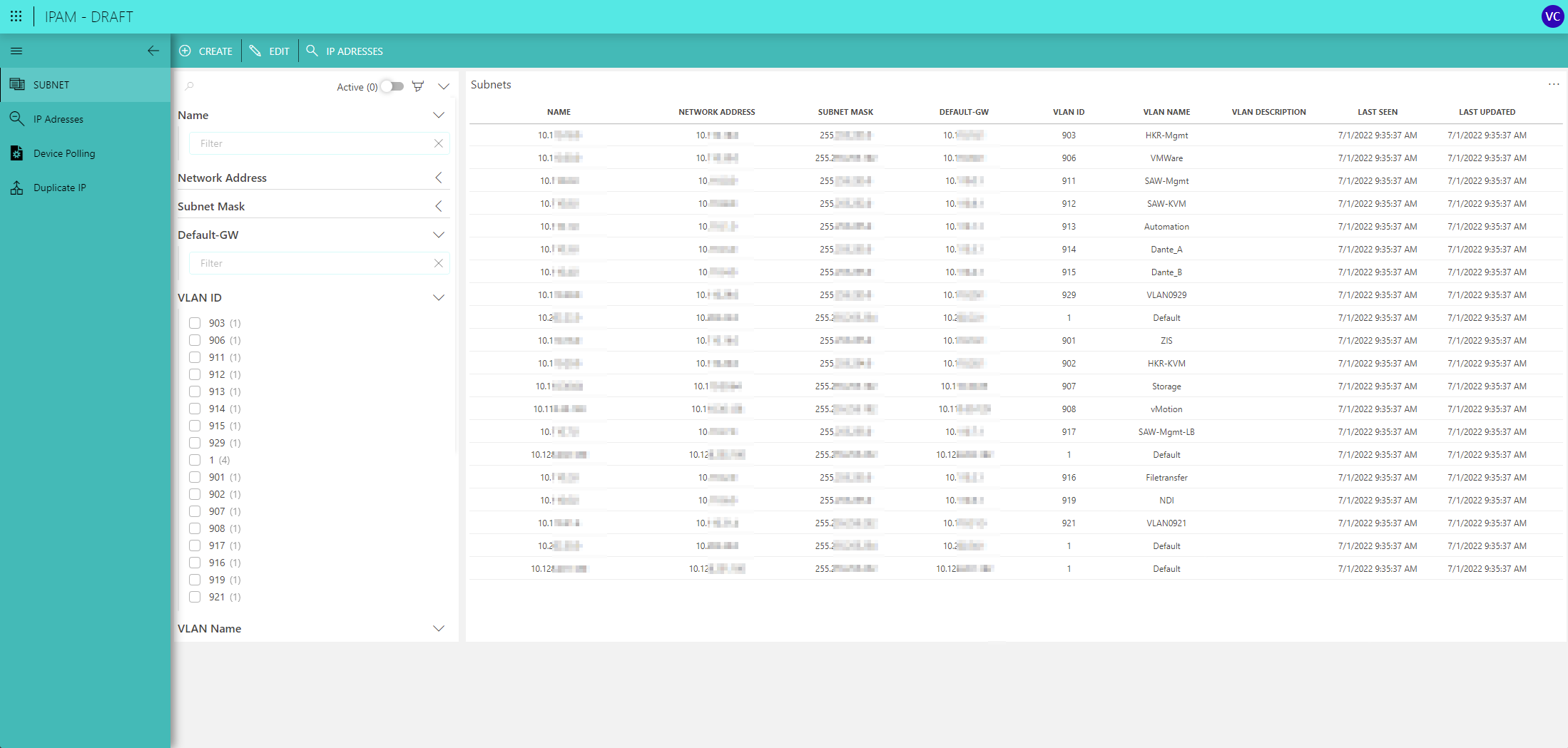
Here is an example of how this looks in a professional IPAM tool. Notice the dedicated column for the default gateway, linking it directly to the subnet and VLAN information.
Exercise: From IPAM to CLI
This is where your planning meets the command line. In the last lesson, you created the IPAM for the AlphaCorp network. Let's take a few of those VLANs and write the corresponding Cisco IOS configuration to create their SVIs. This is the practical step of assigning the gateway.
First, to enable routing on a Cisco L3 switch, you must issue the ip routing command in global configuration mode. This is a one-time command that "turns on" the Layer 3 capabilities of the switch.
Your Task:
Using the data from our completed AlphaCorp IPAM plan below, write the Cisco IOS commands to create the SVIs for the Voice, Servers, and Network Management VLANs. I've provided the configuration for the HQ Corporate Users VLAN as an example.
Relevant IPAM Data:
| VLAN ID | VLAN Name | Subnet (CIDR) | Gateway IP | Subnet Mask |
|---|---|---|---|---|
| 10 | HQ_CORP_USERS | 10.50.0.0/23 |
10.50.0.1 |
255.255.254.0 |
| 40 | VOICE | 10.50.4.0/25 |
10.50.4.1 |
255.255.255.128 |
| 30 | SERVERS | 10.50.5.64/26 |
10.50.5.65 |
255.255.255.192 |
| 99 | MGMT | 10.50.5.128/27 |
10.50.5.129 |
255.255.255.224 |
Fill in the missing configurations in the code block below:
! Configuration for L3 Core Switch

! Enable routing globally (one-time command)
ip routing

! --- SVI for VLAN 10 (HQ_CORP_USERS) ---
interface Vlan10
 description SVI for HQ Corporate Users
 ip address 10.50.0.1 255.255.254.0
 no shutdown
!
! --- SVI for VLAN 40 (VOICE) ---
! YOUR CONFIGURATION HERE
!
! --- SVI for VLAN 30 (SERVERS) ---
! YOUR CONFIGURATION HERE
!
! --- SVI for VLAN 99 (MGMT) ---
! YOUR CONFIGURATION HERE
!
(Hint: The commands will follow the exact same pattern as the example for VLAN 10. You just need to substitute the correct VLAN ID, description, IP address, and subnet mask from the table.)
Conclusion
Today you solidified your understanding of one of the most fundamental concepts in routed networks. The default gateway is no longer just a column in a spreadsheet; you now know it as the SVI that gives each VLAN a path to the rest of the network.
Key Takeaways:
- A default gateway is the router interface on a local subnet that devices use to send traffic to external networks.
- In modern enterprise networks, the gateway is typically a Switched Virtual Interface (SVI) on a Layer 3 switch.
- There is a 1:1 relationship: one VLAN corresponds to one subnet, which is served by one SVI acting as its gateway.
- Best practice for assigning the gateway IP is to use the first or last usable address and, most importantly, to be consistent across the entire network.
- The IPAM document serves as the blueprint, directly informing the
interface Vlan <ID>andip address <gateway_ip> <mask>commands on your switch.
In our next lesson, we will focus on verifying the IPAM plan for completeness and absence of overlapping allocations. Now that the plan is conceptually complete, it's time to audit it for errors. Learning to spot overlaps and other common mistakes before deployment is a crucial skill that separates senior network planners from junior ones.