Introduction
In our first lesson, you learned how to use the browser console to execute JavaScript expressions and see their results. However, those results vanished as soon as the next expression was evaluated. To build programs, we need a way to store and label values for later use. This is where variables come in.
This lesson addresses how to declare variables using JavaScript's three keywords: let, const, and var. We will dissect their differences in behavior, particularly regarding their scope (where they can be accessed) and reassignment (whether their value can be changed). Understanding these distinctions is fundamental to writing predictable, bug-free code—a critical skill for both developers and QA engineers who need to read and analyze that code. We'll focus on the modern best practices that you'll use when writing your own test automation scripts.
What is a Variable?
Think of a variable as a labeled container for a value. When you create a variable, you are reserving a named spot in the computer's memory.
The process involves two main steps:
- Declaration: This is where you create the variable and give it a name. In JavaScript, you do this using the keywords
let,const, orvar.let testCaseId; - Assignment: This is where you put a value into the variable using the assignment operator (
=).testCaseId = 15;
You can, and often will, do both at the same time. This is called initialization.
let testCaseId = 15;
Now, whenever you use the name testCaseId in your code, the JavaScript engine will look up the value stored in that container, which is 15. Let's explore the three keywords you can use for this process.
The Three Keywords: let, const, and var
JavaScript provides three keywords for declaring variables, each with its own set of rules. While you need to be able to recognize all three, in modern JavaScript development (and in your Playwright tests), you will almost exclusively use let and const.
let: Declares a variable whose value can be reassigned.const: Declares a variable whose value cannot be reassigned (it's constant).var: The original keyword for declaring variables. It has some quirky behaviors that can lead to bugs, so it is largely avoided in modern code.
Let's dive into the practical differences. The following article from freeCodeCamp provides a solid foundation.
Var, Let, and Const – What's the Difference?
This article provides a comprehensive breakdown of var, let, and const. It methodically explains the concepts of scope, reassignment, and hoisting for each keyword.
Read through the sections on Var, Let, and Const. As you read, focus on understanding the core differences. Don't worry about hoisting for now; we will cover it separately. Pay close attention to the examples showing what causes an error and what doesn't.
The article you just read introduced the three core concepts that differentiate these keywords: scope, reassignment/redeclaration, and hoisting. Let's solidify these ideas with more examples and visual aids.
Difference 1: Scope
Scope determines where a variable can be accessed in your code. This is the most important difference between var and the modern let/const.
let and const are Block Scoped
A block is any code enclosed in curly braces { }, such as in an if statement or a for loop. Variables declared with let or const only exist within the block where they are defined.
This is highly predictable. Think of it like a variable being confined to a specific room.

The following video from Programming with Mosh provides a crystal-clear demonstration of this concept.
JavaScript Let vs Var vs Constant | Mosh
Mosh visually demonstrates the scope difference using a for loop and an if statement, showing how a var-declared variable "leaks" out of its block while a let-declared variable does not.
Watch from the beginning until the end of the second example. Try typing these examples into your browser console to see the errors for yourself.
var is Function Scoped
As you saw, var is not block-scoped; it's function-scoped. This means if you declare a variable with var anywhere inside a function, it's available everywhere within that function, even outside the block where it was declared. This behavior is a common source of bugs, especially in loops, which is why let was introduced.
Difference 2: Reassignment and Redeclaration
This set of rules governs whether you can change a variable's value or declare it again.
const: You cannot reassign a new value to it, and you cannot re-declare it in the same scope. It must be initialized with a value when declared.const browser = 'Chrome'; browser = 'Firefox'; // Throws TypeError: Assignment to constant variable. const browser = 'Edge'; // Throws SyntaxError: Identifier 'browser' has already been declared.let: You can reassign a new value to it, but you cannot re-declare it in the same scope.let ticketStatus = 'Open'; ticketStatus = 'Closed'; // This is OK. let ticketStatus = 'In Progress'; // Throws SyntaxError: Identifier 'ticketStatus' has already been declared.var: You can reassign it, and you can also re-declare it in the same scope without an error. This can lead to you accidentally overwriting variables.var user = 'Alex'; user = 'Sam'; // This is OK. var user = 'Jordan'; // This is also OK, and silently overwrites the previous value.
A Special Note on const with Objects and Arrays
This is a crucial point that often trips up beginners. When you declare an object or an array with const, it means the variable cannot be reassigned to a new object or array. However, you can still change the properties of the object or the elements inside the array.
The analogy in the image below is helpful: const creates a locked cage (the variable reference) around a box (the object). You can't swap the box for a different one, but you can reach through the bars to change what's inside the box.
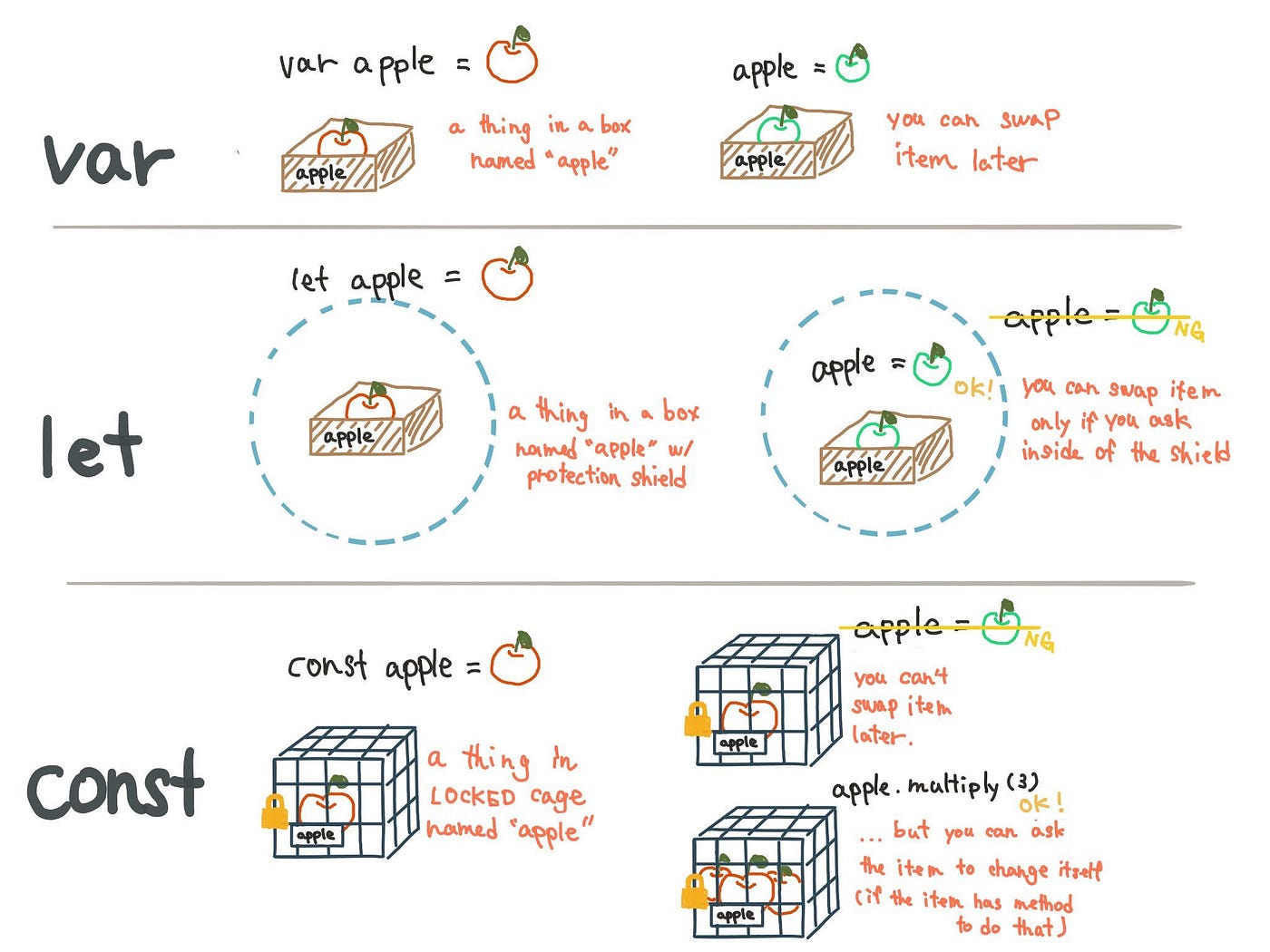
Let's see this in code. Open your console and try this:
// This works
const user = { name: 'John', id: 123 };
user.name = 'Jane'; // We are MUTATING the object's property
console.log(user); // Output: { name: 'Jane', id: 123 }

// This will fail
user = { name: 'Peter', id: 456 }; // We are trying to REASSIGN the variable
// Throws TypeError: Assignment to constant variable.
Difference 3: Hoisting
Hoisting is a JavaScript mechanism where variable declarations are conceptually "moved" to the top of their scope before the code is executed. The behavior differs significantly between var and let/const.
var: Declarations are hoisted and initialized with a value ofundefined. This means you can access avarvariable before it's declared, and you'll getundefinedinstead of an error.letandconst: Declarations are hoisted but are not initialized. If you try to access them before the declaration, you get aReferenceError. The time between the start of the block and the variable declaration is called the "Temporal Dead Zone" (TDZ).
The video from Web Dev Simplified clearly demonstrates this.
Differences Between Var, Let, and Const
This part of the video provides a side-by-side comparison of accessing a variable before declaration using var versus let, showing the different outcomes (undefined vs. ReferenceError).
Watch the segment from this section on hoisting to see this behavior in action.
This "fail-fast" behavior of let and const is another reason they are considered safer and more robust than var.
Best Practices: The const > let > var Rule
Now that we've covered the differences, here is the simple, actionable rule followed by modern JavaScript developers:
- Use
constby default. Start by declaring all your variables withconst. This makes your code more predictable, as you know the variable's assignment won't change. - Use
letonly if you know you need to reassign the variable. This is common for things like loop counters or variables that track a changing state. - Avoid
varentirely. There is no scenario in modern JavaScript wherevaris preferable toletorconst. You only need to understand its behavior so you can read older codebases or legacy examples you might find online.
The Zeeshan Ali blog post provides an excellent summary and decision guide.
What is the Difference Between let, var, and const in JavaScript? | Zeeshan Ali Blog
This article offers clear, practical advice on choosing the right keyword.
Focus on the sections When to Use Which?, Best Practices, and the Quick Decision Guide. Finally, review the Key Takeaways to cement your understanding.
Conclusion
In this lesson, we moved from simply evaluating expressions to storing their results in variables. You've learned the syntax for declaring variables and, more importantly, the critical differences between let, const, and var. Mastering these rules is a key step toward writing professional, maintainable JavaScript.
Key Takeaways:
- Variables are named containers for storing data.
- Scope:
letandconstare block-scoped ({ }), which is predictable.varis function-scoped, which can lead to bugs. - Reassignment:
constvariables cannot be reassigned.letandvarvariables can. - Redeclaration:
letandconstcannot be re-declared in the same scope.varcan, which is risky. - Best Practice: Always default to
const. Useletonly when a variable's value must change. Avoidvar.
Now that you know how to create containers for your data, our next lesson will focus on what you can put inside them. We will explore the primitive data types in JavaScript: strings, numbers, booleans, and more.