Welcome back. In our last session, we navigated the complex world of data consistency in collaborative systems, contrasting the centralized control of Operational Transformation with the decentralized resilience of CRDTs. We solved the problem of what data to sync. Now, we shift our focus to the equally critical, real-time metadata surrounding that collaboration: who is present, what are they doing, and where are they looking?
This lesson addresses the design of a presence system. This is far more than just the "green dot" next to a username; it's the high-scale, low-latency backbone for features like online indicators, "last seen" statuses, typing indicators, and live multiplayer cursors. We will architect this system from the ground up, focusing on the patterns required to handle millions of concurrent connections with sub-second latency, a common challenge in senior-level system design interviews for platforms like Slack, Figma, or Google Docs.
1. Scoping the Presence System
Before drawing a single box, we must define what we're building. In an interview, clarifying requirements is the first and most critical step.
Functional Requirements:
- Online/Offline Status: Show in real-time if a user is connected.
- Last Seen Timestamp: If offline, show when the user was last active.
- Idle Status: Show if a user is connected but inactive for a period.
- Typing Indicators: Show when a user is actively typing a message.
- Active Cursors: In a collaborative document, show the real-time position of other users' cursors.
Non-Functional Requirements:
- Low Latency: Presence updates must be broadcast to interested clients in near real-time (e.g., < 200ms).
- High Availability: The presence system must be fault-tolerant. A user's online status should not flap due to a single server failure.
- Scalability: The system must handle a massive number of concurrent users and connections.
- Efficiency: The solution must be mindful of network bandwidth and client-side resources (especially battery on mobile).
To make this concrete, let's consider the scale. Designing for a platform like LinkedIn or Facebook requires thinking big.
This document provides an excellent breakdown of the requirements and scale for a real-world presence system.
Focus on the Capacity estimation section. Internalize these numbers: millions of concurrent users, millions of heartbeats per second, and millions of notification deliveries per second. This sets the stage for every architectural decision we'll make.
The key takeaway from this estimation is that we're dealing with a massive firehose of small, frequent messages. Polling is not an option. We need a push-based, event-driven architecture.
2. High-Level Architecture
At a high level, we need to decouple the management of persistent client connections from the business logic that processes presence state. This leads to a standard, scalable microservices architecture.

This architecture is a solid starting point. Let's define our specific components:
- Client: The user's application (web browser, desktop app, mobile app). It maintains a persistent connection.
- Real-Time Gateway (RTC Gateway): A fleet of servers whose sole job is to maintain persistent WebSocket connections with clients. They are lightweight and act as a bridge between clients and the backend services. Your experience with AWS load balancers and EC2 autoscaling groups is directly applicable to managing such a fleet.
- Presence Service: The core logic engine. It receives heartbeats and other events, updates user status in the database, and publishes state change events (e.g.,
user_online,user_started_typing). - Presence Cache: A high-throughput, low-latency, in-memory key-value store. This is the source of truth for current presence status. Given your interest in Redis, it's the perfect candidate here.
- Message Bus: A pub/sub system that decouples the Presence Service from the RTC Gateway. When the Presence Service publishes an event like
user-A-online, the bus delivers it to all RTC Gateways that have clients subscribed to User A's status. This is an ideal use case for Kafka, another technology you're keen to learn.
The flow is as follows: A user's client connects to an RTC Gateway. The gateway forwards heartbeats to the Presence Service. The Presence Service updates Redis. If a status change occurs (e.g., offline to online), it publishes a message to Kafka. The relevant RTC Gateways consume this message and push the update down the WebSocket to the appropriate clients.
The following diagram illustrates how a connection registry, like our Redis cache, helps route messages between users connected to different servers.
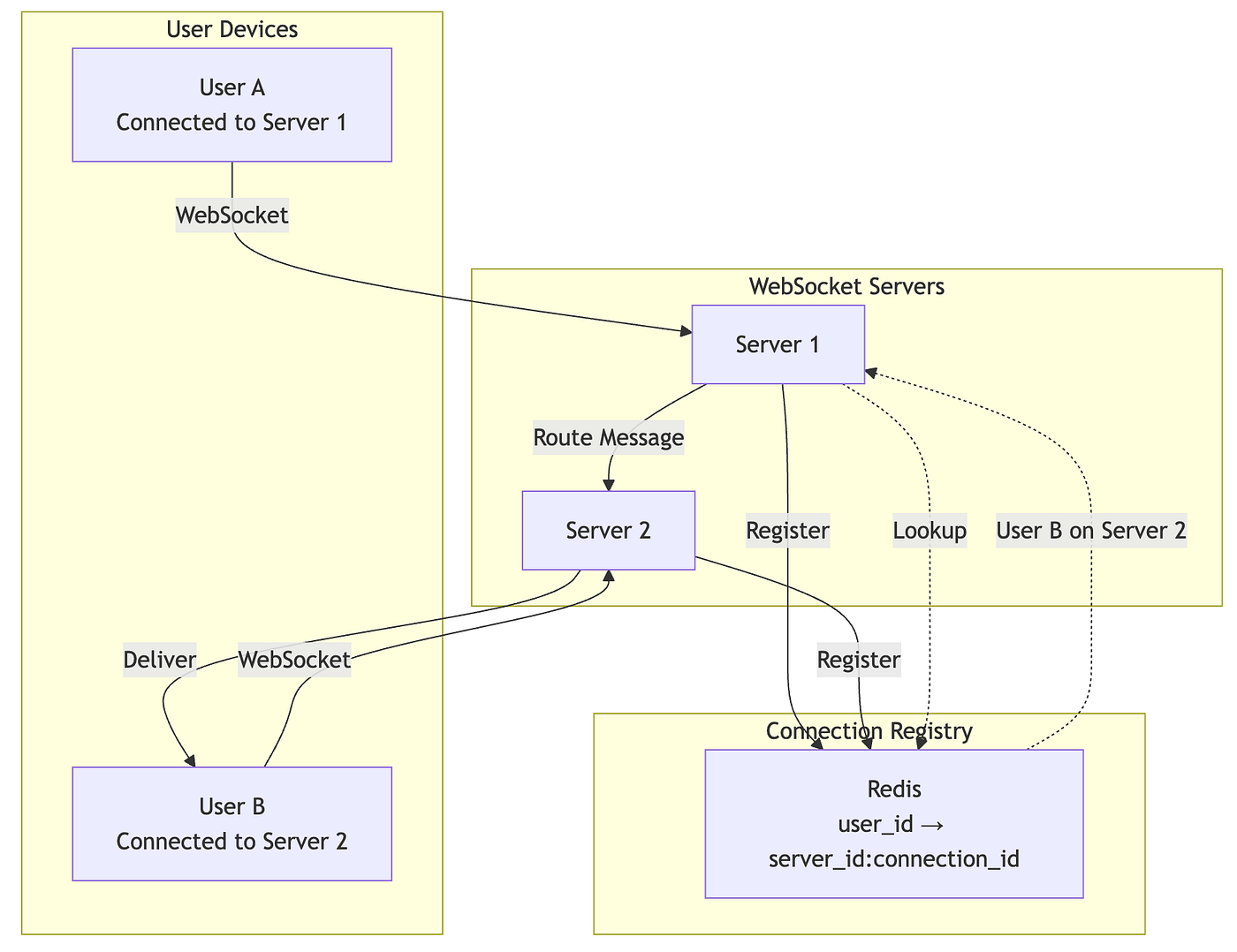
Now let's walk through the end-to-end workflows of this system.
This resource details the high-level design and interaction flows for the architecture we've just outlined.
First, read the High-level design section to solidify your understanding of the components. Then, carefully study the step-by-step workflows under the overall workflow and User Login / Going Online and other key interactions. This will show you how the pieces fit together to handle login, logout, and unexpected disconnects.
3. Deep Dive: Core Mechanisms
Let's zoom in on the specific mechanisms that power this system.
A. Heartbeats and Offline Detection
This is the fundamental mechanism for tracking online status.
- Client Heartbeat: The client sends a lightweight "ping" message over the WebSocket connection at a regular interval (e.g., every 30 seconds).
- Server-Side Logic: The Presence Service receives this heartbeat. For each online user, it stores their status in the Redis cache with a Time-To-Live (TTL) slightly longer than the heartbeat interval (e.g., 65 seconds).
- Refreshing the TTL: Each subsequent heartbeat for that user simply refreshes the TTL on their Redis key.
- Offline Detection: If the client disconnects abruptly (closes laptop, enters a tunnel), the heartbeats stop. After 65 seconds, the Redis key expires automatically.
- Publishing Offline Status: The Presence Service detects this expiration (either via Redis Keyspace Notifications or a delayed-check mechanism) and publishes a
user-offlineevent to the message bus.
This pattern gracefully handles unreliable networks. A short network blip might cause a missed heartbeat, but as long as the connection resumes before the TTL expires, the user's status remains "online," preventing annoying status flapping.
FAANG System Design Interview: Design A Chat System (WhatsApp, Facebook Messenger, Discord, Slack)
This clip from ByteByteGo offers a concise visual summary of using WebSocket pings for heartbeats.
Watch the section from online presence, which explains how heartbeats distinguish between an active connection and a backgrounded app, and how a grace period handles brief disconnections.
The choice of heartbeat interval is a classic trade-off between responsiveness and load. A short interval (e.g., 5s) detects disconnects faster but creates immense server load. A long interval (e.g., 60s) is lighter but introduces significant latency in presence updates. A value between 15-30s is a common compromise.
B. Typing Indicators and Cursor Positions
These features are essentially high-frequency, ephemeral presence events. The same architectural patterns apply, but with a few crucial tweaks to handle the higher message volume.
For Typing Indicators:
- When a user starts typing, the client sends a
start-typingevent. - The Presence Service receives this and publishes a
typingstatus for that user with a very short TTL (e.g., 10 seconds). - If the user continues typing, the client can throttle
start-typingevents (e.g., one every 8 seconds) to refresh the TTL. - If the user stops typing, the TTL expires automatically, and the typing indicator vanishes. There's no need for an explicit
stop-typingevent, which simplifies the client logic and makes the system more resilient.
For Live Cursors:
- Cursor position updates are even higher frequency. A user moving their mouse can generate hundreds of events per second.
- Client-side throttling is non-negotiable. The client must use a mechanism like
requestAnimationFrameor a simple timer to sample the cursor position and send updates at a fixed rate (e.g., 10-20 times per second). Sending every raw mouse event would saturate the network and backend. - The payload must be minimal:
{"docId": "xyz", "userId": "abc", "pos": [x, y]}. - These events flow through the same pipeline: Client -> RTC Gateway -> Message Bus -> other RTC Gateways -> other Clients. They might bypass the main Presence Service and Redis cache for performance, as the state is highly transient and doesn't need to be persisted beyond the immediate broadcast.
✅ System Design 10: Design Real-time Collaborative Text Editor like Google Docs | Notion | HLD | LLD
This video on designing a collaborative editor briefly touches on how cursor positions are handled.
Watch the short segment explaining how cursor positions are communicated via WebSocket and persisted. Note the mention of using a websocket connection and persisting the position in a Redis cluster with a TTL. This reinforces the pattern we've discussed for ephemeral state.
4. Trade-offs and Senior-Level Discussion
In an interview, simply describing the architecture isn't enough. A senior candidate must articulate the why behind their choices.
This section of the GitHub document provides an excellent summary of the key technical decisions and their trade-offs.
Read the entire Trade offs/Tech choices section. Pay close attention to the discussions on Push vs. Pull, WebSocket vs. SSE, heartbeat intervals, and the choice of a distributed cache over a relational database.
Let's summarize the most important trade-offs:
| Decision | Choice Made & Rationale | Alternative & Why Not |
|---|---|---|
| Data Delivery | Push (WebSockets): Essential for real-time updates. Low latency and efficient after initial setup. | Pull (Polling): Inefficient at scale. Creates massive unnecessary load and high latency. Unacceptable for this use case. |
| Real-time State Store | In-Memory Cache (Redis): Extremely fast reads/writes (sub-millisecond), handles high throughput. Key expiration (TTL) is a perfect primitive for offline detection. | Relational Database (e.g., PostgreSQL): Cannot handle millions of writes/second for presence updates. Disk I/O is too slow. ACID guarantees are overkill for ephemeral state. |
| Offline Detection | Application-Managed Timers + DB TTL: Presence service manages timers (e.g., "actor model") for fine-grained control over multi-device logic, using DB TTL as a fallback. | DB TTL Notifications Only: Simpler, but can be less reliable under load (notifications can be delayed/dropped) and makes complex multi-device logic harder to implement correctly. |
| Service Communication | Message Bus (Kafka): Decouples services, provides resilience and backpressure. Allows new services (e.g., analytics) to consume presence events without changing the core system. | Direct RPC: Tightly couples services. A failure or slowdown in one service can cascade to others. Harder to scale and evolve independently. |
A mid-level engineer might describe the happy path of a heartbeat. A senior/staff engineer, however, discusses the failure modes. What happens when a Redis shard fails? (Data is ephemeral, clients re-register on next heartbeat). What happens if Kafka is down? (Presence updates are delayed, but the system doesn't crash). What is the strategy for handling "thundering herd" when a network partition heals and millions of clients try to reconnect simultaneously? (Exponential backoff with jitter on clients, rate limiting at the gateway). This level of thinking demonstrates seniority.
Conclusion
Today we designed a complete, scalable presence system. You now have the architectural blueprint for building features that signal liveness and activity in any real-time application.
Key Takeaways:
- Decouple and Conquer: The architecture separates concerns into a connection layer (RTC Gateway), a logic layer (Presence Service), a state layer (Redis), and a communication layer (Kafka).
- Heartbeats + TTL are the Core: This simple but powerful pattern is the foundation for detecting online/offline status reliably.
- High-Frequency Events Require Throttling: Features like typing indicators and live cursors must be heavily throttled on the client to avoid overwhelming the system.
- Choose the Right Tool: A relational database is the wrong tool for this job. A high-throughput, in-memory cache like Redis is essential for performance.
In our next lesson, we will shift gears to Performance Monitoring & Observability. Having designed these complex frontend systems, we must answer the question: "How do we know it's working well in the real world?" We will explore how to measure Core Web Vitals, implement error tracking, and build dashboards to ensure the systems we design meet their performance and reliability goals for millions of users.