In our previous lesson, we focused on the micro-level of UI architecture, learning how to design scalable and maintainable components using patterns like compound and headless components. Now, we're zooming out to the macro-level: the structure of the entire codebase. How you organize your projects in repositories is one of the most fundamental architectural decisions you'll make, profoundly impacting developer experience, collaboration efficiency, and your ability to ship features at scale.
This lesson directly addresses a classic system design debate: Monorepo vs. Polyrepo. We will dissect the trade-offs between housing multiple projects in a single repository versus giving each project its own. Understanding this is non-negotiable for a senior engineer, as it demonstrates your ability to think about system-wide productivity and long-term architectural health, not just the code for a single feature.
The Fundamental Tension: Atomic Changes vs. Forced Upgrades
At its heart, the monorepo vs. polyrepo debate is about managing change and dependencies across a growing organization. Do you optimize for making sweeping, cross-cutting changes easily, or for allowing teams and projects to evolve independently?
This video provides an excellent narrative introduction to this core tension. It begins by highlighting the primary advantage of a monorepo—atomic changes—before revealing the subtle but significant challenges that emerge as a project scales.
You should probably switch to a monorepo
Watch the initial segments of this video from the Philomatics channel. It clearly articulates the "why" of a monorepo and the coordination pain of a polyrepo, then introduces the critical "forced upgrade" problem that is central to this entire discussion.
First, watch the section explaining the power of atomic commits in a monorepo. Next, see the contrast with the multi-repo workflow and its associated overhead. Finally, and most importantly, grasp the core dilemma: the forced upgrade problem, where a change in a shared library compels all consumers to update simultaneously.
This "forced upgrade" problem is the crux of the matter. While a monorepo promises simplicity by keeping everything in one place, it creates tight coupling. A polyrepo offers loose coupling, but at the cost of significant integration overhead. Let's formalize these concepts.
Defining the Strategies
- Monorepo: A single version control repository that holds the source code for multiple distinct projects. These projects can be applications (e.g.,
web-app,admin-dashboard) or shared libraries (e.g.,ui-kit,auth-client). - Polyrepo (or Multi-repo): The traditional approach where each project lives in its own dedicated repository. Shared code is distributed as versioned packages through a registry like npm.
This table gives a high-level view of when each strategy is typically recommended.

Now, let's go deeper into the specific trade-offs that drive these recommendations.
A Deeper Dive into the Trade-offs
Choosing a repository strategy involves balancing competing concerns. The following article provides a fantastic, detailed comparison that we'll use as our guide.
This guide offers a comprehensive breakdown of the monorepo vs. polyrepo debate. It includes a detailed comparison table and clear criteria for when to choose each approach.
Read the section titled "Monorepo vs Polyrepo". Pay close attention to the comparison table and the subsequent list of criteria for when to choose each strategy.
Let's unpack the most critical points from that reading:
-
Code Sharing and Refactoring:
- Monorepo: Effortless. You import code from another package via a relative path or workspace alias. Refactoring a shared utility and all its usages across multiple applications can be done in a single, atomic commit. This is a massive productivity win.
- Polyrepo: Cumbersome. To share code, you must version, publish, and install a package. A simple refactor might require multiple PRs across different repositories, creating a coordination nightmare and potential for version mismatches.
-
Dependency Management:
- Monorepo: Typically enforces a "single version policy." If your
web-appandadmin-dashboardboth use React, they use the same version of React defined at the root. This prevents dependency hell but leads to the "forced upgrade" problem we saw earlier. A breaking change in a shared library (@acme/ui) requires you to update all consumers in the same commit. - Polyrepo: Flexible. Each project manages its own dependencies. The
web-appcan be on React 18 while theadmin-dashboardstays on React 17. This autonomy is valuable but can lead to "dependency drift," where teams are on vastly different versions of key libraries, making it hard to maintain consistency.
- Monorepo: Typically enforces a "single version policy." If your
-
CI/CD and Tooling:
- Monorepo: Complex. A naive CI setup would rebuild and test everything on every commit, which is untenable at scale. This makes sophisticated tooling non-negotiable. You must have tools that can identify "affected" projects to only run tasks on what has changed.
- Polyrepo: Simple. Each repository has its own independent, isolated build pipeline. The tooling is straightforward, but you lose the ability to easily validate an end-to-end change across multiple projects.
-
Code Visibility and Ownership:
- Monorepo: Total visibility. A developer can search across the entire codebase, which is great for discovery and learning. However, it can blur ownership boundaries. This is mitigated with
CODEOWNERSfiles, which automatically assign reviewers based on which part of the codebase is modified. - Polyrepo: Siloed. Access control is easy—you just grant access to a specific repository. This is essential in environments with strict security or compliance needs. The downside is that it hinders discoverability and cross-team collaboration.
- Monorepo: Total visibility. A developer can search across the entire codebase, which is great for discovery and learning. However, it can blur ownership boundaries. This is mitigated with
Visualizing a Frontend Monorepo
Let's make this more concrete. Here is a common architecture for a frontend monorepo.
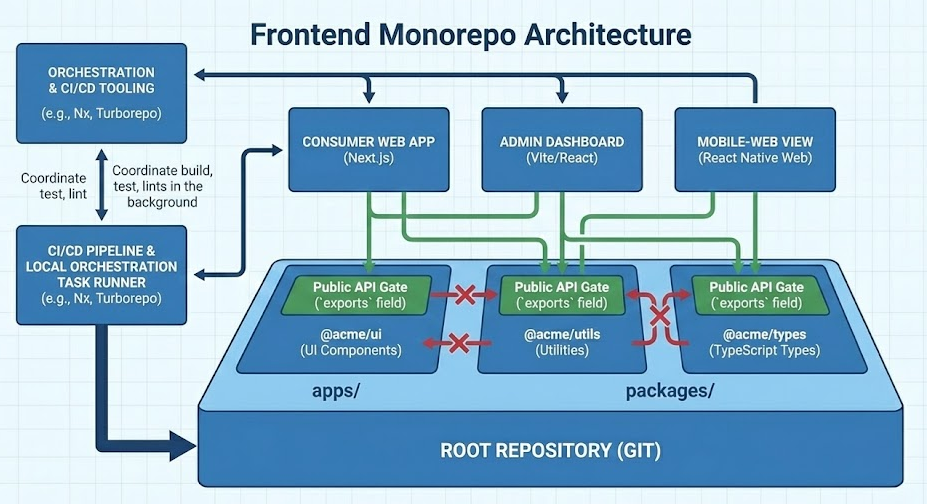
Notice the apps/ and packages/ directories. This is a standard convention.
apps/: Contains the runnable applications.consumer-web-appandadmin-dashboardare examples.packages/: Contains shared code intended to be consumed by the apps.@acme/uiwould be your design system, built with the component patterns from our last lesson.@acme/utilscould be shared business logic, and@acme/typescould be shared TypeScript interfaces, perhaps generated from a backend API schema.
The green lines show valid dependencies (apps depending on packages), while the red "X" signifies that packages should generally not depend on each other in a way that creates cycles, and definitely should not depend on apps. The orchestration tooling (like Turborepo or Nx) is the brain that understands this dependency graph.
Making the Decision: A Pragmatic Framework
Given these trade-offs, how do you decide? Answering "it depends" is a junior-level response. A senior-level response involves a framework for evaluating the context.
The article "Monorepo Architecture: The Ultimate Guide for 2025" provides an excellent, pragmatic checklist.
Monorepo Architecture: The Ultimate Guide for 2025 | Feature ...
This guide cuts through the ideology and provides a practical framework for making the monorepo vs. polyrepo decision.
Read the introductory section up to the checklist. Focus on the core framing of coordination vs. integration cost. Then, go through the pragmatic checklist. If you answer "yes" to 4 or more of those questions for a given project, a monorepo is very likely the correct choice.
The key takeaway is to evaluate change frequency across boundaries. If your teams are constantly making changes that affect multiple projects (e.g., updating a design system, changing an API client), the integration cost of a polyrepo will quickly become a major drag on productivity. In these cases, the upfront investment in a monorepo's tooling pays for itself.
Essential Tooling: Nx vs. Turborepo
As we've established, a monorepo is only as good as its tooling. Without it, you're left with slow builds and a lack of architectural enforcement. Two tools dominate the modern JavaScript monorepo landscape: Turborepo and Nx.
It's helpful to distinguish between two roles:
- Workspace Manager: Handles dependency installation and linking local packages.
pnpm,yarn, andnpmall have "workspace" features for this.pnpmis often preferred for its strictness, which helps prevent dependency issues. - Task Runner / Build Orchestrator: Intelligently runs scripts (
build,test,lint) across the workspace. This is the role of Turborepo and Nx.
Monorepo Architecture: The Ultimate Guide for 2025 | Feature ...
This part of the article clearly explains the roles of different tools and provides a concise comparison and selection rubric.
Read the section on Tooling in 2025. Pay attention to the descriptions of Turborepo and Nx, and review the Tool comparison table and the practical selection rubric at the end.
Here's the senior-level summary of the comparison:
-
Turborepo is the minimalist's choice. It's a high-performance build system that excels at one thing: running tasks fast. It uses smart caching (local and remote) and parallel execution to dramatically speed up CI/CD pipelines. You adopt Turborepo when your main pain point is slow builds and you want a solution with a low learning curve.
-
Nx is the "batteries-included" platform. It does everything Turborepo does (caching, task running) but adds a rich ecosystem of features on top. Its core is a powerful project graph that enables:
- Advanced
affectedcommands: Precisely running tasks only on code affected by a PR. - Code generators: Scaffolding new apps or libraries with your organization's best practices.
- Module boundary enforcement: Linting rules that prevent invalid dependencies (e.g., a
backend-libbeing imported by afrontend-app). - Plugin ecosystem: Rich integrations for frameworks like React, Next.js, and NestJS.
- Advanced
You choose Nx when you're building a "platform" and want to enforce architectural consistency and standards across many teams. The trade-off is a steeper learning curve compared to Turborepo.
Conclusion: A Strategic Choice
We've established that the monorepo vs. polyrepo decision is not about technical purity but about optimizing for your organization's communication and development patterns.
Key Takeaways:
- Monorepos optimize for collaboration and atomic changes. They excel when projects are tightly related and share significant code, but they demand a disciplined approach and investment in sophisticated tooling to manage complexity and CI performance.
- Polyrepos optimize for autonomy and independent deployments. They are a natural fit for disconnected projects, diverse tech stacks, or strict security boundaries, but they impose a high "integration tax" when cross-repository changes are required.
- Tooling is the key to a successful monorepo. For any non-trivial monorepo, a task orchestrator like Turborepo (for speed and simplicity) or Nx (for platform-level control and guardrails) is not optional, but essential.
- For most new projects, a monorepo is the safer default. It's easier to start in a monorepo and split out a service later (if needed) than it is to merge multiple disparate repositories into a monorepo after the fact.
In our next lesson, we'll explore an even more advanced pattern for scaling frontend development: Micro-frontends. We'll see how they take the idea of decoupling to the extreme, allowing independent teams to build, test, and deploy parts of a larger application, and how this strategy relates to the monorepo/polyrepo architectures we've discussed today.