In our last lesson, we focused on moving CPU-intensive logic off the main thread using Web Workers to keep the UI responsive. This is a powerful pattern for tasks like data processing or calculations. But what happens when the bottleneck isn't the computation itself, but the sheer act of rendering thousands of elements to the screen? Even with techniques like virtualization, the DOM has its limits.
This lesson tackles that ultimate performance frontier. We will explore two advanced solutions for scenarios where the DOM is no longer a viable option: Canvas-based rendering and WebAssembly (WASM). You will learn to identify the specific, high-performance use cases where these technologies are superior to the DOM, understanding the critical trade-offs in complexity, accessibility, and development effort. This knowledge is crucial for architecting systems that need to handle extreme data density or near-native computational speed, a common theme in senior-level system design interviews for products like Figma, Google Sheets, or intensive data visualization tools.
1. The Final Frontier: When the DOM Isn't Enough
The browser's Document Object Model (DOM) is a marvel of engineering. It gives us a structured, accessible, and stylable way to build user interfaces. As we've discussed, techniques like virtualization can help us render lists with thousands of items by only creating DOM nodes for the visible elements.
However, there's a ceiling. The browser's rendering pipeline (style → layout → paint → composite) still has to manage every single node. When you need to display tens of thousands of interactive elements simultaneously—think a financial trading dashboard, a complex design tool, or a massive data grid—even a virtualized DOM can buckle under the pressure.
Frontend System Design: Virtualization & Handling Large Data Sets - DEV Community
This article clearly outlines the thresholds where different rendering strategies become necessary. It provides a practical decision-making guide that we will build upon.
First, read the section When DOM vs Canvas to see a direct comparison of when to choose one over the other. Then, review the flowchart under "Choosing the Right Pattern". Notice the thresholds provided—especially when it recommends Canvas for "1,000,000+ cells (extreme)".
The key takeaway is that at a certain scale, the overhead of managing individual DOM nodes becomes the primary bottleneck. To go faster, we need to bypass the DOM's object model entirely.
2. Canvas Rendering: Painting Pixels Directly
The HTML <canvas> element provides a fundamentally different rendering model. Instead of building a tree of objects that the browser manages (retained mode), Canvas gives you a flat, pixel-based drawing surface where you issue immediate drawing commands via JavaScript (immediate mode).
- Retained Mode (DOM/SVG): You declare what you want to draw (
<div>,<circle>). The browser "retains" a model of these objects and handles redrawing them when needed. - Immediate Mode (Canvas): You tell the context to draw a shape at specific coordinates (
ctx.fillRect(10, 10, 150, 100)). Once drawn, the browser forgets about the "rectangle"—it's just a collection of colored pixels. To change it, you must clear and redraw the entire scene (or the affected part).
This distinction is the source of Canvas's power and its pain.
The Trade-Off: Speed vs. "Freebies"
By ditching the DOM's object model, you gain raw speed. You can draw hundreds of thousands of shapes at 60 FPS because the browser isn't tracking 100,000 objects, their styles, and their event listeners. However, you lose everything the DOM provides for free:
- Accessibility: A canvas is a "black box" to screen readers.
- Event Handling: There are no
onClickhandlers for a shape drawn on a canvas. You get a single click event on the<canvas>element and must manually calculate which shape was clicked (this is called hit testing). - Text & Styling: Text rendering is primitive, and you can't use CSS to style your shapes.
- Developer Experience: You are responsible for managing state, redrawing on every frame, and implementing all user interactions from scratch.
This video gives a great overview of the performance vs. pain trade-off across different rendering technologies.
WEIGHING PERFORMANCE AGAINST PAIN SVG, CANVAS AND WEBGL Dominikus Baur
In this talk "Weighing Performance Against Pain," Dominikus Baur provides clear benchmarks and conceptual explanations for SVG (DOM-like), Canvas, and WebGL.
First, watch the introduction to understand the core concept of performance vs. pain. Next, see the demonstration of SVG's performance limits when animating a few thousand stars. Finally, compare this to the Canvas performance, which handles tens of thousands of objects much more smoothly.
When to Use Canvas
Canvas is the right choice when your primary requirement is rendering a high density of graphical elements with frequent updates, and you're willing to pay the complexity cost.
Classic Use Cases:
- High-Density Data Visualization: Scatter plots or heatmaps with 50,000+ data points.
- Real-time Dashboards: Financial trading terminals (like the Bloomberg Terminal) where thousands of values update multiple times per second.
- Creative/Design Tools: Online photo editors or drawing applications.
- 2D Games: Where performance and pixel-level control are paramount.
- Extreme Data Grids: Applications like Google Sheets or Airtable that need to display millions of cells.
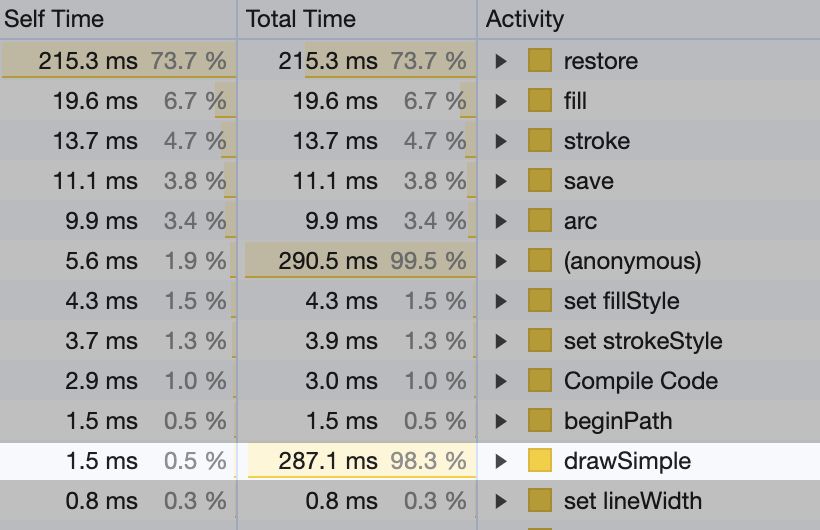
The article from dev.to that you read earlier provides an excellent deep dive into how a high-performance Canvas grid is architected. It involves manually calculating visible cells, drawing them in a requestAnimationFrame loop, and overlaying a native <input> element for text editing.
3. WebAssembly (WASM): Unleashing Near-Native Speed
WebAssembly is often discussed alongside Canvas, but it solves a different problem. WASM is not a graphics API. It is a binary instruction format—a compilation target—that allows you to run code written in languages like C++, Rust, or Go in the browser at near-native speed.
Your background in C++ will make this concept very intuitive. You know that C++ code, when compiled, can execute much faster than interpreted JavaScript for CPU-bound tasks. WASM brings that capability to the web.

When to Use WASM
You should consider WASM when you have a piece of logic that is a significant computational bottleneck in JavaScript.
Classic Use Cases:
- Game Engines: Running the physics and game logic.
- Data Processing: Video and audio codecs, image compression, encryption algorithms.
- Scientific Simulation: Running complex mathematical models.
- The "Engine" of a Web App: As we will see, this is the killer use case when combined with a rendering surface like Canvas or WebGL.
Case Study: Figma's C++ Engine
Figma is the canonical example of WASM used at scale. Figma is not a traditional web app; it's a professional design tool that feels like a native application, built with web technologies. They achieved this by writing their core rendering engine in C++ and compiling it to WebAssembly.
Let's watch Joey Liaw, an engineer at Figma, explain their architecture.
A Tour of the C++ Engine which Powers That Design MMO Called Figma - Joey Liaw (Config 2022)
This talk from Figma's Config conference is a masterclass in frontend system design at the extreme edge. It details why and how they use C++/WASM.
First, watch the section explaining why they use C++ for their graphics renderer and scene graph. The goal is "consistently high frame rates," which would be difficult to achieve in TypeScript. Next, listen to the rationale on tighter control over CPU and memory, a critical factor for operating within the browser's strict resource constraints. Finally, absorb the section on optimization techniques borrowed from game engines, such as deduplication, columnar storage, and Level of Detail (LOD) systems. This demonstrates the depth of engineering required when you bypass the browser's standard rendering model.
The key insight is that Figma's team uses WASM to run their core logic—managing the scene, calculating geometry, and handling data structures—with the performance and memory control of C++. The WASM module then generates rendering commands that are executed by WebGL (a 3D graphics API similar to Canvas) to draw the pixels on the screen.
4. Trade-Off Analysis: Choosing Your Path
In a system design interview, your ability to articulate the trade-offs between these approaches is what demonstrates seniority.
| Aspect | DOM (Virtualized) | Canvas | WASM + Canvas/WebGL |
|---|---|---|---|
| Primary Use Case | Content-rich applications, standard data grids, most web apps. | 2D games, dense data visualizations, simple drawing tools. | "Native" apps in the browser: complex editors, 3D games, simulations. |
| Performance Limit | ~50k-100k DOM nodes. Struggles with high-frequency updates. | Millions of static objects. Tens of thousands of dynamic objects. | Can handle millions of dynamic objects. CPU-bound by logic. |
| Complexity | Low to Medium. Libraries like react-window abstract most of the difficulty. |
High. Must manually implement rendering, state, events, and accessibility. | Very High. Requires expertise in low-level languages (C++/Rust), graphics pipelines, and memory management. |
| Accessibility | Native and excellent. | None out of the box. Requires building a parallel "accessibility tree" in the DOM. | None out of the box. Same challenges as Canvas. |
| Interview Signal | "Pragmatic default." Shows you don't over-engineer. | "Knows the escape hatch." Shows you know how to scale beyond the DOM when necessary. | "Thinks in engines." Shows you can design systems at the scale of FAANG's most ambitious products. |
Senior-Level Insight: The Complexity Budget
A junior engineer might get excited by the raw performance of Canvas or WASM and suggest it too early. A senior engineer understands that these technologies come with a massive "complexity tax." The cost of rebuilding accessibility, event handling, text layout, and SEO is immense and can kill a project. The decision to move from the DOM to Canvas, or from JS to WASM, is as much a product and business decision as it is a technical one. You are trading a massive amount of the web platform's built-in power for raw performance. You only make that trade when you have hit a hard, measurable limit and the product requirements absolutely demand it. Always start with the simplest, most maintainable solution—the DOM—and only escalate when performance data proves you must.
Common Mistakes in Interviews
- Prematurely Suggesting Canvas/WASM: Proposing Canvas for a list of 1,000 items is a red flag. Show that you would use virtualization first.
- Ignoring the Downsides: When you suggest Canvas, immediately follow up by acknowledging the costs: "By moving to Canvas, we'd gain significant rendering performance, but we'd take on the responsibility of implementing accessibility, hit detection, and text editing from scratch, which is a major undertaking."
- Confusing WASM with a Graphics API: Stating "I'll use WASM to draw things" is incorrect. The correct phrasing is, "I'll use WASM to run our high-performance simulation/layout engine, which will then generate commands for a Canvas or WebGL rendering context."
- Failing to Quantify Thresholds: A strong answer includes rough numbers. "Initially, I'd build this with a virtualized DOM. If our data density exceeds 100,000 points or our real-time update frequency causes frame drops, my next step would be to prototype a Canvas-based solution."
Conclusion
You now have a clear framework for deciding when to step outside the browser's standard rendering model. The DOM is your workhorse for the vast majority of applications. When you face extreme data density or high-frequency updates that the DOM cannot handle, Canvas is your escape hatch, trading convenience for speed. For the most demanding applications that require near-native performance for their core logic, the combination of WebAssembly and a graphics API like Canvas or WebGL represents the pinnacle of what's possible on the web today.
Key Takeaways:
- The DOM's object model has an inherent overhead that becomes a bottleneck at extreme scales (e.g., >100,000 elements).
- Canvas offers raw rendering speed by providing an "immediate mode" pixel buffer, but forces you to manually implement accessibility, eventing, and state management.
- WebAssembly (WASM) is a compilation target for high-performance languages like C++, used for computationally expensive logic, not rendering itself.
- The most powerful pattern combines a WASM module for the application "engine" with a Canvas/WebGL context for rendering, as exemplified by Figma.
- The decision to adopt these technologies is a significant architectural commitment driven by hard performance requirements, not a premature optimization.
In the next module, we'll shift our focus from deep rendering performance to the broader architectural strategies required for mobile, Progressive Web Apps (PWAs), and cross-platform development, examining how to deliver robust experiences across a wide array of devices and network conditions.