Welcome back. In our last lesson, we architected a complete offline-first system using IndexedDB and a sync queue, ensuring an application remains functional and data is never lost, even without a network connection. That was a deep dive into data persistence and eventual consistency.
Today, we're going to put all the pieces from this module together. We'll synthesize our knowledge of state categorization, server state management with React Query, optimistic updates, and offline-first principles to tackle a classic senior frontend system design interview problem: designing the complete state architecture for a feature-rich project management board like Trello, Asana, or Linear. This lesson is the capstone for our state management module, challenging you to move from understanding individual concepts to architecting a cohesive, robust, and performant system.
1. Scoping the Problem: What Are We Building?
Before writing a single line of code or choosing a library, a senior engineer first defines the boundaries of the system. For a project management board, the state architecture needs to support a specific set of features and non-functional requirements. A great way to structure this initial phase is by asking targeted clarifying questions.
Let's watch a segment from the video "Frontend System Design Interview: Designing a Kanban Board" that does exactly this.
Frontend System Design Interview: Designing a Kanban Board
This video provides a structured walkthrough of designing a Kanban board. We'll use it to frame our thinking.
Watch the initial section on collecting information. Pay close attention to the questions asked about collaboration, real-time updates, board creation, customization, and scale. These questions directly inform our state architecture.
Based on that framing, let's establish the core requirements for our design:
- Functional Requirements:
- Users can view a board with columns and cards.
- Users can create, edit, and delete cards.
- Users can drag and drop cards between columns.
- The system is collaborative: changes made by one user should appear for others.
- Non-Functional Requirements:
- Performance: The UI must feel instantaneous, especially for drag-and-drop.
- Scalability: The system should handle boards with hundreds of cards without performance degradation.
- Resilience: The application should support offline viewing and editing.
Here is a high-level view of how the different parts of our system will interact.
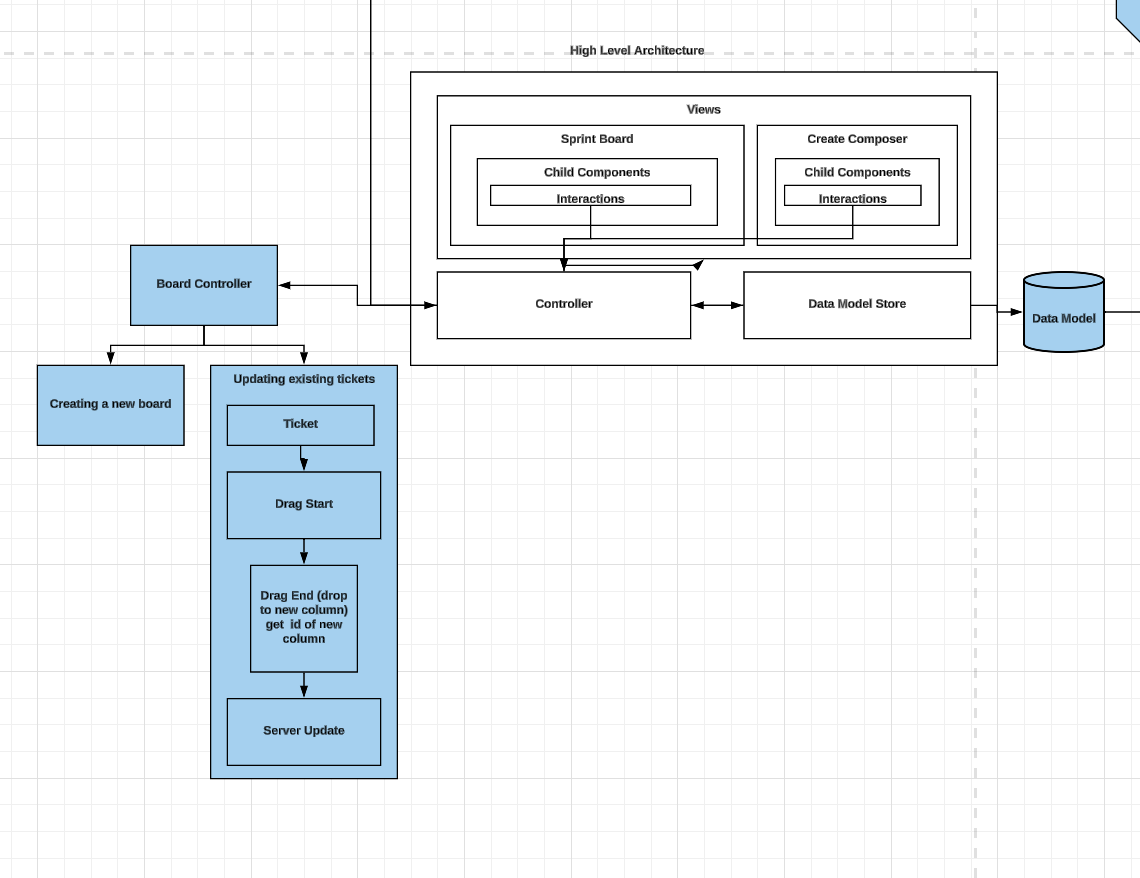
2. Data Modeling: The Perils of Nested State
With the requirements clear, the most critical decision for our state architecture is how to model the data. Your experience with APIs might tempt you to structure your client-side state just like a nested JSON response from the server.
Let's see why that's a problematic approach.
Frontend System Design Interview: Designing a Kanban Board
Let's return to the "Designing a Kanban Board" video.
Watch the section on data modeling. The video clearly explains the issues with a nested data structure (e.g., updating a user's name) and introduces the concept of normalization as the solution.
As the video highlights, a nested structure creates data duplication. If a user is assigned to 50 cards, their name and avatar URL are repeated 50 times in the state tree. Updating their name would require finding and updating all 50 instances—a process that is inefficient and highly error-prone.
The solution is normalization, a concept borrowed from database design. Instead of nesting, we create a "flat" state structure, where each data type (or "entity") lives in its own lookup table, keyed by its ID. Relationships are maintained using arrays of IDs.

For our Kanban board, the normalized state would look something like this:
{
  boards: {
    "board-1": { id: "board-1", title: "Project Phoenix", columnIds: ["col-1", "col-2"] }
  },
  columns: {
    "col-1": { id: "col-1", title: "To Do", cardIds: ["card-1", "card-2"] },
    "col-2": { id: "col-2", title: "In Progress", cardIds: ["card-3"] }
  },
  cards: {
    "card-1": { id: "card-1", content: "Design the login page", assigneeId: "user-1" },
    "card-2": { id: "card-2", content: "Build the API endpoints", assigneeId: "user-2" },
    "card-3": { id: "card-3", content: "Set up CI/CD pipeline", assigneeId: "user-1" }
  },
  users: {
    "user-1": { id: "user-1", name: "Sarah Johnson", avatar: "url_to_sarah_avatar" },
    "user-2": { id: "user-2", name: "David Chen", avatar: "url_to_david_avatar" }
  }
}
With this structure, if Sarah Johnson changes her name, we only need to update a single entry: users['user-1']. Any component that displays her name will automatically receive the update. This model is scalable, easy to maintain, and eliminates data consistency bugs. Your familiarity with Redux Toolkit's createEntityAdapter is relevant here, as it is a utility built specifically to manage normalized state like this.
3. Implementing Core Interactions with Optimistic Updates
Now, let's design the state logic for the most important user interaction: dragging a card from one column to another. To meet our performance requirement, we cannot wait for a server response. The change must be reflected in the UI instantly. This is a job for optimistic updates.
Since you're proficient with React Query, we will use it as our server state manager. Let's walk through how to implement an optimistic update for moving a card.
First, to build intuition, let's review the core mechanics of optimistic updates in React Query.
Frontend System Design Essentials: Optimistic updates
This video, "Frontend System Design Essentials: Optimistic updates," provides a clear, code-driven explanation of the pattern.
Watch these key segments: The introduction explains why optimistic updates are crucial for a good UX. The core implementation walks through the key onMutate callback in React Query. Focus on the steps: cancel queries, get previous data, set optimistic data. Error handling shows how to use the onError callback to roll back the state if the server request fails. The summary provides excellent heuristics for when this pattern is appropriate.
Now, let's apply this pattern to our drag-and-drop feature.
When a user drops a card (card-3) from the "To Do" column (col-1) to "In Progress" (col-2), we would trigger a React Query mutation.
Here's the sequence of events inside the useMutation hook:
-
onMutate: This function executes before the API request is sent.- Cancel ongoing queries: We call
queryClient.cancelQueries(['board', boardId])to prevent any stale data from overwriting our optimistic update. - Snapshot previous state: We get the current board data from the cache using
queryClient.getQueryData(['board', boardId])and store it. This is our rollback point. - Apply the optimistic update: We manually construct the new state. We find the source and destination columns in our normalized data, remove the
cardIdfrom the source column'scardIdsarray, and add it to the destination column'scardIdsarray. - Update the cache: We use
queryClient.setQueryData(['board', boardId], newOptimisticBoardData)to instantly update the cache. React Query re-renders all components subscribed to this query key, and the user sees the card move immediately. - Return the snapshot of the previous state in a context object.
- Cancel ongoing queries: We call
-
mutationFn: Now, the actual API request is sent to the server. For example:PATCH /api/cards/card-3with a payload of{ columnId: 'col-2' }. -
onError: If the API request fails:- We receive the context object containing our snapshot from
onMutate. - We call
queryClient.setQueryData(['board', boardId], previousBoardData)to roll back the UI to its original state. - We display a notification to the user: "Couldn't move card. Please try again."
- We receive the context object containing our snapshot from
-
onSuccessoronSettled: If the API request succeeds (or after it completes, regardless of outcome):- We call
queryClient.invalidateQueries(['board', boardId]). This tells React Query that our local data might be out of sync, triggering a background refetch to get the authoritative state from the server. This ensures our UI is eventually consistent with the backend, reconciling our optimistic update with the true state of the world.
- We call
This flow provides an instantaneous user experience while maintaining data integrity and eventual consistency.
4. Architecting for Offline Resilience
Our design is fast, but it's not yet resilient. What happens if a user moves a card while on an unstable train connection? We can leverage the offline-first architecture from our previous lesson to complete the design.
The key is to use IndexedDB as a persistent, local source of truth that backs our in-memory state.
Architecting an Intuitive and Powerful Offline Experience in Notejoy
This article from the creators of Notejoy is an excellent case study. Their architecture for offline notes is very similar to what we need for our project board.
Read these two sections: Storing offline data: Pay attention to their decision to use IndexedDB and why they chose not to use a library like redux-persist that automatically hydrates the entire state into memory. This is a critical performance consideration for large boards. Viewing and editing notes: This section details a sophisticated data fetching strategy, trying to load from in-memory state, IndexedDB, and the API concurrently, using whichever returns first. It also describes how they handle local offline edits.
Integrating this into our design, the architecture becomes multi-layered:
- In-Memory State (React Query Cache): The fastest layer, holding the data currently being displayed. This is what components read from.
- Persistent Local State (IndexedDB): The single source of truth when offline. Our normalized entities (
boards,columns,cards) map directly to IndexedDB object stores. We'll also have oursyncQueuetable here. - Server State (Backend API): The ultimate source of truth.
Now, our drag-and-drop flow becomes fully resilient:
- User drops a card.
- Optimistic Update:
- We optimistically update the in-memory state (React Query cache) as before, so the UI is instant.
- Simultaneously, we write this new state to our IndexedDB tables. For example, we update the
columnsobject store.
- Queue the Operation:
- We add an operation to our
syncQueuetable in IndexedDB:{ operation: 'UPDATE', endpoint: '/api/cards/card-3', payload: { columnId: 'col-2' } }.
- We add an operation to our
- Background Sync:
- If the user is online, the background sync process from our previous lesson immediately picks up the operation and sends it to the server.
- If the user is offline, the operation sits patiently in the queue. The next time the application detects a connection, the sync process will send it.
By combining a normalized data structure, optimistic updates, and a persistent offline layer, we have designed a complete state architecture that is scalable, performant, and resilient.
Conclusion
In this lesson, we synthesized concepts from across the module to architect the state layer for a complex, feature-rich application. This is precisely the kind of thinking required in a senior-level system design interview.
Key Takeaways:
- Normalize Your State: It is the single most important principle for building a scalable and maintainable frontend state architecture. It avoids update anomalies and reduces memory footprint.
- Embrace Optimistic Updates: For user-initiated actions that have a high probability of success, update the UI immediately to provide an instantaneous experience. Use the
onMutate->onError->onSuccesspattern to manage this flow. - Layer Your Data: A robust architecture often involves multiple layers of data: a fast in-memory cache for the UI, a persistent local database (IndexedDB) for offline support and resilience, and the server as the final authority.
- Queue, Don't Block: For actions that modify data, especially offline, queue them for background processing. This decouples the user experience from network latency.
We have now concluded our deep dive into state management. In our next module, we will shift our focus to Rendering Strategies & Web Performance. Now that we have a solid understanding of how to manage data behind the scenes, we will explore the best ways to get that data rendered on the screen as quickly and efficiently as possible, covering topics like SSR, SSG, ISR, and the Core Web Vitals.