Hello! Welcome back to our series on testing your Django application.
In the last lesson, we explored how to test views using Django's test client. You learned to simulate GET requests, check status codes, verify template usage, and inspect the data passed in the context. You also saw how to test protected views by simulating user login.
Today, we'll build directly on that knowledge to tackle a critical part of any web application: forms. You'll learn how to write tests that simulate a user submitting a form, which is essential for your Task Manager project where users will create and edit tasks. We will cover two main scenarios: what happens when a user submits valid data, and what happens when they submit invalid data.
By the end of this lesson, you will be able to write robust tests that simulate form submissions and validate your application's logic.
1. The Form Submission Lifecycle
Before we write tests, let's quickly review the typical flow when a user submits a form in a Django application. This process dictates what we need to test.
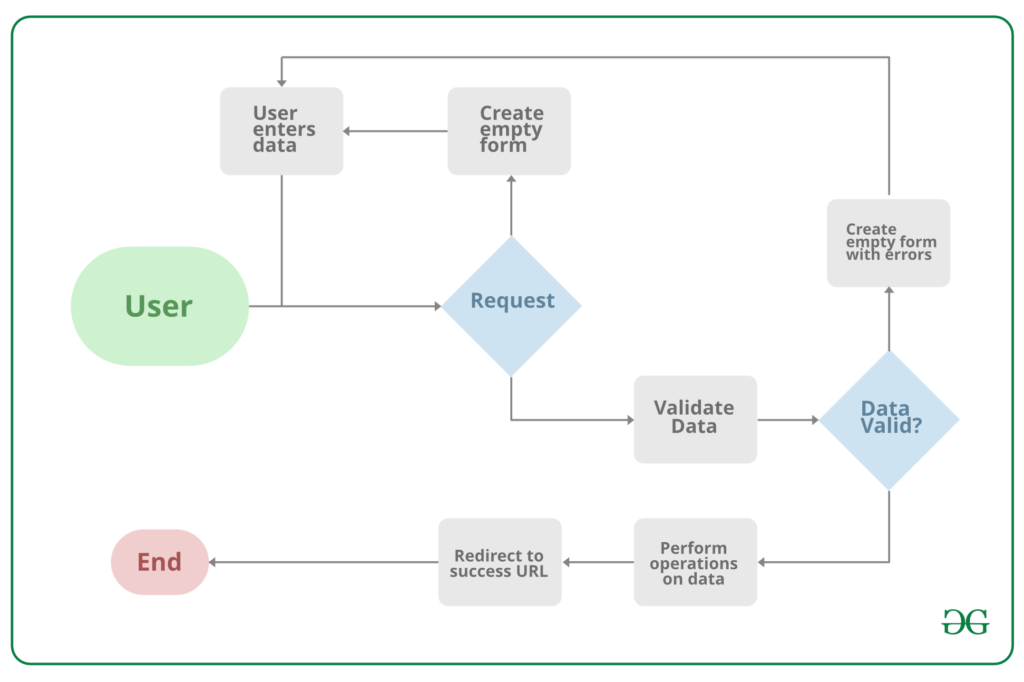
The flow goes like this:
- Initial Request (GET): The user visits a page with a form. Your view renders the template with an empty form instance.
- Submission (POST): The user fills out the form and clicks "submit," sending a POST request with the data to your server.
- Validation: Your view receives the POST data, binds it to a form instance (e.g.,
form = TaskForm(request.POST)), and callsform.is_valid(). - Two Outcomes:
- If Valid: The view performs an action (like saving a new task to the database) and then redirects the user to a "success" page. The server sends a 302 Redirect status code.
- If Invalid: The view does not perform the action. Instead, it re-renders the same page, but this time the form instance contains the user's submitted data and a list of validation errors. The server sends a 200 OK status code.
Our testing strategy will mirror this logic. We'll write separate tests for the "valid" and "invalid" paths to ensure our view handles both correctly.
2. Testing a Valid Form Submission
Let's start with the happy path: a user submits correct data, and everything works as expected. Our test needs to verify two things:
- A new object is created in the database.
- The user is redirected to the success URL.
The "Testing in Django" series by Net Ninja on YouTube has an excellent, practical video demonstrating exactly how to do this.
Testing in Django Tutorial #10 - Testing Forms
This video provides a clear, step-by-step guide to testing a valid form submission. It shows how to prepare form data, use self.client.post() to submit it, and then assert that the expected outcome occurred.
Watch the segment from 05:49 to 08:25. Pay close attention to: How the form_data dictionary is created. The use of self.client.post() with a URL and data. The assertions used to check the response status code (302) and verify that the product was created in the database using .exists().
To summarize the video's approach, a test for a valid form submission looks like this:
# In your tests/test_views.py or a new tests/test_forms.py

from django.test import TestCase
from django.urls import reverse
from your_app.models import Task  # Assuming you have a Task model

class TaskFormTest(TestCase):
    def test_create_task_with_valid_data(self):
        # ARRANGE: Prepare the data to be submitted.
        # This matches the fields on your Task form.
        form_data = {
            'title': 'My New Test Task',
            'description': 'A detailed description.',
            'due_date': '2024-12-31'
        }

        # ACT: Simulate a POST request to the view that handles form submission.
        url = reverse('create-task') # Use the name of your create task URL
        response = self.client.post(url, data=form_data)

        # ASSERT:
        # 1. Check that the submission was successful and redirected.
        self.assertEqual(response.status_code, 302)
        # You can also use assertRedirects for a more specific check.
        # self.assertRedirects(response, reverse('task-list'))

        # 2. Check that a new Task object was created in the database.
        self.assertTrue(Task.objects.filter(title='My New Test Task').exists())
This test gives you confidence that your form and view correctly handle valid user input from start to finish.
3. Testing an Invalid Form Submission
Now for the other path: what happens when a user submits invalid data? For example, they leave a required field blank or enter a negative number for a price.
Our test must verify:
- The user is not redirected and stays on the same page (status code 200).
- No new object is created in the database.
- The page displays specific error messages for the invalid fields.
Let's return to the Net Ninja video, which continues by demonstrating how to test this scenario.
Testing in Django Tutorial #10 - Testing Forms
This next segment shows how to test the handling of invalid data. It's a masterclass in checking for the correct status code, ensuring no data was saved, and verifying that the right error messages are shown to the user.
Watch from 08:25 to 11:22. Focus on: The creation of invalid_form_data. The assertion for the status code (200). The assertFormError() method, which is the star of the show here. It lets you check for specific error messages on specific fields. The final check to ensure no product was created.
Django's TestCase gives us the very powerful self.assertFormError() assertion. It lets you check that a specific field in the form contains a specific error message.
self.assertFormError(response, 'form', 'field_name', 'The expected error message.')
response: The response object fromself.client.post().'form': The name of the form in the response's context. This is usually just'form'.'field_name': The name of the field you expect an error on (e.g.,'title').'The expected error message.': The exact string of the error message.
Here's how you might apply this to your Task Manager:
# In the same test class

class TaskFormTest(TestCase):
    # ... (test_create_task_with_valid_data from above) ...

    def test_do_not_create_task_with_invalid_data(self):
        # ARRANGE: Prepare data with an invalid entry (e.g., blank title).
        invalid_form_data = {
            'title': '',  # Title is required, so this is invalid
            'description': 'This task should not be created.',
            'due_date': '2024-12-31'
        }

        # ACT: Simulate the POST request.
        url = reverse('create-task')
        response = self.client.post(url, data=invalid_form_data)

        # ASSERT:
        # 1. Check that the user stays on the page.
        self.assertEqual(response.status_code, 200)

        # 2. Check that the specific error message for the 'title' field is present.
        self.assertFormError(response, 'form', 'title', 'This field is required.')

        # 3. Check that no Task object was created.
        self.assertEqual(Task.objects.count(), 0)
        # Or more explicitly:
        # self.assertFalse(Task.objects.filter(description='This task should not be created.').exists())
This test ensures that your form's validation rules are working correctly and that your application provides helpful feedback to the user instead of saving bad data.
Test your understanding!
Imagine your Task model has a priority field which is an integer. Your TaskForm has custom validation to ensure priority must be greater than 0.
How would you write a test to verify that submitting a form with priority=-1 fails correctly? What assertions would you make?
Show answer
Your test would look something like this:
- Arrange: Create
form_datawithpriority: -1.form_data = { 'title': 'Low priority task?', 'priority': -1 } - Act:
POSTthis data to your form view.response = self.client.post(reverse('create-task'), data=form_data) - Assert:
- Check that the status code is 200 (user stays on the page).
self.assertEqual(response.status_code, 200) - Check that no task was created.
self.assertEqual(Task.objects.count(), 0) - Check for the specific validation error on the
priorityfield.
self.assertFormError(response, 'form', 'priority', 'Priority must be a positive number.')(Assuming this is your custom error message).
- Check that the status code is 200 (user stays on the page).
Conclusion
You now have a complete toolkit for testing form submissions in Django. By testing both the "happy path" with valid data and the failure path with invalid data, you can build a reliable and robust application.
Key Takeaways:
- Test Two Paths: Always test both valid and invalid form submissions.
- Simulate with
client.post: Useself.client.post(url, data=...)to simulate a user submitting a form. - Assertions for Valid Data:
- Check for a redirect:
self.assertEqual(response.status_code, 302)orself.assertRedirects(...). - Check for database changes:
self.assertTrue(MyModel.objects.filter(...).exists()).
- Check for a redirect:
- Assertions for Invalid Data:
- Check for no redirect:
self.assertEqual(response.status_code, 200). - Check for no database changes:
self.assertFalse(MyModel.objects.exists()). - Check for specific form errors:
self.assertFormError(response, 'form', 'field', 'error_message').
- Check for no redirect:
Preview of the Next Lesson:
In our next lesson, we will focus on a very specific and important type of form submission: user authentication. You will learn how to write tests for your user registration and login flow, combining everything you've learned about testing views and forms to ensure your application's security is working as expected. This will be a huge step toward completing your portfolio project.