Introduction
Welcome to the next step in your journey to mastering high-performance computing. In our previous lessons, you've established a solid foundation: you understand the separate memory spaces of the host (CPU) and device (GPU), and you know how to manage this separation by allocating GPU memory with cudaMalloc and moving data across the PCIe bus with cudaMemcpy. So far, however, the GPU has only acted as a storage device.
This lesson is where the real computation begins. We will shift our focus from data management to data processing by writing and launching your very first CUDA kernel. A kernel is a special function that you write in C++ but which executes in parallel on the GPU's many cores. By the end of this lesson, you will be able to write a function to perform element-wise vector addition, launch it across thousands of threads on the GPU, and orchestrate the entire process from a host application. This "Hello, World!" of GPU programming is a critical milestone that synthesizes everything you've learned into a complete, working CUDA program.
The Anatomy of a CUDA Kernel
At its core, a CUDA kernel is simply a C++ function. What makes it special is the __global__ execution space specifier. This keyword tells the NVIDIA C++ compiler (nvcc) that the function is a kernel that will be called from the host (CPU) but executed on the device (GPU).
| Qualifier | Description |
|---|---|
__host__ |
Indicates that the function executes on the host (CPU). This is the default for standard C++ functions. |
__global__ |
Indicates that the function is a GPU kernel, executable on the device and callable from the host. |
__device__ |
Indicates that the function executes on the device and can only be called from other __global__ or __device__ functions. |
__global__ functions must have a void return type. They operate on data that resides in the GPU's memory, so we pass pointers to device memory as arguments.
The following video provides a concise overview of the key terminology, including what a kernel is in the context of the GPU's thread hierarchy that you studied in the previous module.
CUDA Crash Course (v2): Vector Addition
The video "CUDA Crash Course (v2): Vector Addition" by Nick on YouTube provides an excellent introduction to the core concepts.
Watch the initial segment from the overview. This will refresh your memory on the hierarchy of grids, blocks, and threads, and formally define a kernel as the function that all these threads will execute.
Launching the Kernel
Once you have a kernel defined with __global__, you can't call it like a regular function. You must launch it using a special <<<...>>> syntax, known as the execution configuration. This syntax tells the CUDA runtime how many threads to launch and how to group them.
myKernel<<<numBlocks, threadsPerBlock>>>(arg1, arg2, ...);
Let's break down the two essential parameters for now:
numBlocks: The number of thread blocks in the grid.threadsPerBlock: The number of threads in each thread block.
The total number of threads launched is simply numBlocks * threadsPerBlock.
This structure directly maps to the GPU architecture you learned about. You are defining a grid composed of many thread blocks, which in turn are composed of many threads.
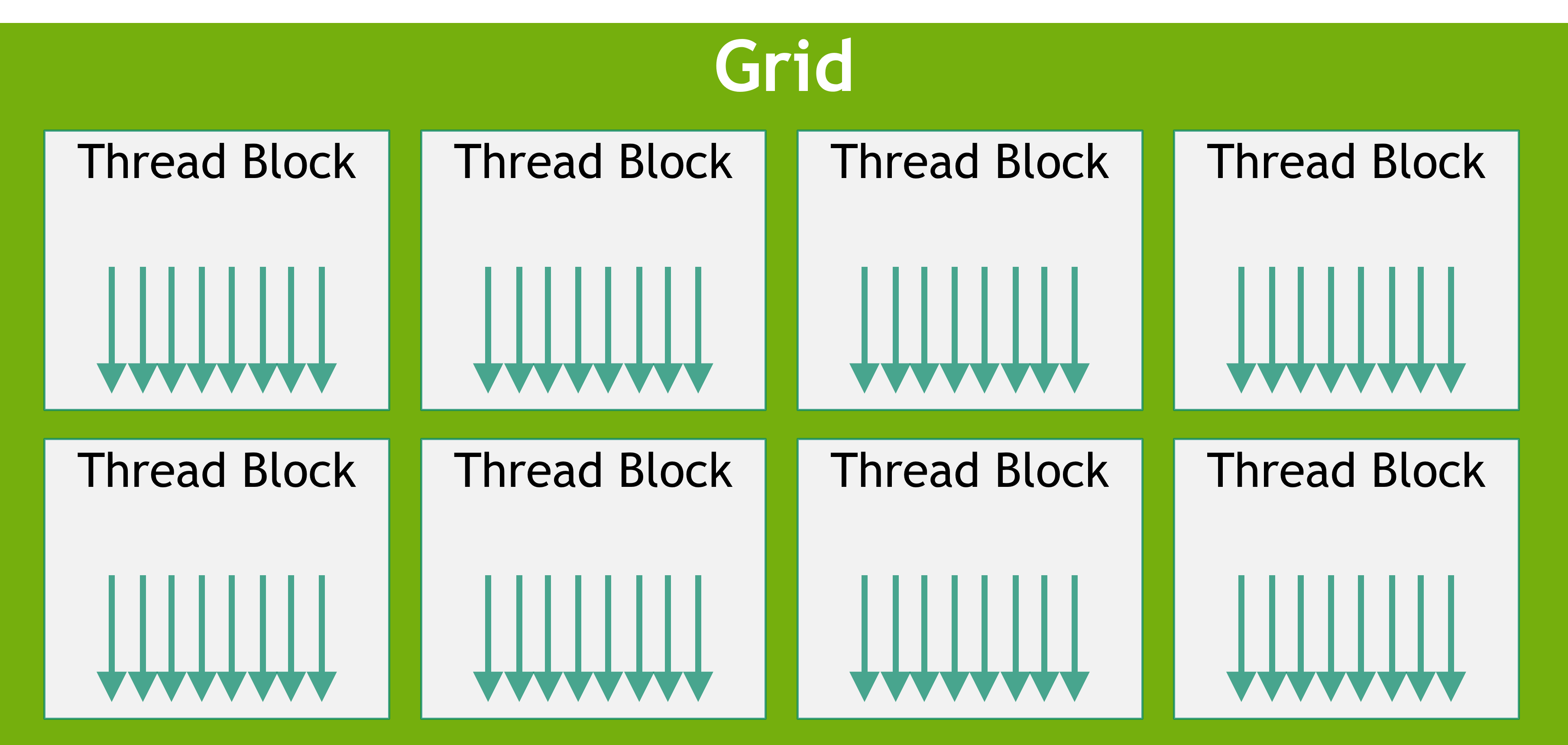
A key detail of kernel launches is that they are asynchronous from the host's perspective. When the CPU executes a kernel launch, it simply issues the command to the GPU and immediately proceeds to the next line of code without waiting for the kernel to finish. This is a powerful feature for overlapping work, but it means we need a way to synchronize. As you learned in the previous lesson, a blocking call like cudaMemcpy or an explicit call to cudaDeviceSynchronize() will force the host to wait until the GPU has completed all preceding work.
Assigning Unique Work to Threads
We can now launch thousands of threads, but by default, they all execute the exact same kernel code. To perform parallel processing, such as having each thread add one pair of elements in a vector, we need a way to differentiate them.
CUDA provides built-in variables that a thread can use to determine its identity within the grid. For a one-dimensional grid and block structure, the most important ones are:
threadIdx.x: The index of the thread within its block (from 0 tothreadsPerBlock - 1).blockIdx.x: The index of the thread block within the grid (from 0 tonumBlocks - 1).blockDim.x: The number of threads in the block (equal to thethreadsPerBlocklaunch parameter).gridDim.x: The number of blocks in the grid (equal to thenumBlockslaunch parameter).
Using these, we can compute a unique global index for every thread in the grid. The standard formula is:
This formula works by calculating a "base" index for each block (the number of threads in all preceding blocks) and adding the thread's local index as an offset within its own block.
The following video and diagram illustrate this fundamental concept perfectly.
CUDA Crash Course (v2): Vector Addition
Let's return to the "CUDA Crash Course" video.
Watch the section on indexing threads. The presenter does an excellent job of breaking down the global thread ID calculation and explaining the role of each built-in variable.
To reinforce this, study the following diagram from NVIDIA's developer blog. It provides a static visual for the exact same calculation.

Example: A Complete Vector Addition Program
Now we have all the pieces to build a complete application. We will create two large vectors on the host, A and B, and use a CUDA kernel to compute C = A + B on the GPU.
First, let's look at the host code (main function), which orchestrates the entire process. Notice how it combines the memory management from the last lesson with the new kernel launch step.
// main.cpp


#include <iostream>
#include <vector>

// Forward declaration of the kernel
void vectorAdd(const int* a, const int* b, int* c, int n);

int main() {
    const int N = 1 << 20; // 2^20 elements, a little over 1 million
    const size_t size = N * sizeof(int);

    // 1. Allocate and initialize host memory
    std::vector<int> h_a(N), h_b(N), h_c(N);
    for (int i = 0; i < N; ++i) {
        h_a[i] = i;
        h_b[i] = i * 2;
    }

    // 2. Allocate device memory
    int *d_a, *d_b, *d_c;
    cudaMalloc((void**)&d_a, size);
    cudaMalloc((void**)&d_b, size);
    cudaMalloc((void**)&d_c, size);

    // 3. Copy data from host to device
    cudaMemcpy(d_a, h_a.data(), size, cudaMemcpyHostToDevice);
    cudaMemcpy(d_b, h_b.data(), size, cudaMemcpyHostToDevice);

    // 4. Define execution configuration and launch kernel
    int threadsPerBlock = 256;
    int blocksPerGrid = (N + threadsPerBlock - 1) / threadsPerBlock;

    vectorAdd<<<blocksPerGrid, threadsPerBlock>>>(d_a, d_b, d_c, N);

    // 5. Copy results from device to host
    cudaMemcpy(h_c.data(), d_c, size, cudaMemcpyDeviceToHost);

    // 6. Verify results and free memory
    // (Verification code omitted for brevity)

    cudaFree(d_a);
    cudaFree(d_b);
    cudaFree(d_c);

    std::cout << "Vector addition complete." << std::endl;
    return 0;
}
A Note on the Grid Calculation: The line int blocksPerGrid = (N + threadsPerBlock - 1) / threadsPerBlock; is a standard integer arithmetic trick to calculate ceil(N / threadsPerBlock). It ensures we launch enough blocks to cover all N elements, even if N is not a perfect multiple of threadsPerBlock.
Now, let's define the kernel itself. This code is what each of the blocksPerGrid * threadsPerBlock threads will execute on the GPU.
// kernel.cu

__global__ void vectorAdd(const int* a, const int* b, int* c, int n) {
    // Calculate the unique global thread ID
    int idx = blockIdx.x * blockDim.x + threadIdx.x;

    // Bounds check: ensure the thread is not accessing out of bounds
    if (idx < n) {
        c[idx] = a[idx] + b[idx];
    }
}
This kernel is remarkably simple yet powerful. Each thread calculates its unique index idx. It then performs a single addition for the element at that index. The if (idx < n) check is crucial for safety; it prevents threads from accessing memory beyond the end of the arrays, which can happen when N is not a perfect multiple of the block size.
To compile this program, you would save the code in a file named vector_add.cu and use the NVIDIA C++ compiler:
nvcc vector_add.cu -o vector_add
Running ./vector_add will then execute the program.
The following resource provides a clean, self-contained textual walkthrough of this entire process, from kernel definition to launch.
Introduction to CUDA programming - Julian Roth
This section of Julian Roth's guide on CUDA programming provides an excellent, compact summary of the vector addition example.
Please read the section labeled 3.3 CUDA implementation. Focus on how the __global__ function is defined, how the global index idx is calculated, and how the kernel is launched with the <<<...>>> syntax. This will solidify the code you've just seen.
Conclusion
You have successfully written and launched your first CUDA kernel. This lesson is a major step, moving you from a conceptual understanding of the GPU to practical, hands-on parallel programming. You now command the entire workflow: allocating memory, transferring data, and executing a parallel computation.
Key Takeaways:
- GPU kernels are C++ functions marked with
__global__that are called from the host but execute on the device. - Kernel launches are asynchronous and configured with the
<<<numBlocks, threadsPerBlock>>>syntax. - The built-in variables
threadIdx.x,blockIdx.x, andblockDim.xare the fundamental tools for assigning unique work to each thread. - The formula
blockIdx.x * blockDim.x + threadIdx.xcomputes a unique global ID for each thread in a 1D grid. - Bounds checking (e.g.,
if (idx < N)) is essential for safely handling arbitrary input sizes.
In our next lesson, we will expand on these fundamentals by exploring how to use 2D grids and blocks. This will allow us to more naturally map computations to two-dimensional problems like image processing and matrix operations, preparing you for the highly optimized GEMM kernels that are central to deep learning.