Welcome back. In our previous lesson, we established the CUDA thread hierarchy—grids, blocks, warps, and threads—and saw how this software model maps directly onto the physical GPU hardware. We now have a clear picture of how work is organized. The next logical question for a kernel engineer is: where does the data for that work reside?
This lesson tackles that question by exploring the GPU's memory architecture. Just as a CPU has a hierarchy of caches and RAM, a GPU possesses a sophisticated, multi-leveled memory system. Your goal is to describe this hierarchy, identifying its main components: registers, shared memory, L1/L2 caches, and global memory. Understanding the properties of each memory space—its size, scope, and speed—is fundamental to writing high-performance kernels, as managing data movement is often the key to unlocking a GPU's full potential.
A High-Level View of the Memory Hierarchy
At its core, the GPU memory system is a pyramid. At the top, you have very small, extremely fast memory units located right next to the CUDA cores. As you move down the pyramid, the memory becomes larger but also slower and more distant. A thread's performance is dictated by how effectively it can access data from the highest, fastest levels of this pyramid.
This structure consists of several distinct memory spaces, each with a specific purpose and scope.
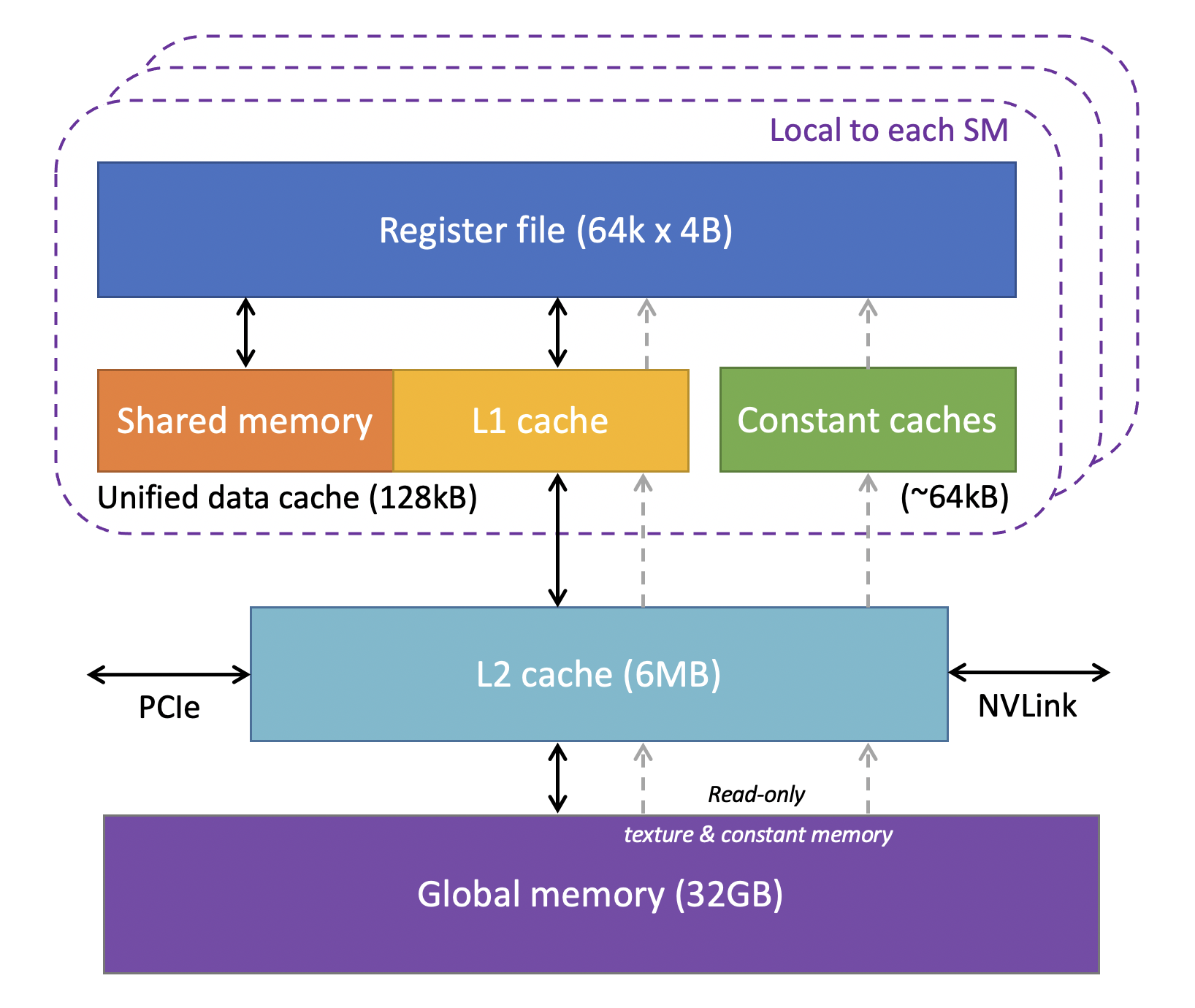
To begin, let's take a quick tour of these components on a modern NVIDIA H100 GPU to see how they are laid out on the physical chip.
HetSys Course: Lecture 4: GPU Memory Hierarchy (Spring 2022)
The "HetSys Course" lecture by Onur Mutlu provides a clear physical overview of the memory system in a state-of-the-art GPU. This will help ground the abstract concepts in hardware reality.
Please watch the segment from GPU memories. As you watch, identify the physical locations of the global memory (HBM3), the L2 cache, and the on-chip L1/shared memory complex within each SM.
As the video shows, the memory system is physically distributed. The large global memory resides on its own off-chip packages (HBM stacks), connected to the main processor die where the large L2 cache and the many SMs live. Each SM, in turn, contains its own even faster local memory.
The Programmer's Model of Memory
While the physical layout is important context, as a programmer, you interact with an abstraction of this hardware. The CUDA model exposes these different memory spaces and ties their visibility, or scope, to the thread hierarchy we learned about previously.
The official NVIDIA documentation provides a definitive table that summarizes these relationships. It's one of the most important references for a kernel developer.
CUDA C++ Best Practices Guide 13.1 documentation
This section from the official NVIDIA guide is the authoritative source on CUDA memory spaces. It clearly defines each memory type and its properties.
Please read the section "10.2. Device Memory Spaces". Start from the beginning and study the text leading up to and including Table 1. This table is the central piece of information for this lesson; analyze each row and column carefully to understand the scope, location, and lifetime of each memory type.
The table you just studied is your primary map to the GPU's memory landscape. Let's now explore each of these spaces in more detail, starting from the memory closest to a single thread and moving outwards.
1. Registers
- Location & Speed: On-chip, directly inside the SM. Registers are the fastest memory available to a thread, with access typically taking zero extra clock cycles.
- Scope & Lifetime: Private to a single thread. No other thread can see its registers. The data exists for the lifetime of the thread.
- Usage: The compiler automatically stores most local variables declared inside a kernel (e.g.,
int x;, loop counters) in registers. This is analogous to how a CPU uses its registers. - Key Consideration: The number of registers is a finite resource on the SM. If a kernel is too complex and requires more registers than are available per thread, the compiler will "spill" variables to a slower memory space. This is known as high register pressure and can severely degrade performance.
2. Local Memory
Local memory is perhaps the most confusingly named space. It is crucial to understand what it is—and what it is not.
- Scope & Lifetime: Private to a single thread, just like registers.
- Location & Speed: Off-chip. Despite its name, local memory physically resides in the same DRAM/HBM as global memory. Accessing it is therefore very slow, hundreds of times slower than accessing a register.
- Usage: It serves as the spill location for registers. It's also where the compiler will place thread-private arrays whose size is unknown at compile-time or whose indices are dynamic.
To solidify this critical distinction, let's turn to the documentation again.
CUDA C++ Best Practices Guide 13.1 documentation
This short section is vital for clearing up the common misconception about local memory.
Read the entire section 10.2.4. Local Memory. The first paragraph is the key takeaway: "Local memory is so named because its scope is local to the thread, not because of its physical location."
3. Shared Memory
Shared memory is one of the most powerful tools for GPU optimization.
- Location & Speed: On-chip, inside the SM. It offers dramatically higher bandwidth and lower latency than global/local memory.
- Scope & Lifetime: Shared by all threads within a single thread block. A thread in block
Acannot see the shared memory of blockB. The data exists for the lifetime of the block. - Usage: It is a programmable memory space. You explicitly declare variables in shared memory using the
__shared__qualifier in CUDA. Its primary uses are:- A user-managed cache: Threads in a block can collaboratively load a "tile" of data from slow global memory into fast shared memory, work on it, and then write results back. This avoids many redundant trips to global memory.
- Inter-thread communication: It provides a high-speed channel for threads within a block to exchange data and cooperate on a task.
On modern GPUs like the H100, the physical on-chip memory in an SM is a unified block that can be dynamically partitioned between shared memory and the L1 cache.
4. L1 and L2 Caches
These function similarly to CPU caches and are managed automatically by the hardware.
- L1 Cache: A small cache located within each SM. It caches accesses to local and global memory to reduce latency. Its effectiveness depends heavily on data access patterns.
- L2 Cache: A much larger cache that is shared by all SMs on the GPU. It acts as a last-level cache, catching requests that miss in L1 before they are sent off-chip to the slow global memory.
5. Global Memory
This is the main memory of the GPU, analogous to a computer's RAM.
- Location & Speed: Off-chip. On modern high-performance GPUs, this is typically High-Bandwidth Memory (HBM). On consumer cards, it's often GDDR6. It is the largest memory space but has the highest latency.
- Scope & Lifetime: Accessible by all threads in the grid, from any SM. It is also accessible by the host (CPU). Its lifetime is managed by the programmer through API calls like
cudaMallocandcudaFree. - Usage: It's the primary storage for initial input data and final output results. The central goal of many optimization efforts is to minimize the number of accesses to global memory.
6. Constant and Texture Memory
These are two additional read-only memory spaces with their own dedicated caches, optimized for specific access patterns.
- Constant Memory: Excellent for situations where all threads in a warp read the same value (a broadcast).
- Texture Memory: Optimized for 2D spatial locality, making it useful for workloads like image processing.
Memory Spaces in Code
The CUDA programming model uses specific qualifiers to tell the compiler where to place variables. The following video demonstrates how these abstract spaces map to actual code.
HetSys Course: Lecture 4: GPU Memory Hierarchy (Spring 2022)
This segment connects the abstract memory spaces to concrete CUDA C++ syntax.
Watch the section from using these different memory spaces. Pay attention to the use of keywords like __shared__ and __device__ and how they correspond to the different memory scopes (thread, block, grid) you've learned about.
To summarize the mapping in code:
- Register:
float my_var;(declared inside a kernel) - Shared Memory:
__shared__ float tile[1024]; - Global Memory:
__device__ float global_array[...];(statically) or a pointer from acudaMalloccall. - Constant Memory:
__constant__ float params[256];
Conclusion
In this lesson, we have dissected the GPU memory hierarchy, a critical concept for any aspiring kernel engineer. You now have a mental model of the different memory spaces, their characteristics, and how their scope is tied to the thread hierarchy.
Key Takeaways:
- GPU memory is a hierarchy of spaces with different trade-offs in size, speed, and scope.
- Registers are the fastest, smallest, and are private to a single thread.
- Shared Memory is a very fast, on-chip, programmable space shared by all threads in a block. It is a primary tool for performance optimization.
- L1/L2 Caches are hardware-managed caches that automatically reduce latency for global memory accesses. L1 is per-SM, while L2 is shared across the entire GPU.
- Global Memory is the largest but slowest memory, accessible to the entire grid and the host. The goal is to minimize traffic to it.
- Local Memory is a misleading name for a thread-private abstraction that is slow because it physically resides in global memory. It's primarily used for register spills.
We've now described the what and where of the GPU memory system. In the next lesson, we will quantify these differences by comparing the bandwidth and latency characteristics of each level. Understanding the concrete numbers—the clock cycles and gigabytes per second—will make it crystal clear why orchestrating data movement up and down this hierarchy is the essence of GPU performance tuning.