Welcome! In our last session, we demystified decorators and saw how they serve as the crucial link between TypeScript classes and the Angular framework. With that, we have covered all the major, advanced TypeScript features that form the foundation of Angular development.
This lesson marks the final step in our TypeScript essentials module. We will explore a set of powerful tools that help you write cleaner, more maintainable code by manipulating existing types. The learning outcome for this session is to use TypeScript utility types such as Partial, Pick, Omit, and Record. These utilities prevent you from manually duplicating type definitions, a practice that is essential for building the complex dashboards and data-heavy forms you'll be working on professionally.
What Are TypeScript Utility Types?
As you build an application, you'll often find yourself needing slight variations of your core data models. For instance, the data needed for a creation form is often different from the data needed for an update form, which is different again from what's displayed in a summary list.
Instead of writing a new interface for every single variation, TypeScript provides utility types. Think of them as pre-built functions that operate on types, not on values. They take an existing type as input and return a new, transformed type as output.
Using them provides several key benefits:
- Code Reusability: You define a base type once and derive all variations from it. This is the "Don't Repeat Yourself" (DRY) principle applied to your types.
- Maintainability: If you need to add or change a property, you only have to update the base type. All derived types update automatically, reducing the risk of errors and inconsistencies.
- Type Safety: They ensure your type transformations are correct and catch potential errors at compile time.
Let's begin by reading a brief overview of why and when you should use these built-in utilities.
Using built-in utility types in TypeScript - LogRocket Blog
Please read the introduction from the LogRocket article by Toni Villena.
Start by reading the section Why should you use built-in utility types? for a clear summary of the benefits. Then, continue to the section Exploring built-in utility type functions for a concise definition of what they are.
Core Utility Types for Object Manipulation
In Angular development, you'll primarily work with utility types that manipulate object shapes. We'll focus on the four most common ones that you will use daily: Pick, Omit, Partial, and Record.
The video below from Web Dev Simplified provides a fantastic, practical walkthrough of these concepts. We will watch it in segments as we discuss each utility type.
You are a Junior Dev if You Don’t Know These 18 TypeScript Utility Types
This video, "You are a Junior Dev if You Don’t Know These 18 TypeScript Utility Types," clearly demonstrates the most common utility types with a practical User object example.
First, watch the introduction where the presenter sets up the problem: why passing the full User type to every function is inefficient and error-prone.
Pick and Omit: Selecting and Excluding Properties
Pick and Omit are two sides of the same coin. They allow you to create a subtype by either including or excluding specific properties from a base type.
Pick<Type, Keys>: Constructs a new type by picking a set of properties (Keys) from an existingType.Omit<Type, Keys>: Constructs a new type by taking an existingTypeand removing a set of properties (Keys).
Imagine you have a full User interface, but for a dashboard list, you only need to display the user's name and email. Using Pick is perfect for this. Conversely, when creating a new user, your front-end form won't provide the id (as it's generated by the database). Omit is the ideal tool to define the shape of your form's data.
The following image provides a clear visual summary of how Pick and Omit work on a User interface.
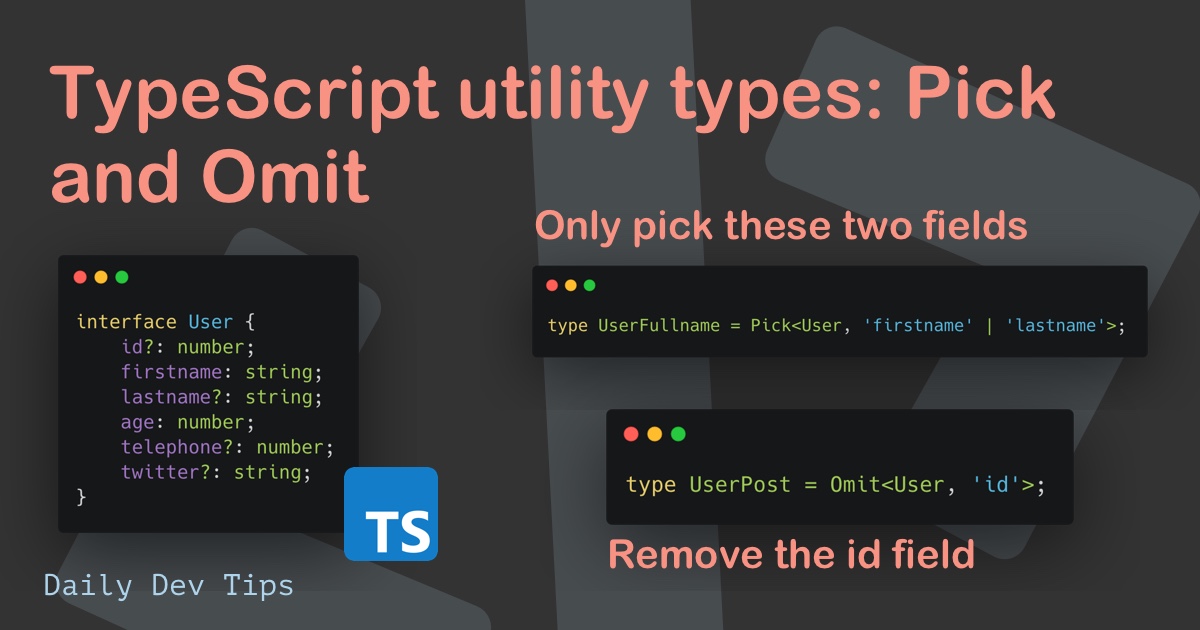
Now, let's see these in action.
You are a Junior Dev if You Don’t Know These 18 TypeScript Utility Types
Continuing with the Web Dev Simplified video, let's see how Pick and Omit solve the problems introduced earlier.
First, watch the explanation of Pick from the render user details example. Notice how it allows the function to be more specific about its requirements, improving type safety. Next, watch the segment on Omit from the create user example, which demonstrates how to create a type for a payload that excludes the server-generated id.
Partial<Type>: Making Properties Optional
When you're building an "edit" or "update" form, the user typically only modifies a subset of the available fields. It would be inconvenient to require the entire object.
Partial<Type>: Constructs a type where all properties of the givenTypeare set to optional.
This is extremely useful for functions that handle updates. You can pass an object containing only the properties that have changed.
You are a Junior Dev if You Don’t Know These 18 TypeScript Utility Types
Let's return to the video to see how to handle update scenarios.
Watch the segment on Partial from the update user example. This is a very common pattern you will use when building forms in Angular.
Record<Keys, Type>: Creating Dictionaries
Sometimes you need to create a type that represents a dictionary or a map—an object where all keys conform to a certain type (e.g., string or a specific union of strings) and all values are of the same type.
Record<Keys, Type>: Constructs an object type with a set of propertiesKeyswhose values are all ofType.
This is incredibly useful for structuring cached data for quick lookups. For example, you might fetch a list of users and store them in an object where each user's id is the key and the user object is the value. This pattern is central to state management libraries like NgRx, which is part of your learning goals.
You are a Junior Dev if You Don’t Know These 18 TypeScript Utility Types
The final core utility type we'll cover is Record.
Watch the explanation starting from this segment on Record. Pay close attention to how it can be used with a union type to enforce that an object has a specific set of keys.
The Power of Derivation
By using these utilities, you establish a single source of truth for your data models. Instead of managing dozens of slightly different, disconnected interfaces, you manage one base interface and derive all variations from it. This makes your codebase dramatically easier to refactor and maintain.
For a more detailed written explanation and examples of these four utility types, you can refer to the following article.
TypeScript Utility Types: A Complete Guide
This article from the Syncfusion blog provides excellent, concise summaries for each of the types we've discussed.
Feel free to read the sections for Partial, Pick, Omit, and Record. The real-world analogies for each (e.g., updating a user profile, creating a dashboard summary) reinforce the concepts we've covered.
Conclusion
This lesson concludes our foundational module on TypeScript. By mastering utility types, you've gained a crucial skill for writing clean, scalable, and maintainable code—a hallmark of a professional developer.
Here are your key takeaways:
- Utility types create new types from existing ones, promoting code reuse and maintainability.
PickandOmitare for creating subsets of types by selecting or excluding properties. They are perfect for tailoring data shapes for specific UI components or API payloads.Partialmakes all properties of a type optional, which is ideal for update operations where only partial data is sent.Recordis used to define dictionary-like objects, a fundamental pattern for data mapping and state management.
With a solid grasp of interfaces, generics, union types, decorators, and utility types, you are now fully equipped to tackle Angular itself.
In our next lesson, we will officially begin Module 2. We will use the Angular CLI to generate our first project, explore the file structure, and see how the concepts you've learned—especially the @Component decorator—come together to form the basis of an Angular application.