Welcome back! In our previous lesson, we explored generics, which provide the flexibility to write code that works with any single type while preserving type safety. We saw how this is perfect for creating reusable components like a generic Queue<T>.
Today, we'll tackle a different but equally common scenario: what happens when a variable isn't just one unknown type, but can be one of several known types? For instance, an ID that could be a string or a number, or an API response that could represent "success," "error," or "loading" states.
This lesson directly addresses the learning outcome: to use union types and type guards to narrow types safely. We'll start with the concept of union types and then explore the various "type guard" mechanisms TypeScript provides to determine the specific type at runtime. We will culminate in a powerful pattern called discriminated unions, which is fundamental to modern state management in Angular with libraries like NgRx, a key technology in your professional work.
Understanding Union Types
A union type is formed from two or more other types and represents a value that may be any one of those types. We use the pipe (|) symbol to denote a union.
function printId(id: number | string) {
  // What can we do with 'id'?
  // console.log(id.toUpperCase());
  // Error: Property 'toUpperCase' does not exist on type 'number'.
}
As you can see, TypeScript will only allow you to perform an operation if it is valid for every member of the union. Since numbers don't have a toUpperCase method, the code fails. To work with a union type, we first need a way to narrow it down to a more specific type.
To build a solid mental model, it's helpful to think of types as sets of possible values. A union of types creates a larger set that includes all possible values from its member types. The following video provides a brilliant visual explanation of this idea.
The KEY to unions and intersections in TypeScript
Watch this short segment from the video "The KEY to unions and intersections in TypeScript" by Andrew Burgess. It offers a crucial mental model for understanding unions.
Pay close attention to the visual explanation using Venn diagrams from this section. The key insight is that a union creates a broader type that accepts a larger set of values.
Type Narrowing with Type Guards
The process of moving from a broad type (like number | string) to a more specific one (like string) within a block of code is called type narrowing. TypeScript's control flow analysis uses special checks called type guards to perform this narrowing.
Let's explore the most common type guards. The following video provides a practical walkthrough of several of them.
This video, "Type Narrowing in TypeScript" also by Andrew Burgess, is an excellent tour of the primary type-narrowing techniques. We will refer back to it as we cover each technique.
First, watch the introduction to understand the core concept of narrowing from the start.
1. The typeof Type Guard
For primitive types like string, number, boolean, and symbol, JavaScript's built-in typeof operator acts as a type guard. TypeScript understands these checks and will narrow the type accordingly inside conditional blocks.
Type Guard | TypeScript Deep Dive
This article from TypeScript Deep Dive provides concise explanations of the different type guards.
Start by reading the section on the typeof operator. It shows exactly how a typeof check allows you to safely access type-specific methods.
This is demonstrated clearly in the "Type Narrowing in TypeScript" video.
This video provides a great example of the typeof guard.
Watch the segment from the toNumber function to see typeof in action. Notice how TypeScript knows val is a number in the else block because the string case was handled.
2. The instanceof and in Type Guards
When working with objects, typeof is less helpful as it usually just returns "object". For these cases, we have other guards:
instanceof: Checks if an object is an instance of a specific class. This is common in more object-oriented code.in: Checks if an object has a property with a specific key. This is very useful for differentiating between object shapes.
Type Guard | TypeScript Deep Dive
Now, let's continue with the same article to see how to narrow object types.
Read the sections on the instanceof operator and the in operator. The in operator is particularly important as it allows us to differentiate objects based on their structure.
The "Type Narrowing in TypeScript" video also provides a realistic example of using the in operator to distinguish between different user types.
This video provides a great example of the in guard.
Watch the section from the login function. It demonstrates how is admin in user allows TypeScript to narrow the user type to AdminUser within the if block.
3. User-Defined Type Guards (Type Predicates)
Sometimes the built-in guards aren't enough. You might have complex validation logic that determines an object's type. In these cases, you can create your own type guard function.
These functions have a special return type signature called a type predicate: argumentName is Type. This doesn't just return a boolean; it tells TypeScript that if the function returns true, the argument passed to it should be considered the specified type.
// Define two types
interface Fish {
  swim: () => void;
}

interface Bird {
  fly: () => void;
}

// User-defined type guard
function isFish(pet: Fish | Bird): pet is Fish {
  return (pet as Fish).swim !== undefined;
}

function move(pet: Fish | Bird) {
  if (isFish(pet)) {
    pet.swim(); // TypeScript now knows 'pet' is a Fish
  } else {
    pet.fly(); // And here it must be a Bird
  }
}
This pattern is especially useful when filtering arrays, as it allows the filtered array to have the correct, narrowed type. The "Type Narrowing in TypeScript" video provides an excellent explanation of this.
This video gives a great example of a user-defined type guard.
Watch the segment on type predicates. It clearly shows how adding the user is StandardUser return type transforms the result of users.filter(), but also correctly warns that you are now responsible for the correctness of the guard's logic.

The Discriminated Union Pattern
While the guards above are powerful, the most robust, scalable, and self-documenting way to work with union types is the discriminated union pattern (also known as "tagged unions" or "algebraic data types"). This is a cornerstone of functional programming patterns you'll see in state management libraries like NgRx.
A discriminated union has three components:
- A set of types that form a union.
- A common property (the discriminant) that has a unique literal type in each member of the union.
- A type alias for the union of these types.
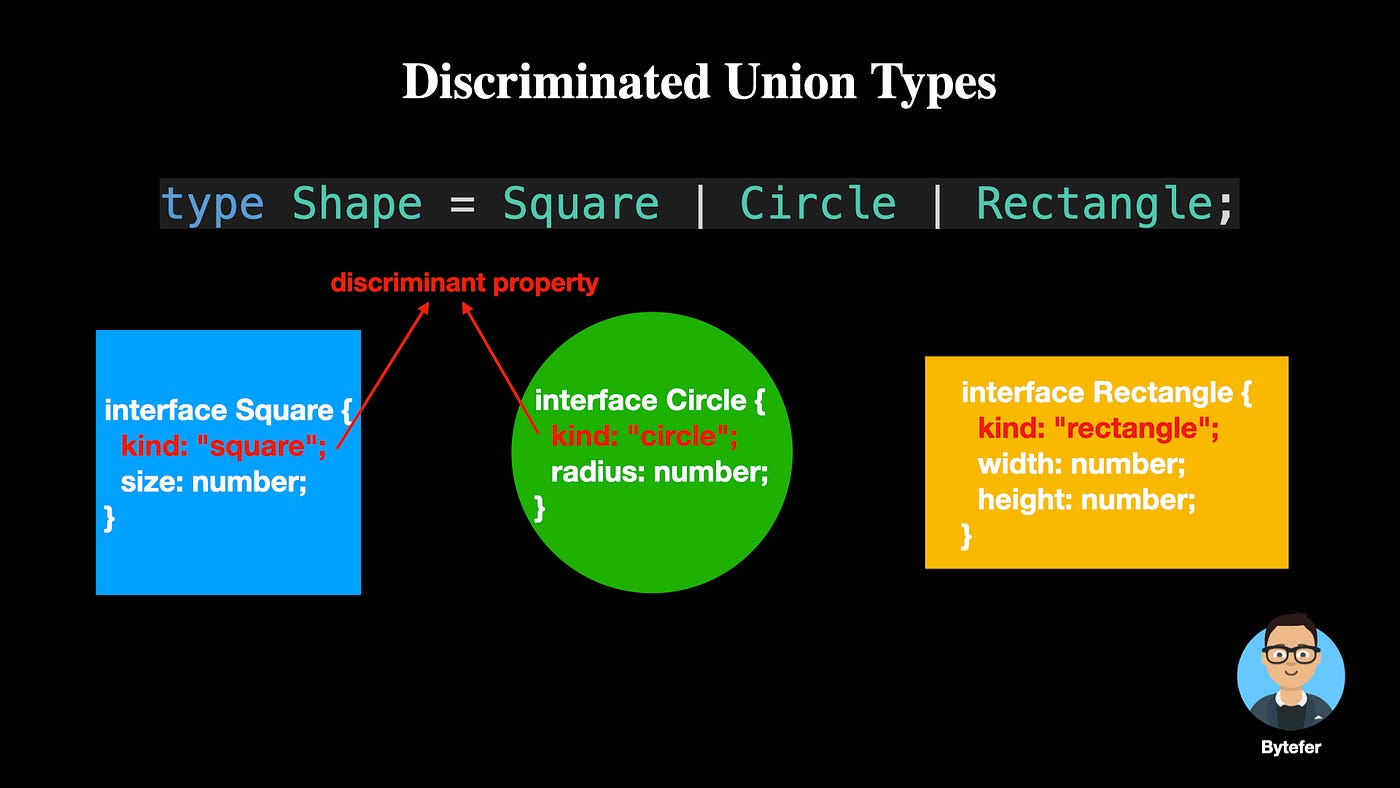
The beauty of this pattern is that checking the discriminant property with a switch statement is a clean and effective type guard. TypeScript can follow the logic and narrow the type perfectly in each case block.
TypeScript Type Guards for Discriminated Unions (Best Practices for ...
This article is an excellent, practical guide to using discriminated unions, which are essential for the kind of applications you are building. It connects the pattern directly to Angular and NgRx.
First, read the sections that introduce the problem and present the solution. Then, see it in action in a real-world example that uses a switch statement.
Exhaustive Checking with never
Discriminated unions enable a powerful safety feature: exhaustive checking. By adding a default case to our switch statement that handles the special never type, we can make the TypeScript compiler ensure we've handled every possible case in the union. If we later add a new type to the union but forget to update our switch statement, TypeScript will give us a compile-time error. This prevents bugs that would otherwise only appear at runtime.
The video and article below both provide a great walkthrough of this technique.
This video explains and demonstrates how to implement an exhaustive switch statement.
Watch the final segment on discriminated unions. Pay close attention to what happens when a new ProspectUser type is added to the union—the default case immediately triggers a type error, forcing the developer to handle the new case.
TypeScript Type Guards for Discriminated Unions (Best Practices for ...
Let's return to the article to see its explanation of exhaustive checks and its connection to your goals.
Read Best Practice 3, which shows how to use a helper function to check for never. Also, read the conclusion, Why Discriminated Unions Are Powerful, which explicitly mentions Angular state management and NgRx.
This pattern of defining application states or events as a discriminated union is central to NgRx. Actions are discriminated unions, and so is the state managed by many reducers. Mastering this now will give you a significant head start.
Conclusion
In this lesson, we've learned how to model values that can be one of several types and how to work with them safely. This is a critical skill for building robust applications where data can come in different shapes, such as from an API or user input.
Here are your key takeaways:
- Union Types (
|) allow a variable to represent a value that can be one of several distinct types. - Type Narrowing is the process of using Type Guards to reduce a broad union type to a specific type within a code block.
- Built-in Guards like
typeof,instanceof, andinare your first line of defense for narrowing types. - User-Defined Type Guards (
arg is Type) give you full control over narrowing logic for complex types. - Discriminated Unions are a powerful pattern that combines a union of object types with a common, unique literal property (the discriminant). This enables clean, safe, and exhaustive type checking with
switchstatements, which is a foundational pattern for state management in Angular.
You now have the tools to handle much of the complexity that arises in real-world data modeling.
In our next lesson, we will make a significant step from general TypeScript toward Angular itself by exploring decorators. We'll look at what decorators are and see how Angular uses them (e.g., @Component, @Injectable) to attach metadata and behavior to plain classes, transforming them into the building blocks of an Angular application.