Hello! In the previous lesson, you separated an article-library feature into browser presentation, backend decisions, and database storage. Now we can name the technologies that help perform those jobs. The important distinction is that TypeScript, Node.js, Hono, React, and PostgreSQL are not five interchangeable pieces of software: each supplies a different kind of capability.
By the end of this lesson, you should be able to describe each one in an interview without calling Node.js a language, Hono a runtime, or React a database—and explain how they can work together on one feature.
A language describes the program; a runtime executes it
A programming language gives you a way to express instructions. JavaScript is a language. TypeScript is a language that builds on JavaScript with additional syntax, particularly for describing types. For example, in TypeScript you can write:
const articleId: string = "42"
The : string expresses what kind of value the developer expects. It helps tooling check the code while you develop it. It does not start a server, display a page, or store an article.
The TypeScript website gives a concise description of both its relationship to JavaScript and where the resulting code can run.
TypeScript: JavaScript With Syntax For Types.
Read the TypeScript website’s short introduction to distinguish the language you write from the JavaScript that ultimately runs.
Under “What is TypeScript?”, read the three cards “JavaScript and More,” “A Result You Can Trust,” and “Safety at Scale.” The passage begins with these three cards. Focus especially on the statement in “A Result You Can Trust” about where converted JavaScript runs; stop before “Get Started.”
A runtime is the environment that executes a program and supplies capabilities the program can use. Node.js is a JavaScript runtime commonly used for backend applications. It includes a JavaScript engine and provides access to facilities useful to server software, such as networking and file-system operations. A browser is another environment that runs JavaScript, but it supplies a different set of capabilities, including those needed to work with a web page.
Read the beginning of the Node.js introduction for its definition of a runtime. You do not need its later discussion of asynchronous I/O yet; that has its own module.
Introduction to Node.js | Node.js Learn
The official Node.js introduction identifies what Node.js runs and what it adds outside the browser.
In “Introduction to Node.js,” read the opening paragraphs, ending just before “A Node.js app runs in a single process.” Notice the distinction between Node.js and the V8 JavaScript engine it uses. Leave the later I/O discussion for now.
That distinction matters when you describe a TypeScript backend. You write TypeScript source code; tooling converts it to JavaScript; Node.js executes JavaScript in the running backend. The next lesson will examine more closely what happens to TypeScript’s types during that conversion. For now, remember that adding TypeScript does not turn Node.js into a TypeScript language or a database.
A framework structures your application; a UI library helps build its interface
A runtime can execute backend JavaScript, but it does not decide how you want to organize article routes. Hono is a web framework that helps you define routes and produce HTTP responses. You supply application-specific behavior; Hono handles parts of the surrounding request-handling structure.
Consider this small TypeScript example:
import { Hono } from "hono"

const app = new Hono()

app.get("/articles/:id", (c) => {
  const id: string = c.req.param("id")
  return c.json({ id })
})

export default app
Several layers appear in just a few lines. The : string annotation belongs to TypeScript. The new Hono(), app.get(...), and c.json(...) calls use Hono. The function you pass to app.get is your article-route behavior. When this application is deployed on Node.js, Node.js supplies the runtime in which the resulting JavaScript executes. The example returns a made-up response; it does not retrieve an article from a database.
A useful framework-versus-library clue is who calls your application code, and when. You call app.get(...) to register a route. Later, when a matching request arrives, the framework calls the handler you supplied. The diagram below emphasizes this change in control.
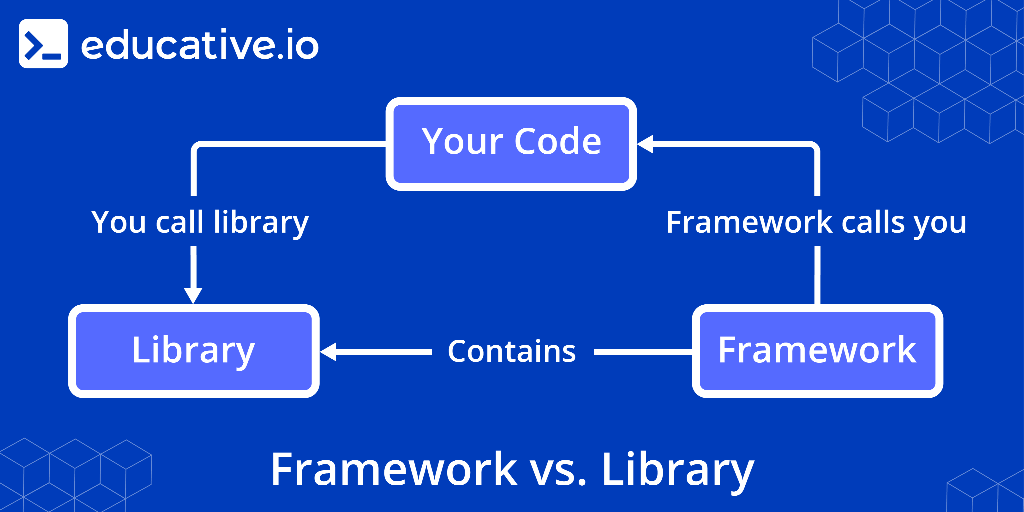
The boundary is not perfectly sharp. You also call methods on a framework, as the Hono example shows, and a library may call functions you provide. “Framework” is useful here because Hono provides the structure in which your route handlers participate.
React is commonly described as a UI library. Its main job is helping you define interfaces from components and update what users see as application data changes. In the article library, a React component might display an article title, a loading message, or an access-denied message. React does not, by itself, make a backend access decision or persist membership records. Although React components can also be rendered on a server, its role in this stack remains building the UI, not replacing the backend framework or database.
Notice that “framework” and “UI library” describe what a tool helps you build, while “runtime” describes where executable code runs. A React-based interface typically runs in the browser, where JavaScript is executed. A Hono backend can run on Node.js. Neither React nor Hono is itself the JavaScript engine executing that code.
A database keeps and queries application records
In the article library, article and membership records must remain available after a request ends or a browser closes. PostgreSQL is the database management system we will use for persistent records. It accepts queries, stores data, and returns results. Its job is different from TypeScript’s code checking, Node.js’s program execution, Hono’s request handling, and React’s UI rendering.
Suppose a member requests a restricted article. A Hono route handler might ask PostgreSQL for the article and relevant membership record, then apply the application’s access rules before responding. PostgreSQL is not a collection of TypeScript variables inside Node.js: it is a separate database system with its own stored data and query processing. The backend communicates with it rather than becoming it.
You may also hear SQL in the same conversation. SQL is a language used to express database operations; PostgreSQL is a system that executes SQL queries and manages the records. Knowing this distinction prevents “we use SQL” from becoming an incomplete answer to “Which database do you use?”
There is a practical reason to keep the database separate from the UI and route framework. A membership record must be available to later requests, including requests that do not come from the original browser. The database provides that persistent source of records; the backend decides how those records affect the response. This is the same division of responsibility you traced in the previous lesson, now with concrete technologies attached.
Put the labels together without mixing their jobs
Here is the course stack viewed by category:
| Category | Example | What it contributes to the article library |
|---|---|---|
| Programming language | TypeScript | Source code for application behavior, with type syntax that helps check the code during development |
| Runtime | Node.js | An environment for executing backend JavaScript |
| Web framework | Hono | Route registration and HTTP request/response handling |
| UI library | React | Components that present article data and interaction states |
| Database | PostgreSQL | Persistent article and membership records, with query processing |
A browser is also a JavaScript runtime environment, though it is not the backend runtime named in the table. React interface code commonly executes there. Likewise, the table gives each technology its primary role, not an exclusive claim about every way it can be used: Hono can run in other supported runtimes, for example.
Return to a single article request to see why all five labels can be relevant without overlapping. The browser displays a React-based article list. When someone selects an article, browser code requests it from the backend. A Hono route handler, executing as JavaScript on Node.js, identifies the requested article and obtains the records it needs from PostgreSQL. The handler decides what response to send, and the browser presents that result. TypeScript helped describe and check the application source code while it was being developed; it is not a separate server receiving the request.
An effective interview explanation names both the category and the contribution. “We used Node.js and Hono for the backend” is accurate but leaves their relationship unclear. “Node.js ran our backend JavaScript; Hono provided the routing structure for our handlers” explains why both appear in the same application. Similarly, “React built the interface, while PostgreSQL held persistent records” identifies two jobs that should not be confused.
Conclusion
The core distinctions are: TypeScript describes and helps check code; Node.js runs backend JavaScript; Hono structures HTTP handlers; React builds UI; PostgreSQL stores and queries persistent records. A feature can involve all five, but they do not all perform the same kind of work.
Next, we will examine one particularly important boundary: why TypeScript’s type annotations disappear from the JavaScript that runs, and why an API must still check data arriving in a request.