Hello! Welcome to the fifth lesson in our module on SQL fundamentals.
In our last session, we explored how to build more complex filters using the AND and OR logical operators. You learned about operator precedence and the importance of using parentheses () to ensure your query's logic is explicit and correct—a practice that resonates with the structured nature of system programming.
Today, we'll build on that foundation by learning more specialized and efficient filtering operators. Our learning outcome is to filter data using IN, BETWEEN, and the LIKE operator for pattern matching. These operators don't just make your code cleaner; they provide powerful ways to express complex filtering requirements that would be clumsy or difficult to write using only AND and OR.
Let's get started.
The IN Operator: Checking for Membership in a Set
In the last lesson, you saw how to find rows matching one of several values using OR:
SELECT * FROM customers WHERE city = 'London' OR city = 'Paris' OR city = 'Tokyo';
This works, but it quickly becomes repetitive and hard to read as the list grows. The IN operator provides a much more elegant solution by testing if a value is present within a specified list (or set) of values.
The syntax is:WHERE column_name IN (value1, value2, ...)
Let's watch a short video that demonstrates how IN cleans up a query that would otherwise need multiple OR statements.
How to Filter with the WHERE clause in SQL
This clip from the video 'How to Filter with the WHERE clause in SQL' by Becoming a Data Scientist shows the practical difference between using multiple OR conditions and using the IN operator.
Watch from 08:12 to 09:36. Notice how the IN clause provides a compact way to select specific, non-sequential category IDs.
As you saw, the IN operator simplifies the query significantly. Our previous example becomes:
SELECT * FROM customers WHERE city IN ('London', 'Paris', 'Tokyo');
This is not only easier to write but also much clearer to read, which is vital for maintaining code. You can also use the NOT IN operator to find all rows where the value does not match any item in the list.
Test your understanding!
You have a bugs table with a status column. Write a query to find all bugs with a status of 'NEW', 'ASSIGNED', or 'REOPENED'.
Show answer
SELECT *
FROM bugs
WHERE status IN ('NEW', 'ASSIGNED', 'REOPENED');
The BETWEEN Operator: Filtering Within a Range
Similarly, filtering for a range of values can be done with AND:
SELECT * FROM orders WHERE order_date >= '2023-06-01' AND order_date <= '2023-06-30';
The BETWEEN operator provides a more concise and readable way to express the same logic. It checks if a value falls within a specified range.
The syntax is:WHERE column_name BETWEEN lower_bound AND upper_bound
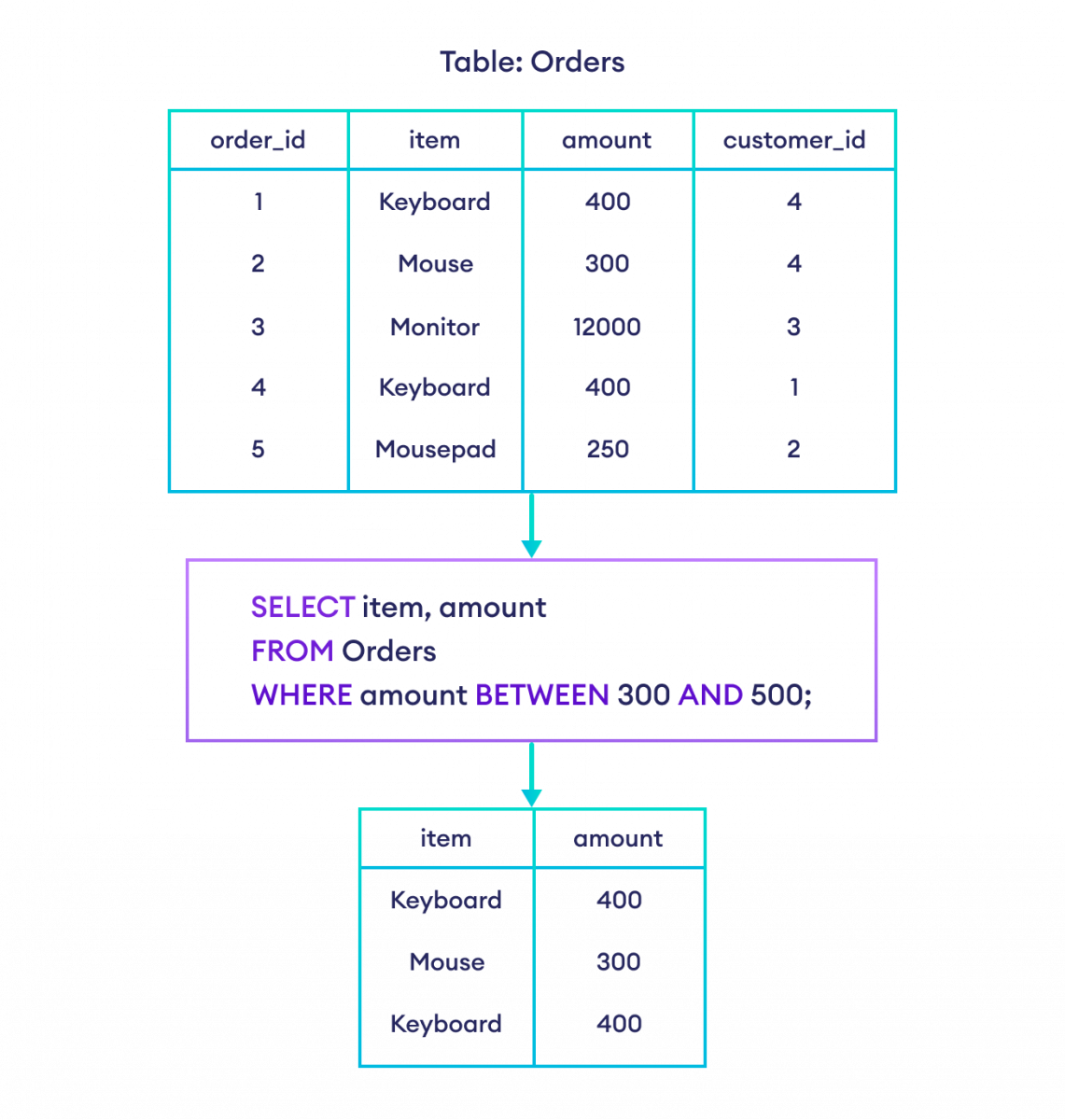
A crucial detail is that the BETWEEN operator is inclusive: it includes both the lower and upper bounds in the range. So BETWEEN 10 AND 20 is equivalent to >= 10 AND <= 20.
The following video demonstrates BETWEEN with numbers, text, and its inverse, NOT BETWEEN.
SQL Tutorial #15 - BETWEEN Operator in SQL | SQL BETWEEN Operator
This video from Software Testing Mentor provides a clear walkthrough of the BETWEEN operator. It covers its use with different data types and explains the NOT BETWEEN variation.
Please watch from 01:06 to 06:02. Pay attention to three key parts: The numeric range example (01:06 - 04:07) and the confirmation that the boundaries are included. The text-based range example (04:07 - 05:06), which works alphabetically. The NOT BETWEEN operator (05:06 - 06:02), which selects values outside the specified range.
This image provides a great visual summary of how BETWEEN works.
For a more in-depth textual explanation, you can read the following sections.
How To Use the BETWEEN and IN Operators in SQL
The article 'How To Use the BETWEEN and IN Operators in SQL' from DigitalOcean provides excellent written explanations that complement the videos.
Read the sections titled 'Range Predicates' and 'Membership Predicates'. They provide clear syntax examples and reinforce the concepts of BETWEEN and IN that we've just discussed.
Test your understanding!
You are troubleshooting network logs stored in a logs table. This table has a response_time_ms column (integer). Write a query to find all log entries where the response time was between 500 and 1000 milliseconds, inclusive.
Show answer
SELECT *
FROM logs
WHERE response_time_ms BETWEEN 500 AND 1000;
The LIKE Operator: Flexible Pattern Matching
The IN and BETWEEN operators are powerful shortcuts for logic you could already write with AND and OR. The LIKE operator, however, introduces a completely new capability: pattern matching for strings. This is incredibly useful in technical support and development, where you might need to search for error messages, log entries, or user data without knowing the exact text.
LIKE is used with two special wildcard characters:
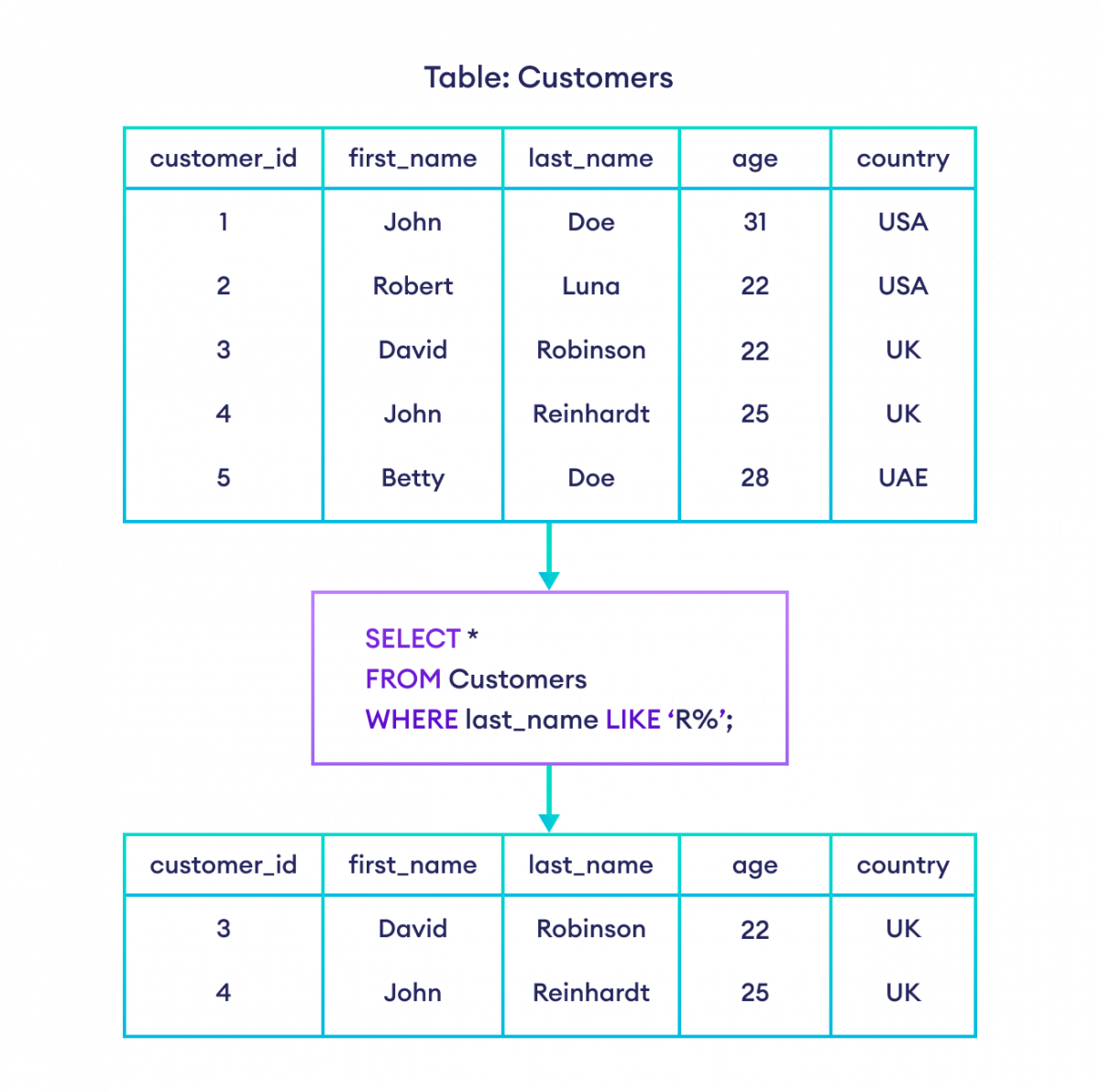
%(Percent sign): Matches any sequence of zero or more characters._(Underscore): Matches exactly one single character.
Let's see some common patterns:
| Pattern | Description | Example Match |
|---|---|---|
LIKE 'S%' |
Finds any string that starts with 'S'. | 'Smith', 'SQL' |
LIKE '%exe' |
Finds any string that ends with 'exe'. | 'program.exe' |
LIKE '%error%' |
Finds any string containing 'error'. | 'fatal error', 'error_code' |
LIKE 'L_n' |
Finds a 3-letter string starting with 'L' and ending with 'n'. | 'Len', 'Lin' |
LIKE '_i%' |
Finds any string where the second character is 'i'. | 'file', 'widgets' |
This visual shows a simple LIKE query in action.
The following article offers a comprehensive guide to using LIKE with many practical examples. Given your interest in logical puzzles, you might find crafting these patterns quite engaging.
SQL LIKE Pattern Matching Tutorial
This DataCamp tutorial, 'SQL LIKE Pattern Matching Tutorial', is a fantastic resource. It breaks down the wildcards and provides clear, step-by-step examples of how to build patterns.
Please read through the first few sections of the article: Start with 'The SQL LIKE Operator for Pattern Matching' for the basic syntax. Read through the 'Beginner SQL LIKE Examples' (parts 1-4) to see how to use % and _ in various combinations. The section 'Use NOT to find strings that do not match a pattern' introduces NOT LIKE. Finally, read 'Use LOWER (or UPPER) with LIKE for case-insensitive pattern matching'. This is a very important technique for real-world applications, as data is rarely consistent in case.
A Note on Case Sensitivity
As the article mentions, LIKE is case-sensitive in many database systems (like PostgreSQL and Oracle) but case-insensitive by default in others (like MySQL and SQL Server). To write portable, predictable code, it is best practice to force a case conversion using LOWER() or UPPER() on both the column and the pattern string.
Case-sensitive (might miss results):WHERE last_name LIKE 'smith%' -- Won't find 'Smith'
Case-insensitive (robust):WHERE LOWER(last_name) LIKE 'smith%' -- Finds 'smith', 'Smith', 'SMITH', etc.
Test your understanding!
You are querying a users table with a username column. Write a query to find all users whose username is exactly 5 characters long and ends with the letter 'n'. For example, it should match 'admin' and 'log_in' but not 'susan' or 'main'.
Show answer
SELECT *
FROM users
WHERE username LIKE '____n';
This uses four underscores _, each matching a single character, followed by a literal 'n'.
Conclusion
Great work! You've just added three powerful tools to your SQL toolkit that go beyond simple equality checks. These operators will make your queries more concise, readable, and capable.
Key Takeaways:
IN: Use this to check if a value exists within a list of discrete options. It's a cleaner alternative to multipleORconditions.BETWEEN: Use this to check if a value falls within an inclusive range. It's more readable than usingANDwith>=and<=.LIKE: Use this for powerful string pattern matching. The%wildcard matches any number of characters, while_matches just one. Remember to useLOWER()for reliable case-insensitive searches.
Preview of the Next Lesson:
So far, we've assumed that every column in every row has a value. But in the real world, data is often incomplete. How do we find rows where a value is missing? In the next lesson, we will cover how to handle NULL values in your queries using the IS NULL and IS NOT NULL operators. This is a fundamental concept for cleaning data and handling exceptions—a daily reality in both technical support and software development.