Hello! Welcome back.
In our last lesson, we explored the theoretical foundation of database reliability: the ACID properties. We learned that a transaction is an "all-or-nothing" unit of work (Atomicity) that preserves the database's rules (Consistency), runs as if it's alone (Isolation), and its results are permanent (Durability).
Today, we move from the why to the how. You will learn to take direct control of these transactional guarantees. The goal of this lesson is to learn how to use BEGIN, COMMIT, and ROLLBACK to manage explicit transaction boundaries. This is a fundamental skill for writing safe and reliable code that interacts with a database, moving beyond simple, single queries.
Implicit vs. Explicit Transactions
By default, most database systems operate in an "autocommit" mode. This means that every single SQL statement you execute—like an INSERT, UPDATE, or DELETE—is treated as its own complete transaction. It is implicitly wrapped in a BEGIN and COMMIT.
UPDATE products SET price = 25.99 WHERE id = 123; (This is an implicit transaction)
This is fine for single, isolated changes. But what about the bank transfer example from our last lesson, which required two separate UPDATE statements? If the first UPDATE succeeds but the system crashes before the second UPDATE runs, you have an inconsistent database. This is where you need to define the transaction boundaries yourself.
Explicitly managing transactions is conceptually similar to manual resource management in programming languages like C. Just as you might use fopen() to open a file, perform several read/write operations, and then fclose() to close it, SQL allows you to BEGIN a transaction, perform several queries, and then COMMIT or ROLLBACK to finalize it. This creates a safety wrapper around a group of operations that must succeed or fail together.
The Core Commands: BEGIN, COMMIT, ROLLBACK
To control transactions, you will use three primary commands.
BEGIN TRANSACTION(or justBEGIN): Marks the start of a transaction. The database's autocommit behavior is suspended until the transaction is ended.COMMIT: If all operations within the transaction are successful,COMMITsaves all the changes made sinceBEGINand makes them permanent and visible to other users.ROLLBACK: If an error occurs or a condition isn't met,ROLLBACKdiscards all the changes made sinceBEGIN, returning the database to the state it was in before the transaction started.
Let's watch a demonstration of these commands in action.
SQL Server Programming Part 14 - Transactions
This video from WiseOwlTutorials provides a clear, practical demonstration of the basic syntax for starting, committing, and rolling back a transaction in SQL Server. The syntax is very similar across other databases like PostgreSQL and MySQL.
Watch from the beginning until 04:32. Focus on how BEGIN TRANSACTION creates a block of operations that can be made permanent with COMMIT or completely undone with ROLLBACK.
As the video showed, once you BEGIN a transaction, any changes you make are provisional. They are visible to you within your current session but are not yet permanent or visible to other concurrent users. The choice to COMMIT or ROLLBACK determines their final fate.
This flowchart provides a simple mental model of the process.

A Practical Example: The Bank Transfer
Let's apply these commands to the classic bank transfer scenario. We need to debit Account A and credit Account B, ensuring both operations happen as a single atomic unit.
Understanding SQL Transactions: A Comprehensive Guide
To see how these commands are used in a real-world context, please read the following sections from the DataCamp article 'Understanding SQL Transactions'.
Read the sections titled 'How to Implement SQL Transactions' and 'Practical examples of transaction implementation'. Pay close attention to the code examples for transferring funds and managing e-commerce inventory.
Based on the article, here is how you would structure a safe bank transfer:
-- Let's assume a table 'accounts' with columns 'account_id' and 'balance'

BEGIN TRANSACTION;

-- Step 1: Deduct $100 from account with ID 1
UPDATE accounts
SET balance = balance - 100
WHERE account_id = 1;

-- Step 2: Add $100 to account with ID 2
UPDATE accounts
SET balance = balance + 100
WHERE account_id = 2;

-- If we reach this point without errors, both operations were successful.
COMMIT;
If a system crash or power failure occurred after the first UPDATE but before the COMMIT, the database's recovery process would see the uncommitted transaction and automatically ROLLBACK, ensuring atomicity.
The Power of ROLLBACK
ROLLBACK is your safety net. It allows you to discard operations if something goes wrong, or even to perform "what-if" analysis without permanently changing data.
Let's see a powerful example of ROLLBACK in action.
The Complete Guide to Database Transactions
The following article gives a great example of how to use ROLLBACK to undo a potentially disastrous operation. It's a vivid demonstration of the 'undo' power of transactions.
Please read the section titled 'The ROLLBACK Time Machine'. Focus on the MySQL example where all books are deleted and then restored with a simple ROLLBACK command.
As you saw, you can perform massive changes inside a transaction, but until you type COMMIT, you have a get-out-of-jail-free card.
In application code, you would typically wrap your database queries in a try...catch block. If any query fails and throws an exception, the catch block would issue a ROLLBACK. If the entire block completes without error, you issue a COMMIT.
Test your understanding!
You are tasked with adding a new user to your application. The process requires two steps:
- Insert a new row into the
userstable. - Insert a corresponding row into the
user_profilestable with default profile information.
Write a SQL transaction block that performs these two actions. Explain what would happen if the first INSERT into users succeeds, but the second INSERT into user_profiles fails because of a database error (e.g., the disk is full).
Show answer
Here is the SQL transaction block:
BEGIN TRANSACTION;

INSERT INTO users (username, email, password_hash)
VALUES ('new_user', 'new@example.com', 'hashed_password_abc123');

INSERT INTO user_profiles (user_id, bio, website)
VALUES (LAST_INSERT_ID(), 'Welcome to my profile!', NULL); -- LAST_INSERT_ID() gets the ID from the first insert

COMMIT;
Explanation:
If the first INSERT succeeds but the second one fails, the transaction is in an incomplete state. Because it's wrapped in a BEGIN...COMMIT block, the failure of the second statement would prevent the COMMIT from being reached. A well-written application would catch this error and issue a ROLLBACK. This would undo the first INSERT into the users table.
The end result is that the database returns to the state it was in before the transaction began. No partial data (a users record without a user_profiles record) is left behind, thus preserving data consistency thanks to the atomicity of the transaction.
Syntax and Low-Level Details
The exact syntax for transactions can vary slightly between database systems. For example, BEGIN TRANSACTION, BEGIN TRAN, BEGIN WORK, or simply BEGIN often do the same thing.
The Complete Guide to Database Transactions
This article provides a handy 'Quick Reference Guide' that shows the syntax for both MySQL and PostgreSQL. It's useful to be aware of these minor differences.
Review the 'Basic Commands' section under the 'TL;DR — Transaction Essentials' heading at the very top of the article. Notice the slight variations in syntax between MySQL and PostgreSQL.
For someone with your interest in systems programming, you might wonder if you can programmatically check if you're inside a transaction. Many database systems provide a way to do this. For example, in SQL Server, there is a global variable @@TRANCOUNT that tracks the nesting level of transactions.
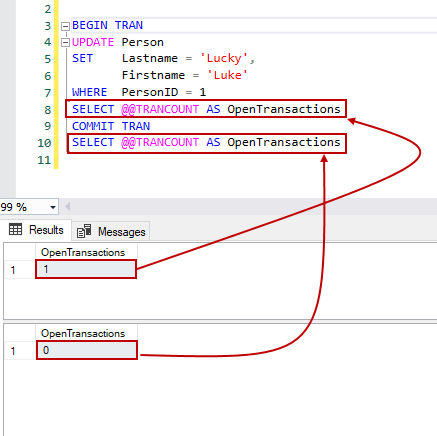
This kind of feature is essential for writing complex stored procedures or application logic that might call functions that also manage their own transactions.
Conclusion
Today you've made the leap from theory to practice. You now have the essential tools to group database operations into safe, atomic units, ensuring the integrity of your data.
Key Takeaways:
- By default, most databases use autocommit, treating each statement as a separate transaction.
BEGIN TRANSACTIONstarts an explicit transaction, grouping subsequent operations.COMMITmakes all changes within the transaction permanent and durable.ROLLBACKdiscards all changes made since the transaction began.- This
BEGIN...COMMIT/ROLLBACKpattern is the practical implementation of the Atomicity principle from our last lesson.
Preview of the Next Lesson:
We've now seen how to create a transaction that acts as a single unit. But what happens when you have hundreds of users all initiating transactions at the same time? How does the database keep them from interfering with each other and corrupting the data? In the next lesson, we will explore this challenge by describing how concurrent transactions can lead to data anomalies like dirty reads or phantom reads, which will highlight the importance of the Isolation property.