Hello! Welcome to your fourth lesson.
In our previous lessons, we've built a strong foundation. We started by understanding why we need a Database Management System (DBMS) over simple files. Then, we explored the paradigm we use to communicate with it, distinguishing between the imperative "how" of languages like C and the declarative "what" of SQL.
Today, we're going to answer the next logical question: Where do the database and my application live, and how do they connect? This lesson covers the client-server architecture, the dominant model for modern database systems. Given your background in network troubleshooting and REST APIs, you're already familiar with the core principles of clients making requests and servers providing responses. We'll now apply that same model specifically to the world of databases.
By the end of this lesson, you will be able to explain the client-server architecture of modern database systems, including the different "tiers" and how they communicate.
From One Machine to Many: The Rise of Client-Server
In the early days of computing, all processing happened on a single, powerful mainframe computer. Users connected with "dumb" terminals that could only display information. As personal computers became more powerful and cheaper, it made sense to distribute the workload. This led to the client-server architecture.
Let's start with a video that explains this evolution and introduces the basic architectural patterns.
This video from Neso Academy, titled 'DBMS Architecture,' provides a clear overview of the shift from centralized systems to the client-server model. It then explains the two most common variations: two-tier and three-tier architectures.
Watch the video from the beginning up to 07:45. Pay close attention to: The reasons for moving from a centralized to a client-server model. The definitions of 'client' and 'server'. The structure and components of two-tier and three-tier architectures.
The Fundamental Model
As the video explained, the core idea is a separation of concerns:
- A Client is a process that requests a service. This is typically your application, a user's machine, or a web browser.
- A Server is a process that provides a service. In our case, this is the Database Management System (DBMS) running on a machine, managing access to the data.
This is fundamentally different from a standalone application where the program and the data files it manipulates reside on the same machine and are tightly coupled.
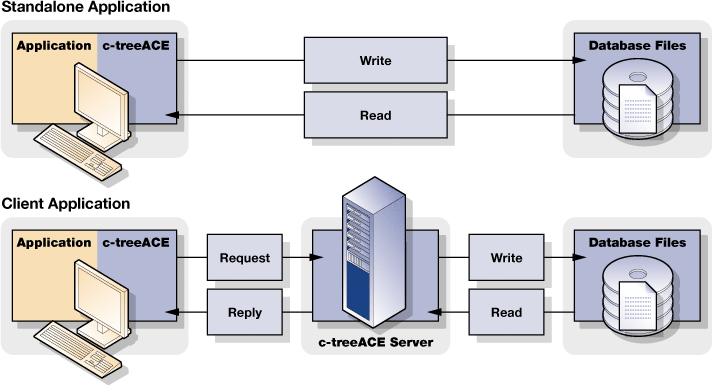
The communication follows a structured request-response cycle, much like the network protocols you've worked with.

Logical Components of a Database Application
To better understand the different architectural "tiers," it helps to think about the three logical jobs that need to be done:
- Presentation Logic: This is the user interface (UI). It's responsible for displaying data to the user and capturing their input. Think of a web form, a command-line interface, or the GUI of a desktop application.
- Processing Logic: This is the "business logic" or application logic. It takes the user's input from the presentation layer, enforces rules, performs calculations, and translates the request into a format the database can understand (e.g., constructing an SQL query).
- Storage Logic: This is the DBMS itself. It's responsible for physically storing, retrieving, and managing the data on disk, executing queries, and ensuring data integrity.
How these three logical components are distributed across physical machines defines the architectural tier. Let's formalize what you saw in the video.
This text from 'Introduction to Database Systems' provides a more detailed breakdown of the client-server model, the three logical components, and how they are arranged in different tiers. This will reinforce and add structure to the concepts from the video.
Read the sections 'Introduction and Background...', 'Three components of client/server systems', and 'Two-tier and three-tier architectural distinctions'. Focus on how the presentation, processing, and storage logic are assigned in each tier.
As you've now seen in both video and text format:
- Two-Tier Architecture: The client (Tier 1) handles Presentation and sometimes Processing logic, communicating directly with the database server (Tier 2), which handles Storage logic. This is simple but can be less scalable and secure.
- Three-Tier Architecture: An intermediate Application Server (Tier 2) is introduced between the client (Tier 1) and the database server (Tier 3). The client handles only Presentation. The Application Server handles the Processing logic. The Database Server handles the Storage logic. This is the standard for most web applications as it's more scalable, secure, and easier to maintain.
Test your understanding!
Consider two scenarios:
- You have installed a database (like PostgreSQL) on your local machine. You then use a GUI tool (like DBeaver or pgAdmin) on the same machine to connect to it and run queries.
- You visit an e-commerce website like Amazon.com. Your browser sends requests over the internet, and product information stored in a database is displayed on the page.
How would you classify each scenario in terms of architectural tiers?
Show answer
-
Scenario 1 is a classic Two-Tier architecture. The GUI tool is the client (handling presentation and some processing, like query building). It communicates directly with the PostgreSQL database server running on your machine (handling storage). Even though they are on the same physical machine, they are two separate processes communicating in a client-server fashion.
-
Scenario 2 is a Three-Tier (or N-Tier) architecture. Your web browser is the client (Tier 1, presentation). Your request goes to Amazon's web/application servers (Tier 2, processing), which handle the business logic (e.g., finding your order history, recommending products). Those servers then query one or more database servers (Tier 3, storage) to get the necessary data, which is then sent back down the chain to your browser.
How They Talk: A Look at Protocols
Your network troubleshooting experience gives you a great advantage here. The "connection" between a client and a database server isn't magic; it happens over a network (even if it's just a "network within your own machine") using specific protocols.
Just like web traffic uses HTTP, database systems use their own specialized application-layer protocols that typically run on top of TCP/IP.
- MySQL uses the MySQL Protocol.
- PostgreSQL uses the PostgreSQL Wire Protocol.
- Microsoft SQL Server uses Tabular Data Stream (TDS).
These protocols define the rules for authentication, sending queries, and receiving result sets. The following video uses excellent, relatable analogies to explain the different ways a client can connect to a database server.
MS SQL Server 2019 Architecture |SQL SERVER ARCHITECTURE| SQL DBA II SQL Server query flow explained
This video from The SkillPedia breaks down the ways a client can connect to an MS SQL Server. The analogies it uses for different connection protocols—shared memory, TCP, and named pipes—are a perfect way to build a mental model for these low-level concepts.
First, watch from 00:23 to 01:16 to get the basic client-server concept in the context of SQL Server. Then, jump to 03:18 and watch until 09:04. Focus on the analogies (Tom talking to his mom at home, ordering from Starbucks, talking to a neighbor) to understand the difference between connecting on the same machine, over a network, and on a local area network.
This is the low-level "how" that underpins the entire client-server model. Your application uses a specific driver (like a JDBC driver in Java, or a pyodbc library in Python) which knows how to "speak" the database's specific protocol (like TDS) and sends that information over the network via TCP/IP.
This is exactly why some databases are "wire-compatible" with others. For example, CockroachDB implements the PostgreSQL wire protocol. This means you can connect to a CockroachDB cluster using the exact same tools and drivers you would use for a PostgreSQL database, simplifying development and migration.
Conclusion
In this lesson, we demystified how applications connect to databases. We moved from the abstract idea of a DBMS to a concrete architectural model.
Key Takeaways:
- Modern database systems use a client-server architecture to separate the application (client) from the database (server).
- We can analyze these systems based on three logical components: Presentation, Processing, and Storage.
- Two-Tier architecture involves a client connecting directly to the database server. It's simple but less scalable.
- Three-Tier architecture adds an application server in the middle to handle business logic, which is the standard for web applications and provides better scalability, security, and maintainability.
- The communication between client and server relies on specific database protocols (like TDS or PostgreSQL Wire Protocol) that operate at the application layer, typically running over TCP/IP.
Preview of the Next Lesson:
We have now looked at the system from the outside—how a client connects to the server. In the next lesson, we will go inside the database server itself. You will learn about the core components of a DBMS, such as the query processor and the storage engine. This will complete our high-level tour of database architecture and set the stage for you to start writing queries.