Hello! Welcome back.
In our last lesson, we established a detailed timeline of the NSE trading day, figuring out when your trading bot is allowed to operate. Now, we'll equip it with the language it needs to act, addressing how it communicates its intentions to the market.
This lesson directly addresses the learning outcome: to explain order types: market, limit, stop-loss, and bracket orders. These order types are the fundamental commands you will use in your Python code to tell your broker, Angel One, precisely how to execute your trades. Understanding the trade-offs between them is critical for translating a strategy from an idea into a robust, executable algorithm.
The Core Instructions: Market and Limit Orders
At the most basic level, every trade instruction comes down to a decision between speed and price. This is handled by market and limit orders.
To get a conceptual overview, let's start with a short video that explains the four main order types.
Stock Market Order Types (Market Order, Limit Order, Stop Loss, Stop Limit)
This video from Arvabelle provides a clear and simple introduction to the fundamental order types. It uses helpful analogies to explain the core differences.
Please watch from the beginning to 04:44. Focus on the distinction it draws between a market order (prioritizing speed) and a limit order (prioritizing price).
Now, let's break those down from an engineering perspective, keeping your Angel One API in mind.
1. Market Order
A market order is the most straightforward instruction: "Buy or sell these shares now at the best available price."
-
Mechanism: Your order is matched with the best available counter-party order in the market's order book. If you are buying, you'll pay the lowest available seller's price (the "ask"). If you're selling, you'll get the highest available buyer's price (the "bid").
-
Advantage: Guaranteed execution (as long as there is liquidity). It's the fastest way to enter or exit a position.
-
Disadvantage: No price guarantee. The price you get might be different from the last traded price you saw, a phenomenon known as slippage. This is especially risky in volatile or thinly traded stocks.
-
API Implementation (Angel One): You specify this by setting the
ordertypeparameter to'MARKET'. Nopriceparameter is needed.{ "ordertype": "MARKET", "quantity": 10, ... }
2. Limit Order
A limit order adds a condition to the instruction: "Buy these shares only if the price is at or below X," or "Sell these shares only if the price is at or above Y."
-
Mechanism: Your order is placed in the order book and will only execute if the market price reaches your specified limit price.
-
Advantage: Complete price control. You will never pay more than your limit for a buy or receive less than your limit for a sell. This protects you from slippage.
-
Disadvantage: No execution guarantee. The market price may never reach your limit, and your order may go unfilled or only be partially filled.
-
API Implementation (Angel One): You set
ordertypeto'LIMIT'and must provide thepriceparameter with your desired limit price.{ "ordertype": "LIMIT", "price": "150.50", "quantity": 10, ... }
Test your understanding!
Your momentum strategy detects that a stock has just broken through a key resistance level and is moving up very quickly. Your algorithm decides it must enter the trade immediately to catch the move. Which order type is more suitable here, Market or Limit, and what is the primary risk associated with your choice?
Show answer
A Market order is more suitable. The priority is immediate execution to catch the fast-moving trend. The primary risk is slippage: the execution price might be significantly higher than the price at the moment the signal was generated, eating into potential profits. Using a limit order might mean missing the trade entirely if the price moves away too quickly.
Conditional Orders for Risk and Entry Management
Beyond simple execution, you need orders that can react to market conditions. This is where stop-loss orders come in. They are foundational for any automated risk management system.
For a deeper dive, let's consult a resource from your chosen broker, Angel One.
Types Of Orders in Stock Market
This article from the Angel One Knowledge Center provides clear, broker-specific definitions for these order types.
Please read the section titled 'Stop-loss Order', including its subsections on 'Stop-loss Market order' and 'Stop-loss Limit order'. Notice the two distinct parts of a stop-loss: the trigger and the subsequent action.
3. Stop-Loss (SL) Order
A stop-loss order is an inactive order that is "activated" or sent to the exchange only when a specific price, the trigger price, is reached.
Its name comes from its most common use: to limit losses on an existing position. However, it can also be used to initiate a new position.
There are two main variants, which map directly to the API parameters you'll use:
-
Stop-Loss Market (SL-M) Order:
- Mechanism: When the stock's price hits your
triggerprice, aMARKETorder is sent to the exchange. - Use Case: To exit a losing position quickly. For example, you buy a stock at ₹100 and set an SL-M order with a trigger at ₹95. If the price drops to ₹95, a market sell order is immediately placed.
- Advantage: High probability of execution once triggered.
- Disadvantage: Subject to slippage. In a fast-falling market, your execution price could be well below ₹95.
- API Implementation (Angel One): Set
ordertypeto'STOPLOSS_MARKET'and provide thetriggerprice.
- Mechanism: When the stock's price hits your
-
Stop-Loss Limit (SL-L) Order:
- Mechanism: When the stock's price hits your
triggerprice, aLIMITorder is sent to the exchange with a pre-definedprice. - Use Case: To control the price of your exit after a stop is triggered. For example, you set a trigger at ₹95 and a limit price of ₹94.80. If the price drops to ₹95, a limit sell order is placed at ₹94.80. The broker will try to sell, but not for less than ₹94.80.
- Advantage: Protects you from excessive slippage on the exit.
- Disadvantage: Your order may not get filled if the market gaps down violently past your limit price. You wanted to get out at ₹95, the market gapped to ₹94.50, and your limit sell order at ₹94.80 is left unfilled as the price continues to fall.
- API Implementation (Angel One): Set
ordertypeto'STOPLOSS_LIMIT'and provide both atriggerpriceand aprice(your limit).
- Mechanism: When the stock's price hits your
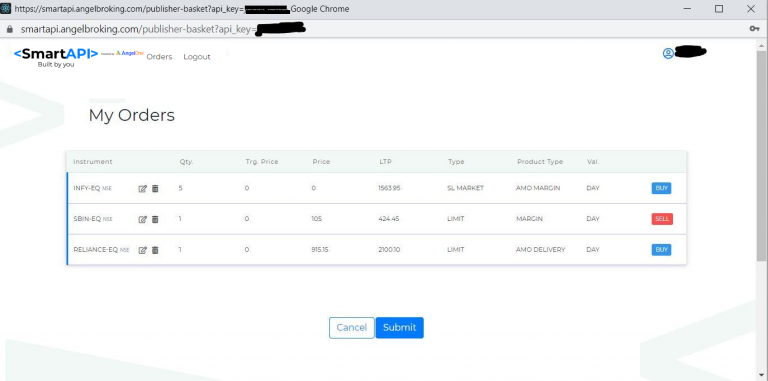
This image from the Angel One platform shows how these orders appear in their system. Note the "SL MARKET" order type for INFY.
The All-in-One Tool: Bracket Orders (Robo Orders)
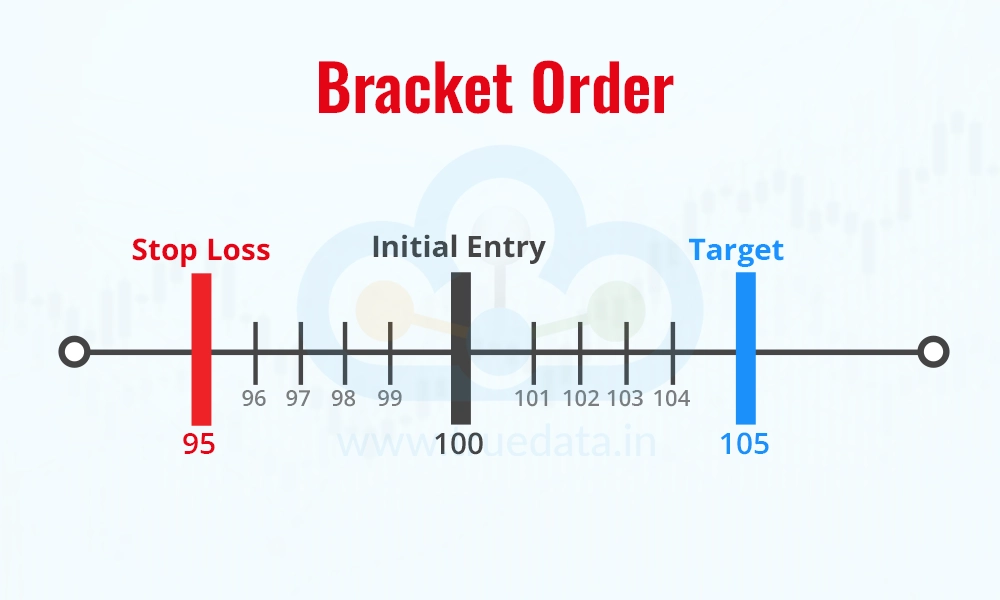
For a fully automated strategy, managing entry, profit-taking, and stop-loss orders separately can be complex. A bracket order is a powerful compound order type designed to handle all three in a single instruction. Angel One refers to this as a Robo Order.
A Robo/Bracket order consists of three legs:
- The initial entry order (e.g., buy 100 shares of XYZ at a limit of ₹1000).
- A profit-taking order (e.g., sell those 100 shares if the price reaches ₹1050).
- A stop-loss order (e.g., sell those 100 shares if the price drops to ₹990).
The key feature is that the profit-taking and stop-loss orders are linked in a One-Cancels-the-Other (OCO) relationship. If the target price is hit and the position is sold for a profit, the stop-loss order is automatically canceled. Conversely, if the stop-loss is triggered, the profit-taking order is canceled.
Let's see how Angel One describes their implementation.
Types Of Orders in Stock Market
The 'Robo Order' section in the Angel One article explains this powerful order type with a concrete numerical example. This is exactly what a Bracket Order is.
Read the subsection 'Robo Order'. Pay close attention to how the three components (initial, target, stop-loss) work together and how the cancellation of one leg affects the other.
-
Advantage: This is ideal for automation. It encapsulates an entire trade plan in a single API call, reducing the complexity of state management in your bot. The server at the broker's end manages the OCO logic.
-
Disadvantage: It is typically restricted to intraday (
MIS) trades and may not be available for all securities. -
API Implementation (Angel One): This is specified using a special
varietyparameter. You setvarietyto'ROBO'. You then provide thepricefor the initial entry, thesquareoffvalue (your target price), and thestoplossprice.{ "variety": "ROBO", "price": "1000", "squareoff": "50", // Profit target is price + squareoff "stoploss": "10", // Stop loss is price - stoploss "quantity": 100, ... }Note: The
squareoffandstoplossvalues in the API are often specified as differentials from the entry price, not absolute values. Always check the latest API documentation.
Putting It All Together: The API Perspective
Your background in system architecture will appreciate how these concepts are mapped to a clean API. The Angel One API documentation provides a perfect reference table.
This is your primary reference sheet. The Angel One API documentation clearly defines the constants you will use in your Python code to place these different orders.
Review the tables under 'Order Constants' and 'Order Parameters'. These tables are your dictionary for translating trading concepts into API calls. Note the distinction between variety (like ROBO) and ordertype (like MARKET or LIMIT).
Here is a summary of the key mappings for Angel One:
| Order Concept | API variety |
API ordertype |
Key Parameters |
|---|---|---|---|
| Market Order | 'NORMAL' |
'MARKET' |
quantity |
| Limit Order | 'NORMAL' |
'LIMIT' |
quantity, price |
| Stop-Loss Market | 'NORMAL' |
'STOPLOSS_MARKET' |
quantity, triggerprice |
| Stop-Loss Limit | 'NORMAL' |
'STOPLOSS_LIMIT' |
quantity, triggerprice, price |
| Bracket/Robo Order | 'ROBO' |
(Usually LIMIT or MARKET for entry) |
quantity, price, squareoff, stoploss |
Conclusion
You now have the vocabulary to command your trading bot. You can choose the right instruction based on the trade-offs between execution certainty and price control.
Key Takeaways:
- Market Order: Use for speed and certainty of execution. Pay with potential slippage.
- Limit Order: Use for price control. Pay with potential non-execution.
- Stop-Loss (SL) Order: A conditional order triggered by price, essential for risk management (exits) and breakout strategies (entries). Comes in Market (SL-M) and Limit (SL-L) flavors.
- Bracket (Robo) Order: A powerful compound order that bundles entry, profit target, and stop-loss. It is highly effective for automating self-contained intraday trades.
- API Mapping: These concepts translate directly into parameters like
ordertype,variety,price, andtriggerpricein the Angel One API.
Preview of the Next Lesson:
We've mentioned "slippage" and the "best available price" several times. But what determines that price? The market isn't just a single number; it's a collection of bids and offers. In the next lesson, we will dive into the bid-ask spread and see how its size and dynamics directly impact your execution price and trading costs.