Hello! Welcome back to our journey of building a message broker in Go.
In our last lesson, you implemented the crucial partition assignment logic within our broker. By creating AssignPartitionRoundRobin and AssignPartitionByKey, you gave the broker the intelligence to decide where incoming messages should be stored, laying the groundwork for both load balancing and ordered processing.
Introduction to the Lesson
Today, we're building the front door to our broker: the producer handler. This component will listen for incoming network connections, accept data from producers, and use the partitioning logic you just built to persist messages to the correct commit log. This is the core of the "write path" for our mini-Kafka system.
Your Goal for Today: Your learning outcome is to implement a producer handler that receives a message via TCP and appends it to the correct partition log.
To achieve this, we will:
- Set up a TCP server that accepts and handles concurrent client connections.
- Decode structured messages from the raw TCP stream using our binary protocol.
- Integrate the network handler with the broker's core logic to select a partition.
- Append the received message data to the selected partition's append-only log.
Let's get started on bringing our broker to life.
1. The TCP Server: Accepting Producer Connections
The first step is to open a network socket and listen for incoming TCP connections. In Go, the net package provides a clean and powerful API for this. The standard pattern is:
- Call
net.Listento create anet.Listener. - Enter an infinite loop that calls
listener.Accept()to block until a new connection arrives. - For each accepted
net.Conn, spawn a new goroutine to handle it concurrently. This allows the server to manage many producers at once.
To see this pattern in action, watch the first couple of minutes of the following video. It provides a concise demonstration of building a basic, concurrent TCP server.
#80 Golang - Master TCP & UDP Sockets – Complete Guide
This video from codeHeim provides a clear, step-by-step guide to building a TCP server in Go. Pay close attention to how it structures the listener and the connection acceptance loop.
Watch from the beginning to 01:48. Focus on the main function to see the net.Listen call, the deferred listener.Close(), and the for loop that calls listener.Accept() and dispatches connections to handleConnection in a new goroutine.
Let's apply this pattern to our broker. We'll add a Start method to our Broker struct, which will contain this server logic.
// internal/broker/broker.go

import (
    "log"
    "net"
    // ... other imports
)

// ... Broker struct definition ...

// Start begins listening for TCP connections and handling them.
func (b *Broker) Start(listenAddr string) error {
    listener, err := net.Listen("tcp", listenAddr)
    if err != nil {
        return err
    }
    defer listener.Close()
    log.Printf("Broker listening on %s", listener.Addr().String())

    for {
        conn, err := listener.Accept()
        if err != nil {
            log.Printf("Failed to accept connection: %v", err)
            // In a real server, you might want to check if the error is temporary
            // and continue, but for now, we'll just log it.
            continue
        }

        // Handle each connection in a new goroutine
        go b.handleConnection(conn)
    }
}

// handleConnection is the entry point for a new client connection.
func (b *Broker) handleConnection(conn net.Conn) {
    defer conn.Close()
    log.Printf("Accepted new connection from %s", conn.RemoteAddr().String())
    // We will fill this in next.
}
This code establishes the concurrent server foundation. The Start method is blocking, and the main application goroutine will live here, while each new connection gets its own dedicated goroutine running handleConnection.
2. The Write Path: From TCP Stream to Commit Log
Now for the core of the lesson: implementing handleConnection. This function is responsible for the entire write path within a single connection's lifecycle.
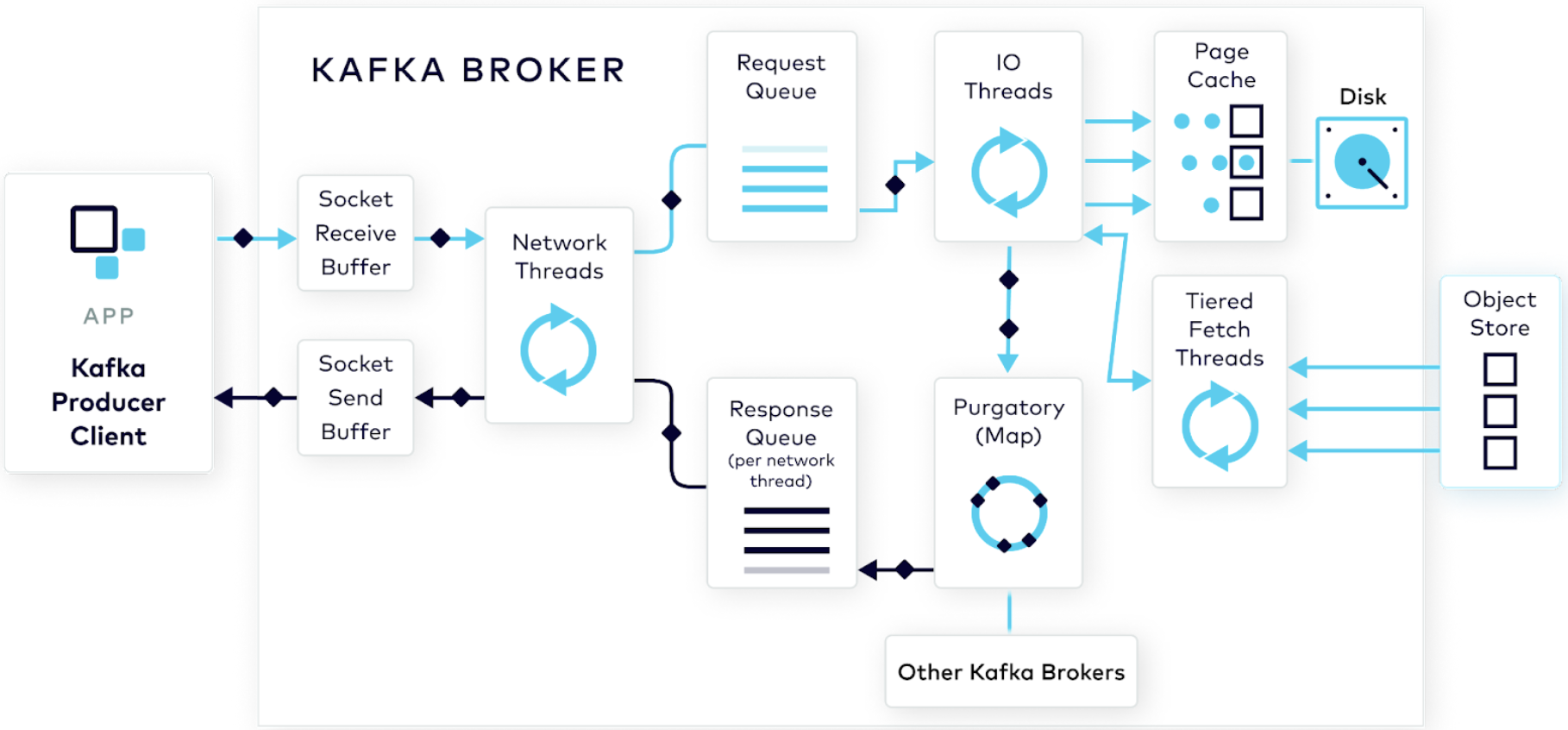
Our handleConnection will perform three main tasks in a loop:
- Decode: Read from the
net.Connand decode a complete message using our binary protocol. - Process: Examine the message type. If it's a "produce" request, extract the topic, key, and value.
- Append: Use the broker's logic to select a partition and append the message data to its commit log.
Decoding Framed Messages
A raw TCP connection is a stream of bytes. As we established in Module 5, we need a protocol to delineate message boundaries. We're using a length-prefixed binary protocol. The OneUptime article provides an excellent implementation of Decode and Encode functions for this purpose.
How to Implement Custom Binary Protocols Over TCP in Go
This article, 'How to Implement Custom Binary Protocols Over TCP in Go', gives a complete walkthrough of designing and implementing a framed binary protocol. We'll focus on the server's read loop.
First, review the Decode function in the article. Notice how it uses io.ReadFull to guarantee it reads the entire header, then reads the exact payload length. This is critical for avoiding partial reads. Then, look at the handleConnection function. See how it uses protocol.Decode(conn) inside a for loop to continuously process messages from the client.
Let's integrate this decoding logic into our handleConnection function. For now, let's assume you have a protocol package with a Decode function similar to the one in the article and a Message struct.
// internal/broker/broker.go

import (
    "io"
    "our-kafka/internal/protocol" // Assuming this is where your protocol code lives
    // ... other imports
)

func (b *Broker) handleConnection(conn net.Conn) {
    defer conn.Close()
    log.Printf("Accepted new connection from %s", conn.RemoteAddr().String())

    for {
        // Decode the next message from the stream
        msg, err := protocol.Decode(conn)
        if err != nil {
            // If it's an EOF, it means the client closed the connection gracefully.
            if err == io.EOF {
                log.Printf("Client %s closed the connection", conn.RemoteAddr().String())
                return
            }
            log.Printf("Error decoding message from %s: %v", conn.RemoteAddr().String(), err)
            return // On any other error, we terminate the connection.
        }

        // Process the decoded message
        err = b.handleMessage(conn, msg)
        if err != nil {
            log.Printf("Error handling message from %s: %v", conn.RemoteAddr().String(), err)
            // Optionally send an error response to the client here
            return
        }
    }
}

// handleMessage dispatches messages to specific handlers based on their type.
func (b *Broker) handleMessage(conn net.Conn, msg *protocol.Message) error {
    switch msg.Type {
    case protocol.TypeProduceRequest:
        return b.handleProduceRequest(conn, msg)
    // Other cases for different message types (e.g., FetchRequest) will go here.
    default:
        return fmt.Errorf("unsupported message type: %d", msg.Type)
    }
}
Handling the Produce Request
This is where everything comes together. The handleProduceRequest function will orchestrate the final steps: partitioning and appending.
Let's assume the Payload of our protocol.Message contains a serialized ProduceRequest struct that looks something like this:
// internal/protocol/produce.go
type ProduceRequest struct {
    TopicName string
    Key       []byte
    Value     []byte
}

// And functions to serialize/deserialize it, e.g., using encoding/gob or json.
// For example:
// func DecodeProduceRequest(data []byte) (*ProduceRequest, error)
Now, we can implement handleProduceRequest to use the methods from our last lesson.
// internal/broker/broker.go

func (b *Broker) handleProduceRequest(conn net.Conn, msg *protocol.Message) error {
    // 1. Deserialize the payload into a ProduceRequest
    req, err := protocol.DecodeProduceRequest(msg.Payload)
    if err != nil {
        return fmt.Errorf("failed to decode produce request: %w", err)
    }

    // 2. Select a partition using the logic from the previous lesson
    var partition *Partition
    if len(req.Key) > 0 {
        // If a key is present, use key-based partitioning for ordering
        partition, err = b.AssignPartitionByKey(req.TopicName, req.Key)
    } else {
        // Otherwise, use round-robin for load balancing
        partition, err = b.AssignPartitionRoundRobin(req.TopicName)
    }

    if err != nil {
        return fmt.Errorf("failed to assign partition: %w", err)
    }

    // 3. Append the message value to the partition's commit log
    // The Append method on the CommitLog interface handles the actual disk write.
    _, err = partition.Log.Append(req.Value)
    if err != nil {
        return fmt.Errorf("failed to append to commit log for partition %d: %w", partition.ID, err)
    }

    // In a future lesson, we would send an acknowledgment back to the client here.
    log.Printf("Appended message to topic '%s', partition %d", req.TopicName, partition.ID)

    return nil
}
This flow is remarkably similar to how a key-value store based on an append-only log works. The following article on building a Bitcask-inspired store demonstrates the exact same pattern: create an entry, append it to the active log file, and update an index. In our case, "selecting a partition" is analogous to finding the active log file, and "appending" is the disk write.
Building a Bitcask Inspired KV Store: Append-Only Logs Meet In ...
This article provides a fantastic walkthrough of building a KV store with an append-only log, a design that is at the heart of systems like Kafka. The 'Set' operation is a direct parallel to our producer handler's logic.
Read the section titled 'Core Operations: Get, Set, Delete', focusing specifically on the subsection 'Set' and its code example. Notice the sequence: a) create an entry, b) append it to the active segment, c) update the in-memory index. This is conceptually identical to our handleProduceRequest logic.
By calling partition.Log.Append(), our network handler correctly delegates the storage concern to the CommitLog interface. This keeps our code clean and respects the abstractions we've designed—the handler doesn't need to know if the log is being written to a local file or a PostgreSQL table.
Conclusion
Congratulations! You have just built the complete write path for our message broker. Producers can now connect to our server over TCP, send messages using our binary protocol, and have that data durably persisted to the correct partition on disk.
Key Takeaways:
- A concurrent TCP server in Go is built with a
net.Listenerin a loop that spawns a new goroutine for eachnet.Conn. - The handler for each connection must loop, decoding framed messages from the stream using a function like
io.ReadFullto ensure completeness. - The producer handler acts as an orchestrator, integrating networking, partitioning, and storage layers.
- The logic flow is: Decode Request -> Select Partition -> Append to Log.
- Using interfaces (like
CommitLog) allows the network handling code to remain completely decoupled from the underlying storage implementation.
Next Up
Our current handler processes each message synchronously. While simple, this means the network goroutine is blocked waiting for a disk write to complete, which can limit throughput.
In the next lesson, we will use buffered channels to create a bounded work queue for incoming produce requests. This will decouple message reception from disk I/O, allowing the network goroutine to handle new messages faster while a separate pool of worker goroutines handles the slower disk-bound operations. This is a crucial pattern for building high-performance, resilient systems and will introduce the concept of backpressure.