Hello! Welcome back to our course on building scalable systems in Notion.
In our last lesson, we established a strategic framework for choosing the right automation tool—deciding between native automations, no-code platforms, and the Notion API. This is the crucial first step in any automation project.
Today, we take the logical next step. Now that you know how to select the right tool, your goal for this lesson is to learn how to design scalable, single-direction integration workflows with a focus on error handling and maintainability.
For a consultant, this is where you elevate your service from simply "connecting apps" to "engineering a reliable business process." A workflow that runs successfully 99% of the time is good; a workflow that anticipates the 1% failure, handles it gracefully, and tells you what to do about it is truly scalable and professional.
1. Architectural Principles of a Maintainable Workflow
Before we dive into specific tools, let's establish some high-level architectural principles. While the following resource discusses ServiceNow, its best practices are universal and directly apply to designing robust automations with tools like Make.com or Zapier. Given your background in process improvement, these strategic concepts will be a natural fit.
ServiceNow Workflow Best Practices: Automate and ...
The article 'ServiceNow Workflow Best Practices' provides an excellent, platform-agnostic overview of what makes a workflow scalable and maintainable. We will borrow its core ideas.
Please read the sections 'Designing Workflows That Scale: Architectural Best Practices' and 'Practical Implementation: Moving from Theory to Practice'. Pay close attention to the concepts of 'Embrace Modularity Through Subflows,' 'Establish Naming Conventions,' and 'Document Workflows.'
Based on that reading, here are the core principles for designing maintainable workflows:
- Modularity (Subflows): Instead of building one giant, monolithic workflow, break it into smaller, reusable components. In Make.com, these can be separate scenarios that call each other; in Zapier, you can use "Sub-Zaps." This makes the system easier to debug and update. If you have a sequence for "Create New Client in Notion," build it once and call it from your "DocuSign" workflow and your "HubSpot" workflow.
- Clear Naming Conventions: A workflow named "Automation 1" is useless in six months. A name like
[Stripe > Notion] Sync New Customer to Client DBis immediately understandable. This discipline is crucial for long-term maintenance, especially in a client-facing context. - Documentation: Every workflow you build for a client should have a simple entry in your System Owner's Manual (a topic we'll cover in detail in Module 6). It should state:
- What is its purpose? (The business process it automates)
- What is the trigger? (e.g., "New paid invoice in Stripe")
- What are the key actions? (e.g., "Finds or creates a client in Notion, adds an invoice page, rolls up total revenue.")
- How are errors handled?
2. Designing for Failure: The Heart of Resilient Systems
A common mistake is to design a workflow only for the "happy path"—the scenario where everything works perfectly. A professional system is defined by how it behaves when things go wrong.
Error handling isn't an add-on; it's a core design consideration. These patterns are so fundamental to software engineering that they have established names.
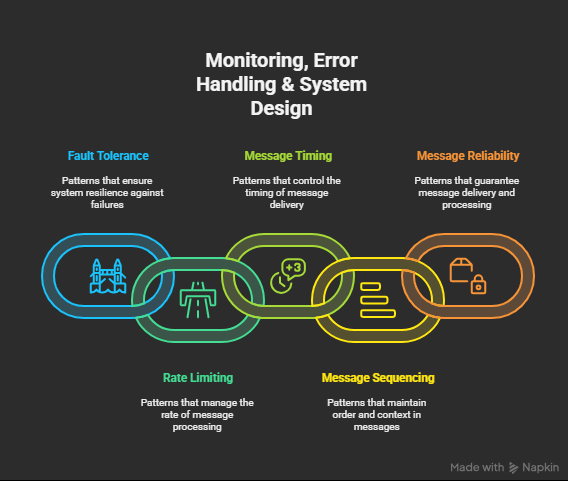
There are generally two categories of errors you must plan for:
- Data & Logic Errors: The input data is not what you expected. For example, a user submits a form without a required email address, and your workflow fails when it tries to send a confirmation. These errors are often predictable.
- External System Errors: An API you are calling is temporarily down, slow, or returns an unexpected error. For example, the Notion API is unavailable for 30 seconds, or your Google Sheets connection times out. These errors are often transient (temporary).
A well-designed workflow anticipates both. It doesn't just crash; it follows a pre-defined path depending on the type of error.

3. Error Handling Strategies in Practice
Let's make this concrete. We'll use Make.com as our primary example because its visual interface and error-handling capabilities are exceptionally well-suited for building and managing complex, reliable systems.
The following video provides an excellent introduction to the mechanics of error handling in Make.com.
Error Handling in Make.com: A Beginner's Guide
The video 'Error Handling in Make.com' by Jannis Moore is a fantastic practical guide. It will show you exactly how to implement the error handling theory we've just discussed.
Please watch the following segments: What are errors? (00:41 - 04:01) to understand the difference between internal and external errors. Adding an Error Handler (06:36 - 11:10) to see the basic mechanism. The 'Ignore' directive (11:10 - 11:20) for simple cases. The 'Break' directive (11:20 - 14:43) - this is the most important part for building self-healing systems.
From the video, let's distill the two most critical strategies for any single-direction workflow.
Strategy 1: Automatic Retries for Transient Errors
Problem: Your workflow tries to create a Notion page, but the Notion API is temporarily down and returns a 503 Service Unavailable error. The workflow fails and stops.
Solution: Use a Retry mechanism. This is for transient, external errors that are likely to resolve themselves in a short time.
In Make.com, this is handled by the Break directive. You can configure it to:
- Try the failed step again.
- Wait for a specific interval (e.g., 15 minutes).
- Attempt this a set number of times (e.g., 5 attempts).
If the Notion API is back online within that window, the workflow execution resumes automatically, and no data is lost. This creates a self-healing system that is significantly more maintainable because it doesn't require your immediate manual intervention for temporary glitches.
Strategy 2: Alternative Paths for Predictable Errors
Problem: Your workflow is triggered by a new Typeform submission. It tries to create a new contact in your Notion CRM, but it fails because the user didn't enter a value for "Company Name," which is a required Relation property in Notion. Retrying won't fix this, as the data itself is the problem.
Solution: Define an Alternative Path. The workflow should catch this specific error and do something else instead of stopping.
In Make.com, you can add an error handler route from a module. Instead of using Break or Ignore, you can add other modules to this error path, for example:
Create a Notion Page: Create a new page in a "Workflow Errors" database. Log the error message and all the data received from Typeform.Assign a User: Assign the task to a team member for manual review.Send a Slack Message: Notify a specific channel that manual intervention is required.
This makes the system maintainable because it transforms an invisible failure into a visible, actionable task within your existing project management system.
Test your understanding!
A client has a workflow that syncs approved expense reports from an app called Expensify to their financial ledger in Notion. Last week, the workflow failed for two hours because the Expensify API was undergoing maintenance. This caused a backlog of 50 reports that had to be entered manually.
How would you redesign the workflow's error handling for the "Get new report from Expensify" module to prevent this in the future?
Show answer
This is a classic case for a Retry strategy, as the error was transient (the API was temporarily unavailable).
The best solution would be to add a Break error handler to the "Get new report from Expensify" module in Make.com. You would configure it to retry the connection, for example, 5 times with a 30-minute interval between attempts.
This way, during the 2-hour maintenance window, the workflow would simply pause and retry. Once the Expensify API came back online, the workflow would automatically resume processing the reports, requiring no manual intervention and preventing a backlog.
4. Putting It All Together: A Design Example
Let's apply these principles to a single-direction workflow. We'll use the "Product Launch Coordination" example mentioned in the "Zapier AI vs Make.com AI vs n8n AI" article you reviewed.
Goal: When a product launch date in an Airtable base is one week away, orchestrate a series of actions.
Design with Maintainability in Mind:
- Trigger: A scheduled Make.com scenario runs daily, searching for launches in Airtable where the date is 7 days from now.
- Action: Get Launch Tasks from Notion
- Happy Path: Retrieves all tasks related to this launch project.
- Error Handling: What if the Notion API is down?
- Apply
Breakdirective: Retry 3 times at 15-minute intervals. If it still fails after 45 minutes... - Alternative Path: Send a high-priority Slack message to the
#marketing-opschannel and stop the workflow for this launch. This prevents partial execution.
- Apply
- Action: Iterate through Social Media Posts
- Happy Path: A router iterates through planned posts and schedules them on LinkedIn and Twitter.
- Error Handling: What if the LinkedIn API connection fails but Twitter works?
- Modular Design: The LinkedIn and Twitter modules should be on separate branches of the router, each with its own error handler.
- LinkedIn Error Path: Create a task in the Notion project board, assign it to the Social Media Manager, with a title "Failed to schedule LinkedIn post," and include the error details. The rest of the workflow continues.
- Action: Generate Executive Summary
- Happy Path: At the end, an AI module drafts a summary of actions taken and posts it to Slack.
- Error Handling: What if the AI API times out?
- Apply
Ignoredirective: This step is not critical for the launch itself. We can simply ignore the failure and allow the workflow to complete successfully. The core tasks (scheduling posts) are done.
- Apply
This design is scalable and maintainable because it is resilient to temporary outages, contains failures to their specific modules, and creates actionable tasks for errors that require human input.
Conclusion
You now have a robust mental model for designing professional-grade, single-direction automation workflows. The focus is no longer just on making it work once, but on ensuring it works reliably over time.
Key Takeaways:
- Design for Maintainability: Use modularity (subflows), clear naming conventions, and basic documentation to ensure your systems can be understood and managed in the future.
- Embrace Failure by Design: Anticipate both data errors and external system failures. A resilient system has a plan for both.
- Use Retries for Transient Errors: The
Breakdirective in Make.com is your best tool for creating self-healing workflows that can survive temporary API outages. - Use Alternative Paths for Actionable Errors: When an error requires human intervention, don't just let the workflow fail. Route it to a path that creates a task, sends a notification, and logs the details for review.
In our next lesson, we'll tackle a more complex challenge: analyzing the architectural challenges of bi-directional syncing. We'll explore the problems that arise when data flows in two directions, such as infinite loops and data conflicts, and discuss the strategies needed to manage them effectively.