Welcome back! In our last session, we successfully set up your development environment, which is now ready for you to build Flutter apps. With the tools in place, we can now shift our focus from configuration to code.
This lesson marks your first real dive into the Dart programming language. Our goal is to cover the essential syntax you'll use every day. We will explore how Dart handles variables and types, introduce its powerful "sound null safety" feature—a concept that will feel familiar given your TypeScript experience—and walk through the standard control flow statements like loops and conditionals. Mastering these fundamentals is the essential next step toward building your first Flutter application.
Variables and Types in Dart
Coming from JavaScript and TypeScript, Dart's approach to variables and types will feel quite natural. Dart is a strongly typed language, but like TypeScript, it has excellent type inference, which keeps the code concise.
Let's start with variable declaration. You can declare a variable using the var keyword. Dart will infer its type from the initialized value.
// Dart infers the type of 'greeting' to be a String.
var greeting = 'Hello, Dart!';

// Reassigning to a different type will cause an error.
// greeting = 123; // Error: A value of type 'int' can't be assigned to a variable of type 'String'.
If you don't initialize a variable upon declaration, you should provide an explicit type. If you omit the type, it defaults to dynamic, which is similar to TypeScript's any type and should be used sparingly.
// Explicitly typed variable.
int year;
year = 2024;

// This variable is of type 'dynamic' and can hold any value.
dynamic anything;
anything = 'a string';
anything = 42; // This is allowed.
Immutability with final and const
You'll frequently use final and const to declare variables that don't change.
final: Use this when you want a variable to be assigned only once. It's analogous toconstin JavaScript. Afinalvariable's value is determined at runtime.const: Use this for values that are known at compile time. This is a stronger form of immutability thanfinal. Aconstvariable must be initialized with a compile-time constant value.
final String name = 'Alice';
// name = 'Bob'; // Error: The final variable 'name' can only be set once.

const double pi = 3.14159;
// pi = 3.14; // Error: Constant variables can't be assigned a value.
The article "Learning Dart as a JavaScript developer" provides a good comparison of these concepts with their JavaScript counterparts.
Learning Dart as a JavaScript developer
This guide from dart.cn is specifically designed for developers with your background. It clearly explains Dart's variable system by contrasting it with JavaScript.
Please read the section on Variables, starting from the main explanation and continuing through the subsection on Final and const. Pay close attention to the distinction between final and const, as it's more nuanced than in JavaScript.
Basic Data Types
Dart comes with a core set of built-in types. For now, we'll focus on the most common ones. The video below gives a great visual overview of declaring variables and using these types.
Learn The Dart Programming Language - Complete Free Course!
This video from the "Learn The Dart Programming Language" course by John Elder offers a practical introduction to Dart's variables and data types.
First, watch the section on Variables, from the beginning. This covers var, explicit type declarations, dynamic, const, and final. Next, watch the segment on Data Types, from the overview. This will introduce you to String, int, double, and bool.
To summarize the types from the video:
- Numbers: Dart has two main numeric types:
int: For integer values (e.g.,10,-5).double: For floating-point numbers (e.g.,3.14,-0.5).
Both are subtypes of a class callednum.
- Strings: The
Stringtype represents a sequence of UTF-16 code units. You can use single (') or double (") quotes. String interpolation is done with$variableor${expression}. - Booleans: The
booltype has two possible values:trueandfalse. Unlike JavaScript's "truthy" and "falsy" values, Dart conditions strictly require abool. dynamic: As mentioned, this is a special type that tells the type checker to allow any type. It's similar in spirit to TypeScript'sany.
Understanding Sound Null Safety
One of Dart's most important features is its sound null safety. This system prevents a whole class of errors commonly known as "null pointer exceptions" or "null reference errors." Since you have experience with TypeScript's strict null checks, the core ideas should be very intuitive.
The fundamental principle is: types are non-nullable by default. A variable of type String can never hold a null value. This is enforced at compile time.
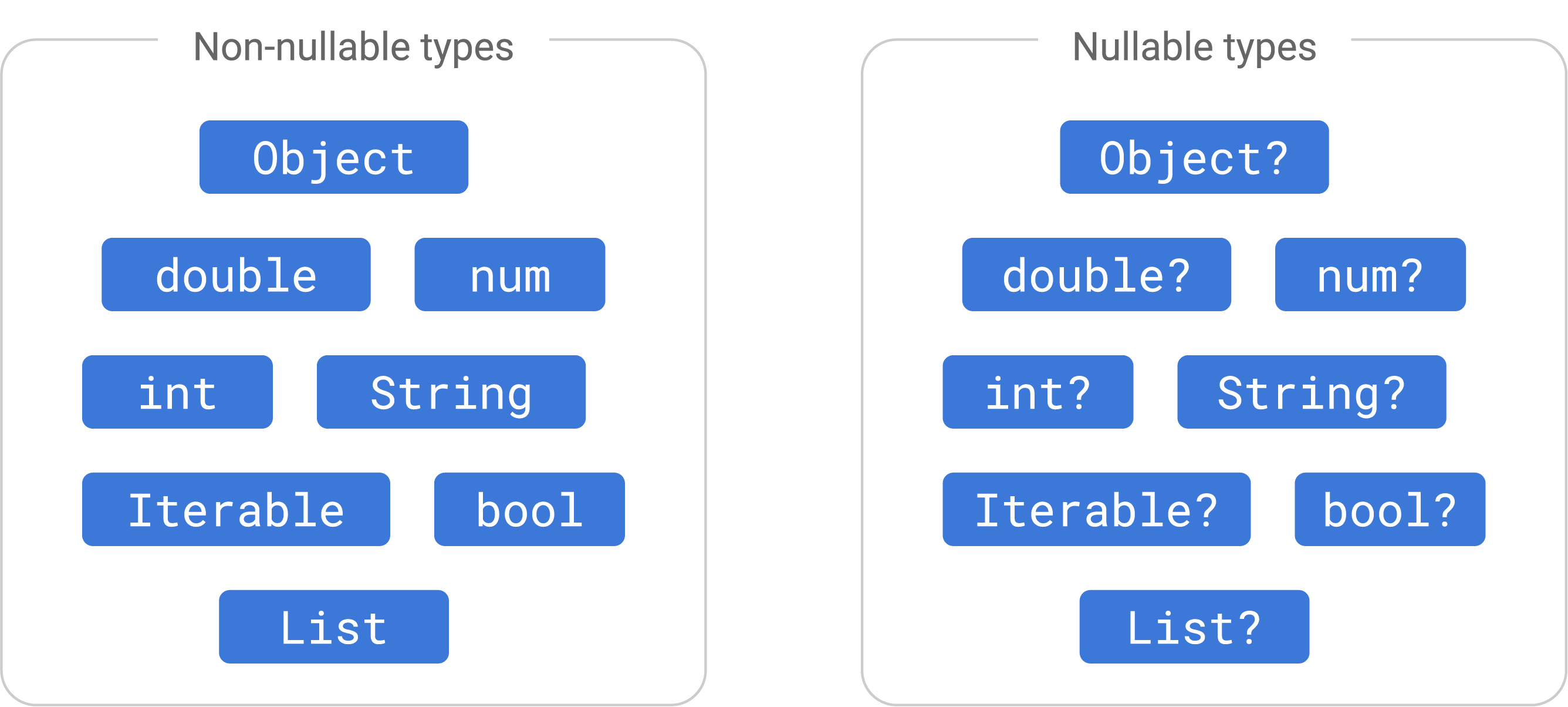
If you need a variable to be able to hold null, you must explicitly declare it as nullable by adding a question mark (?) to the type.
String nonNullableName = 'Jane';
// nonNullableName = null; // Error: A value of type 'Null' can't be assigned to a variable of type 'String'.

String? nullableName = 'John';
nullableName = null; // This is allowed.
A nullable type like String? is a union of the String type and the Null type.
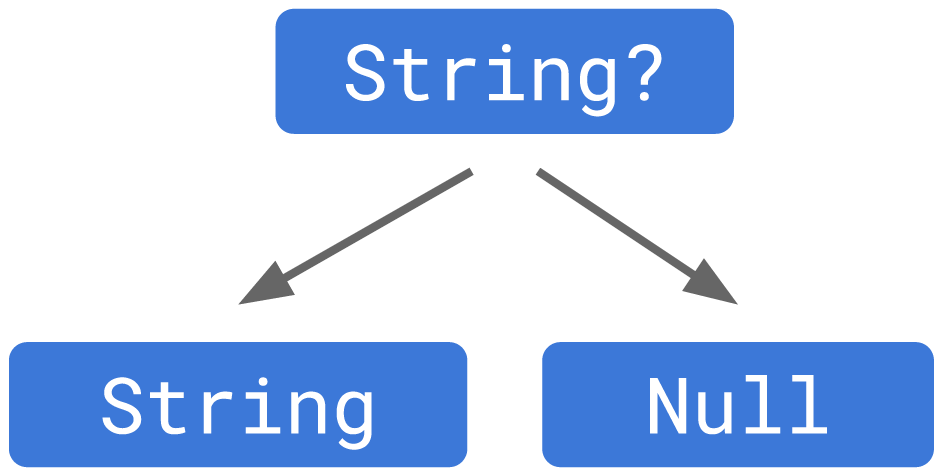
The following video provides an excellent conceptual overview of why null safety is important and how it works in Dart.
#9 - Understanding Null Safety in Dart - Type Promotions, Null Assertion, Late, Required
This video from Flutterly provides a deep dive into Dart's null safety, starting with the motivation behind it and explaining the core concepts.
Watch the introduction from the beginning to understand the problem null safety solves. Next, watch the explanation of non-nullable by default types from the start of the section. This explains how the ? operator creates nullable types. Pay attention to the segment on the type hierarchy from the diagram to see how null safety fundamentally changed Dart's type system.
Working with Nullable Types
Since you can't call methods on null (e.g., null.toUpperCase()), Dart requires you to handle the possibility of null before you can use a nullable variable. There are several ways to do this.
1. Flow Analysis (Type Promotion)
The Dart analyzer is smart. If you perform a null check, it will "promote" the variable's type to its non-nullable version within that code branch.
void printNameLength(String? name) {
  if (name != null) {
    // Inside this block, Dart knows 'name' is not null.
    // It's treated as a non-nullable 'String'.
    print(name.length);
  } else {
    print('No name provided.');
  }
}
2. Null-aware Operators
These operators provide a more concise way to handle nullability and will be very familiar from modern JavaScript.
?.(Null-aware access): If the object is not null, access the property. Otherwise, the expression evaluates tonull.String? name; int? length = name?.length; // length is null because name is null.??(If-null operator): If the expression on the left is null, use the value on the right.
t String? name;
String guestName = name ?? 'Guest'; // guestName is 'Guest'.
```
!(Null assertion operator): If you are certain that a nullable expression is not null, you can use the!operator to tell Dart to treat it as non-nullable. This is like a type cast and will throw an error at runtime if the expression is indeed null. Use it with caution.String? name = 'Bob'; int length = name!.length; // You are asserting name is not null.
3. The late Keyword
Sometimes you have a non-nullable variable that can't be initialized immediately when it's declared, but you guarantee it will be assigned a value before it's used. In such cases, you can use the late keyword.
class MyClass {
  late String description;

  void fetchData() {
    // Simulates fetching data and then initializing the variable.
    description = 'Data has been fetched!';
  }
}
This avoids making description nullable (String?) when you know it will eventually have a value.
Learning Dart as a JavaScript developer
This section of the guide covers the practical operators for dealing with nullability.
Read the section on Null safety, focusing on the type syntax and the subsection on Null-aware operators, including the ! operator.
Control Flow
Dart's control flow statements are very similar to what you know from C++ and JavaScript.
if-else: Works as expected, but remember, the condition must be abool.forloops: The standardfor (var i = 0; i < 5; i++)loop is available. Dart also has afor-inloop, which behaves like JavaScript'sfor-ofloop for iterating over the elements of a collection.whileanddo-while: Standard pre-test and post-test loops.breakandcontinue: Work inside loops as expected.switch: Dartswitchstatements can be used with integers, strings, and compile-time constants. A key difference from JavaScript is that there is no implicit fall-through. A non-emptycasemust end withbreak,return,throw, orcontinue.
Learn The Dart Programming Language - Complete Free Course!
This video provides a clear, practical demonstration of loops and conditional logic in Dart.
Watch the section on Loops from the beginning, which covers for, for-in, and while loops. Then, watch the section on Logic from the demonstration of if, else if, and else.
Practice: The FizzBuzz Challenge
To put your knowledge of variables, control flow, and operators to the test, try implementing the classic "FizzBuzz" problem in a Dart file.
The Challenge:
Write a program that prints the numbers from 1 to 100. But for multiples of three, print "Fizz" instead of the number, and for the multiples of five, print "Buzz". For numbers which are multiples of both three and five, print "FizzBuzz".
You will need:
- A
forloop to iterate from 1 to 100. if,else if, andelsestatements to check the conditions.- The modulo operator (
%) to check for multiples (e.g.,number % 3 == 0).
Give it a try! This simple exercise is a great way to solidify your understanding of the fundamentals.
Conclusion
In this lesson, we've covered the foundational syntax of the Dart language. You've learned about:
- Declaring variables with
var,final, andconst, and the core data types likeint,double,String, andbool. - Dart's sound null safety, which helps you write more robust code by default, and the tools (
?,!,??) to manage nullability when needed. - Standard control flow statements like
if,for, andswitch, noting some key differences from JavaScript.
You now have the basic building blocks to start writing logic in Dart.
In our next lesson, we will move on to one of the most powerful features of Dart: classes. We'll explore how to define classes and constructors, and how to use inheritance and mixins for code reuse. This will draw heavily on your existing knowledge of object-oriented programming from C++ and JavaScript.