Introduction
In our last lesson, we transitioned from merely inspecting class structures to actively manipulating them at runtime by creating objects and invoking methods with reflection. You learned how to use Constructor.newInstance() and Method.invoke() to bring your code to life dynamically, a technique that underpins many advanced Java frameworks.
This lesson explores another critical dimension of reflection: reading metadata. We will focus on how to discover and process annotations on classes and methods at runtime. Annotations are the declarative heart of modern Java development, used by frameworks like Spring for dependency injection, JUnit for test discovery, and Hibernate for object-relational mapping. By learning to read them, you'll uncover the mechanism that allows these frameworks to be so powerful and flexible, directly aligning with your goal of understanding the internal workings of Java used in backend engineering.
Annotations: Metadata for Your Code
Before we can read annotations, we must ensure they are available at runtime. An annotation is just metadata—a tag you add to your code—that doesn't change the code's behavior on its own. It's up to another piece of code to read this tag and act on it.
For the JVM's Reflection API to "see" an annotation, it must be defined with RetentionPolicy.RUNTIME. This instructs the Java compiler to embed the annotation data into the .class file and for the JVM to load it into memory, making it accessible at runtime.
The video "Java Annotations and How to Build Your Own" provides an excellent explanation of retention policies.
Java Annotations and How to Build Your Own Runtime Annotations - Java Programming
This video explains the different annotation retention policies and highlights why RUNTIME is crucial for reflection.
Please watch the segment from this timestamp. Pay close attention to the explanation of the three policies: SOURCE, CLASS, and RUNTIME. The key takeaway is that only RUNTIME makes an annotation available for the kind of processing we'll do today.
The AnnotatedElement Interface
The Reflection API provides a clean, unified way to access annotations through the java.lang.reflect.AnnotatedElement interface. The key classes we've already worked with—Class, Method, Field, and Constructor—all implement this interface.
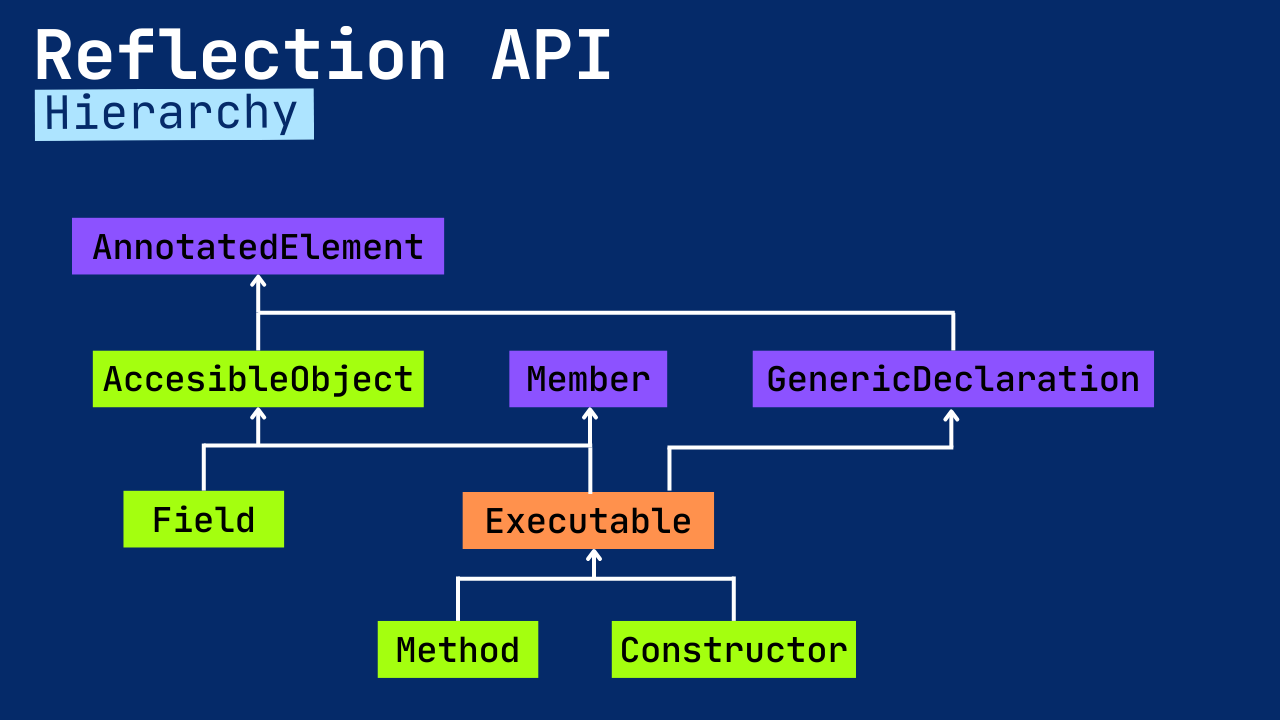
This interface provides the essential methods for annotation discovery:
isAnnotationPresent(Class<? extends Annotation> annotationClass): Checks if a specific annotation is present on the element.getAnnotation(Class<T> annotationClass): Returns the annotation object of a specific type, if present. This allows you to access the annotation's parameters.getAnnotations(): Returns an array of all annotations present on the element.getDeclaredAnnotations(): Returns an array of annotations directly present on the element, ignoring inherited ones.
The video from "Coding with John" gives a practical and clear demonstration of creating a custom annotation and then checking for its presence on a class object.
Annotations In Java Tutorial - How To Create And Use Your Own Custom Annotations
This video walks through creating a custom annotation and then using reflection to process it.
First, watch the segment on creating an annotation from this timestamp. This will show you how to define your own annotation using @interface, @Target, and @Retention. Next, watch how this annotation is processed from this segment. The presenter uses myObject.getClass().isAnnotationPresent() to check for the annotation at runtime, which is the most fundamental operation we'll be using.
Discovering and Processing Annotations
Now, let's combine our knowledge from the previous lesson with annotation discovery. A common pattern in testing frameworks like JUnit is to scan a class for methods marked with a specific annotation (e.g., @Test) and then execute them. This involves:
- Getting the
Classobject. - Iterating through its methods using
getDeclaredMethods(). - For each
Methodobject, checking if it has the desired annotation usingisAnnotationPresent(). - If it does, invoking the method using
method.invoke().
This powerful pattern connects metadata (the annotation) directly to runtime behavior (method execution).
The tutorial "Reading Annotations" from dev.java provides a solid textual reference for these concepts, along with code examples.
Reading Annotations - Dev.java
This official Java tutorial explains the AnnotatedElement interface and its methods in detail.
In the article, read the section "Discovering Annotations on Elements". This section formally introduces AnnotatedElement and demonstrates the use of isAnnotationPresent(), getAnnotations(), and getAnnotation(). Pay attention to the example where it retrieves the Person class and inspects its annotations.
The next video provides a fantastic live-coding example of building a simple "unit tester" that does exactly this—finds and runs methods annotated with a custom @Test annotation.
Java Annotations and How to Build Your Own Runtime Annotations - Java Programming
This video demonstrates a practical use case: building a simple test runner that finds and invokes annotated methods.
Watch the segment from this timestamp. Notice how it combines concepts: it loops through getDeclaredMethods() (which you've seen before), uses isAnnotationPresent() to check for a @Test annotation, and then calls method.invoke() (from our last lesson) to run the test. This is a perfect synthesis of our recent topics.
Accessing Annotation Parameters
Annotations can also carry data. For example, a test annotation might have a parameter for a timeout, like @Test(timeout=5000). You define these parameters as methods in your annotation's @interface declaration.
To access these parameter values at runtime, you first get the annotation object using getAnnotation(MyAnnotation.class), and then you simply call the methods on that object to retrieve the values.
// Annotation definition
@Retention(RetentionPolicy.RUNTIME)
@Target(ElementType.METHOD)
public @interface RunImmediately {
    int times() default 1; // A parameter named 'times' with a default value
}

// Usage
@RunImmediately(times = 3)
public void myMethod() {
    System.out.println("Running!");
}

// Processing
Method method = ... ; // get the Method object for myMethod
if (method.isAnnotationPresent(RunImmediately.class)) {
    RunImmediately annotation = method.getAnnotation(RunImmediately.class);
    int numberOfTimes = annotation.times(); // Access the parameter value
    for (int i = 0; i < numberOfTimes; i++) {
        method.invoke(myObject);
    }
}
Both of the videos we've looked at demonstrate this concept clearly.
Annotations In Java Tutorial - How To Create And Use Your Own Custom Annotations
This segment from "Coding with John" shows how to add a parameter to a custom annotation and retrieve its value at runtime.
Watch from this timestamp. The presenter adds an int times parameter to an annotation and then uses getAnnotation().times() to control a loop that invokes a method multiple times.
A Comprehensive Example
Let's look at one more resource that ties everything together. The article from Keyhole Software provides a complete, self-contained example of creating several custom annotations and a processor class that inspects classes, fields, and methods to read their annotations and values. This serves as an excellent practical summary.
Processing Java Annotations Using Reflection - Keyhole Software
This article provides a full code example of an annotation processor.
First, read the section "Processing Annotations". It explains the core logic of iterating over class members (Field, Method) and using isAnnotationPresent() to find what you're looking for. Then, examine the code for the AnnotatedClassProcessor in the "Conclusion" section. Trace the logic: it takes a class, iterates through its type, field, and method annotations, and prints the details. This is a great blueprint for how you might build a similar utility.
Inherited Annotations
One final nuance is the difference between getAnnotations() and getDeclaredAnnotations(). If a class B extends class A, and class A is marked with an annotation that is itself annotated with @Inherited, then B.class.getAnnotations() will include that annotation from A. However, B.class.getDeclaredAnnotations() will not, as it only returns annotations physically present in the source code of class B. This distinction is important for building frameworks that need to respect or ignore class hierarchies.
The dev.java article we looked at earlier has a concise section explaining this.
Reading Annotations - Dev.java
This section explains how annotation inheritance works.
Please read the brief section "Getting Inherited Annotations". The example with the User and Person classes clearly illustrates the difference in behavior between getAnnotations() and getDeclaredAnnotations().
Conclusion
Today, you've added a crucial capability to your reflection toolkit: the ability to read and act upon metadata. By understanding how to process annotations at runtime, you've demystified a core mechanism behind many of the most popular Java frameworks.
Key Takeaways:
- Runtime Retention is Key: For reflection to see an annotation, it must be defined with
@Retention(RetentionPolicy.RUNTIME). AnnotatedElementis the Gateway:Class,Method,Field, andConstructorall implement this interface, providing a consistent API for discovery.- The Discovery Pattern: The common workflow is to iterate over class members, use
isAnnotationPresent()to find annotated elements, and usegetAnnotation()to retrieve the annotation object itself. - Accessing Parameters: You can access an annotation's parameters by calling the corresponding methods on the annotation object returned by
getAnnotation().
In our next lesson, we will venture into one of the most powerful features of the Reflection API: dynamic proxies. We've learned to inspect, instantiate, invoke, and read metadata. Now, you'll learn how to generate entirely new classes on the fly at runtime that implement specific interfaces, a technique used for AOP (Aspect-Oriented Programming), logging, and transaction management in enterprise applications.