Hello and welcome back!
In the previous module, we successfully built and fortified the communication bridge between our Unity frontend and Rust backend. We now have a robust, error-handling pipeline ready to pass data back and forth. With that foundation in place, it's time to start defining the content of that data.
This lesson kicks off Module 3: Character Data Model & Creation. We'll begin by tackling the first, crucial step in bringing your game's inhabitants to life. Our learning outcome is to design a JSON schema for character data including name, age, personality, and traits. This schema will serve as the definitive "blueprint" for a character, ensuring that all data—whether created by the game, saved to a file, or introduced by a mod—is consistent and valid.
1. The Language of Data: JSON and JSON Schema
First, let's briefly revisit JSON (JavaScript Object Notation). As a Computer Science undergraduate, you're likely familiar with it, but a quick refresher on its structure is always helpful before we define its rules.
This short video provides an excellent 10-minute overview of JSON, covering its basic data types (strings, numbers, booleans, arrays, objects) and syntax. It's a great refresher before we start building our schema.
Watch from the beginning until the 6:35 mark. Focus on how key-value pairs form objects and how nesting objects and arrays allows for complex data structures. This is exactly what we'll be doing for our character.
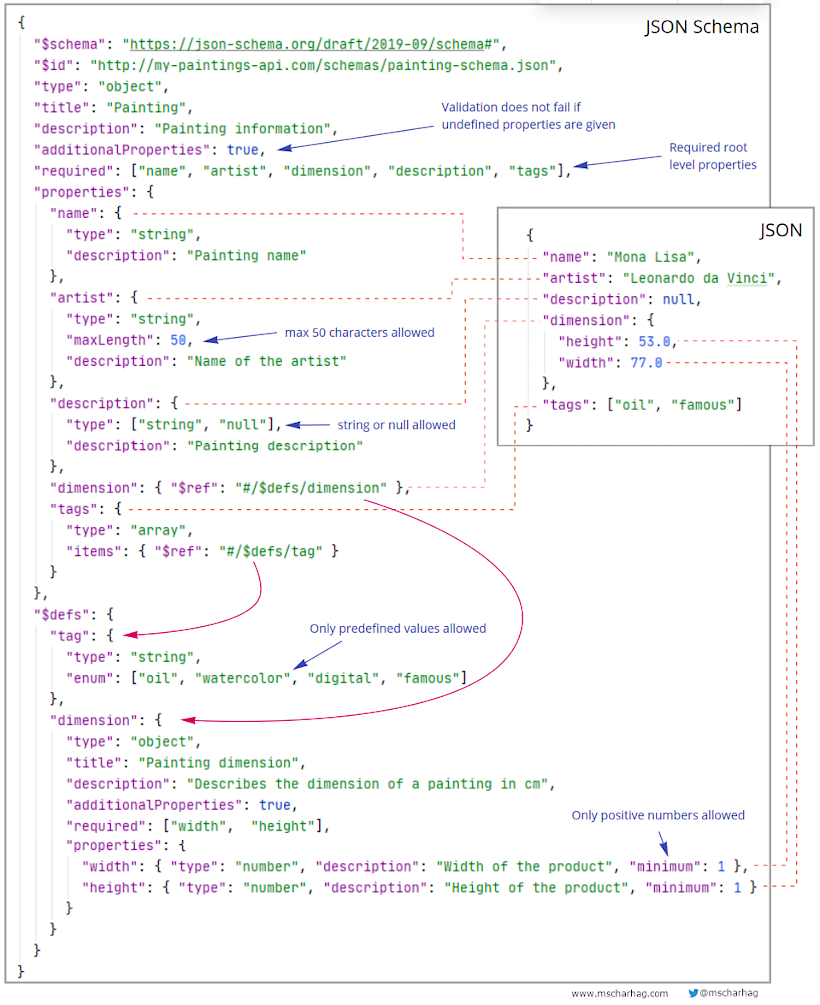
While JSON gives us a flexible way to structure data, it doesn't enforce that structure. For a complex project like a life simulation game, we need a guarantee that every character object has, for example, a name and a personality. This is where JSON Schema comes in. It's a formal vocabulary that allows us to annotate and validate JSON documents. Think of it as creating a "type definition" or an "interface" for your JSON data.
What is a JSON Schema? Generate, Modify, and Understand a JSON Schema: Example
To get a clear understanding of what a JSON Schema is and why it's useful, watch the beginning of this video from Brandan Jones.
Watch from the start until 3:05. The video clearly explains that a schema describes, validates, and can even be used to generate code for your JSON. Pay attention to the core concepts like properties and validation rules (minLength, minimum, etc.).
2. Crafting the Character Schema
Now, let's get hands-on and design our character.schema.json. We will build it piece by piece, defining all the core attributes of a character in our game.
Step 1: The Basic File Structure
Every schema starts with some boilerplate that declares it as a schema and provides metadata. We'll define a top-level object with a few key properties.
Miscellaneous Examples - JSON Schema
The official JSON Schema documentation provides excellent, clean examples. We'll use the 'Basic' example as the skeleton for our character schema.
Review the 'Basic' schema example. Notice the $schema, $id, title, type, and properties keywords. This is the standard structure we will adopt.
Let's create a file named character.schema.json and start with this structure:
{
  "$schema": "https://json-schema.org/draft/2020-12/schema",
  "$id": "https://lifesim.example.com/character.schema.json",
  "title": "Character",
  "description": "A character in the life simulation game.",
  "type": "object",
  "properties": {
    "character_id": {
      "description": "A unique identifier for the character.",
      "type": "string",
      "format": "uuid"
    },
    "name": {
      "description": "The character's full name.",
      "type": "string",
      "minLength": 2
    }
  }
}
Here, we've defined two initial properties:
character_id: A string that we specify should be a UUID (Universally Unique Identifier) using theformatkeyword. This is crucial for telling characters apart.name: A simple string with a minimum length of 2.
Step 2: Defining Age Stages with enum
As we simplified in our project plan, characters will have four distinct age stages. A JSON schema enum is the perfect way to enforce that the ageStage property can only contain one of these specific values.
Miscellaneous Examples - JSON Schema
The JSON Schema docs also show how to use enum for validation.
Look at the 'Enumerated values' example. It shows how the enum keyword takes an array of allowed values. We will adapt this for our age stages.
Let's add ageStage to our properties block:
// Inside the "properties" object of character.schema.json
"ageStage": {
  "description": "The current life stage of the character.",
  "type": "string",
  "enum": ["Child", "Teen", "Adult", "Elder"]
}
Step 3: Defining Traits with an array
The trait system will be a collection of simple strings (e.g., "Creative", "Clumsy", "Genius"). An array of strings is the ideal data structure for this.
Miscellaneous Examples - JSON Schema
Again, the official docs provide a clear template for defining arrays.
Examine the 'Arrays of things' example, specifically the fruits property. Note how type is set to "array" and the items keyword specifies what type the elements of the array should be.
Now, let's add the traits property:
// Inside the "properties" object of character.schema.json
"traits": {
  "description": "A list of personality traits that affect behavior.",
  "type": "array",
  "items": {
    "type": "string"
  },
  "uniqueItems": true
}
We've also added uniqueItems: true to ensure a character can't have the same trait listed twice.
Step 4: Defining Personality with a Nested Object (HEXACO)
This is the core of our character's personality. We will use the HEXACO model, which defines personality along six dimensions.
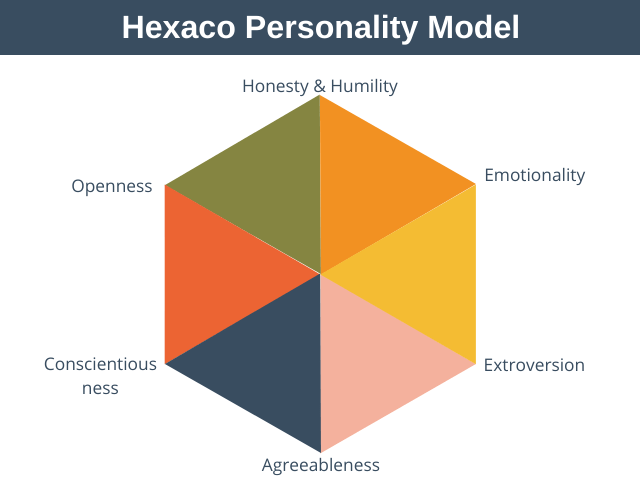
We will represent these six dimensions as a nested object within our character schema. Each dimension will be a floating-point number between 0.0 and 1.0.
aura | Skills Marketplace - LobeHub
For the names and meanings of the HEXACO dimensions, we can refer to the AURA protocol documentation. It provides a concise table explaining each trait.
Review the 'Personality (HEXACO)' table. This gives us the names of the six dimensions and a clear description of what low and high values represent. We will use these descriptions in our schema.
Now, let's add the personality property. This will be a complex object containing other properties.
// Inside the "properties" object of character.schema.json
"personality": {
  "description": "The character's personality based on the HEXACO model (0.0 to 1.0 scale).",
  "type": "object",
  "properties": {
    "honesty": {
      "type": "number",
      "minimum": 0.0,
      "maximum": 1.0,
      "description": "Honesty-Humility: High = Sincere, fair. Low = Deceitful, greedy."
    },
    "emotionality": {
      "type": "number",
      "minimum": 0.0,
      "maximum": 1.0,
      "description": "Emotionality: High = Fearful, anxious. Low = Brave, tough."
    },
    "extraversion": {
      "type": "number",
      "minimum": 0.0,
      "maximum": 1.0,
      "description": "Extraversion: High = Outgoing, sociable. Low = Shy, passive."
    },
    "agreeableness": {
      "type": "number",
      "minimum": 0.0,
      "maximum": 1.0,
      "description": "Agreeableness: High = Gentle, patient. Low = Stubborn, ill-tempered."
    },
    "conscientiousness": {
      "type": "number",
      "minimum": 0.0,
      "maximum": 1.0,
      "description": "Conscientiousness: High = Organized, disciplined. Low = Negligent, lazy."
    },
    "openness": {
      "type": "number",
      "minimum": 0.0,
      "maximum": 1.0,
      "description": "Openness to Experience: High = Creative, innovative. Low = Conventional."
    }
  },
  "required": ["honesty", "emotionality", "extraversion", "agreeableness", "conscientiousness", "openness"]
}
Notice how we've defined each dimension as a number and used minimum and maximum to enforce our 0.0 to 1.0 scale.
3. The Complete Schema and an Example
Finally, we'll add a required array at the top level to specify which properties a character object must have to be considered valid.
Here is the complete character.schema.json file:
{
  "$schema": "https://json-schema.org/draft/2020-12/schema",
  "$id": "https://lifesim.example.com/character.schema.json",
  "title": "Character",
  "description": "A character in the life simulation game.",
  "type": "object",
  "properties": {
    "character_id": {
      "description": "A unique identifier for the character.",
      "type": "string",
      "format": "uuid"
    },
    "name": {
      "description": "The character's full name.",
      "type": "string",
      "minLength": 2
    },
    "ageStage": {
      "description": "The current life stage of the character.",
      "type": "string",
      "enum": ["Child", "Teen", "Adult", "Elder"]
    },
    "traits": {
      "description": "A list of personality traits that affect behavior.",
      "type": "array",
      "items": {
        "type": "string"
      },
      "uniqueItems": true
    },
    "personality": {
      "description": "The character's personality based on the HEXACO model (0.0 to 1.0 scale).",
      "type": "object",
      "properties": {
        "honesty": {
          "type": "number",
          "minimum": 0.0,
          "maximum": 1.0,
          "description": "Honesty-Humility: High = Sincere, fair. Low = Deceitful, greedy."
        },
        "emotionality": {
          "type": "number",
          "minimum": 0.0,
          "maximum": 1.0,
          "description": "Emotionality: High = Fearful, anxious. Low = Brave, tough."
        },
        "extraversion": {
          "type": "number",
          "minimum": 0.0,
          "maximum": 1.0,
          "description": "Extraversion: High = Outgoing, sociable. Low = Shy, passive."
        },
        "agreeableness": {
          "type": "number",
          "minimum": 0.0,
          "maximum": 1.0,
          "description": "Agreeableness: High = Gentle, patient. Low = Stubborn, ill-tempered."
        },
        "conscientiousness": {
          "type": "number",
          "minimum": 0.0,
          "maximum": 1.0,
          "description": "Conscientiousness: High = Organized, disciplined. Low = Negligent, lazy."
        },
        "openness": {
          "type": "number",
          "minimum": 0.0,
          "maximum": 1.0,
          "description": "Openness to Experience: High = Creative, innovative. Low = Conventional."
        }
      },
      "required": ["honesty", "emotionality", "extraversion", "agreeableness", "conscientiousness", "openness"]
    }
  },
  "required": ["character_id", "name", "ageStage", "traits", "personality"]
}
And here is an example of a character.json file that would be valid according to our new schema:
{
  "character_id": "123e4567-e89b-12d3-a456-426614174000",
  "name": "Alex Chen",
  "ageStage": "Adult",
  "traits": [
    "Bookworm",
    "Loves the Outdoors"
  ],
  "personality": {
    "honesty": 0.8,
    "emotionality": 0.6,
    "extraversion": 0.4,
    "agreeableness": 0.7,
    "conscientiousness": 0.9,
    "openness": 0.85
  }
}
Conclusion
In this lesson, you've designed a comprehensive and robust blueprint for your game's most important asset: its characters. By using JSON Schema, you've created a formal contract that will ensure data consistency throughout your project's lifecycle.
Key Takeaways:
- JSON Schema provides a way to define the structure, constraints, and documentation for your JSON data.
- A well-designed schema is essential for maintaining data integrity in a complex application.
- We can model different kinds of data using schema keywords:
enumfor a fixed set of choices (like our age stages).arrayfor lists of items (like traits).objectfor complex, nested structures (like the HEXACO personality).- Validation keywords (
minLength,minimum,maximum,format) enforce rules on the data values.
This schema is not just a theoretical exercise. It is the direct blueprint we will use to build our Rust data structures.
In the next lesson, we will do exactly that. We'll take this schema and implement the HEXACO personality model and trait system as Rust structs, preparing our backend to create, validate, and manage character data.