Hello! Welcome to the final lesson in our first module, "Course Foundations and Strategy."
In our last session, you defined the core transformation of your Power BI course. You crafted a powerful "Transformation Statement" that articulates the journey from a state of frustration with manual data work to a state of confidence and strategic impact. This statement is the soul of your course.
Today, our goal is to give that soul a voice. We will write a compelling course value proposition and a Skool-style description that speaks directly to your target audience. This is where your strategic vision meets the real world. The description you write today will be the "front door" to your course on the Skool platform, serving as the key piece of marketing that convinces a potential learner to click "join."
As a business analyst, you know that a project's success often hinges on a clear and compelling business case. Think of this lesson as building the business case for your course, presented in a way that resonates with your future students.
From Transformation to Value Proposition
Your transformation statement is the core, but a full value proposition is the entire promise you make to your learner. It answers the question: "Why should I choose this course over all other options?"
To build this, we can use a framework that will feel familiar to you: the Value Proposition Canvas. It helps us systematically ensure that what we're offering (our course) is perfectly aligned with what our customer (the learner) needs and wants.
Value Proposition and Customer Segments: Crash Course Business - Entrepreneurship #3
The CrashCourse video 'Value Proposition and Customer Segments' offers an excellent breakdown of this concept. It introduces the Value Proposition Canvas, which is a powerful tool for structuring your thinking.
Please watch the following segments: Introduction to Value Proposition (01:12 - 02:00): Understand the core definition. Understanding Customers (02:57 - 03:36): Focus on 'Jobs', 'Pains', and 'Gains'. This builds directly on the 'Before' state we defined in the last lesson. Your Offering (03:36 - 04:09): Focus on 'Products/Services', 'Pain Relievers', and 'Gain Creators'. This is how your course solves their problems. Case Study: Stitch Fix (09:12 - 10:50): See a fantastic real-world application of this entire framework. It's a great model for how to think about your own course.
The video breaks the canvas into two parts:
-
The Customer Profile (Circle):
- Jobs: What is your learner trying to accomplish? (e.g., analyze sales data, prepare a monthly report, answer a director's question).
- Pains: What frustrates them? (e.g., manual data cleaning, VLOOKUP errors, static reports, feeling undervalued).
- Gains: What outcomes are they seeking? (e.g., automation, clear insights, confidence, recognition as an expert).
-
The Value Map (Square):
- Products & Services: This is your course itself—the videos, datasets, assignments, etc.
- Pain Relievers: How does your course specifically eliminate their pains? (e.g., Power Query lessons to automate cleaning, a DAX guide for reliable calculations).
- Gain Creators: How does your course help them achieve their gains? (e.g., dashboard design principles to create clarity, storytelling techniques to boost their status).
When your Pain Relievers and Gain Creators directly address your customer's Pains and Gains, you have achieved "fit." This fit is the foundation of a powerful value proposition.
Test your understanding!
A business analyst's 'Pain' is "spending hours manually combining 10 different Excel files every month." Which of the following is the most effective 'Pain Reliever' you could offer in your Power BI course?
- A lesson on advanced DAX functions.
- A lesson showing how to use Power Query to automatically merge files from a folder.
- A lesson on choosing the right color palette for a dashboard.
Show answer
Option 2 is the correct answer. It directly and specifically solves the stated pain point, creating immediate value for the learner. While the other topics are useful, they don't address this particular frustration.
Anatomy of a Skool Course Description
Now, let's translate this value proposition into the specific format of the Skool platform. Your course will primarily be presented on the "About" page of your community, which acts as its main sales page.
First, let's see what a prospective student sees when they browse Skool.
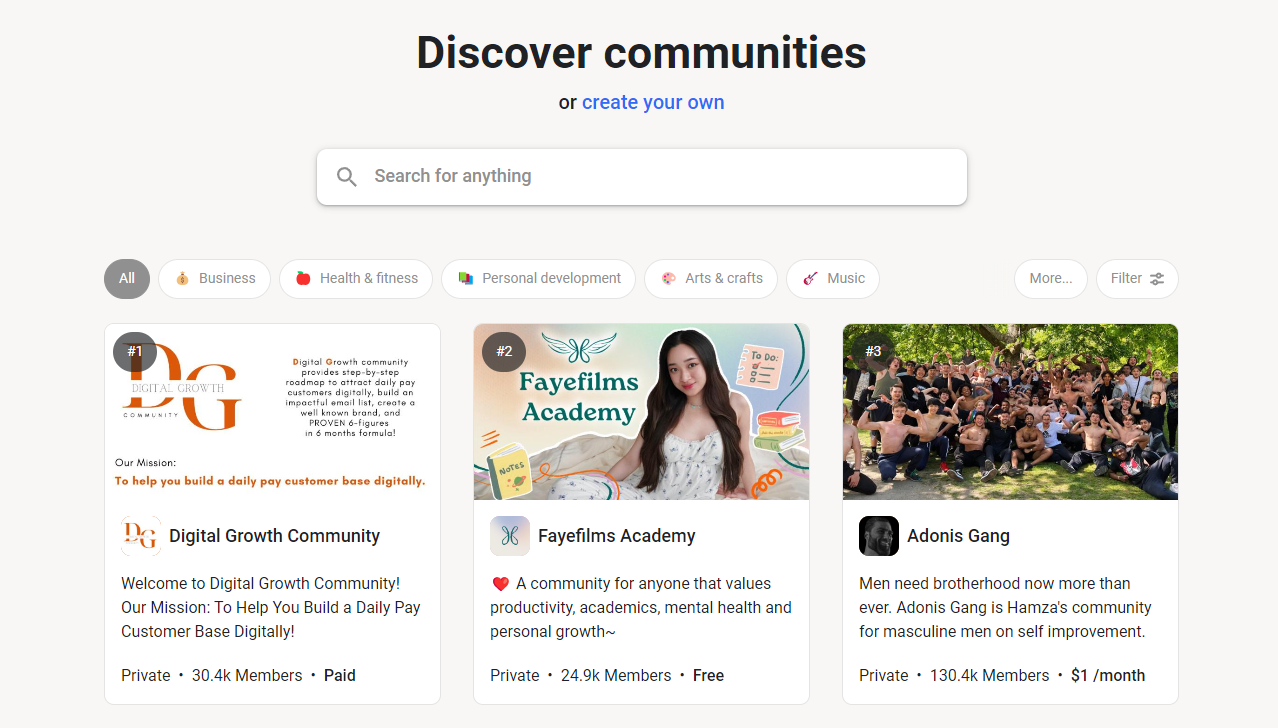
The title and one-liner are crucial for getting the initial click. But once they click, the "About" page needs to do the heavy lifting of convincing them to join.
How To Set Up Your Skool Community From Scratch [Step-By-Step Tutorial]
The video 'How To Set Up Your Skool Community From Scratch' provides a walkthrough of the key elements of a compelling Skool group description and 'About' page. The host, Austin Coldiron, offers a simple but powerful formula.
Watch these two key sections: The Group Description Formula (03:25 - 05:31): Pay close attention to the 'Who, What, How' formula and the importance of addressing fears and objections. The Skool About Page (38:20 - 43:01): Understand that this is your sales page and see the key elements it should contain, like social proof, visuals, and clear calls to action.
This video, along with the "Complete Skool Community Setup Guide," gives us a clear blueprint for a Skool description.
Complete Skool Community Setup Guide
This article reinforces the concepts from the video and provides clear, written examples. It's a great reference for the writing task ahead.
Read the sections 'Crafting Your Group Description' and 'Optimizing Your About Page for Conversions'. They reiterate the 'who, what, how' formula and the key components of a high-converting About Page.
Based on these resources, a winning Skool "About" page should include:
- A Compelling Headline: Your transformation statement, rephrased as a headline.
- The "Who, What, How" Description: A clear, concise paragraph that forms the core of your pitch.
- A Breakdown of What's Inside: A bulleted list of your course modules, case studies, and resources to make the value tangible.
- Social Proof (To be added later): Testimonials, member wins, and case studies. You won't have this yet, but you should leave space for it.
- A Clear Call to Action: A direct instruction to "Join the Course" or "Become a Member."
Your Action Task: Write Your Course Title and Description
It's time to bring it all together. Open a new document and craft the public-facing identity of your course.
Part 1: The Hook (5 mins)
This is for the Skool "Discover" page. Brainstorm a few options. Keep it concise and outcome-focused.
- Course Title: Examples: "Power BI for Business Analysts," "The Decision-Driven Dashboard," "From Excel to Insight."
- One-Line Description: A single sentence that captures the main promise. Example: "Go from messy data to clear, automated dashboards that drive business decisions."
Part 2: The "About" Page Copy (25 mins)
Using the frameworks we've discussed, write the full description for your "About" page. Follow this template:
[Compelling Headline]
(Example: Stop Drowning in Spreadsheets. Start Driving Decisions with Power BI.)
Who This Is For
This course is for business professionals (analysts, controllers, managers) who are tired of manual reporting and want to leverage the power of data to become indispensable business partners. You don't need to be a coding expert, but you should be comfortable with data and eager to solve business problems.
The Transformation: From Data-Cruncher to Data-Driven Leader
Right now, you might feel like you're stuck in an endless cycle of exporting data, wrestling with VLOOKUPs, and building static reports that are outdated the moment you send them.
This course provides a step-by-step path to go from feeling overwhelmed by data to feeling confident and in control. You will learn to:
- [Pain Reliever #1] (Example: Automatically clean and connect messy data sources with Power Query, saving you hours of manual work.)
- [Pain Reliever #2] (Example: Build a reliable data model that acts as a 'single source of truth' for your entire team.)
- [Gain Creator #1] (Example: Craft interactive, decision-focused dashboards that answer key business questions at a glance.)
- [Gain Creator #2] (Example: Tell a compelling story with your data, turning you into a trusted advisor for leadership.)
What You'll Get Inside the Course:
- Module 1: The Business Analyst's Mindset
- Module 2: From Mess to Masterpiece: Data Prep with Power Query
- Module 3: Building Your Data Foundation: Simple & Scalable Data Models
- Module 4: DAX for Decisions (Not for Data Scientists)
- Module 5: Designing Dashboards that Drive Action
- [...List other key features like case studies, datasets, community access, etc.]
By the end of this course, you will be able to take a vague business problem and a set of raw data files and independently build a clear, useful, and automated Power BI dashboard that helps your company make smarter decisions.
[Call to Action]
(Example: Ready to become a data leader? Join the course today.)
Fill in the bracketed sections with your own content, drawing from your learner persona, your transformation statement, and your ideas for the course structure.
Conclusion
Congratulations on completing Module 1! You have now laid the complete strategic foundation for your course. You've identified your ideal learner, understood the platform, defined the core transformation, and translated that transformation into a compelling value proposition and course description. This is a massive step.
Key Takeaways:
- A strong value proposition is built by aligning your course's "Pain Relievers" and "Gain Creators" with your learner's "Pains" and "Gains."
- The Skool "About" page is your primary sales tool, and it requires a clear headline, a concise "Who, What, How" description, and a tangible breakdown of what's inside.
- Your course description should sell the outcome and the transformation, not just the technical features.
You are now ready to move from strategy to structure. In our next lesson, we will kick off Module 2: Instructional Design and Course Architecture. Your first task will be to translate common business challenges into specific, problem-focused learning objectives. This is where we begin designing the actual learning journey, one step at a time.