Welcome to the next lesson in our journey through Java's foundational elements. In our previous lessons, we've built a solid base, learning to control program flow with loops and conditionals and to organize our code into reusable blocks with methods. Now, it's time to address a fundamental question in programming: how do we handle collections of data?
Imagine you need to store the test scores for a class of 30 students or the names of all users registered on a website. Creating a separate variable for each item (score1, score2, score3...) would be incredibly inefficient and unmanageable. This is where arrays come in.
In this lesson, you will learn how to declare, initialize, and manipulate one-dimensional arrays in Java. An array is a powerful data structure that allows you to store a fixed-size collection of elements of the same data type under a single variable name. Since you're familiar with Python, you can think of a Java array as being conceptually similar to a Python list, but with two critical distinctions: an array's size is fixed once created, and all its elements must be of the same type. Mastering arrays is a crucial step toward tackling the data structure and algorithm problems essential for your software engineering interview preparation.
1. The Anatomy of an Array
At its core, an array is a container object that holds a fixed number of values of a single type. The length of an array is established when the array is created, and after creation, its length is fixed.
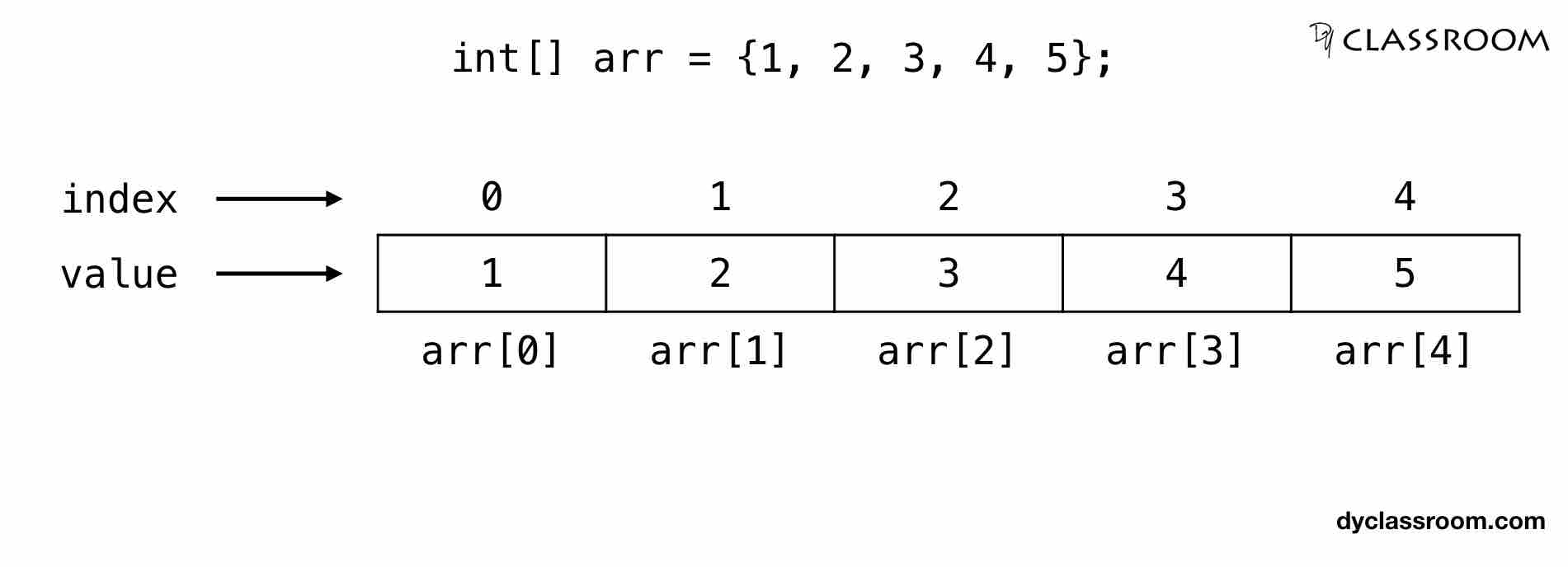
Each item in an array is called an element, and each element is accessed by its numerical index. A key concept to remember, just like in Python, is that Java arrays are zero-indexed. This means the first element is at index 0, the second at index 1, and so on.
The following image provides a clear visual representation of a simple integer array.
An important detail for a computer science student is how arrays are represented in memory.
- Primitive Type Arrays: For arrays of primitive types like
int[],double[], orchar[], the actual values are stored in a single, contiguous block of memory. This makes accessing elements by index very fast. - Object Arrays: For arrays of objects like
String[], the array itself stores a contiguous block of references (memory addresses). Each reference points to the actual object, which can be stored elsewhere in the computer's memory (specifically, on the heap).
The image below demonstrates this concept for a String array. The array names holds memory addresses (2001, 2002, 2003), which in turn point to the actual String objects ("amit", "deepak", "rahul").

For a good summary of these foundational concepts, the "The Ultimate Guide to Arrays in Java" article is a great start.
The Ultimate Guide to Arrays in Java: From Zero to Hero ...
This article provides an engaging introduction to what arrays are and how they are represented in memory.
Read the first three sections to solidify your understanding: What is an Array? Purpose of Arrays Memory Representation of Arrays
2. Declaring and Initializing Arrays
There are two primary ways to create an array in Java. The "Bro Code" channel offers a quick and clear video demonstration of both methods.
This short video introduces the concept of an array and demonstrates the two main ways to declare and initialize them.
Watch the following segments: First method: This shows how to declare an array and initialize it with values directly using curly braces. Second method: This demonstrates creating an array of a specific size using the new keyword and then assigning values to its elements individually.
Let's break down these two approaches in more detail.
Approach 1: Declare, Allocate, and then Assign
This approach is a three-step process, though the first two steps are often combined. You first declare a variable to hold the array, then use the new keyword to allocate memory for a specific number of elements, and finally, you assign values to each element using its index.
// 1. Declare an array variable of type int
int[] numbers;

// 2. Allocate memory for 5 integers
numbers = new int[5]; // The array is created with default values (0 for int)

// 3. Assign values to elements
numbers[0] = 10;
numbers[1] = 20;
numbers[2] = 30;
numbers[3] = 40;
numbers[4] = 50;
This approach is useful when you know the size of the array you'll need, but the values will be determined later, perhaps from user input or a file.
Approach 2: Array Literal (Shorthand Initialization)
This is a more concise method where you declare and initialize the array in a single statement. The Java compiler automatically determines the size of the array based on the number of elements you provide in the curly braces {}.
// Declare and initialize an array of strings in one line
String[] fruits = {"Apple", "Banana", "Cherry"};

// The compiler creates an array of size 3.
// fruits[0] is "Apple"
// fruits[1] is "Banana"
// fruits[2] is "Cherry"
This approach is perfect when you know the initial values of the array at the time you are writing the code.
The GeeksForGeeks article "Arrays in Java" covers these declaration and initialization techniques thoroughly.
This article provides detailed syntax and examples for declaring and initializing arrays.
Focus on the sections explaining the core syntax: Declaring an Array: Note the two possible syntax styles (int[] arr is preferred). Initialization: Read about both initialization with the new keyword and with array literals.
3. Manipulating Array Elements
Once an array is created, the next step is to work with its elements. This includes accessing them, updating them, and iterating over the entire collection.
Accessing and Updating Elements
You can access an element by using its index inside square brackets []. You can also update an element in the same way, using the assignment operator =.
int[] scores = {85, 92, 78};

// Access the second element (at index 1)
int secondScore = scores[1]; // secondScore is now 92
System.out.println("Original second score: " + secondScore);

// Update the third element (at index 2)
scores[2] = 81;
System.out.println("Updated third score: " + scores[2]); // Prints 81
Important: If you try to access an element with an index that is outside the valid range (e.g., less than 0 or greater than or equal to the array's length), Java will throw an ArrayIndexOutOfBoundsException. This is a common runtime error for beginners.
Finding the Length of an Array
To get the number of elements in an array, you use the length property. Note that it's not a method call, so there are no parentheses ().
String[] names = {"Amit", "Deepak", "Rahul"};
int numberOfNames = names.length; // numberOfNames is 3
System.out.println("The array has " + numberOfNames + " elements.");
Traversing an Array with Loops
To process all elements in an array, you'll typically use a loop. There are two common ways to do this in Java.
1. The Classic for Loop
This loop gives you access to the index of each element, which is useful if you need to know the element's position.
String[] cars = {"Camaro", "Corvette", "Tesla"};
System.out.println("Using a classic for loop:");
for (int i = 0; i < cars.length; i++) {
    System.out.println("Element at index " + i + ": " + cars[i]);
}
2. The Enhanced for Loop (for-each)
This loop is simpler and more readable when you only need to access the elements themselves and don't care about their index. This is very similar to Python's for item in collection: syntax.
String[] cars = {"Camaro", "Corvette", "Tesla"};
System.out.println("Using an enhanced for-each loop:");
for (String car : cars) {
    System.out.println("Car: " + car);
}
The "SDET- QA" video provides an excellent, detailed walkthrough of these operations.
Session 6- Working with Java Arrays | Single & two dimensional | Java & Selenium
This video covers finding the length of an array, reading values, and iterating through them using both types of for loops.
Please watch these specific segments: Finding Length: Explains how to use the .length property. Reading a Specific Value: Shows how to access an element by its index. Classic for loop: A detailed explanation of how to iterate using a traditional for loop with an index. Enhanced for loop: Demonstrates the simpler for-each loop syntax.
4. Arrays and Methods
Just like any other data type, arrays can be passed to methods and returned from them. This is essential for writing modular, organized code. When you pass an array to a method, you are actually passing the reference to the array. This means any modifications made to the array's elements inside the method will affect the original array.
The GeeksForGeeks article we looked at earlier also contains clear examples of this.
This article demonstrates how arrays interact with methods.
Read the final two sections of the article: Passing Arrays to Methods: This example shows how to pass an array to a sum method. Returning Arrays from Methods: This shows a method that creates and returns a new array.
Conclusion
In this lesson, we have taken a deep dive into one-dimensional arrays, a cornerstone of data management in Java and a critical topic for your future as a software engineer.
Here are the main takeaways:
- An array is a fixed-size data structure that stores a sequence of elements of the same type.
- Arrays are zero-indexed, with the first element at index 0.
- You can declare and initialize arrays either by specifying a size with
newor by using an array literal ({...}). - Elements are accessed and updated using square bracket notation
[index]. - The number of elements is found using the
.lengthproperty. - You can iterate through arrays using a classic
forloop (with an index) or a more concise enhancedfor-eachloop.
Arrays are the most basic data structure you'll encounter and form the basis for many interview questions related to searching, sorting, and other common algorithms. In our next lesson, we will build on this foundation to explore two-dimensional arrays, which allow you to store data in a grid-like structure, similar to a table or a matrix.