Hello! Welcome to the first lesson in our module on Model Tuning and Selection.
In the previous module, we covered how to build and evaluate supervised learning models, including how to handle common issues like class imbalance. You saw that many models have settings you can adjust, like class_weight='balanced'. In our last lesson's conclusion, I mentioned that mastering these "dials" is the key to unlocking a model's full potential.
This lesson is the first step on that path. Our goal is to explain the difference between model parameters and hyperparameters. This distinction is fundamental to machine learning and is the conceptual foundation for all model tuning and optimization work. Understanding it will move you from simply using algorithms to systematically improving them.
1. The Core Distinction: Learned vs. Set
At the highest level, the difference is simple:
- Model Parameters are values that the model learns from your training data. They are internal to the model and are the direct output of the training process. You don't choose them yourself.
- Hyperparameters are values that you, the data scientist, set before the training process begins. They are external configurations that control how the learning algorithm behaves.
Let's watch a short video that explains this core idea clearly.
Parameters vs Hyperparameters ( Parameter vs Hyperparameter ) in Machine Learning Detailed
This video by Pankaj Kumar Porwal provides a clear, conceptual distinction between what is learned during training (parameters) and what is decided before training (hyperparameters).
Watch from 02:22 to 04:27. Focus on how the video defines parameters as the values learned during training (like weights and biases) and hyperparameters as the settings decided beforehand, which control the training process itself.
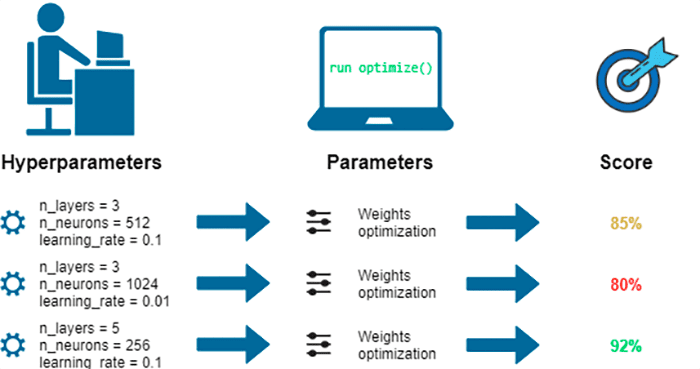
To make this even more concrete, take a look at the following diagram. It perfectly visualizes the roles: the data scientist chooses the hyperparameters, which configures the model. The model then uses the data to optimize its internal parameters. Different hyperparameter choices lead to different final models and different performance scores.
2. A Concrete Example: Linear Models
Let's ground this in an algorithm you're familiar with: Linear Regression. The goal of linear regression is to find the line that best fits the data. The equation for a simple line is .
- Parameters: The slope () and the intercept () are the model's parameters. The algorithm finds the optimal values for and by minimizing the error on the training data.
- Hyperparameters: Now, imagine we are using Ridge or Lasso regression, which are regularized versions of linear regression. The regularization strength (often denoted by or its inverse,
Cin scikit-learn) is a hyperparameter. We have to decide how much regularization to apply before training. This setting influences how the model learns the parameters and , but it isn't learned itself.
This article gives an excellent explanation using this exact example.
Hyperparameters in Machine Learning Explained
The article 'Hyperparameters in Machine Learning Explained' from the Train In Data blog clearly breaks down this difference using linear regression.
Read the section titled 'Parameters vs Hyperparameters'. It walks through the linear regression example and clearly identifies the learned parameters (slope and intercept) and the manually set hyperparameter (regularization strength).
The key insight is that hyperparameters control the learning process, often by managing the model's complexity to find a balance between underfitting and overfitting—a concept we discussed in Module 4.
3. Parameters and Hyperparameters in Scikit-Learn
Now for the most important part: connecting this theory to practice. Since you're focused on building your practical skills, let's see how this works in scikit-learn. The library has clear conventions that make this distinction easy to manage.
Identifying Parameters vs. Hyperparameters
- Fitted Parameters in a scikit-learn model object always have a trailing underscore (
_). These attributes only become available after you call the.fit()method. For example:model.coef_ormodel.intercept_. - Hyperparameters are the arguments you pass to the model's constructor when you first create it. For example:
LogisticRegression(C=1.0, solver='liblinear').
Let's see this in action with a hands-on resource.
Set and get hyperparameters in scikit-learn
This guide from the scikit-learn MOOC is perfect for understanding the practical side. It shows you exactly how to find and change hyperparameters.
Read the introductory section up to the first code block, which explains the naming convention for fitted parameters (ending in _). Then, read the section that starts with 'In general, you can use the get_params method...' to see how to list all available hyperparameters for a model.
Hands-On Code Example
Let's write a small piece of code to make this absolutely clear. We will instantiate a LogisticRegression model, fit it, and then inspect its parameters and hyperparameters.
from sklearn.linear_model import LogisticRegression
from sklearn.datasets import make_classification


# Create a sample dataset
X, y = make_classification(n_samples=100, n_features=5, random_state=42)


# 1. Instantiate the model with specific HYPERPARAMETERS
# Here, 'C', 'solver', and 'random_state' are hyperparameters
model = LogisticRegression(C=0.5, solver='liblinear', random_state=42)


# We can view all hyperparameters using get_params() before fitting
print("--- Hyperparameters ---")
print(model.get_params())
print("-" * 25)


# 2. Before fitting, the model has NO learned PARAMETERS
# Trying to access model.coef_ here would raise an error
# print(model.coef_) # This line would fail!


# 3. Fit the model to learn the PARAMETERS from data
model.fit(X, y)


# 4. Now, we can inspect the learned PARAMETERS (note the trailing underscore)
print("\n--- Learned Parameters ---")
print("Coefficients (model.coef_):", model.coef_)
print("Intercept (model.intercept_):", model.intercept_)
print("-" * 25)
When you run this code, you'll see a dictionary of hyperparameters printed first. After the model is trained, the learned coef_ and intercept_ arrays are printed. This directly demonstrates the difference: one is your input to the learning process, the other is the output.
4. Summary and Common Examples
To wrap up the concepts, this table provides a fantastic side-by-side comparison.
Here are some common hyperparameters for models you know:
- K-Nearest Neighbors:
n_neighbors(thekvalue) - Decision Tree:
max_depth,min_samples_leaf,criterion - Random Forest:
n_estimators(number of trees),max_features - Logistic Regression / SVMs:
C(regularization strength),kernel(for SVMs)
You've already set some of these without necessarily calling them "hyperparameters." Now you have the correct terminology and a solid framework for thinking about them.
Conclusion
Great work! You've just mastered a critical piece of machine learning terminology that is essential for practical success.
Key Takeaways:
- Model Parameters are learned from data during training. They define what the model has learned (e.g., the coefficients of a regression model). In scikit-learn, they are identifiable by a trailing underscore (e.g.,
model.coef_). - Hyperparameters are set by the data scientist before training. They configure the model and control how it learns (e.g.,
Cfor regularization,max_depthfor a tree). - You can view a model's hyperparameters in scikit-learn using the
get_params()method.
Preview of the next lesson:
Knowing what hyperparameters are is the first step. The next, more exciting step is figuring out how to choose the best values for them. In our next lesson, we will learn how to automate this search process. We'll start with GridSearchCV, a powerful technique for systematically testing different hyperparameter combinations to find the one that results in the best model performance.