Hello! Welcome to the first lesson in our DevOps course.
Given your advanced experience with Git's mechanics, we'll jump straight into the high-level strategy. This is crucial for a DevOps Engineer, as the branching model a team uses directly influences the architecture of CI/CD pipelines, deployment frequency, and overall team velocity.
Today, we'll focus on comparing the most common Git branching strategies. By the end of this lesson, you will be able to analyze a team's context and select the most appropriate strategy, weighing the trade-offs between models like GitFlow, GitHub Flow, and Trunk-Based Development. This isn't just about Git commands; it's about engineering philosophy and its impact on delivering software.
The Spectrum of Branching Strategies
At a high level, branching strategies exist on a spectrum. On one end, you have highly structured, complex models designed for safety and managing formal releases. On the other, you have simple, lean models designed for speed and continuous integration.
To get a quick and engaging overview of this landscape, let's start with a video that tours the most common strategies and their philosophical underpinnings.
Branching Strategies Explained
This video from the DevOps & AI Toolkit channel provides a fantastic, opinionated tour of different branching strategies, from the simplest to the most complex. Pay close attention to the 'madness level' concept he uses—it's a memorable way to think about the operational overhead of each model.
Watch the video from the beginning (00:00) until the end (18:07). Focus on understanding the core idea behind each strategy and the context in which it might be used (or avoided).
As you saw, the choice of a branching strategy reflects a team's culture, technical maturity, and release cadence. There's no single "best" strategy, only the one that best fits the context. Now, let's dive deeper into the three most prevalent models in the industry today: GitFlow, GitHub Flow, and Trunk-Based Development.
For a comprehensive written guide that we will refer to throughout the lesson, please review the following article. It does an excellent job of comparing these workflows with real-world scenarios and connects them to DORA metrics, which are highly relevant in a DevOps context.
GitFlow vs GitHub Flow vs Trunk-Based Development Guide
This guide from Code With Mukesh provides a detailed comparison of GitFlow, GitHub Flow, and Trunk-Based Development. It also offers valuable historical context on why these workflows evolved.
Read the article from the beginning down to (and including) the summary table. This will give you a solid foundation for the specific models we're about to dissect.
GitFlow: The Structured, Version-Oriented Model
GitFlow is the most formal and complex of the popular strategies. It was designed for projects with scheduled, versioned releases, where you might need to support multiple versions in production simultaneously.
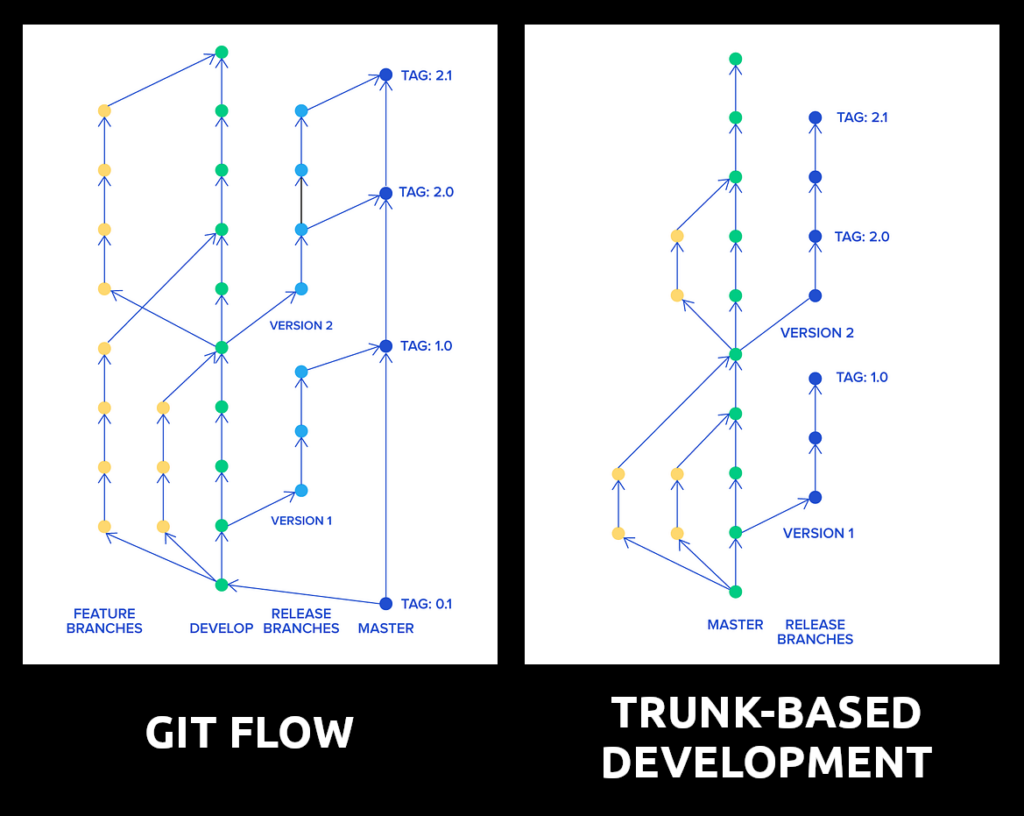
As you can see, GitFlow uses a collection of long-lived branches:
main(ormaster): Contains production-ready, tagged release code. You never commit directly here.develop: The primary integration branch for ongoing development. This is where all feature work is merged.feature/*: Branched fromdevelopfor new features. They are merged back intodevelopwhen complete.release/*: Branched fromdevelopwhen you're preparing for a new release. It's used for final bug fixes and preparation. Once ready, it's merged into bothmain(to create the release) anddevelop(to ensure fixes are in future code).hotfix/*: Branched frommainto address urgent production bugs. It's merged back into bothmainanddevelop.
When does it make sense?
Imagine you're a DevOps engineer for a company that sells on-premise accounting software. Customers are running v2.1, v2.2, and v2.3. A critical security flaw is discovered in v2.2. With GitFlow, you can create a hotfix/security-flaw branch from the v2.2 tag on main, patch it, merge it back to main to release v2.2.1, and also merge the fix into develop so it's included in the upcoming v2.4.
Why is it often overkill?
For most modern web applications that practice continuous delivery, GitFlow's overhead is significant. The complexity of managing all these branches and the "merge hell" that can result from long-lived branches make it slow and cumbersome. As the original creator noted, if you're doing continuous delivery, you should probably use a simpler workflow.
Trunk-Based Development (TBD): The High-Performance Model
At the opposite end of the spectrum lies Trunk-Based Development (TBD). This is the strategy used by elite-performing teams (as measured by DORA metrics) who practice continuous integration and deployment.
The core principle is simple: all developers commit to a single branch, the trunk (main), at least once a day.
"But what about half-finished features breaking production?" This is where TBD's prerequisites come into play. TBD is not just a branching model; it's an outcome of a mature engineering culture that includes:
- Comprehensive Automated Testing: A robust test suite must run on every commit to ensure the trunk is always stable and releasable. As the DevOps engineer, your CI pipeline is the gatekeeper.
- Feature Flags (Toggles): This is the key. You decouple deployment from release. New, incomplete code is deployed to production but is wrapped in a feature flag, making it invisible to users. This eliminates the need for long-lived feature branches.
- A Disciplined Team: Developers must learn to break work into small, incremental commits.
When does it shine?
Consider your role at a fast-paced SaaS company that deploys code 20 times a day. TBD allows developers to integrate their work continuously, eliminating merge conflicts and getting fast feedback from the CI system. A new feature is built behind a flag over several days, with dozens of small commits hitting main. Once QA and Product are happy, they flip the switch in a feature flag service (like LaunchDarkly or Unleash), and the feature is live for users. No big, risky merge is required.
GitHub Flow: The Pragmatic Middle Ground
GitHub Flow is a lightweight strategy that strikes a balance between the structure of GitFlow and the raw speed of TBD. It’s what many teams naturally gravitate towards.
The rules are simple:
- Anything in the
mainbranch is deployable. - To work on something new, create a descriptively named branch off
main(e.g.,fix/user-login-bug). - Commit to that branch locally and regularly push your work to the same named branch on the server.
- When you need feedback or help, or you think the branch is ready for merging, open a pull request (PR).
- After someone else has reviewed and signed off on the feature, you can merge it into
main. - Once it is merged and pushed to
main, you should deploy immediately.
This model is essentially "TBD with Pull Requests." It formalizes the code review step before integration into the trunk, which provides a safety net that pure TBD (with direct commits to main) doesn't have. It's an excellent choice for the vast majority of teams building and continuously deploying web applications.
Choosing the Right Strategy
So, how do you choose? Your role as a DevOps engineer often involves guiding teams toward practices that improve delivery performance. You can use the following questions as a decision framework:
| Workflow | Best For | Avoid When |
|---|---|---|
| GitFlow | Versioned software with multiple supported releases (e.g., desktop apps, mobile apps, on-premise enterprise tools). Regulated industries requiring formal release sign-offs. | Web apps with continuous deployment. Teams prioritizing speed and low overhead. |
| GitHub Flow | Most SaaS/web applications practicing continuous delivery. Teams that value code review via PRs but want a simple workflow. | Projects where you must support multiple distinct versions in production simultaneously. |
| Trunk-Based | High-performing, mature teams with very strong automated testing and CI/CD. Environments demanding extremely high deployment frequency. | Teams with weak test coverage or an immature CI process. Inexperienced teams not yet disciplined in small commits. |
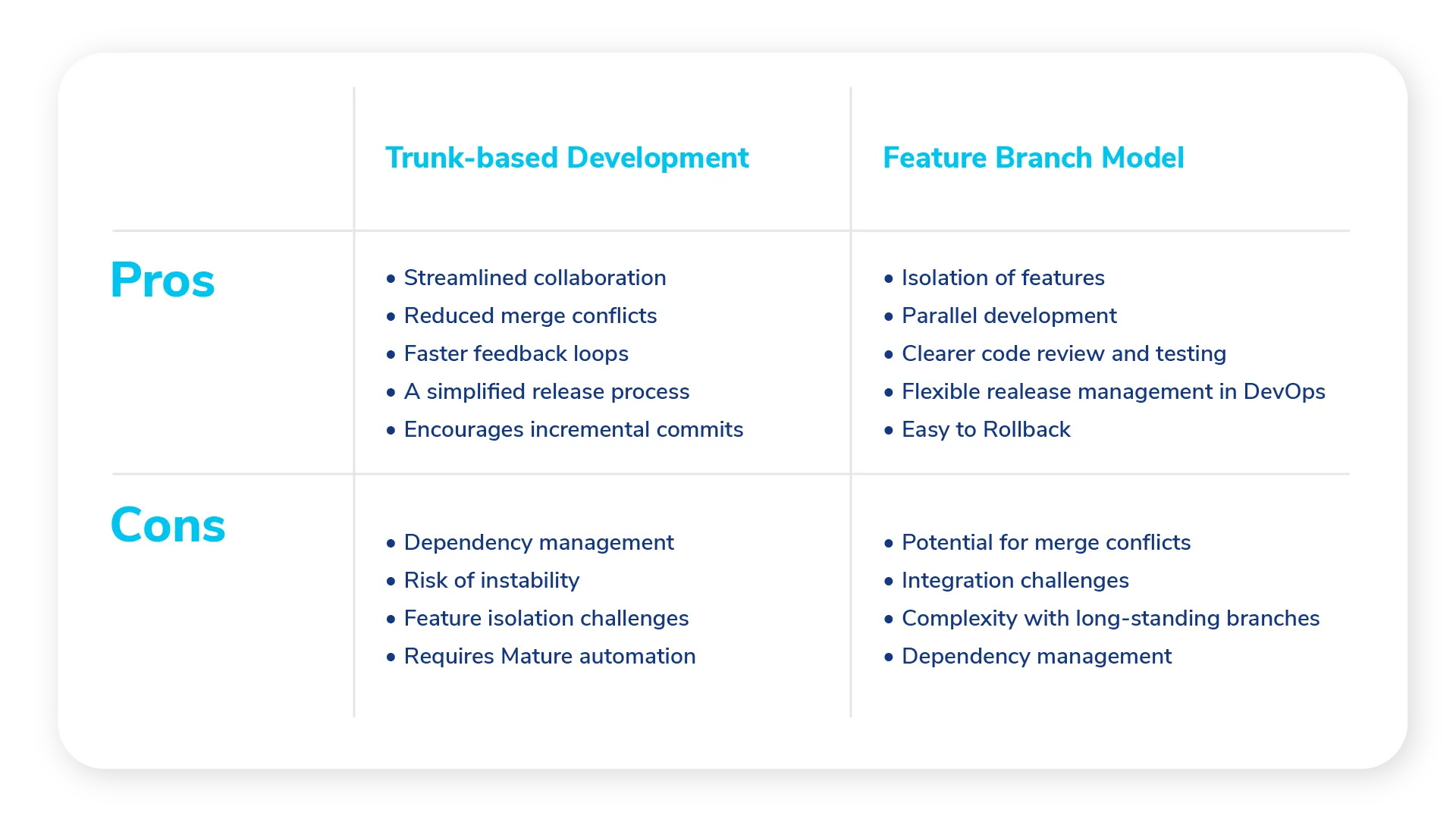
This table from another excellent article on the topic provides a great summary of the pros and cons.
Conclusion
In this lesson, we've moved beyond the "how" of Git and into the "why" of branching strategies.
Key Takeaways:
- GitFlow provides structure for versioned software but is often too complex and slow for modern, continuous deployment environments.
- Trunk-Based Development is the leanest, fastest model, enabling elite CI/CD performance, but it depends heavily on mature automation and feature flags.
- GitHub Flow offers a pragmatic and popular middle ground, combining the safety of pull requests with a simple,
main-is-always-deployable philosophy. - The right choice depends entirely on your team's context: what you're building, how you deploy it, and your team's technical maturity.
Preview of the Next Lesson:
To maintain a clean and understandable history, especially in fast-moving workflows like GitHub Flow and TBD, you need to master your commit history. In the next lesson, we will dive into git rebase -i (interactive rebase), a powerful tool for squashing, reordering, and editing your commits before you share them with the team.