Hello! Welcome to the final lesson in your "Networking for DevOps Engineers" module.
In our previous lesson, we differentiated between Layer 4 and Layer 7 load balancers, mapping them to AWS Network Load Balancers (NLB) and Application Load Balancers (ALB), respectively. We highlighted a key difference: an L7 ALB terminates client connections and creates new ones to the backend, while an L4 NLB forwards packets using NAT. This distinction is crucial for today's topic.
This lesson is the capstone of the module, where we put all the theory into practice. Your learning outcome is to troubleshoot advanced cloud networking issues involving VPC routing, security groups, and network ACLs.
As a DevOps engineer, debugging connectivity is a high-stakes, everyday reality. When a service goes down, the ability to methodically and quickly diagnose the root cause—whether it's a misconfigured route, a restrictive firewall rule, or a combination of factors—is an invaluable skill. Given your strong AWS background, you're already familiar with these components; today, we'll focus on how they interact and how to debug them under pressure.
1. The Core Components of VPC Traffic Control
In any AWS VPC, traffic flow and security are governed by three primary components. Understanding their distinct roles and the order in which they process traffic is the key to effective troubleshooting.
- Route Tables: These act as the traffic directors for your VPC. They contain rules (routes) that determine where network traffic from your subnets or gateways is directed. If you want traffic to go to an Internet Gateway, a NAT Gateway, or a peered VPC, you must have an explicit route for it.
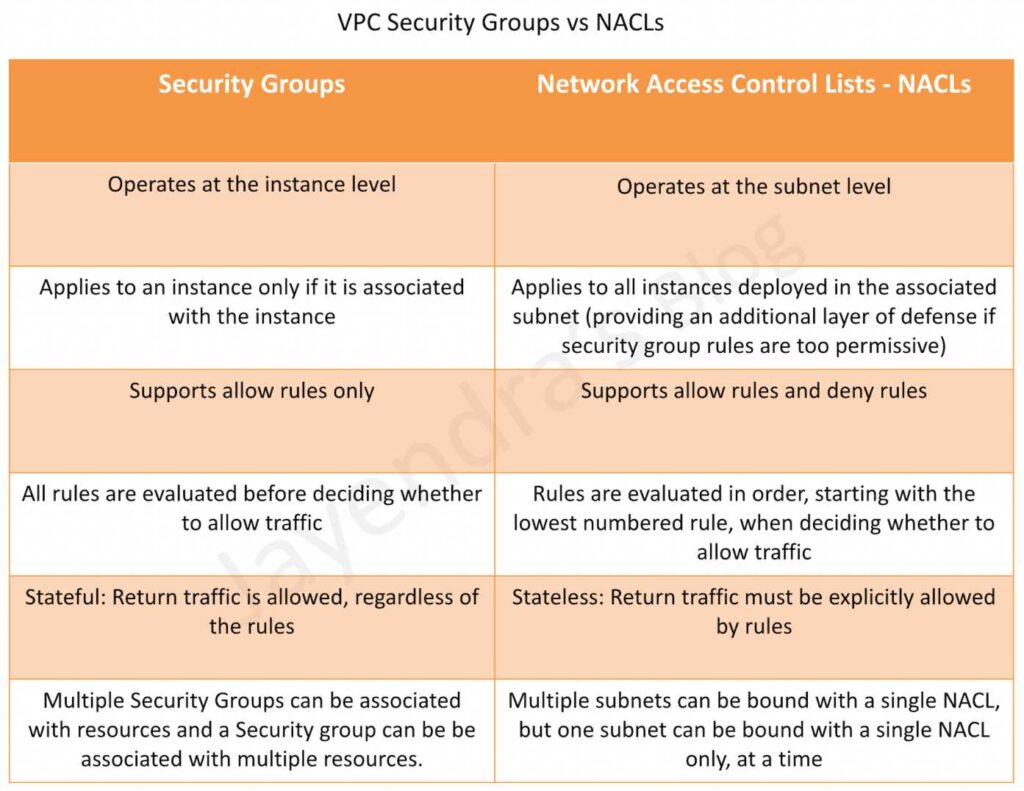
- Network Access Control Lists (NACLs): These are the stateless firewalls for your subnets. They evaluate traffic as it enters or leaves a subnet. Because they are stateless, you must have explicit
ALLOWrules for both inbound and outbound traffic. They support bothALLOWandDENYrules, which are evaluated in numerical order. ADENYrule will block traffic, period. - Security Groups (SGs): These are the stateful firewalls for your EC2 instances. They evaluate traffic just before it reaches the instance's network interface. Because they are stateful, if you allow an inbound request, the corresponding response is automatically allowed out, regardless of outbound rules. They only support
ALLOWrules; anything not explicitly allowed is denied.
This image provides a concise comparison of the two firewall layers:
The order of evaluation is critical:
- A request leaving an instance first passes its Security Group outbound rules.
- Then, it hits the subnet's NACL outbound rules.
- The Route Table associated with the subnet then directs the packet.
- On the receiving end, the packet is directed by the destination's Route Table to the correct subnet.
- The packet is then evaluated by that subnet's NACL inbound rules.
- Finally, it must pass the destination instance's Security Group inbound rules to be delivered.
2. A Practical Troubleshooting Walkthrough
Theory is useful, but seeing it in action is better. We'll now watch a detailed video that builds a VPC from scratch and then demonstrates a classic troubleshooting scenario.
The video will first provide a solid conceptual overview, reinforcing the roles of SGs and NACLs, and then transition into a hands-on demonstration.
Day-5 | AWS Security Group and NACL | Theory + Practical | AWS FREE COURSE by Abhishek |#devops #aws
This video from Abhishek Veeramalla provides an excellent and comprehensive look at Security Groups and NACLs. We will focus on the theoretical explanation and the practical troubleshooting steps.
First, watch the conceptual overview from 03:23 to 23:50. This will be a great refresher and will frame the hands-on section. Pay attention to: The overall traffic flow in a typical VPC architecture. The explanation of Security Groups as an instance-level, stateful firewall. The role of NACLs as a subnet-level, stateless firewall that can explicitly deny traffic.
Now that you have a fresh overview of the concepts, let's watch the troubleshooting part of the video. The scenario is simple but powerful: a web server is deployed in an EC2 instance, but it's unreachable. We will follow the debugging process step-by-step.
Day-5 | AWS Security Group and NACL | Theory + Practical | AWS FREE COURSE by Abhishek |#devops #aws
Let's continue with the same video to see how these concepts are applied in a real troubleshooting scenario.
Watch from 36:24 to 47:52. This is the core of the lesson. First problem (36:24 - 41:20): Notice how the application is initially inaccessible. The first check is the Security Group, where an inbound rule for the application port (8000) is missing. Adding this rule fixes the issue. This is the most common connectivity problem. Second problem (41:20 - 47:52): Now, the video introduces a more advanced issue. Even with the correct Security Group rule, the application becomes inaccessible again. The root cause is a DENY rule added to the NACL. This perfectly demonstrates the power hierarchy: a NACL rule can override a Security Group rule. Also, pay close attention to how the rule numbering in the NACL determines the order of evaluation.
This demonstration makes it clear: when an instance is unreachable, you must check both the Security Group and the NACL. A common mistake is to confirm the SG is correct and stop there, forgetting that the NACL provides an earlier and more powerful layer of control.
3. Advanced Scenario: Troubleshooting VPC Peering
Let's increase the complexity. A very common architecture involves peering two or more VPCs to allow private communication between resources. When this communication fails, the cause is often related to the "traffic director" of the VPC: the Route Table.
Scenario: You have two EC2 instances, one in vpc-A and one in vpc-B. The VPCs have an active peering connection, the SGs and NACLs on both sides allow the required traffic, but instance-A cannot ping instance-B.
The create-vpc-peering-connection action only creates the potential for traffic to flow. You must explicitly tell each VPC's route table how to reach the other VPC's CIDR block via that connection.
AWS VPC Peering - Step By Step Tutorial (Part-12) | #aws #vpc #devops #cloud #programming #coding
This video by Rahul Wagh demonstrates how to set up VPC peering and, more importantly for us, what happens when the routing is incorrect.
Watch these two key segments: Configuring the Routes (16:59 - 19:27): This is the crucial step. Observe how a route for the destination VPC's CIDR block is added to the route table of the source VPC, with the target set as the peering connection. This must be done on both sides. Demonstrating the Failure (23:17 - 24:31): Here, the presenter intentionally removes the routes. Notice how communication immediately fails. This is a classic troubleshooting test: if you suspect a routing issue, examining the route tables for the correct peering routes should be your first step.
This highlights the #1 cause of VPC peering connectivity issues: incomplete or missing route table entries.
4. A Systematic Troubleshooting Framework
When faced with a production networking issue, having a systematic plan is essential. Panic and random checks waste time. The following resources provide a structured approach.
First, this infographic presents a "golden flow" for troubleshooting and summarizes common issues you'll encounter.

Next, for a more detailed checklist, we can turn to official AWS guidance.
Resolve Amazon VPC peering network connectivity issues
This AWS re:Post article, 'Resolve Amazon VPC peering network connectivity issues', provides a concise but powerful checklist. While it's focused on VPC peering, the principles apply to most VPC connectivity issues.
Read the section titled 'Troubleshoot VPC peering connectivity issues'. We can adapt this into a general-purpose checklist: (For peering) Verify the connection is in the Active state. Update/verify your Route Tables. Does a route exist to direct traffic to the intended destination? Check the Network ACLs. Is there a DENY rule blocking the traffic? Are there ALLOW rules for both inbound and outbound traffic on the relevant ports? Review the Security Group rules. Is there an ALLOW rule for the inbound traffic? Is the source IP/SG correct? Use VPC Flow Logs. If all else fails, enable flow logs. REJECT entries will often pinpoint whether the SG or NACL is the component dropping the traffic.
Behavioral Interview Tip
This entire lesson is perfect preparation for a common behavioral interview question: "Tell me about a time you resolved a complex production issue."
You can use the STAR method (Situation, Task, Action, Result) combined with the troubleshooting framework:
- Situation: "A critical service hosted on an EC2 instance suddenly became unavailable to its upstream dependency in another VPC after a deployment."
- Task: "My task was to diagnose the connectivity failure and restore service as quickly as possible."
- Action: "I followed a systematic approach. First, I checked the VPC peering connection status, which was active. Next, I inspected the route tables in both VPCs. I discovered that the new deployment had provisioned a new subnet, but the route table for the upstream VPC had not been updated with a route to this new subnet's CIDR block. I then checked the NACLs and Security Groups to be thorough, but they were configured correctly."
- Result: "By adding the missing route to the route table, traffic flow was immediately restored. This resolved the incident in under 15 minutes. As a post-mortem action, we updated our IaC module to automatically add the necessary routes when creating new application subnets to prevent recurrence."
This demonstrates a calm, logical, and expert approach to problem-solving.
Conclusion
Mastering VPC troubleshooting is a journey from knowing what the components do to understanding how they interact. When things break, you now have a framework to diagnose the issue methodically instead of through guesswork.
Key Takeaways:
- The Troubleshooting Order: When diagnosing connectivity to an instance, check in the order that traffic flows: Route Tables -> NACLs -> Security Groups.
- Hierarchy of Rules: An explicit
DENYin a NACL will always win, even if the Security GroupALLOWs the traffic. - Stateless vs. Stateful: NACLs are stateless, requiring explicit rules for both request and response traffic. SGs are stateful, simplifying rules by automatically allowing responses.
- Peering's Prerequisite: VPC Peering connections are useless without corresponding route table entries in both participating VPCs that direct traffic to the peering connection.
Preview of the Next Module:
This concludes the "Networking for DevOps Engineers" module. You've built a strong foundation from the physical layer all the way up to advanced cloud networking. Our next module, "Advanced Bash Scripting," will shift gears to focus on automation. We'll begin by learning how to write robust and error-proof scripts, a fundamental skill for any DevOps practitioner.