Hello! Welcome back to the Embedded Interview Preparation Bootcamp.
In our last lesson, we distinguished between kmalloc and vmalloc, focusing on what kind of memory is allocated—physically contiguous vs. virtually contiguous. This is fundamental for satisfying hardware constraints like DMA.
Today, we move from the what to the where. On modern multi-core SoCs, the physical location of data relative to the CPU core accessing it is a critical factor for performance. We'll explore a subtle but devastating performance issue called "false sharing" and learn how the Linux kernel provides an elegant solution.
Your learning outcome for this lesson is to: Use per-CPU variables to eliminate false sharing and cache line bouncing in performance-critical multi-core kernel code.
1. The Hidden Performance Killer: False Sharing
Before we can appreciate the solution, we must deeply understand the problem. On a multi-core processor, caches are fundamental to performance. However, the mechanism that keeps these caches consistent—cache coherency—can introduce severe performance penalties if not handled with care.
This leads to a phenomenon called false sharing. It occurs when:
- Two or more cores are accessing different, unrelated variables.
- These variables happen to be located on the same cache line in memory.
- At least one of the cores is writing to its variable.
When Core A writes to its data, the cache coherency protocol must invalidate the entire cache line in Core B's cache, even though Core B only cares about a different piece of data on that same line. This forces Core B to fetch the line again from a slower cache level or main memory, even though its data of interest hasn't changed. The cache line "bounces" between cores, leading to high latency.
This concept is best understood with a practical demonstration.
This video from Nick's channel provides an excellent, practical demonstration of false sharing. It uses C++ and standard tools like perf to show the performance impact, a methodology directly applicable to kernel performance analysis.
Please watch the following segments carefully: Contention & Direct Sharing (00:09 - 07:36): This sets a baseline, showing the performance cost when multiple threads fight over the same piece of data. The False Sharing Problem (07:36 - 13:47): This is the crucial part. Pay close attention to how creating separate counters for each thread still results in poor performance because they land on the same cache line. The perf c2c (cache-to-cache) analysis is particularly insightful. A Solution with Alignment (13:47 - 16:48): This shows a common user-space solution: manually padding data to align it with cache line boundaries, ensuring each counter gets its own exclusive cache line.
The video demonstrates a powerful concept: logically separate data can become performance-coupled due to memory layout. While manual padding with alignas is a valid technique, the Linux kernel provides a more abstract and robust solution.
2. The Kernel's Solution: Per-CPU Variables
The kernel's answer to false sharing is a specialized data declaration mechanism: per-CPU variables.
The core idea is simple but powerful: when you declare a per-CPU variable, the kernel allocates a separate instance of that variable for each CPU core in the system. Crucially, the kernel's memory allocator ensures that each core's copy is located in a memory region far from the others, guaranteeing they will not share a cache line.
This is the ideal solution for data that is conceptually global but has access patterns that are local to a specific core, such as statistics counters, temporary buffers, or pointers to per-core resources.
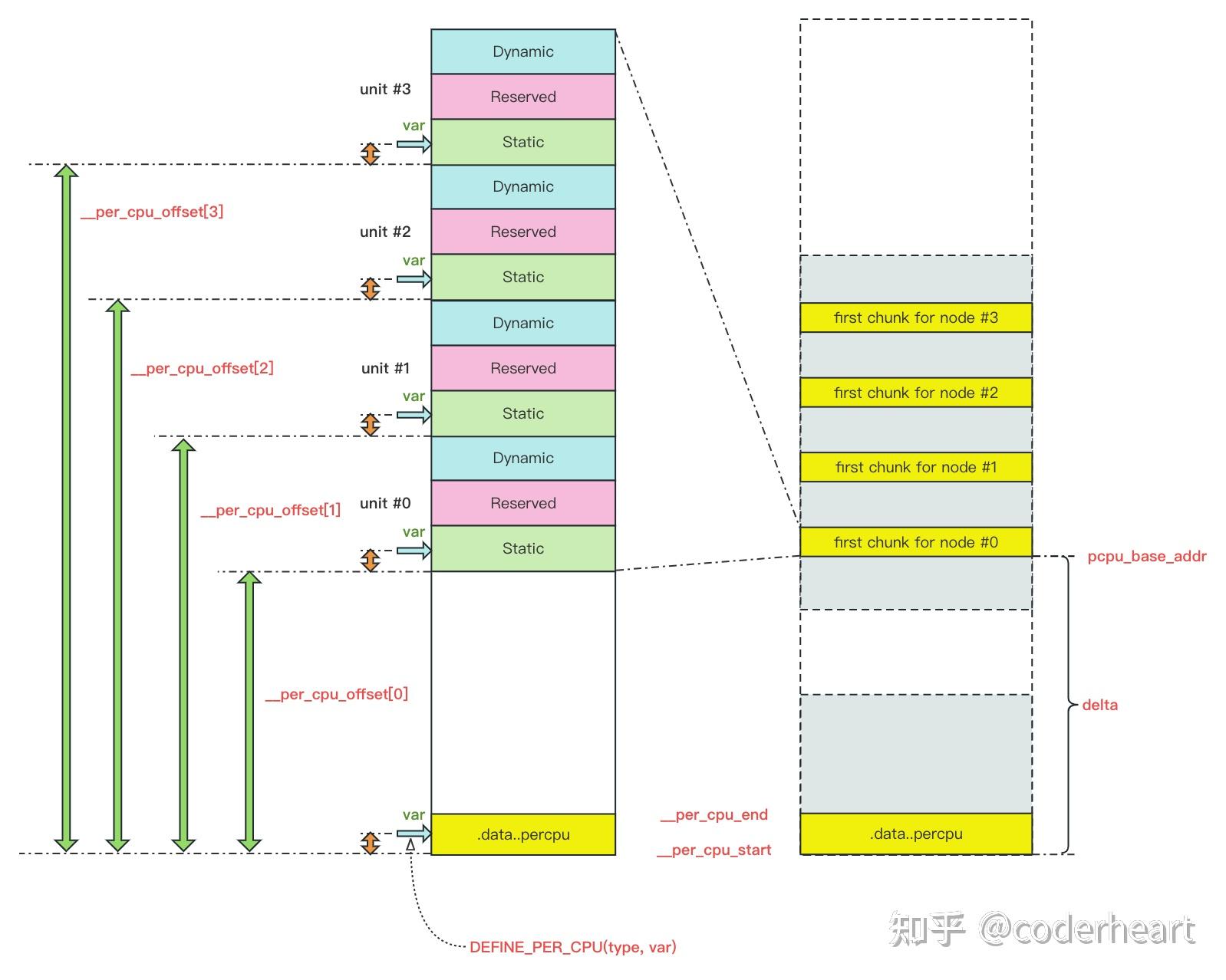
To understand the mechanics, let's explore how to define and use these variables.
Per-CPU variables · Linux Inside
The 'Linux Insides' book provides a fantastic deep-dive into the implementation of per-CPU variables. This will help you understand not just how to use them, but how they work internally—a key differentiator in an interview.
Please read through the entire article. Focus on these key points: Declaration: How DEFINE_PER_CPU places variables in the special .data..percpu ELF section. Initialization: The role of setup_per_cpu_areas during boot to replicate this section for each CPU. Access API & Preemption: Why get_cpu_var() must be paired with put_cpu_var() and the critical role of preempt_disable()/preempt_enable(). This is a very common interview question. Address Calculation: How the per_cpu_ptr macro uses the __per_cpu_offset array to calculate the address of the variable for a specific CPU.
Key Usage Pattern
The most critical takeaway from the reading is the access pattern. Since a task can be migrated between CPU cores at any time by the scheduler, you must explicitly prevent this migration while working with a per-CPU variable.
// 1. Disable preemption to lock the task to the current CPU.
preempt_disable();

// 2. Get a pointer to this CPU's instance of the variable.
//    The 'this_cpu_ptr' macro is a common way to do this.
my_var_ptr = this_cpu_ptr(&my_per_cpu_var);

// 3. Perform operations on this CPU's private copy.
my_var_ptr->counter++;
my_var_ptr->status = new_status;

// 4. Re-enable preemption.
preempt_enable();
Failing to disable preemption can lead to subtle and catastrophic bugs where your code begins an operation on CPU0's data, gets rescheduled to CPU1, and then incorrectly completes the operation on CPU1's data.
3. Mitigation Strategies and Real-World Examples
Turning a hot global variable into a per-CPU variable is a canonical optimization strategy in the Linux kernel. Let's see how the official documentation frames this.
The kernel's own documentation on false sharing provides a high-level overview and lists common mitigation techniques, including the one we're focused on.
Read the section titled 'Possible Mitigations'. Pay special attention to the fourth point: 'Turn hot global data to ‘per-cpu data + global data’ when possible'. Notice that the examples are direct links to kernel commits. Skimming one of these commits (like the ext4 one) will show you exactly how this pattern is applied in real-world code.
The typical use case involves statistics. Instead of a single global atomic_t counter that all CPUs increment (causing cache line bouncing), you would use:
- A per-CPU counter:
DEFINE_PER_CPU(long, packet_count). - Each CPU's network interrupt handler increments its own local
packet_countviathis_cpu_inc(packet_count). This operation is fast and lock-free. - When a user-space tool needs the total count (e.g., via a
/procorsysfsfile), a function iterates through all possible CPUs, sums up their individualpacket_countvalues, and returns the total. The contention only happens during the infrequent read, not on the hot path of every packet reception.
4. Interview-Style Knowledge Check
Let's test your understanding with questions you might face in an interview.
Question 1: You've written a networking driver and perf c2c reports a huge number of "hitm" events (cache line found in a modified state on another core) on a global structure containing statistics counters. What is the problem, and what is the idiomatic kernel solution?
Answer: The problem is false sharing. Even if different cores are updating different counters, if those counters reside on the same cache line, the line will bounce between cores, causing significant performance degradation. The idiomatic kernel solution is to replace the global structure with per-CPU variables (
DEFINE_PER_CPU). This gives each core a private copy of the counters, eliminating cache contention on the hot path.
Question 2: Why is it mandatory to disable preemption when accessing a per-CPU variable?
Answer: It's mandatory to prevent the scheduler from migrating the current task to another CPU core in the middle of an operation. The address of a per-CPU variable is calculated based on the current CPU ID. If the task were to be moved to another core after the address is calculated but before the memory is accessed, it would incorrectly read or write to the wrong CPU's private data, leading to data corruption.
Question 3: What is the trade-off of using per-CPU variables?
Answer: The main trade-off is increased memory consumption. Instead of one instance of a variable, you have
NR_CPUSinstances. For a smalllong, this is negligible, but for a large structure, the cost can be significant. There is also a slight performance overhead when you need to aggregate the data from all CPUs, but this is usually acceptable as it's done on a much colder path than the per-CPU updates.
Conclusion
You now have a deep understanding of a critical performance optimization technique used in the Linux kernel and other high-performance systems. Recognizing and solving false sharing is a sign of an experienced systems programmer.
Key Takeaways:
- False Sharing: Occurs when unrelated data on the same cache line is modified by different cores, causing the cache line to bounce between them and degrading performance.
- Per-CPU Variables: The kernel's solution to false sharing. It creates a private, cache-line-safe copy of a variable for each core.
- Access Protocol: Per-CPU variables must be accessed with preemption disabled (
preempt_disable()/preempt_enable()) to prevent data corruption from task migration. - Use Case: Ideal for frequently updated, core-local data like statistics, where aggregation is infrequent.
Preview of the Next Lesson:
We've just seen how to optimize data access by ensuring it's local to a core. But what if you need to ensure a task itself stays on a specific core? In our next lesson, we will cover Linux real-time scheduler policies (SCHED_FIFO, SCHED_RR) and CPU affinity. You will learn how to bind tasks to specific cores, a critical technique for latency-sensitive and real-time applications.