Hello! Welcome to the final lesson of our first module, "SQL for Data Analysis."
In our last session, you learned how to use CASE statements to embed if-then-else logic directly into your queries. We even saw a basic way to handle missing data with CASE WHEN some_column IS NULL THEN .... This is a perfectly valid approach, but SQL provides more specialized and efficient functions for this exact task.
Today, we'll dive deep into those functions. This lesson is designed to help you handle NULL values effectively using COALESCE and NULLIF. As a data analyst, you'll constantly encounter missing data. Knowing how to manage NULLs correctly is not just a matter of clean code; it's fundamental to preventing incorrect calculations and ensuring the integrity of your analysis.
What Exactly is a NULL Value?
Before we start manipulating NULLs, let's be crystal clear on what they are. A NULL value in a database represents a missing or unknown value. It is not the same as zero (0) or an empty text string (''). This distinction is critical because NULL behaves differently in calculations and comparisons.
Let's watch a short video to solidify this concept.
SQL NULL Functions | COALESCE, ISNULL, NULLIF, IS (NOT) NULL | #SQL Course 18
This clip from 'Data with Baraa' clearly defines what a NULL is and, importantly, what it is not.
Watch the first 1 minute and 22 seconds of the video. Pay close attention to the explanation that a NULL is not equal to anything, not even another NULL.
Replacing NULLs with COALESCE
The most common task when dealing with NULLs is replacing them with a default value. For this, the COALESCE function is your best friend.
COALESCE evaluates a list of arguments in order and returns the first non-NULL value it finds.
The syntax is:COALESCE(expression1, expression2, ..., fallback_value)

How COALESCE Works
Imagine you have three columns: a shipping_address, a billing_address, and you want to ensure you always have some address. You can use COALESCE to create a priority system.
COALESCE(shipping_address, billing_address, 'Address Unknown')
This expression will:
- Check
shipping_address. If it's notNULL, it will return theshipping_address. - If
shipping_addressisNULL, it will checkbilling_address. If it's notNULL, it will return thebilling_address. - If both are
NULL, it will return the final fallback value,'Address Unknown'.
Let's watch a detailed walkthrough of this "waterfall" logic.
SQL NULL Functions | COALESCE, ISNULL, NULLIF, IS (NOT) NULL | #SQL Course 18
This segment of the video from 'Data with Baraa' provides an excellent, step-by-step explanation of how COALESCE processes its arguments.
Watch from 07:31 to 12:57. The video first demonstrates a simple two-argument case and then builds up to a three-argument case, which really clarifies the function's power.
COALESCE vs. ISNULL and IFNULL
You might come across other functions like ISNULL (in SQL Server) or IFNULL (in MySQL) that perform a similar job. While they can be slightly faster in their specific database systems, they are generally limited to only two arguments.
COALESCE is part of the ANSI SQL standard, meaning it is supported across almost all major database systems (PostgreSQL, SQL Server, MySQL, Oracle, etc.). For this reason, it's a best practice to prefer COALESCE for better portability of your SQL skills and scripts.
Practical Applications of COALESCE
Knowing the syntax is one thing; seeing why it's indispensable is another. Here are two critical scenarios where COALESCE is essential.
1. Preventing Errors in Mathematical Operations
One of the most surprising behaviors of NULL for newcomers is that any arithmetic operation involving a NULL results in NULL.
10 + NULL=NULL'Hello ' || NULL=NULL(in databases that use||for concatenation)
This can silently break your calculations. For example, if you're calculating the total price (price + tax) and the tax column is NULL for some rows, the total_price for those rows will also become NULL, which is likely not what you want.
The solution is to use COALESCE to replace the NULL with a sensible default (like 0 for numbers or '' for strings) before the operation.
price + COALESCE(tax, 0)
SQL NULL Functions | COALESCE, ISNULL, NULLIF, IS (NOT) NULL | #SQL Course 18
Let's watch a demonstration of this problem and its solution. This video shows how NULLs can corrupt both numeric and string calculations and how COALESCE fixes it.
Watch from 18:09 to 24:11. The examples of concatenating names and adding bonus points are very practical and common in data analysis tasks.
2. Ensuring Accurate Aggregations
Aggregate functions like AVG(), SUM(), and COUNT(column_name) ignore NULL values. Sometimes this is what you want, but other times it can skew your results.
For example, imagine you have a scores table for a test: [100, 80, 60, NULL].
AVG(score)would be calculated as(100 + 80 + 60) / 3 = 80. TheNULLvalue is completely ignored.- However, if the business rule states that a missing score should be treated as a
0, the true average should be(100 + 80 + 60 + 0) / 4 = 60.
To achieve the correct result, you must use COALESCE inside the aggregate function:AVG(COALESCE(score, 0))
SQL NULL Functions | COALESCE, ISNULL, NULLIF, IS (NOT) NULL | #SQL Course 18
This clip demonstrates exactly how ignoring NULLs can affect an AVG() calculation and how to get a more accurate result if the business context requires it.
Watch from 14:33 to 18:09. This is a crucial concept for producing trustworthy summary statistics.
Replacing a Value with NULL using NULLIF
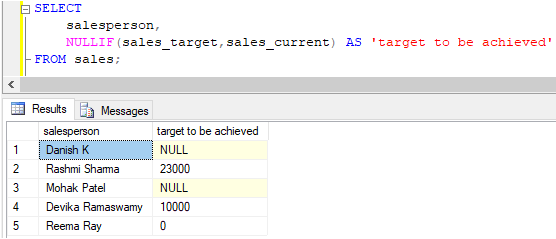
Now let's look at the other side of the coin. NULLIF is a handy function that does the opposite of COALESCE: it returns NULL if its two arguments are equal. Otherwise, it returns the first argument.
The syntax is:NULLIF(expression1, expression2)
If expression1 = expression2, the result is NULL.
If expression1 != expression2, the result is expression1.
Use Case: Preventing Division-by-Zero Errors
The most common and important use of NULLIF is to prevent "division by zero" errors, which would crash your query.
If you have a query like SUM(sales) / COUNT(orders), it will fail if COUNT(orders) happens to be zero. By wrapping the denominator in NULLIF, you can gracefully handle this case.
SUM(sales) / NULLIF(COUNT(orders), 0)
If COUNT(orders) is 0, NULLIF will turn the denominator into NULL. Any number divided by NULL results in NULL (not an error), so your query will run successfully.
SQL NULL Functions | COALESCE, ISNULL, NULLIF, IS (NOT) NULL | #SQL Course 18
Let's see a live demonstration of a query crashing and then being fixed with NULLIF.
Watch from 36:43 to 42:42. This segment clearly shows the error and then the elegant solution using NULLIF.
Another common use for NULLIF is in data cleaning. For instance, if a text field contains placeholder values like 'N/A' or 'Not Applicable', you can use NULLIF(column_name, 'N/A') to convert them to proper NULLs for consistency.
Hands-on Practice
Now it's time to put these functions to work. The best way to learn is by doing. Let's look at a few exercises. For each one, read the problem and think about how you would write the query using COALESCE or NULLIF.
10 NULL Exercises for Beginners
We'll use a few exercises from this LearnSQL article. First, familiarize yourself with the two tables used in the exercises: employee and department.
Briefly review the schema and sample data for the employee and department tables under the 'Get to Know the Data' section.
Exercise 1: Employees and Regions (COALESCE)
- Task: For each employee, display their name, department name, and region. For departments with a missing region (which indicates they are online), display the word
'Online'as the region. - Hint: You'll need to join the tables and then use a function to replace the
NULLvalues in theregioncolumn.
Think about your query...
10 NULL Exercises for Beginners
Now, let's check the solution and explanation for this task.
Read 'Exercise 6. Employees and Regions' to see how COALESCE is used to solve this problem.
Exercise 2: Bonus-to-Salary Ratio (NULLIF)
- Task: For each employee, display their name and the ratio of their bonus to their salary (
bonus / salary). However, if an employee's bonus is0, the ratio should be displayed asNULLinstead of0. - Hint: How can you turn a
0value in thebonuscolumn intoNULLbefore the division happens?
Think about your query...
10 NULL Exercises for Beginners
Let's see how NULLIF can be cleverly used to handle this business rule.
Read 'Exercise 8. Bonus-to-Salary Ratio' for the solution. This is a great example of using NULLIF for something other than division by zero.
Conclusion
Congratulations on completing the first module of your data analyst journey! You have built a solid foundation in SQL, from retrieving and joining data to performing complex transformations.
Key Takeaways from this Lesson:
NULLrepresents an unknown or missing value; it is not0or''.COALESCE(val1, val2, ...)is the standard and most flexible function to replaceNULLvalues. It returns the first non-NULLvalue from its argument list.NULLIF(val1, val2)is a powerful tool for returningNULLwhen two values are equal, which is essential for preventing division-by-zero errors and for certain data cleaning tasks.- Always handle potential
NULLs before performing arithmetic or in aggregations to ensure your results are accurate and your queries don't fail unexpectedly.
In our next module, "Advanced Analytics with SQL Window Functions," you'll learn to perform sophisticated analysis like calculating running totals, ranking results, and analyzing row-over-row changes. Your ability to handle NULLs with COALESCE and NULLIF will be invaluable as you apply these advanced techniques to real-world datasets, which are rarely perfect or complete.