Hello! In our last lesson, we successfully built the bridge between your Node.js application and your PostgreSQL database. You now have a working connection pool and can execute simple queries. However, an empty database isn't very useful. It's time to give it structure.
Today's lesson focuses on a crucial skill for any developer: designing a database schema and creating tables with appropriate data types and constraints. A well-designed schema is the blueprint of your application's data, ensuring integrity, performance, and scalability. We will apply these concepts to design the initial tables for our task_manager application.
1. From Idea to Blueprint: Designing Your Schema
Before writing any SQL, we must think like an architect. The first step is to identify the core "things" or entities your application needs to manage, their properties or attributes, and how they relate to each other.
For our task manager app, the two most fundamental entities are:
- Users: The people using the application.
- Tasks: The to-do items they create.
Next, we define the relationships between them. A user can have many tasks, but each task is created by only one user. This is a classic one-to-many relationship.
From Idea to Production-Ready Database Design (No More Mistakes!)
To see this process in action, watch the following video. The presenter walks through the initial steps of database design: formulating an idea and identifying the core entities from the application's requirements.
Watch from the beginning to 02:10. Pay attention to how a description of an application is broken down into a list of nouns, which become the primary entities (tables) in the database.
Once you have your entities, you list the attributes for each.
- User Attributes:
id,username,email,password_hash,created_at. - Task Attributes:
id,title,description,status,due_date,created_at.
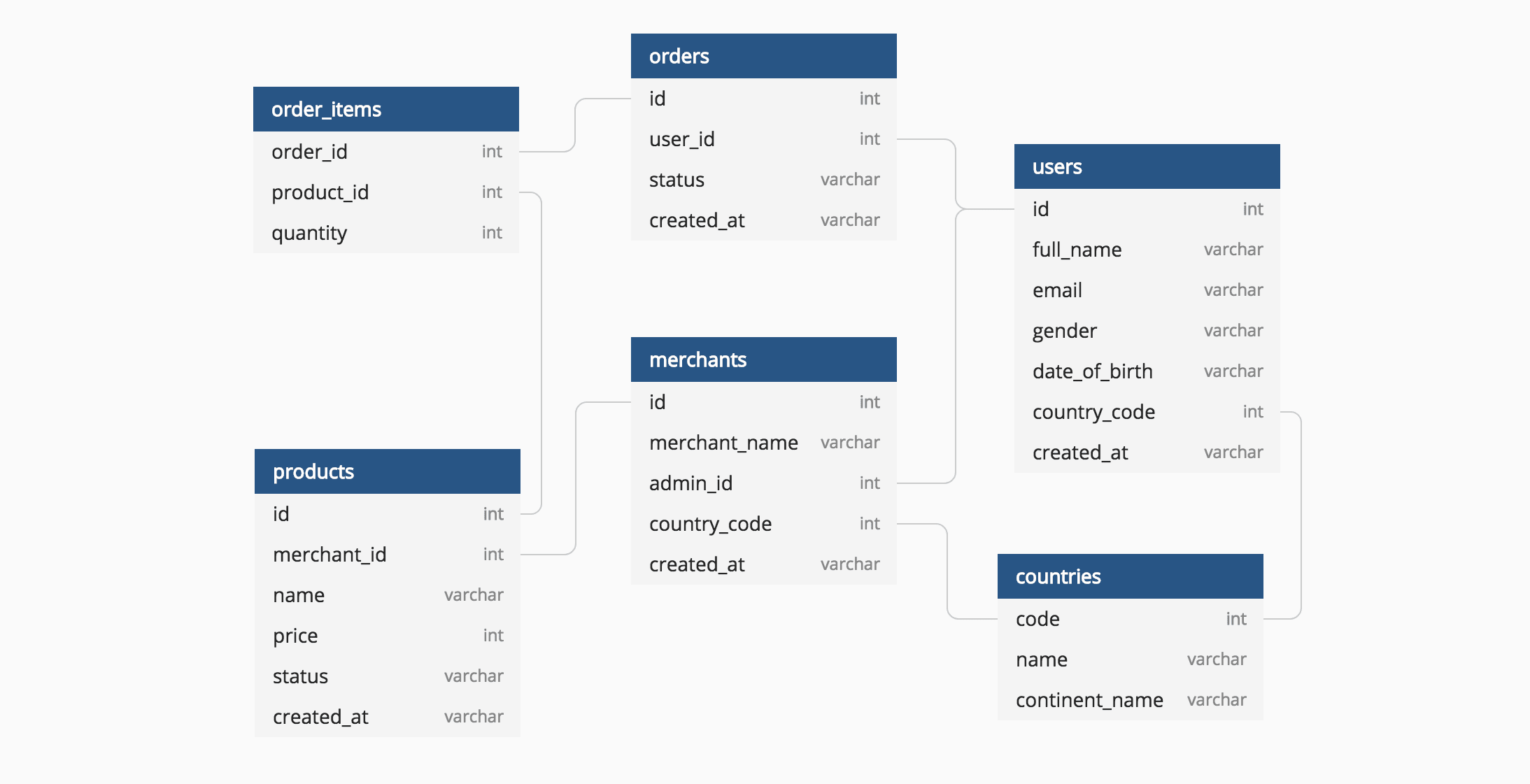
This conceptual model, often visualized as an Entity-Relationship Diagram (ERD), is the blueprint we'll use to build our tables.
2. The CREATE TABLE Statement
Now we translate our blueprint into SQL. The command for this is CREATE TABLE. It defines the table's name and a list of columns, each with a specific name, data type, and set of rules (constraints).
PostgreSQL CRASH COURSE - Learn PostgreSQL in 2024
This video provides a clear, practical demonstration of the CREATE TABLE syntax in PostgreSQL.
Watch from 04:23 to 08:09. The video explains the basic structure of a CREATE TABLE statement, SQL keyword conventions (like using uppercase for keywords), and introduces the concept of defining columns and their data types.
3. Choosing the Right Data Types
Selecting the correct data type for each column is essential for data integrity and performance. Using a VARCHAR for a number or an INTEGER for a date can cause errors and inefficiencies.
Here are some common PostgreSQL data types and our choices for the task_manager app:
| Data Type | Description | Our Use Case |
|---|---|---|
SERIAL / BIGSERIAL |
Auto-incrementing integer. Perfect for primary keys. | users.id, tasks.id |
VARCHAR(n) |
Variable-length text with a maximum length n. |
users.username, users.email, tasks.title |
TEXT |
Variable-length text with no preset limit. | tasks.description |
TIMESTAMPTZ |
Timestamp with time zone information. | users.created_at, tasks.created_at, tasks.due_date |
BOOLEAN |
true or false values. |
(We'll add a completed column later) |
VARCHAR |
You can also use VARCHAR for fixed-state values. | tasks.status |

PostgreSQL CRASH COURSE - Learn PostgreSQL in 2024
Let's dive deeper into some of these data types, especially the SERIAL type which is fundamental for creating unique IDs.
Watch from 08:09 to 13:08. This segment gives a detailed explanation of VARCHAR, TEXT, INTEGER, and SERIAL, and critically, introduces the concept of a PRIMARY KEY.
4. Enforcing Rules with Constraints
Constraints are rules that the database enforces to guarantee data integrity. They prevent you from storing invalid data, like creating a task without a title or two users with the same email.
Primary and Foreign Keys
These are the two most important constraints for creating relationships.
PRIMARY KEY: Uniquely identifies each row in a table. It cannot be null and must be unique. Ouridcolumns will be primary keys.FOREIGN KEY: A column (or set of columns) in one table that refers to thePRIMARY KEYof another table. This is how we link tasks back to users. Thetaskstable will have auser_idcolumn that is a foreign key referencing theidin theuserstable.
PostgreSQL CRASH COURSE - Learn PostgreSQL in 2024
Understanding how to relate tables is the most powerful aspect of relational databases. This video explains the theory behind relationships and then shows how to implement a FOREIGN KEY constraint in SQL.
Watch these three segments: 30:43 - 34:18: Introduces the concept of table relationships and foreign keys. 36:04 - 38:36: Explains the one-to-many relationship, which is exactly what we have between users and posts (or in our case, tasks). 40:16 - 43:04: Shows the practical SQL syntax for creating a table with a FOREIGN KEY constraint.
Other Essential Constraints
NOT NULL: Ensures a column cannot be empty. A tasktitleshould not be null.UNIQUE: Ensures every value in a column is unique. A user'semailmust be unique.DEFAULT: Sets a default value if one isn't provided. We'll useDEFAULT CURRENT_TIMESTAMPfor ourcreated_atcolumns.CHECK: Enforces a custom rule. We can use this to ensure thetasks.statuscolumn only contains specific values like'pending','in_progress', or'completed'.
Database Schema Design: Principles Every Developer Must Know
This article provides a superb overview of database design principles, including why constraints are so important. It reinforces the concepts from the video with professional best practices.
Please read the following two sections: "Foreign Keys: Maintaining Data Integrity": This section powerfully argues why you should always use foreign key constraints rather than relying on application code. "Designing for Data Integrity Beyond Foreign Keys": This section provides excellent examples of CHECK and UNIQUE constraints to enforce business rules directly in the database.
Test your understanding!
Imagine we add a categories table to our application. A task can belong to one category, and a category can have many tasks.
- What kind of relationship is this?
- Which table should contain the foreign key?
- What would you name the foreign key column?
Show answer
- This is a one-to-many relationship, just like between users and tasks.
- The "many" side holds the foreign key. In this case, the
taskstable should contain the foreign key. - A good, descriptive name would be
category_id. This makes it clear that this column in thetaskstable references theidof thecategoriestable.
5. Putting It All Together: The SQL Schema
Now, let's combine everything we've learned to write the CREATE TABLE statements for our task_manager application. It's a good practice to follow consistent naming conventions (e.g., snake_case, plural table names) as they make your schema much easier to read and maintain.
Here is the final SQL. We will create the users table first, because the tasks table references it.
-- Creates the 'users' table
CREATE TABLE users (
    id BIGSERIAL PRIMARY KEY,
    username VARCHAR(50) NOT NULL UNIQUE,
    email VARCHAR(255) NOT NULL UNIQUE,
    password_hash VARCHAR(255) NOT NULL,
    created_at TIMESTAMPTZ NOT NULL DEFAULT CURRENT_TIMESTAMP
);

-- Creates the 'tasks' table with a foreign key relationship to the 'users' table
CREATE TABLE tasks (
    id BIGSERIAL PRIMARY KEY,
    user_id BIGINT NOT NULL,
    title VARCHAR(255) NOT NULL,
    description TEXT,
    status VARCHAR(20) NOT NULL DEFAULT 'pending' CHECK (status IN ('pending', 'in_progress', 'completed')),
    due_date TIMESTAMPTZ,
    created_at TIMESTAMPTZ NOT NULL DEFAULT CURRENT_TIMESTAMP,
    updated_at TIMESTAMPTZ NOT NULL DEFAULT CURRENT_TIMESTAMP,

    CONSTRAINT fk_user
        FOREIGN KEY(user_id)
        REFERENCES users(id)
        ON DELETE CASCADE
);

-- Optional: Create a trigger to automatically update the 'updated_at' timestamp
CREATE OR REPLACE FUNCTION update_timestamp()
RETURNS TRIGGER AS $$
BEGIN
   NEW.updated_at = NOW();
   RETURN NEW;
END;
$$ language 'plpgsql';

CREATE TRIGGER update_tasks_updated_at
BEFORE UPDATE ON tasks
FOR EACH ROW
EXECUTE PROCEDURE update_timestamp();
How to Run This SQL:
- Open pgAdmin.
- Connect to your server and navigate to your
task_managerdatabase. - Right-click the database and select Query Tool.
- Copy and paste the SQL code above into the Query Tool panel.
- Execute the query (by clicking the "play" button or pressing F5).
If successful, you can refresh the Tables section under your database in the browser pane, and you will see your new users and tasks tables.
Conclusion
Excellent work! You have just designed and implemented your first database schema. This is a foundational skill that separates simple scripts from robust, professional applications.
Key Takeaways:
- Design First: Always start by identifying entities, attributes, and relationships before writing code.
- Data Types Matter: Choose the most appropriate data type for each column to ensure data integrity and optimize performance.
- Constraints are Your Friend: Use
PRIMARY KEY,FOREIGN KEY,NOT NULL,UNIQUE, andCHECKto make your database enforce your application's rules. - Relationships are Key: Foreign keys are the mechanism that links your tables together, forming the relational structure of your data.
Preview of the Next Lesson:
Our database now has a structure, but it's empty. In the next lesson, we will learn how to bring it to life. We will write SQL queries to perform CRUD operations (INSERT, SELECT, UPDATE, DELETE), allowing us to create users, add tasks, and manage data from our Node.js application.