Hello! Welcome to your fourth lesson in the "Large Language Models and Generative AI" module.
In our last lesson, we mastered prompt engineering, learning how to guide LLMs using techniques like role-playing, zero-shot, and few-shot prompting. You learned that a well-crafted prompt is like a program written in natural language. However, even the most sophisticated prompt is constrained by the LLM's static, pre-trained knowledge. This leads to a fundamental question: how can we make an LLM reason about information it was never trained on, like your company's internal documents or events that happened yesterday?
Today, we'll answer that question by exploring Retrieval-Augmented Generation (RAG). This lesson will teach you:
- The architecture of a RAG system and the problems it solves.
- The concepts of embeddings and semantic search.
- How to use a vector database to perform document retrieval, the core of the RAG process.
RAG is one of the most important patterns in modern AI development, allowing you to ground LLMs in factual, timely, and private data.
1. Why Do We Need RAG?
Large Language Models have some well-known limitations: they can "hallucinate" (invent facts), their knowledge is frozen at the time of training, and they have no access to your private data. While fine-tuning can adapt a model's style, it's expensive, time-consuming, and not ideal for constantly changing information.
RAG offers a more flexible and efficient solution. It gives the LLM a "cheat sheet" by finding relevant information from an external knowledge source and adding it to the prompt, all in real-time.
RAG Crash Course for Beginners
To start, let's watch a section of the 'RAG Crash Course for Beginners' video. It clearly explains the core idea of RAG and contrasts it with other methods like prompt engineering and fine-tuning.
Watch from 01:16 to 07:34. Pay close attention to: The simple analogy of looking up a policy document (01:16 - 02:48). The breakdown of when to use RAG (for dynamic factual information) versus fine-tuning (for stable patterns like style or tone) (03:24 - 07:34).
As the video highlights, RAG is perfect for building applications like a chatbot that can answer questions about your company's internal policies, a support tool that uses up-to-date documentation, or a Q&A system for a new product.
2. The RAG Architecture Explained
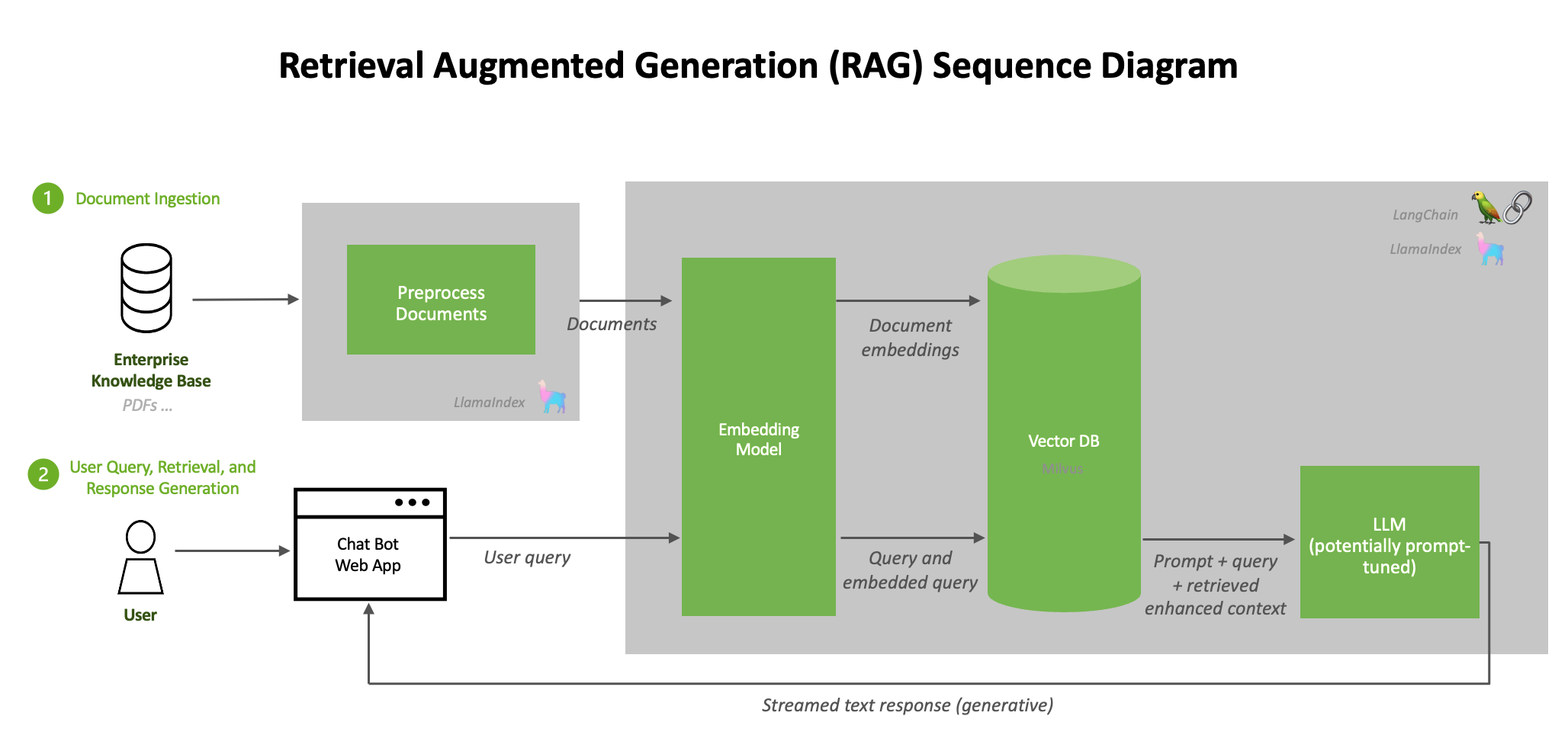
The name "Retrieval-Augmented Generation" perfectly describes the process. It consists of two main phases:
- Indexing (or Ingestion): An offline process where you prepare your knowledge base. You take your documents (PDFs, text files, etc.), break them into smaller pieces called chunks, and convert each chunk into a numerical representation called an embedding. These embeddings are then stored in a special database.
- Retrieval and Generation: A real-time process that happens when a user asks a question.
- Retrieval: The user's query is also converted into an embedding. This query embedding is used to search the database for the most similar document chunks. This is the "retrieval" step.
- Augmentation: The retrieved chunks (the context) are combined with the original user query into a new, more detailed prompt.
- Generation: This augmented prompt is sent to the LLM, which then generates an answer based on the provided context.
This diagram clearly illustrates the two-phase flow of a RAG pipeline.
3. The "Retrieval" Engine: Embeddings and Semantic Search
The magic of RAG lies in its ability to find semantically relevant information, not just documents that contain the exact keywords. This is achieved through embeddings and vector search.
- Embeddings: An embedding is a list of numbers (a vector) that captures the semantic meaning of a piece of text. An "embedding model" is a special neural network that takes text as input and outputs this vector. Texts with similar meanings will have mathematically similar vectors.
- Semantic Search: Instead of matching keywords, we can search for documents whose embedding vectors are "closest" to our query's embedding vector in a high-dimensional space. This allows us to find a document about "working from home" even if the user asks about "remote work policy."
RAG Crash Course for Beginners
The 'RAG Crash Course' video has an excellent segment explaining embeddings and semantic search. It makes these abstract concepts easy to grasp.
Watch from 14:48 to 24:56. Focus on: The limitation of keyword search and how semantic search overcomes it. The concept of embeddings as mathematical vectors representing meaning. How vector similarity is calculated (e.g., using the dot product) to find the closest matches.
4. Vector Databases: The Knowledge Store
Searching through millions of vectors one by one to find the closest match for every query would be incredibly slow. This is where vector databases come in.
A vector database is a type of database specifically designed to store and efficiently query high-dimensional vectors. It uses special indexing algorithms (like HNSW - Hierarchical Navigable Small World) to quickly find the nearest neighbors to a query vector without having to compare it against every single vector in the database.

Popular vector databases include Chroma, Pinecone, Weaviate, and FAISS. Many traditional databases like MongoDB and PostgreSQL are also adding vector search capabilities.
RAG Crash Course for Beginners
Let's return to the 'RAG Crash Course' to understand why vector databases are essential and how they work.
Watch from 29:50 to 34:28. This section explains: The performance problem of naive vector search. How vector databases use indexing to solve this problem. Examples of vector databases like Chroma and Pinecone.
5. Building the Retrieval Pipeline: A Practical Walkthrough
Now let's put these concepts into practice. We'll build the core of the RAG pipeline: the retrieval step. Our goal is to take a set of documents, process them, and find the most relevant one for a given user query.
Step 1: The Document Chunking Problem
Real-world documents are often too long to be processed by an embedding model at once. We need to break them down into smaller, meaningful chunks.
RAG Crash Course for Beginners
Before we write code, it's important to understand the strategy of 'chunking'.
Watch from 38:08 to 43:15. This part explains: Why we can't embed an entire 50-page document. The trade-off between chunk size (context) and precision. The concept of 'overlap' to preserve meaning across chunk boundaries.
Step 2: Implementing Retrieval in Python
For this example, we will perform the entire retrieval process using standard Python libraries. We'll simulate a vector database using a simple in-memory list to focus on the core logic.
First, ensure you have the necessary libraries installed:
pip install sentence-transformers numpy
Now, let's write the script. This code will:
- Define a small knowledge base (corpus) of text chunks.
- Use a
sentence-transformersmodel to create embeddings for each chunk. - Take a user query and create an embedding for it.
- Calculate the cosine similarity between the query embedding and all chunk embeddings.
- Identify and retrieve the most relevant chunk.
import numpy as np
from sentence_transformers import SentenceTransformer
from numpy.linalg import norm


# 1. Define our knowledge base (corpus)
# In a real application, these would be chunks from your documents.
corpus = [
    "The capital of France is Paris, a major European city and a global center for art, fashion, and culture.",
    "Python is a high-level, general-purpose programming language known for its simple syntax.",
    "The first moon landing was achieved by the United States' Apollo 11 mission on July 20, 1969.",
    "A CPU, or Central Processing Unit, is the primary component of a computer that executes instructions.",
    "Climate change refers to long-term shifts in temperatures and weather patterns, mainly caused by human activities."
]


# 2. Load a pre-trained embedding model
# 'all-MiniLM-L6-v2' is a popular and efficient model for sentence embeddings.
print("Loading embedding model...")
model = SentenceTransformer('all-MiniLM-L6-v2')


# 3. Create embeddings for our corpus (This is the 'indexing' step)
# We'll store this in a simple list to act as our in-memory vector database.
print("Creating embeddings for the corpus...")
corpus_embeddings = model.encode(corpus, convert_to_tensor=False)


# This is our simple, in-memory "vector database"
vector_database = {
    "corpus": corpus,
    "embeddings": corpus_embeddings
}


# 4. Define a user query and create its embedding
user_query = "What is the main computer processor called?"
print(f"\nUser Query: '{user_query}'")

query_embedding = model.encode(user_query, convert_to_tensor=False)


# 5. Calculate cosine similarity between the query and all corpus embeddings
# Cosine similarity measures the cosine of the angle between two vectors.
# A value closer to 1 means the vectors are more similar.
cos_similarities = np.dot(vector_database["embeddings"], query_embedding) / (norm(vector_database["embeddings"], axis=1) * norm(query_embedding))


# 6. Find the most similar chunk
most_similar_idx = np.argmax(cos_similarities)
retrieved_chunk = vector_database["corpus"][most_similar_idx]
similarity_score = cos_similarities[most_similar_idx]

print(f"\nMost relevant chunk retrieved (Similarity: {similarity_score:.4f}):")
print(retrieved_chunk)
When you run this script, you'll see that even though the query "What is the main computer processor called?" doesn't share many keywords with the sentence about the CPU, the model correctly identifies it as the most semantically similar chunk. This is the power of semantic search!
6. From Retrieval to Generation
The final step in the RAG pipeline is to use the retrieved chunk to "augment" a prompt for the LLM.
Code a simple RAG from scratch
The article 'Code a simple RAG from scratch' demonstrates how to construct this final prompt.
Read the short section 'Generation phrase'. Notice how it combines a direct instruction with the retrieved knowledge to create a comprehensive prompt for the chatbot.
Building on our Python example, the final prompt sent to an LLM like GPT-3.5 would look something like this:
You are a helpful chatbot.
Use only the following piece of context to answer the question. Don't make up any new information:
- A CPU, or Central Processing Unit, is the primary component of a computer that executes instructions.

Question: What is the main computer processor called?
The LLM can now easily and accurately answer the question based on the provided context.
Conclusion
In this lesson, you have learned the theory and practice behind Retrieval-Augmented Generation, a cornerstone of modern AI application development. You now understand how to overcome the limitations of standard LLMs by grounding them in external data.
Key Takeaways:
- RAG Architecture: RAG solves LLM limitations like hallucinations and outdated knowledge by retrieving relevant information from a knowledge base and adding it to the prompt.
- Embeddings & Semantic Search: Text is converted into numerical vectors (embeddings) that capture meaning, allowing for searches based on semantic similarity rather than just keywords.
- Vector Databases: These specialized databases are crucial for efficiently storing and querying billions of embeddings, making real-time retrieval possible.
- The Retrieval Pipeline: The core process involves chunking documents, creating embeddings, storing them, and then performing a similarity search to find context relevant to a user's query.
Preview of the Next Lesson:
Building a RAG pipeline from scratch is insightful, but in production, you'll use frameworks that streamline this process. In our next lesson, we will dive into LangChain, a powerful library that provides tools and abstractions to build, chain, and deploy RAG pipelines and other complex LLM applications with much less code.