Hello! Welcome to your sixth lesson in the "Large Language Models and Generative AI" module.
In our last lesson, we built powerful applications using LangChain chains and agents. You learned how to orchestrate workflows, construct a complete RAG pipeline, and even build agents that can reason and use tools. However, you may have noticed that those applications were stateless—they treated every query as a brand new interaction, with no memory of what came before.
Today, we'll solve that problem by exploring one of the most critical components of building effective chatbots: conversation memory. Large Language Models are inherently stateless, but by implementing memory, we can give them the ability to recall past parts of a conversation, leading to more natural and context-aware interactions.
This lesson will equip you to:
- Understand why memory is essential for conversational AI.
- Implement various in-memory strategies in LangChain (
Buffer,Window,Summary). - Analyze the trade-offs between different memory types in terms of context retention and token usage.
- Implement persistent memory to store conversations across sessions for real-world applications.
1. Why Chatbots Need Memory
At its core, a conversation is a stateful process. We remember what was said earlier to understand pronouns, follow-up questions, and the overall context. Without memory, a chatbot would be like talking to someone with severe short-term memory loss, asking "Who are you?" every time you speak.
LangChain provides several mechanisms to add this statefulness to your applications. All these methods work on a simple principle: store the conversation history and inject it back into the prompt for the next turn.
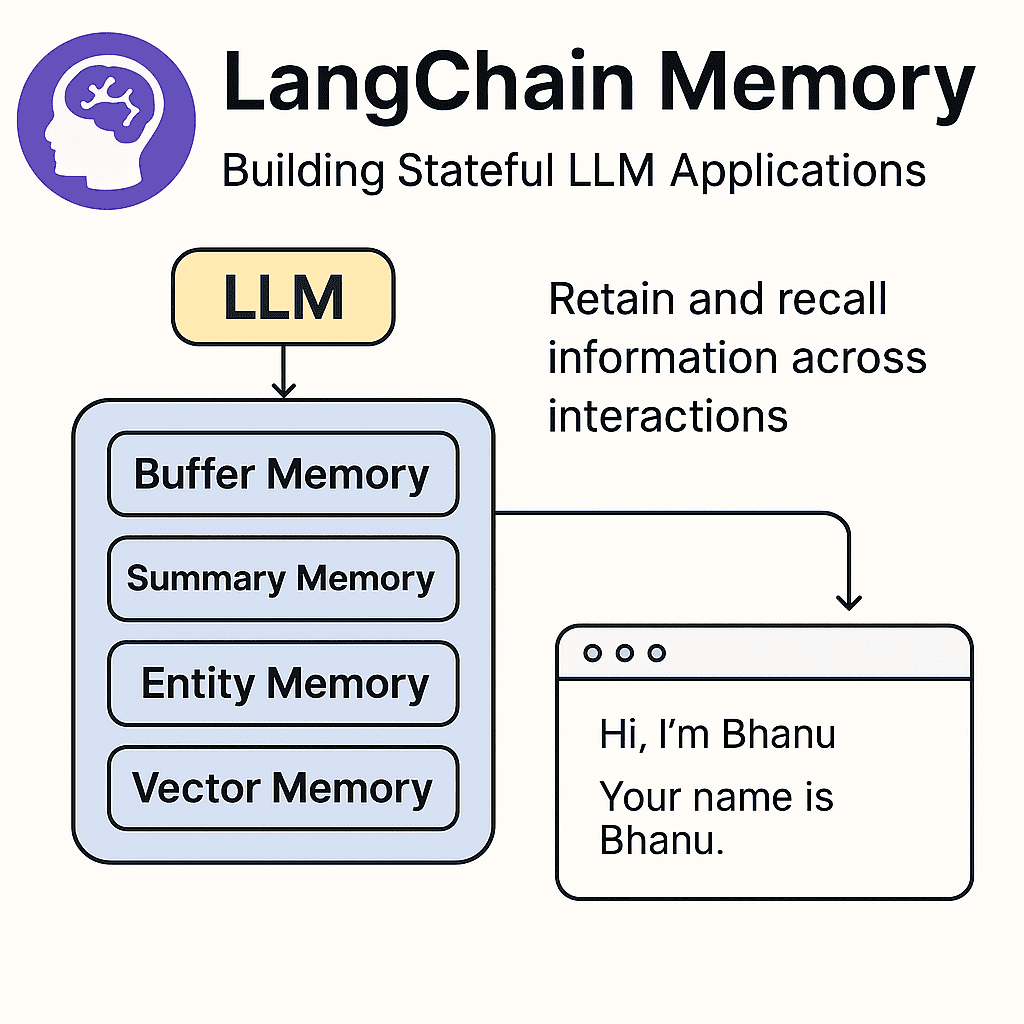
To begin, let's get a clear conceptual overview of why memory is so important and the different approaches LangChain offers.
LangChain - Conversations with Memory (explanation & code walkthrough)
The video 'LangChain - Conversations with Memory' by Sam Witteveen provides an excellent introduction to this topic. The first few minutes explain the core problem and outline the main strategies for solving it.
Watch the first 5 minutes and 16 seconds of the video (00:00 - 05:16). Pay attention to: The reasons why memory is crucial for a natural user experience. The two main ways to provide memory to an LLM: putting history back into the prompt or using external lookups. The brief overview of different memory types available in LangChain, such as buffering, summarizing, and using a sliding window.
2. Basic Memory: Remembering Everything
The most straightforward way to implement memory is to store the entire conversation history and include it in every new prompt. This is called buffering.
ConversationBufferMemory
LangChain's ConversationBufferMemory does exactly this. It's simple, intuitive, and ensures the LLM has complete context. Let's see it in action.
LangChain - Conversations with Memory (explanation & code walkthrough)
Let's continue with the same video. This next segment provides a code walkthrough of ConversationBufferMemory, the simplest form of memory.
Watch from 05:16 to 07:35. Notice how the verbose=True flag is used to show the prompt sent to the LLM. You'll see the 'Current conversation' section grow with each turn.
Here is a Python code snippet that demonstrates this. It uses a ConversationChain, which combines an LLM with a memory object.
import os
from dotenv import load_dotenv
from langchain_openai import OpenAI
from langchain.chains import ConversationChain
from langchain.memory import ConversationBufferMemory


# Load your OpenAI API key
load_dotenv()


# Initialize the LLM
# Note: We're using the base 'OpenAI' model with 'gpt-3.5-turbo-instruct'
# as ConversationChain is often used with completion models.
llm = OpenAI(model="gpt-3.5-turbo-instruct", temperature=0)


# Initialize ConversationChain with a buffer memory
# verbose=True lets us see the prompt
conversation = ConversationChain(
    llm=llm,
    memory=ConversationBufferMemory(),
    verbose=True
)


# First interaction
conversation.predict(input="Hi, my name is Alex.")


# Second interaction
conversation.predict(input="I'm interested in building chatbots.")


# Third interaction
conversation.predict(input="What was my name again?")
If you run this code, you'll see the prompt expand with each call. In the final call, the history includes "Hi, my name is Alex," allowing the LLM to correctly answer the question.
The Problem: While simple, ConversationBufferMemory can become very expensive and slow. As the conversation grows, the prompt gets longer, consuming more tokens and eventually hitting the model's context limit (e.g., ~4k tokens for older models, more for newer ones).
3. Managing Long Conversations: Memory Strategies
To build scalable chatbots, we need smarter ways to manage memory. Let's explore three key strategies and their implementations in LangChain.
Strategy 1: Sliding Window Memory (ConversationBufferWindowMemory)
This strategy keeps only the last k interactions. It's a simple way to keep the prompt size fixed, preventing it from growing indefinitely. The trade-off is that the model will "forget" anything that happened more than k turns ago.
LangChain - Conversations with Memory (explanation & code walkthrough)
The video provides a clear example of ConversationBufferWindowMemory, showing how the chatbot 'forgets' information once it falls outside the memory window.
Watch from 10:53 to 13:04. Pay close attention to how setting k=2 causes the model to forget the user's name from the first interaction.
This method is effective for tasks where only recent context matters.
Strategy 2: Summary Memory (ConversationSummaryMemory)
Instead of keeping the raw transcript, this strategy uses an LLM to create a running summary of the conversation. This keeps the context concise, even for very long conversations.
The drawback is that it requires an extra LLM call for summarization at each step, which can add latency and cost. Also, details can be lost during the summarization process.
LangChain - Conversations with Memory (explanation & code walkthrough)
Let's see how summary memory works. This segment explains the process and shows the evolving summary in the prompt.
Watch from 07:35 to 10:53. Note that this memory type needs an LLM to perform the summarization. Observe how the 'Current conversation' block contains a summary, not a verbatim transcript.
This is a great option for maintaining the gist of a long conversation without hitting token limits.
Strategy 3: Hybrid Memory (ConversationSummaryBufferMemory)
This approach offers a "best of both worlds" solution. It keeps a buffer of the most recent interactions raw (like window memory) and compiles older interactions into a summary. This ensures that recent, specific details are preserved while the overall context of a long conversation is still maintained.
LangChain - Conversations with Memory (explanation & code walkthrough)
Finally, let's look at the hybrid approach, which combines a summary with a buffer.
Watch from 13:04 to 15:23. See how the prompt now contains both a summary of the early conversation and the full text of the most recent messages.
Other advanced memory types also exist, such as ConversationKGMemory (to build a knowledge graph) and ConversationEntityMemory (to extract and remember entities like people, places, and things), which you saw mentioned at the end of the video. These are powerful for specific use cases but the three strategies above are the most fundamental.
4. Persistent Memory: Remembering Across Sessions
All the memory types we've discussed so far are stored in-memory. This means if your application restarts, the entire conversation history is lost. For a real-world chatbot, we need persistent memory.
The solution is to store the conversation history in an external database. Each conversation is typically associated with a unique session_id. When a user returns, we can load their past conversation history from the database using their session_id.
LangChain integrates with many databases for this purpose. A popular and easy-to-use option is Redis, particularly the serverless offering from Upstash.
LangChain Tutorial (Python) #7: Long Term Chat Memory with Upstash Redis
The video 'Long Term Chat Memory with Upstash Redis' by Leon van Zyl is a fantastic practical guide to implementing persistent memory. It will walk you through setting up a free Redis database and integrating it with LangChain.
Watch from 01:58 to 12:28. The video covers the entire process: The Problem with In-Memory History (01:58 - 03:19): Explains why manually managing a list for history isn't a robust solution. LangChain's ConversationBufferMemory (03:19 - 07:37): A quick recap of how LangChain automates in-memory history management. Setting up Upstash Redis (07:37 - 08:58): A step-by-step guide to creating a free Redis database and getting your credentials. Implementing Persistent Memory (08:58 - 12:28): The core of the tutorial. Watch how UpstashRedisChatMessageHistory is configured with a session_id and passed to the memory object. The final demonstration, where the script successfully recalls a name from a previous, separate run, is key.
By using a ChatMessageHistory backend like Redis, you can build truly stateful applications that provide a continuous experience for your users, even across different sessions and over long periods. This is a standard pattern in production-grade chatbot applications.
Conclusion
In this lesson, you've bridged the gap between stateless LLM calls and stateful, conversational applications. You learned not just how to make a chatbot remember, but also how to choose the right memory strategy for your needs.
Key Takeaways:
- Memory is Essential: LLMs are stateless by default, and conversation memory is the mechanism that allows them to maintain context.
- Memory Strategies: You can use different strategies to manage conversation history, each with its own trade-offs:
ConversationBufferMemory: Simple and complete, but risks high token usage.ConversationBufferWindowMemory: Limits token usage by keeping only the lastkinteractions, but forgets older context.ConversationSummaryMemory: Keeps context from long conversations concise, but adds latency and can lose details.
- Persistent Memory: For production applications, storing conversation history in a database (like Redis) using a
session_idis crucial for remembering users across sessions.
Preview of the Next Lesson:
We've now explored how to build sophisticated LLM applications with external knowledge (RAG) and internal memory. But what if the base model's inherent knowledge or writing style isn't a perfect fit for your domain? In our next lesson, we will dive into fine-tuning, a powerful technique for adapting a pre-trained language model to a custom dataset, tailoring its behavior for specific tasks.