Hello! Welcome back to our course on becoming a Full Stack AI Developer.
In our last lesson, we built the front end of our authentication system: functional registration and login forms using Flask and Flask-WTF. However, when a user submits these forms, nothing really happens yet. We can collect the data, but we aren't storing it or managing a "logged-in" state.
Today, we will build the conceptual foundation for a secure authentication system. Our learning outcome is to explain session-based authentication and the importance of password hashing. We'll explore how to handle sensitive user credentials securely and how web applications "remember" a user from one page to the next. These are non-negotiable skills for building any professional web application.
1. The Cardinal Rule of Web Security: Never Store Plain-Text Passwords
Let's start with the most critical aspect: password security. When a user trusts you with their password, it's your responsibility to protect it.
Imagine we store passwords directly in our database.
-- This is DANGEROUS and WRONG!
CREATE TABLE users (
    id INT PRIMARY KEY,
    username VARCHAR(80) UNIQUE NOT NULL,
    password VARCHAR(120) NOT NULL -- Storing the actual password!
);
If an attacker gains access to this database—a scenario that happens more often than you'd think—they instantly have the usernames and passwords for all your users. Since many people reuse passwords across different services, this breach could compromise their email, banking, and social media accounts.
To prevent this, we use a technique called password hashing.
What is Hashing?
A hash function is a one-way cryptographic operation. It takes an input (the password) and produces a fixed-size string of characters, called a hash.
- One-way: It's computationally infeasible to reverse the process—you can't get the original password back from its hash. This is like mixing different colors of paint; once mixed, you can't easily separate them back into the original colors.
- Deterministic: The same input will always produce the same output hash.
This means we don't store the user's password. Instead, we store its hash. When a user tries to log in, we hash the password they entered and compare it to the hash stored in our database. If they match, the password is correct.
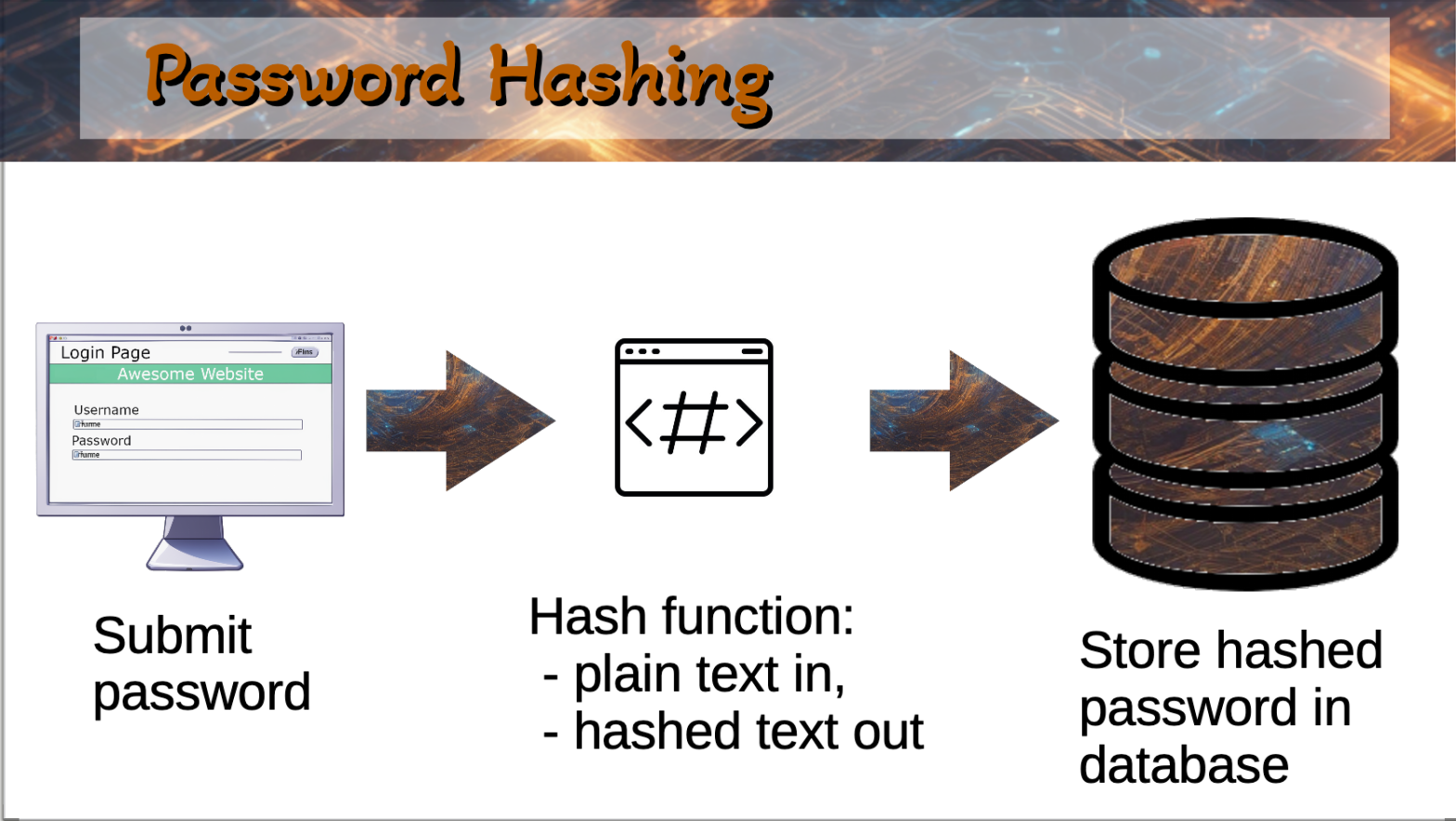
The following video provides an excellent "tier list" of password storage methods, starting from the worst (plain text) and working up to secure, modern techniques.
Password Storage Tier List: encryption, hashing, salting, bcrypt, and beyond
This video from the Studying With Alex channel explains why simple hashing isn't enough and introduces the concepts that make password storage truly secure.
Watch from the beginning to 04:15. Focus on understanding: Why storing passwords in plain text is so dangerous (F-Tier). Why encryption is better, but still not ideal for passwords (D-Tier). The core concept of hashing as a one-way function (C-Tier).
2. Making Hashing Robust: Salt and Slow Functions
As you just saw, basic hashing is a huge step up, but it's still vulnerable to certain attacks.
- Dictionary Attacks & Rainbow Tables: Attackers can pre-compute the hashes of common passwords (like "123456", "password", etc.) and store them in a massive lookup table called a rainbow table. By comparing the hashes in your database to their table, they can quickly crack weak passwords.
To defeat this, we use salting. A salt is a unique, random string that we generate for each user and append to their password before hashing it. We then store the salt alongside the hashed password in the database.
Without Salt:hash("password123") -> a9dd...
(Every user with "password123" has the same hash)
With Salt:hash("password123" + "salt_for_user_A") -> b4fe...hash("password123" + "salt_for_user_B") -> c1a0...
(Now, every hash is unique, making rainbow tables useless)
However, modern GPUs can compute billions of hashes per second, making it feasible for an attacker to try common passwords one by one for a specific user (a dictionary attack). To counter this, we use deliberately slow hash functions like Bcrypt, Scrypt, or Argon2. These algorithms are designed to be computationally expensive, slowing down attackers to a crawl and making brute-force attacks impractical.
Let's return to the video to see how these concepts complete the picture of modern password security.
Password Storage Tier List: encryption, hashing, salting, bcrypt, and beyond
Now, let's look at the B-Tier and A-Tier of password storage, which introduce salting and slow hashing functions.
Watch from 04:15 to 08:40 and the recap from 09:21 to 10:04. Pay attention to: How rainbow tables work and why salting defeats them. Why fast hash functions like SHA-256 are not ideal for passwords. The purpose of slow, expensive hashing algorithms like bcrypt.
Libraries like werkzeug (which comes with Flask) and passlib handle all of this for you. For example, werkzeug.security.generate_password_hash() automatically uses a strong algorithm (like scrypt or pbkdf2_sha256) and generates a salt.
The Flask Mega-Tutorial, Part V: Password Hashing
To see how this is implemented in a Flask context, let's look at a section from Miguel Grinberg's renowned Flask Mega-Tutorial. It shows the exact functions you'll use.
Read the section titled 'Password Hashing'. Notice how generate_password_hash creates a complex string that includes the algorithm, salt, and hash. The check_password_hash function handles everything for you during verification.
3. Remembering the User: Session-Based Authentication
Now that we can securely verify a user's password, how do we keep them logged in as they navigate from the /login page to their /profile or /dashboard? HTTP is a "stateless" protocol, meaning each request is independent. The server doesn't inherently know that the request for /profile is from the same user who just logged in.
This is where sessions come in. Session-based authentication creates a stateful connection over the stateless HTTP protocol.
Here's the flow:
- Login: A user sends their username and password to the server.
- Verification: The server verifies the credentials (using
check_password_hash). - Session Creation: Upon success, the server creates a "session" and stores some information on its side, like
user_id: 123. - Cookie: The server sends a unique Session ID back to the user's browser in a cookie. A cookie is a small piece of data that the browser stores and sends back to the server with every subsequent request.
- Subsequent Requests: When the user requests a new page, their browser automatically includes the cookie with the Session ID.
- Authorization: The server receives the Session ID, looks up the corresponding session data, finds
user_id: 123, and treats the request as coming from that user.
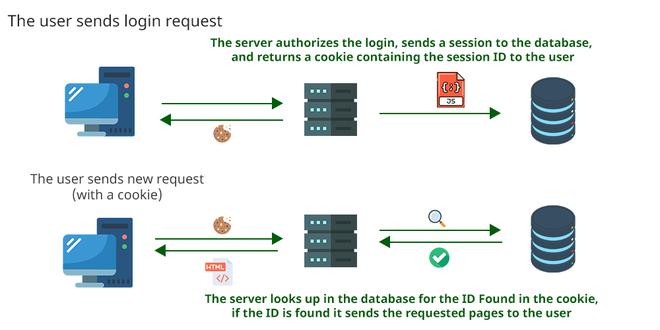
To understand this process in more detail, let's watch a short, clear explanation.
Session Vs JWT: The Differences You May Not Know!
This video from ByteByteGo provides a great visual walkthrough of the session-based authentication flow.
Watch from 00:19 to 01:43. Focus on the sequence of events: where the session is stored, and how the session ID in the cookie acts as a key to retrieve the user's information on the server.
In Flask, the Flask-Login extension manages this entire session lifecycle for us. When you call its login_user() function, it creates an entry in Flask's session object and handles the cookie management. On each new request, it uses a user_loader function that you provide to retrieve the user from the database using the ID stored in the session.
How to Implement Flask-Login for Authentication
The OneUptime blog provides a concise guide to Flask-Login that summarizes this process well. We will focus on the initial setup and the crucial user_loader callback.
Read the sections 'How Flask-Login Works', 'Installation and Basic Setup', 'Creating the User Model with UserMixin', and 'The User Loader Callback'. The diagrams and code snippets clearly show how a request flows through the system and how Flask-Login uses the session to load the current user.
Conclusion
In this lesson, we covered the essential security and state-management principles behind user authentication. You are now equipped with the theoretical knowledge to build a secure login system.
Key Takeaways:
- Password Hashing: Never store passwords in plain text. Always store a salted, computationally expensive hash of the password. Algorithms like
bcryptorscryptare the standard. - One-Way Function: Hashing is a one-way street; you can't retrieve the original password from its hash.
- Salting: A unique, random salt for each user defeats rainbow table attacks and ensures that even identical passwords have different hashes.
- Session-Based Authentication: A mechanism to maintain user state across multiple HTTP requests. The server stores session data and gives the client a cookie with a Session ID to identify itself.
- Flask-Login: A Flask extension that handles the complexities of session management for you, allowing you to focus on your application logic.
In our next lesson, we will put this all into practice. We will take our forms from the previous lesson and use Flask-Login to implement user registration, login, logout, and protected routes. Get ready to build a complete and secure authentication system