Hello! Welcome to the final lesson in our "Machine Learning Fundamentals" module.
In our last lesson, we explored how to evaluate model performance across all possible classification thresholds using ROC curves and the AUC metric. You learned that these tools provide a robust way to measure a model's ability to distinguish between classes, independent of any single threshold.
Now that you know how to reliably evaluate a model, it's time to learn how to systematically improve it. This lesson will teach you two critical techniques for building high-performing, reliable machine learning models:
- Cross-validation: A technique to get a more accurate and stable measure of your model's performance on unseen data.
- Hyperparameter tuning using Grid Search: A systematic process to find the optimal settings for your model to maximize its performance.
By the end of this lesson, you'll be able to move beyond training a model with default settings and instead fine-tune it to achieve the best possible results.
1. The Limits of a Single Train-Test Split
So far, we've followed a standard procedure: split our data once into a training set and a test set, train the model on the training data, and evaluate it on the test data.
While this is a fundamental step, it has a hidden weakness. The performance score you get (e.g., AUC of 0.85) depends on the specific, random split of data. If you were to split the data again, you would get a slightly different training set and test set, and thus a slightly different performance score. This "luck of the draw" means a single score might not be a reliable estimate of how your model will truly perform on new, unseen data. It might be overly optimistic or pessimistic.
To build robust models, we need a more stable way to estimate their generalization performance.
2. Cross-Validation: A More Robust Evaluation
The solution to the problem of single-split variance is cross-validation. The most common method is k-fold cross-validation.
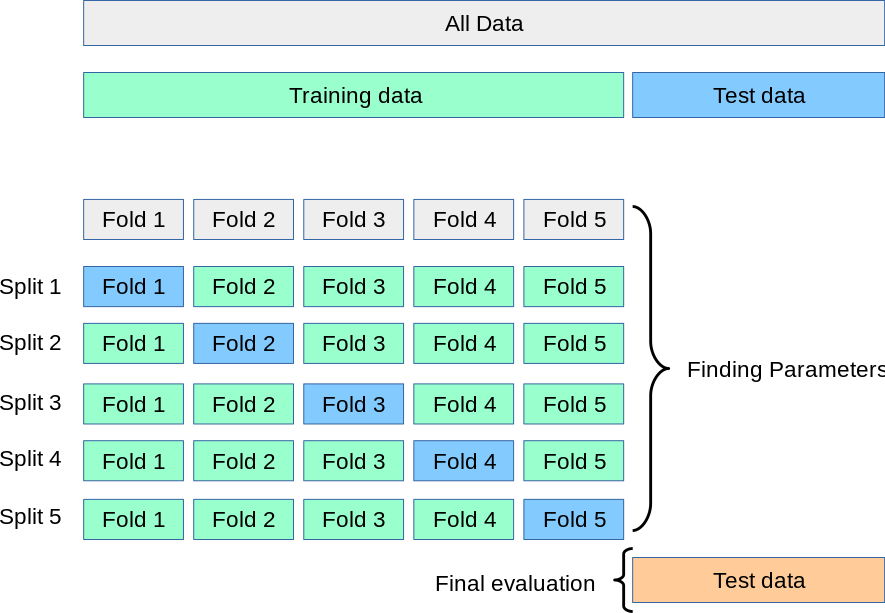
Instead of one split, we create k splits (or "folds") of our data. The process works like this:
- Divide the training dataset into k equal-sized parts, called folds (e.g., 5 or 10 folds).
- Run a loop k times. In each iteration:
- Hold out one fold as a temporary validation set.
- Train the model on the remaining k-1 folds.
- Evaluate the model on the held-out validation fold and record the score.
- After completing k iterations, you will have k performance scores. The average of these scores provides a much more robust and reliable estimate of the model's performance.
This video from StatQuest provides a fantastic and clear visual explanation of why we need cross-validation and how it works.
Machine Learning Fundamentals: Cross Validation
This video from StatQuest with Josh Starmer will walk you through the logic of cross-validation. Pay close attention to how it overcomes the limitations of a single train-test split.
Please watch from the beginning to 5:20. This will cover: The problem of deciding which model is best and the need for evaluation. The pitfall of using the same data for training and testing. The limitations of a single train-test split. A clear, animated demonstration of how k-fold cross-validation works.
The overall process, combining a main train-test split with cross-validation, is shown perfectly in the diagram below. We first create a final hold-out test set. Then, we use cross-validation on the training data to tune our model and find its best settings. Finally, we evaluate our best model on the test set for a final, unbiased performance measure.
3. Hyperparameters and the Quest for the Best Model
Think about the models we've used. For K-Nearest Neighbors, we had to choose k, the number of neighbors. For Support Vector Machines (SVMs), we might need to choose a kernel type (linear, rbf) and a regularization parameter C.
These settings, which are chosen by you before the model starts training, are called hyperparameters. They are different from model parameters (like the coefficients in logistic regression), which are learned from the data during training.
The choice of hyperparameters can have a massive impact on model performance. A model with poor hyperparameters might perform terribly, while the exact same model with well-chosen hyperparameters could be state-of-the-art.
So, how do we find the best combination of hyperparameters? We could try different values manually, but that would be tedious and disorganized. A better way is to automate the search.
4. Grid Search: Finding the Best Hyperparameters Systematically
Grid Search is a technique for hyperparameter tuning that systematically searches for the best combination of hyperparameter values. It works like this:
- Define a "grid" of hyperparameters: You create a dictionary where the keys are the hyperparameter names (e.g.,
'C','kernel') and the values are lists of the settings you want to try. - Exhaustive Search: The algorithm then exhaustively tries every possible combination of the values you provided.
- Cross-Validated Evaluation: For each combination, it evaluates the model's performance using k-fold cross-validation.
- Select the Best: The hyperparameter combination that results in the best average cross-validation score is declared the winner.
Scikit-learn provides a powerful and easy-to-use implementation called GridSearchCV that handles this entire process for you.
The following video provides an excellent practical demonstration of this process. It starts by showing a manual approach to highlight how tedious it is, then introduces GridSearchCV as the efficient solution.
Machine Learning Tutorial Python - 16: Hyper parameter Tuning (GridSearchCV)
This video from codebasics will guide you through implementing hyperparameter tuning in Python, clearly showing the power of GridSearchCV.
Watch from 2:45 to 10:14. This segment covers: A manual approach to trying different hyperparameter combinations with a for-loop. The introduction of GridSearchCV as a convenient, automated alternative. How to set up the parameter grid and run the search. How to inspect the results, find the best score, and identify the best parameters.
For a detailed textual guide that you can refer back to, the following article provides a comprehensive walkthrough.
Apply Grid Searching Using Python: A Comprehensive Guide
This DigitalOcean article provides a clear, step-by-step tutorial on implementing grid search. It's a great reference to solidify your understanding of the code and concepts.
Please read the sections 'What is Grid Search in Python?', 'How Does Grid Search Work?', and 'Implementing Grid Search in Python'. This will give you a solid definition and a full code example.
5. Putting It All Together: A Python Implementation
Let's now write the code to perform a grid search on a Support Vector Machine (SVM) classifier. We will tune the C (regularization strength) and kernel hyperparameters.
import pandas as pd
from sklearn.datasets import make_classification
from sklearn.model_selection import train_test_split, GridSearchCV
from sklearn.svm import SVC
from sklearn.metrics import classification_report


# 1. Generate and split data
X, y = make_classification(
    n_samples=1000,
    n_features=20,
    n_informative=10,
    n_redundant=5,
    random_state=42
)
X_train, X_test, y_train, y_test = train_test_split(X, y, test_size=0.3, random_state=42)


# 2. Define the hyperparameter grid
# These are the hyperparameters and their values we want to test.
param_grid = {
    'C': [0.1, 1, 10, 100],          # Regularization parameter
    'kernel': ['linear', 'rbf'],    # Kernel type
    'gamma': ['scale', 'auto']      # Kernel coefficient for 'rbf'
}


# 3. Set up the GridSearchCV object
# We provide the model, the parameter grid, and specify the number of folds for cross-validation (cv=5).
# n_jobs=-1 uses all available CPU cores to speed up the process.
grid_search = GridSearchCV(
    estimator=SVC(random_state=42),
    param_grid=param_grid,
    cv=5,
    n_jobs=-1,
    verbose=2  # Shows progress
)


# 4. Fit GridSearchCV to the training data
# This step will train the SVM model with every combination of hyperparameters using 5-fold cross-validation.
print("Starting Grid Search...")
grid_search.fit(X_train, y_train)


# 5. View the best results
print(f"\nBest Hyperparameters found: {grid_search.best_params_}")
print(f"Best cross-validation score (Accuracy): {grid_search.best_score_:.4f}")


# 6. Evaluate the best model on the test set
# The `grid_search` object automatically refits the best model on the entire training set.
# We can access it via `best_estimator_`.
best_model = grid_search.best_estimator_
y_pred = best_model.predict(X_test)

print("\nPerformance report on the test set:")
print(classification_report(y_test, y_pred))


# You can also view the full results as a DataFrame
results_df = pd.DataFrame(grid_search.cv_results_)
print("\nFull Grid Search Results:")


# Displaying a subset of important columns
print(results_df[['param_C', 'param_kernel', 'param_gamma', 'mean_test_score', 'rank_test_score']].sort_values(by='rank_test_score').head())
Code Breakdown:
- Step 2: We define a
param_griddictionary.GridSearchCVwill test 4 * 2 * 2 = 16 different hyperparameter combinations. - Step 3: We create the
GridSearchCVobject, passing our model (SVC), theparam_grid, and settingcv=5for 5-fold cross-validation. - Step 4: The
.fit()method kicks off the exhaustive search. This can take some time! - Step 5: After fitting, we can directly access the
best_params_andbest_score_attributes to see the winning combination and its average cross-validation score. - Step 6: We use the
best_estimator_(which is a fully trained model with the best found hyperparameters) to make predictions on our final, held-out test set to get an unbiased estimate of its real-world performance.
6. A Note on Efficiency: Grid Search vs. Randomized Search
Grid search is exhaustive, which guarantees that you find the best combination within your specified grid. However, if you have many hyperparameters or many values to test, the number of combinations can explode, making it computationally very expensive.
An alternative is Randomized Search (implemented in scikit-learn as RandomizedSearchCV). Instead of trying every combination, it randomly samples a fixed number of hyperparameter settings from specified ranges or distributions. It's often more efficient and can sometimes find a better model in less time, especially when only a few hyperparameters truly matter.
The codebasics video you watched (from 10:14 onwards) and the DigitalOcean article both briefly discuss this alternative. It's a useful tool to be aware of when grid search becomes too slow.
Conclusion
Congratulations on completing the "Machine Learning Fundamentals" module! You've built a strong foundation, from data splitting and model training to robust evaluation and optimization.
Key Takeaways:
- A single train-test split provides an unstable estimate of model performance. K-fold cross-validation offers a more robust and reliable evaluation by averaging results over multiple splits of the data.
- Hyperparameters are settings you define before training that control the model's behavior. Finding the right ones is crucial for performance.
- Grid Search (
GridSearchCV) is a powerful technique that automates hyperparameter tuning. It exhaustively searches a predefined grid of values, using cross-validation to find the combination that yields the best performance. - The final workflow is: split data into train/test, use
GridSearchCVon the training data to find the best model, and then get a final, unbiased evaluation on the test set.
You are now equipped with the core skills to build, evaluate, and optimize classical machine learning models.
Preview of the Next Lesson:
We are now ready to take a major step into the world of deep learning. In the next module, "Deep Learning Foundations," you will start by learning about the fundamental building block of modern AI: the artificial neuron. You will understand what it is, how it processes information using activation functions, and how multiple neurons are connected to form a neural network.