Hello! Welcome to the fifth lesson in our module on Networking Fundamentals.
In our previous lesson, we established the structure of an IP address and the fundamental role of a subnet mask. You learned that a mask separates an IP address into a network portion and a host portion, allowing devices to determine if traffic is destined for the local network or a remote one.
Today, we will build directly on that foundation to address the learning outcome: Describe the purpose and process of subnetting a network. We will explore why network administrators divide large networks into smaller ones and walk through the exact process of how it's done. This is a critical skill for understanding network architecture, a prerequisite for any penetration tester who needs to map and navigate a target environment.
The Purpose of Subnetting
In the last lesson, we touched on the idea that dividing networks helps manage broadcast traffic. Let's start by seeing a clear, animated explanation of this problem.
The video 'Subnet Mask - Explained' illustrates why having a single, massive network is inefficient and can lead to performance degradation due to excessive broadcast traffic.
Watch the segment from 07:26 to 10:25. Pay close attention to how routers act as a boundary for broadcasts, which is the core reason for creating subnets.
As the video showed, breaking one large network into smaller subnets (or subnetworks) contains broadcast traffic and improves overall network performance.

Beyond performance, subnetting provides several other key benefits. The following reading offers a superb overview of these advantages.
Subnetting: A Dev's Guide to Networks
The article 'Subnetting: A Dev's Guide to Networks' provides a clear, concise explanation of the benefits of subnetting, using a helpful analogy.
Please read the sections 'What is Subnetting? The Core Concept' and 'The “Why”: Benefits of Subnetting for Modern Applications'. Focus on the three main benefits discussed.
To summarize the key purposes of subnetting:
- Enhanced Performance: By creating smaller broadcast domains, you reduce the amount of unnecessary traffic each device has to process.
- Bolstered Security: Subnetting allows you to logically segment a network and apply specific security rules between segments. For example, you can create a rule that allows your web servers (in Subnet A) to talk to your database servers (in Subnet B), but prevents anyone on the guest Wi-Fi (in Subnet C) from accessing the databases at all.
- Efficient IP Management & Organization: It allows you to right-size your networks. Instead of assigning a massive block of addresses to a department that only needs a few, you can carve out a perfectly sized subnet, preventing waste and keeping the network organized.
The Process of Subnetting: Borrowing Bits
Now for the "how." Subnetting is achieved by borrowing bits from the host portion of an IP address and re-purposing them as subnet bits. This effectively extends the network portion of the address, creating new, smaller networks.
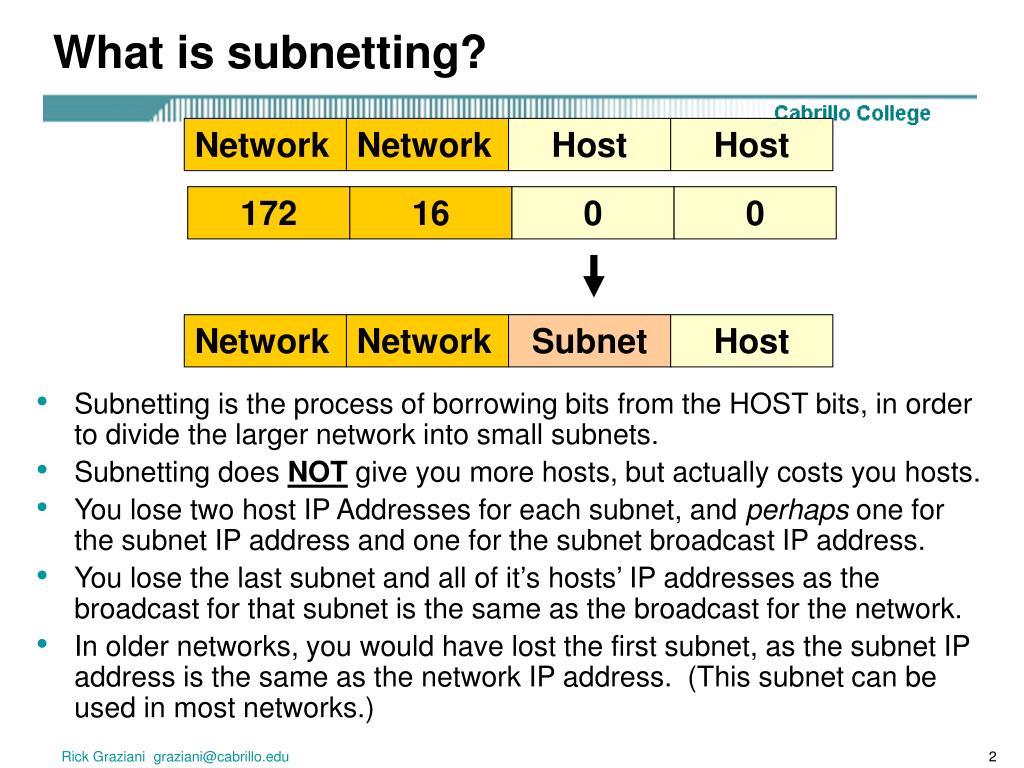
This creates a trade-off:
- The more bits you borrow for subnets, the more subnets you can create.
- The more bits you borrow, the fewer bits are left for hosts, reducing the number of devices you can have on each subnet.
Let's watch a short video segment that visualizes this trade-off perfectly.
This clip from 'Subnet Mask - Explained' demonstrates the relationship between borrowing bits, the number of resulting subnets, and the number of hosts available in each.
Watch from 11:20 to 14:20. Notice how each bit you borrow doubles the number of subnets while cutting the number of hosts per subnet in half.
A Step-by-Step Guide to the Calculation
Let's walk through a practical scenario. Imagine you are a network administrator for a small project. You've been given the network address 192.168.10.0/24.
A /24 network has 24 network bits and 8 host bits (32 - 24 = 8). This gives you one network with 2^8 - 2 = 254 usable host addresses.
Your task is to divide this network to meet the following requirements:
- You need at least 5 separate subnets (e.g., for different teams or server types).
- The largest subnet needs to accommodate at least 20 hosts.
Here is the process you would follow.
Step 1: Determine How Many Bits to Borrow
You need to create at least 5 subnets. The formula for the number of subnets you can create is 2^s, where s is the number of bits you borrow.
- If you borrow
s=1bit:2^1 = 2subnets. Not enough. - If you borrow
s=2bits:2^2 = 4subnets. Still not enough. - If you borrow
s=3bits:2^3 = 8subnets. This meets the requirement of 5 subnets and gives you 3 spares for future growth.
So, we will borrow 3 bits from the host portion.
Step 2: Calculate the New Subnet Mask
Our original mask was /24. We borrowed 3 bits, so our new mask is /24 + 3 = /27.
To find the dotted-decimal notation for a /27 mask, we write out 27 ones followed by 5 zeros:11111111.11111111.11111111.11100000
Converting that last octet (11100000) to decimal: 128 + 64 + 32 = 224.
So, our new subnet mask is 255.255.255.224.
Step 3: Calculate the Hosts Per Subnet
We started with 8 host bits and borrowed 3 for subnets, leaving us with h = 8 - 3 = 5 host bits.
The formula for usable hosts per subnet is 2^h - 2.
2^5 = 32total addresses per subnet.32 - 2 = 30usable host addresses per subnet.
This meets our requirement of needing at least 20 hosts in the largest subnet.
Why subtract 2?
In any subnet, two addresses are always reserved and cannot be assigned to a device:
- Network Address: The very first address in the range (where all host bits are 0). It's used to identify the subnet itself.
- Broadcast Address: The very last address in the range (where all host bits are 1). It's used to send messages to all devices on that specific subnet.
Step 4: Determine the Subnet Ranges
Now we need to find the actual IP address ranges for our 8 new subnets. The easiest way to do this is to find the "block size" or "increment".
Our block size is 2^h = 2^5 = 32. This means our subnets will be in blocks of 32 addresses, starting from 0.
- Subnet 1: 192.168.10.0 - 192.168.10.31
- Subnet 2: 192.168.10.32 - 192.168.10.63
- Subnet 3: 192.168.10.64 - 192.168.10.95
- ...and so on, up to the last subnet.
Let's detail the first three subnets:
| Subnet | Network Address | Usable IP Range | Broadcast Address |
|---|---|---|---|
| 1 | 192.168.10.0/27 |
192.168.10.1 - 192.168.10.30 |
192.168.10.31 |
| 2 | 192.168.10.32/27 |
192.168.10.33 - 192.168.10.62 |
192.168.10.63 |
| 3 | 192.168.10.64/27 |
192.168.10.65 - 192.168.10.94 |
192.168.10.95 |
And there you have it. You have successfully taken one /24 network and divided it into eight smaller, more manageable /27 subnets. For a more detailed walkthrough of this process, the guide we looked at earlier is an excellent resource to study.
Subnetting: A Dev's Guide to Networks
The section on 'How to Subnet: A Step-by-Step Guide for Developers' in this article provides the same calculation we just did, along with a helpful table summarizing all eight subnets created.
Review this section to solidify your understanding of the step-by-step process. Compare the table in the article to the one we created above.
Conclusion
In this lesson, we moved from the "what" to the "why" and "how" of network division. You now understand the strategic value of subnetting and the mathematical process behind it.
Key Takeaways:
- Purpose: Subnetting is done primarily for performance (reducing broadcast traffic), security (isolating networks), and organization (efficient IP management).
- Process: The process involves "borrowing" bits from the host portion of an IP address to create new subnet bits.
- Trade-off: Each bit you borrow doubles the number of subnets you can create but halves the number of hosts available per subnet.
- Key Formulas:
- Number of subnets =
2^s(wheresis bits borrowed). - Usable hosts per subnet =
2^h - 2(wherehis remaining host bits).
- Number of subnets =
In our next lesson, we will examine a fundamental protocol that operates within these subnets: the Address Resolution Protocol (ARP). You'll learn how a device with an IP address finds the physical (MAC) address of another device on the same local network, a process that relies heavily on the broadcast mechanisms we've discussed today.