Hello! Welcome to the seventh lesson in our module on Networking Fundamentals for Security.
In our last lesson, we saw how the Address Resolution Protocol (ARP) enables devices on the same local network to find each other's physical MAC addresses using their logical IP addresses. This gets a data packet to the correct machine. But what happens next?
Today, we address the final step in delivering data. Once a packet arrives at the correct computer, how does that computer's operating system know which specific application—your web browser, your email client, a running game—should receive it? This brings us to our learning outcome: Explain the role of ports in network communication.
We'll explore how these logical "docking points" manage conversations between applications, ensuring that data flows to the right place. Understanding ports is not just fundamental to networking; it's absolutely critical for a penetration tester.
The Problem of Multiple Conversations
A modern computer is constantly handling numerous network communications at once. You might have a web browser open with multiple tabs, an email client syncing in the background, and a music streaming service running simultaneously.
When data arrives at your computer's IP address, the operating system is faced with a challenge: which of these applications should get this specific piece of data? An IP address identifies the host (the computer), but it doesn't identify the process (the application) running on it.
This is where ports come in. A network port is a logical, numbered endpoint that is assigned to a specific application or service. It functions like an apartment number in a large building. The IP address is the building's street address, and the port number is the specific apartment, ensuring the mail gets to the right resident.
Let's begin with a video that clearly defines ports and illustrates how they work in conjunction with IP addresses.
The video 'Network Ports Explained' by PowerCert Animated Videos provides an excellent introduction to what ports are and how they direct traffic to the correct service on a server.
Please watch from the beginning until 03:01. The video will define a port, explain its relationship with an IP address, and walk through a detailed example of accessing a web page using port 80.
As the video explained, a port is a logical construct. The combination of a device's IP address and a port number creates a unique identifier for a specific service on that device. This combination is often called a socket, typically written as IP_address:Port_number (e.g., 192.168.1.10:80).
The Three Categories of Ports
There are 65,536 possible port numbers (from 0 to 65535), as the port number field in the transport protocol header is a 16-bit unsigned integer ( values). These numbers are organized by the Internet Assigned Numbers Authority (IANA) into three distinct ranges.
-
Well-Known Ports (0-1023): These are reserved for common, system-level services. For a server to offer a standard service, it will "listen" for incoming requests on one of these ports. For example, a web server listens on port 80 for HTTP traffic. On many operating systems, special administrative privileges are required to run an application on a well-known port.
-
Registered Ports (1024-49151): These can be registered by software developers for a specific application. For example, a company might register a port for its database server or a specific online game.
-
Dynamic or Private Ports (49152-65535): This range is not assigned to any specific service. Instead, it's used for temporary, outgoing connections. When your web browser (the client) connects to a web server, it is assigned a temporary port from this range for the duration of that session. These are also known as ephemeral ports.
The following video segment provides a clear summary of these categories.
Let's return to the 'Network Ports Explained' video to see a breakdown of these three port categories.
Watch the segment from 05:02 to 06:53, which explains the well-known, registered, and dynamic port ranges and clarifies which are typically used by servers and which by clients.
For your career in ethical hacking, memorizing the most common well-known ports is essential. When you scan a target, seeing that port 22 is open immediately tells you it's likely running an SSH service.
The Wikipedia article on ports provides a concise, formal definition and a useful reference table of common services.
This Wikipedia entry offers a formal definition of ports and a table of notable well-known port numbers. This is a great reference to bookmark.
Read the section titled 'Common port numbers'. Pay close attention to the table listing the port number and its corresponding service (e.g., FTP, SSH, SMTP, DNS, HTTP, HTTPS).
This image provides another useful visual summary, distinguishing between unencrypted and encrypted protocols, a critical security distinction.

Source and Destination Ports: A Two-Way Conversation
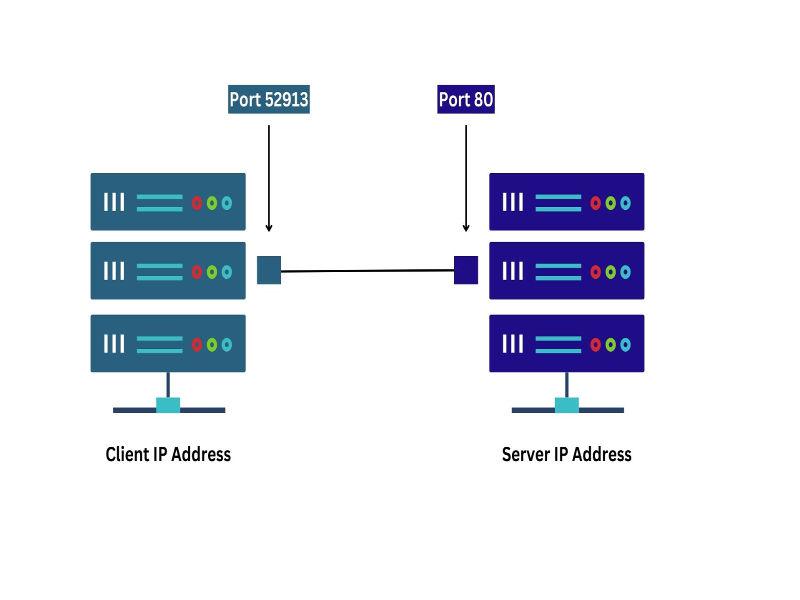
A network connection is a two-way street, involving both a source and a destination port. Let's trace the connection from your browser to a web server and back again.
-
Client to Server (Request):
- Your computer (the client) wants to visit a website. It creates a request packet.
- Source IP: Your computer's IP address.
- Source Port: A random, high-numbered ephemeral port (e.g.,
51500). This is so the server knows where to send the reply. - Destination IP: The web server's IP address.
- Destination Port: The well-known port for HTTP, port
80(or443for HTTPS).
-
Server to Client (Reply):
- The web server receives the request and prepares to send the webpage data back.
- It reverses the source and destination.
- Source IP: The web server's IP address.
- Source Port: The well-known port it was listening on, port
80. - Destination IP: Your computer's IP address.
- Destination Port: The ephemeral port your browser originally used, port
51500.
This mechanism allows your computer's operating system to receive the reply and forward it to the correct application—and even the correct browser tab—that initiated the request.
This image neatly illustrates the concept.
To see this process of reversing port numbers explained, watch this final video segment.
Port Numbers Explained | Cisco CCNA 200-301
The video 'Port Numbers Explained' by CertBros clearly illustrates how source and destination ports are used and then reversed in a client-server interaction.
Watch from 01:16 to 03:55. Focus on how the client chooses a source port and uses a destination port, and how the server reverses these when it replies.
Why Ports Matter for Ethical Hacking
Your goal is to become a penetration tester. For you, ports are not just a networking concept—they are gateways. An open port on a target system signifies a listening service. Every listening service is a potential attack surface.
One of the first and most fundamental stages of hacking is reconnaissance, which involves discovering as much as possible about a target. A key part of network reconnaissance is port scanning: the act of systematically probing a host to discover which ports are open.
Tools like Nmap, a cornerstone of the Kali Linux toolkit, are designed to perform sophisticated port scans. By identifying open ports, a penetration tester can:
- Infer the services running on a machine (e.g., port 21 suggests an FTP server).
- Determine the operating system and service versions.
- Look for known vulnerabilities associated with those services.
An open port is an invitation to investigate further. We will dedicate an entire module to network scanning and enumeration later in this course.
Conclusion
In this lesson, we've established the critical role of ports in network communication. They provide the final layer of addressing needed to deliver data to the correct application on a host.
Key Takeaways:
- Function: Ports are logical endpoints that direct network traffic to specific applications or services running on a computer.
- Addressing: A port number combined with an IP address forms a socket (
IP:Port), which uniquely identifies a single network connection. - Categories: Ports are divided into Well-Known (0-1023) for servers, Registered (1024-49151) for specific applications, and Dynamic/Ephemeral (49152-65535) for clients.
- Communication Flow: Clients use an ephemeral source port to connect to a server's well-known destination port. The server then replies by swapping these source and destination ports.
- Security Relevance: For a penetration tester, open ports represent potential attack surfaces. Port scanning is a foundational reconnaissance technique.
This lesson concludes our look at the core addressing mechanisms of a network. In our next and final lesson of this module, we will examine two technologies that control and manage these connections: firewalls and Network Address Translation (NAT).