In our previous lessons, you learned how to define an API's actions with HTTP methods and how to structure its resources with clean URI conventions. You can now construct a complete, well-formed request. This lesson closes the loop by focusing on the server's reply: the HTTP status code. A clear and correct status code is the cornerstone of a predictable and developer-friendly API.
This lesson fulfills the learning outcome: Select appropriate HTTP status codes for success, client error, and server error scenarios. Mastering this is essential for backend interviews, as it demonstrates your ability to design robust systems that communicate outcomes effectively, making them easier to debug and integrate with.
The Language of Responses: Status Code Classes
Every HTTP response from a server includes a status code. This three-digit number is a standardized way for the server to tell the client the outcome of its request. These codes are organized into five distinct classes, identified by their first digit.
For a comprehensive overview of these classes, the Postman blog provides an excellent breakdown.
What Are HTTP Status Codes? Complete Guide
This article from the Postman blog is a great reference for API developers. It systematically explains the five classes of status codes, giving you a solid mental model for categorizing any response you might need to send or debug.
Please read the section titled The five classes of HTTP status codes. As you read, focus on understanding the fundamental role of each class: 1xx: Informational (rarely implemented in application-level code) 2xx: Success 3xx: Redirection 4xx: Client Error 5xx: Server Error
In backend development, you will primarily work with the 2xx, 4xx, and 5xx classes. Understanding the distinction is critical: 4xx codes mean the client did something wrong, while 5xx codes mean the server failed. This distinction dictates whether a client should modify its request and retry, or simply wait for the server to be fixed.
The Happy Path: 2xx Success Codes
When a request is successful, you should return a 2xx code. While 200 OK is a common default, being more specific adds significant clarity to your API.
The following video offers a concise explanation of the most important success codes.
Learn HTTP Status Codes In 10 Minutes
The "Learn HTTP Status Codes in 10 Minutes" video by Web Dev Simplified is excellent for its clear, practical explanations, perfect for an interview prep context.
Watch the segment on success codes. Pay close attention to the distinction between 200, 201, and 204.
To summarize the key success codes you'll use:
200 OK: The all-purpose success code. It's the correct response for a successfulGETrequest that returns data, or aPUT/PATCHthat updates a resource and returns the updated representation.201 Created: Use this specifically for aPOSTrequest that successfully creates a new resource. A crucial best practice is to include aLocationheader in the response, with a URL pointing to the newly created resource (e.g.,Location: /api/users/124).204 No Content: This indicates success, but there is no data to return in the response body. This is the ideal code for aDELETErequest. It can also be used forPUT/PATCHrequests where you don't need to send the updated resource back to the client.
When Things Go Wrong: Client Errors (4xx)
Client errors are some of the most important codes to get right, as they provide direct feedback to the API consumer about what they need to fix. In an interview, confidently explaining the nuances of 4xx codes shows a deep understanding of API design.
The most common general-purpose client error is 400 Bad Request. This is a catch-all for issues like malformed JSON, missing required fields, or invalid query parameters.
However, being more specific is always better. The DataCamp article on REST API interview questions provides an excellent breakdown of key distinctions.
REST API Interview Questions and Answers (2026 Guide)
This article is tailored for interview preparation and directly addresses the most frequently confused status codes.
Read the sections covering the distinctions between 401 and 403, 400 and 422, and the use case for 409 Conflict.
Here's a summary of the critical 4xx codes:
400 Bad Request: The client sent a request the server cannot understand due to a syntax error. For example, sending invalid JSON.401 Unauthorizedvs.403 Forbidden: This is a classic interview question.401 Unauthorized: The client is unauthenticated. They have not provided valid credentials (like an API key or JWT), or their credentials have expired. The server is saying, "I don't know who you are."403 Forbidden: The client is authenticated, but they are not authorized to perform the requested action. The server knows who they are, but their permissions are insufficient.
404 Not Found: The server cannot find the requested resource. This applies to a specific resource (GET /users/9999) or an entire endpoint (GET /non-existent-endpoint). For aGETon a collection that happens to be empty (e.g., a user with no orders), you should return200 OKwith an empty array, not a404.409 Conflict: The request could not be completed because of a conflict with the current state of the resource. A common example is trying toPOSTa new user with an email that already exists in the database.422 Unprocessable Entity: The request was well-formed (valid syntax), but contained semantic errors. For example, the JSON is valid, but a password field doesn't meet the length requirements. This is more specific than a400.429 Too Many Requests: The user has sent too many requests in a given amount of time ("rate limiting"). The response should ideally include aRetry-Afterheader telling the client when they can send another request.
When Things Really Go Wrong: Server Errors (5xx)
Server errors indicate that the client's request was valid, but the server failed to fulfill it due to an internal problem.
Learn HTTP Status Codes In 10 Minutes
The same Web Dev Simplified video also provides a clear explanation of server errors.
Watch the final segment on 500-level errors. The key takeaway is that a 500 error signals to the client that the problem is not their fault.
The main server errors you should know are:
500 Internal Server Error: This is a generic, catch-all error for any unexpected condition on the server that prevented it from fulfilling the request. This typically means there's a bug in your code, an unhandled exception occurred, or a database connection failed unexpectedly. In a production environment, you should log these errors thoroughly for debugging but avoid sending sensitive details (like stack traces) to the client.503 Service Unavailable: This means the server is temporarily unable to handle the request due to overload or maintenance. It implies the condition is temporary. Like with429, you can include aRetry-Afterheader to guide the client.
A Practical Decision-Making Guide
To tie this all together, flowcharts can be incredibly useful tools for choosing the right status code during development or for walking through your logic in an interview.
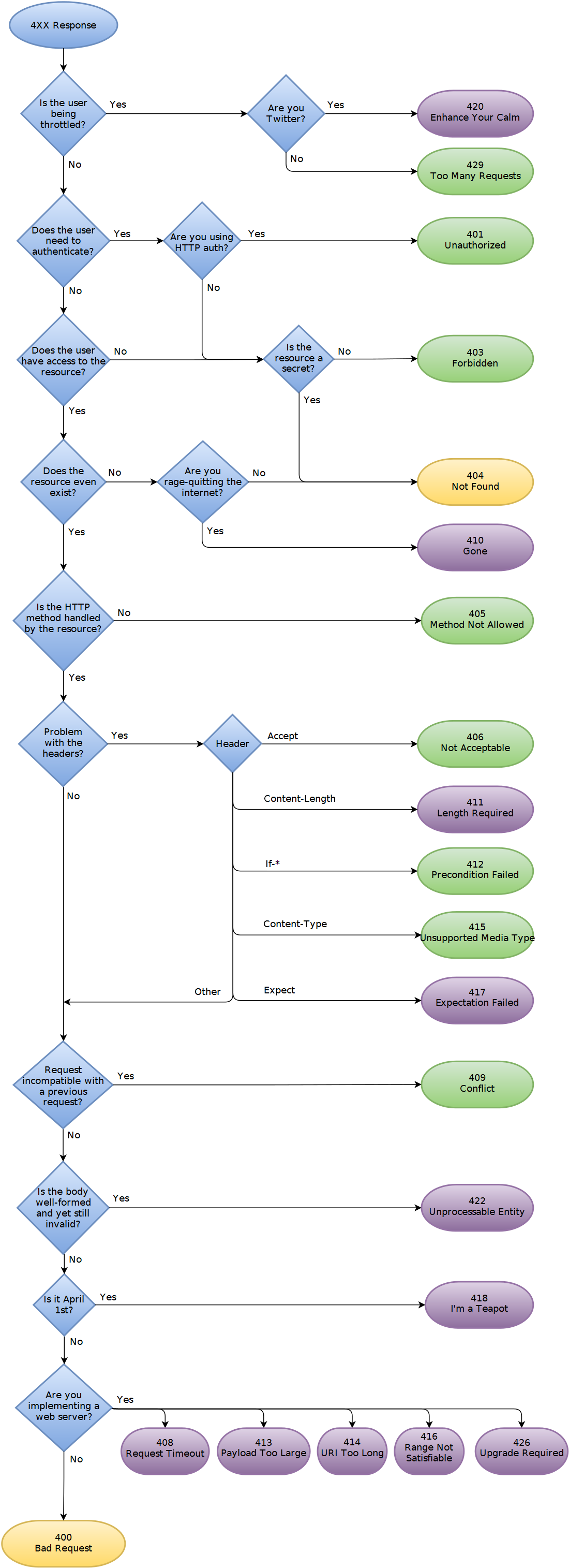

Take a moment to trace a few scenarios through these flowcharts. For example:
- A user tries to create an account with an email that's already taken. Following the 4xx flowchart: Is the request valid? Yes. Problem with headers? No. Does the request conflict with a previous one? Yes. ->
409 Conflict. - A client successfully deletes a user. Following the 2xx/3xx flowchart: Do you want to redirect? No. Will the request be completed later? No. Do you want the user's view to remain unchanged? Yes. ->
204 No Content.
The following video from Caleb Curry provides a great summary of which codes to use for each common REST operation.
API Status Codes and OpenAPI Documentation - Backend Engineering
This video provides a very practical mapping of HTTP methods to their corresponding success and error status codes, which is exactly how you'll think about it when building an API.
Watch the detailed breakdown from 12:55 to 16:32. This section methodically goes through GET (many vs. single), POST, PUT/PATCH, and DELETE requests and lists the appropriate status codes for their success and failure scenarios.
Conclusion
You have now learned how a server communicates the outcome of a request using HTTP status codes. By choosing specific, correct codes, you build APIs that are predictable, easier for clients to consume, and simpler to debug. This demonstrates a level of professionalism and attention to detail that is highly valued in backend engineering roles.
Key Takeaways:
- Five Classes: Status codes are grouped into five classes (1xx-5xx), with 2xx (Success), 4xx (Client Error), and 5xx (Server Error) being the most important for API development.
- Be Specific on Success: Use
200 OKfor successful retrievals/updates,201 Createdfor new resources (with aLocationheader), and204 No Contentfor successful actions with no body to return (likeDELETE). - Diagnose Client Errors: Differentiate clearly between common 4xx codes. Remember the classic interview question:
401 Unauthorizedmeans "who are you?" (unauthenticated), while403 Forbiddenmeans "I know who you are, but you can't do that" (unauthorized). Use400for syntax errors and422for semantic validation errors. - Isolate Server Failures: Use
500 Internal Server Errorfor unexpected bugs and503 Service Unavailablefor temporary outages. A 5xx error is always the server's fault.
In our next lesson, we'll address another crucial aspect of API design for real-world systems: comparing API versioning strategies. This is essential for evolving your API over time without breaking existing client integrations.